Image

Flying Cell Towers Are A Thing

Typically, when you’re sitting on a plane on the tarmac, you switch your phone to flight mode while you’re sitting through yet another “quirky” (boring) safety video. You’ll watch some inflight entertainment, read the airline magazine if you get really desperate, and wonder if anyone ever buys those random watches for sale in the “duty free” section. Then, finally, upon landing, you’ll be connected back to the Internet and you’ll finally feel like you can breathe again.

Only, this time, you forgot to set your plane on flight mode. You’re sitting at 30,000 feet, and… your phone has signal? You’re online, and you’re getting notifications and emails just like you’re on the ground. You’ve accidentally discovered that your flight has an on-board cell tower.

Continue reading “Flying Cell Towers Are A Thing”

Image

Laser Scanning A Cave With Homebrew Gear

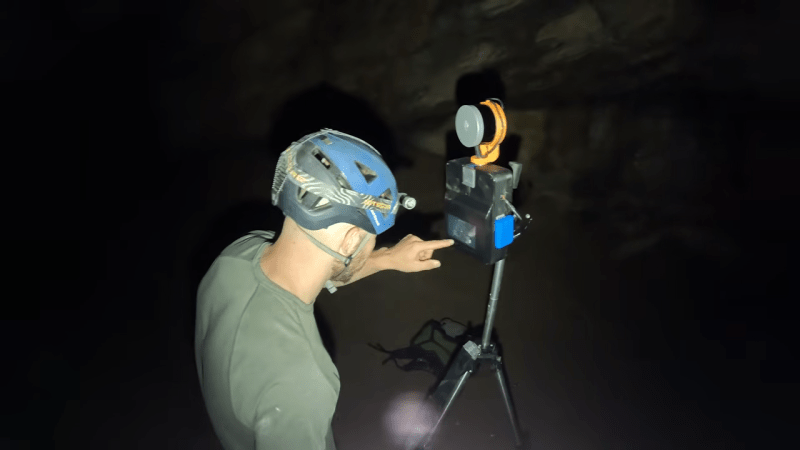
How do you measure the inside of a cave? You could do a bunch of hard work with classic surveying gear… or you could just use a laser scanner. [9nl] did the latter, with a scanning rig of his own creation.

The build is based around an Ouster VLP-16 mid-range lidar sensor. It shoots out pulses of light and measures how long it takes them to bounce back in order to determine the range of objects in the vicinity, and thus can be used to great effect for 3D scanning tasks. For [9nl], though, the sensor had a serious limitation. Since it only had a 40-degree field of view, it wasn’t ideal for the desired application of scanning a cave. However, by building a custom rig that could rotate the sensor, [9nl] ended up with a rig that could 3D scan an area through a full 360 degrees. There’s nothing wildly complex involved, just some good old mechanical engineering—putting the sensor on a shaft and spinning it with a belt drive. Then it’s just a matter of processing the data correctly. The hard part is then getting the rig in and out of the cave without breaking anything.

There are plenty of off-the-shelf 3D scanning solutions that can do this work, but few of them come cheap. Plus, rolling your own teaches you a great many things as you hone your solution to your particular needs. Video after the break.

Continue reading “Laser Scanning A Cave With Homebrew Gear”

Image

Battery Tester Gets An App Upgrade

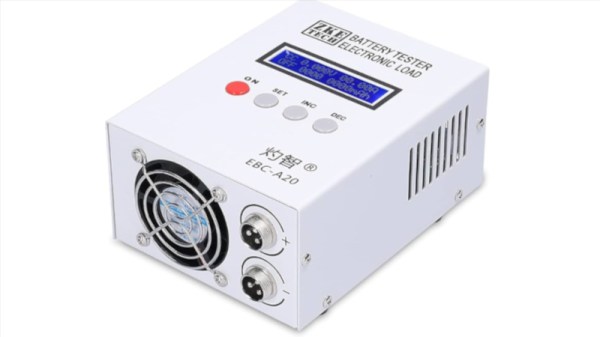
Do you have a ZKETECH EBC-A20 battery tester? Perhaps you don’t like the default software used to control the device. In that case, you might like the alternative whipped up by [Kazhuu.]

A reverse-engineering effort targeted at the EBC-A20 served as the basis for the work. The battery tester is ultimately controlled by a simple serial interface, running at 9600 bps, 8 bits, with odd parity. Armed with a relatively complete understanding of the commands used to control the device, [Kazhuu] was able to whip up a simple web app to control the device instead, using WebUSB to access the device over a USB-to-serial converter, though a desktop version for Linux and Windows is also available. If you’ve got one of these battery testers sitting on your bench, using the app is as simple as pointing your browser here with the device plugged in via USB. Then you can run basic load tests on battery cells and graph the results right on your computer without having to deal with the proprietary software.

Of course, if you don’t like the EBC-A20 battery tester, you could always build your own. If you’re whipping up your own test hardware on the lab bench, don’t hesitate to notify us on the tipsline.

Image

Picking A CRC

You send a file, but how do you know it arrived intact? In other words, how do you know that it didn’t get cut off, garbled, or changed somehow? Simplistically, you could just add up all the bytes in the file — a checksum — and send that along with the file. You compute the checksum when you know the file is good, and the receiver can compare the checksum to see if they match.

However, a simple addition doesn’t catch certain classes of errors, which is why there are better checksum algorithms that, for example, wrap the carry bit around or otherwise modify files with common errors so they produce different checksums. There are two problems with checksums. First, no matter how much you modify the algorithm, the chances that two files produce the same checksum are pretty high. Especially with common error patterns.

For example, assume a very simple algorithm that simply adds the bytes and discards any carry. If a file contains 0x80, 0x80, those numbers essentially cancel each other out. If you replace them with 0, 0, you’ll get the same checksum. To some degree, using anything other than a second copy of the entire file will have this problem — some corruption goes undetected — but you want to minimize the number of times that happens.

The other problem is that a checksum by itself doesn’t let you correct anything. You know the data is bad, but you don’t know why. If you think about it, the simplest checksum is a parity bit on a byte: odd parity is simply summing all the bits together. If the parity bit doesn’t match, you know the byte is bad, but you don’t know why. Any even number of errors goes undetected, but I am sure one-, three-, five-, or seven-bit errors will get caught.

People invent better error-checking codes by devising schemes that can promise they can detect a certain number of bit flips and, at least in some cases, correct them. One of these is the cyclic redundancy check (CRC). It is easy to think of the CRC as a “strong checksum,” but it actually works differently. What’s more, there isn’t just a single CRC algorithm. You have to select or design a particular algorithm based on your needs. Most people pick a “named” implementation like CCITT or Ethernet and assume it must be the best. It probably isn’t.

A CRC is a checksum in the broad sense: you feed it a message, and it gives you a small value that you append, store, or compare later. But unlike a simple additive checksum, a CRC is based on polynomial division over GF(2), which is a fancy way of saying “divide using XOR instead of carries.” That detail matters. It gives CRCs very strong guarantees against common classes of errors, provided you choose the right polynomial for the job. That’s the key. You must choose the right polynomial.

Continue reading “Picking A CRC”

Image

PCB Map Display Keeps An Eye On Family

PCBs are traditionally designed with traces laid out to support a circuit full of electronic components. However, they’ve become increasingly popular as a way to produce functional visual artworks. This PCB map from [Jonathan] is a great example.

The PCB was designed as a map of the California East Bay area. The roads are laid out as the top-side copper layer, while the land and roads are used for the top solder mask layer, with the flipped land and roads area making up the solder mask on the bottom side. The map data itself was cribbed from Snazzy Maps. Behind the PCB, [Jonathan] mounted a 64 x 32 RGB LED array, which can be seen glowing through from behind the material. The LEDs are controlled by an ESP32, which grabs location data from [Jonathan’s] family member’s mobile devices over MQTT, and uses it to light their positions on the map. Files are on Github for the curious.

If you’ve got a family that is open to location tracking, and the money to pay for a custom PCB, you could probably recreate this project yourself. We’ve seen some other great PCB maps before, too, like this amazing metro tracker. Video after the break.
Continue reading “PCB Map Display Keeps An Eye On Family”

Image

Touchable POV Display Blooms In Mid Air

Typically, when we think of touch screens, we think of LCDs or OLEDs with a resistive or capacitive sensing layer laid over the top. However, a team from the University of Chicago has developed an entirely different type of touch-sensitive display that uses persistence-of-vision techniques.

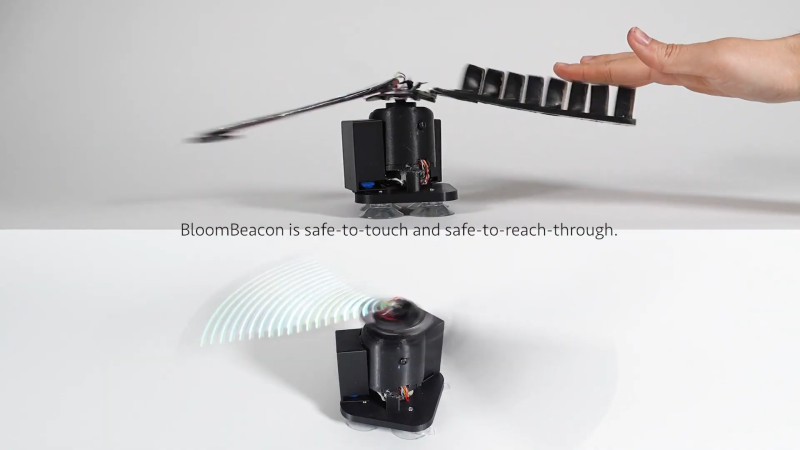
The project is called BloomBeacon. It consists of a pair of spinning arms to create a stable round display in mid-air. One arm is covered in LEDs, while the other is covered with capacitive pads for touch sensing purposes.  The trick behind this device is evident in the name—the device uses soft, flexible arms which are hinged and “bloom” upwards as the device spins up to speed. This makes it safe to physically interact with the spinning blades while they’re in motion to create a touch-interactive display. The device can thus display user interface elements like buttons that the viewer can interact with by reaching out and touching them directly.

Normally we’d advise not sticking your fingers in a rotating piece of machinery, but in this case, BloomBeacon was designed specifically to make this safe. Even sticking your fingers or hand right through the spinning arms won’t cause injury.

We’ve featured some other cool POV projects over the years, like this neat volumetric display. Video after the break.

Continue reading “Touchable POV Display Blooms In Mid Air”

Image

Passive Bug Zapper Tracks Its Kill Count

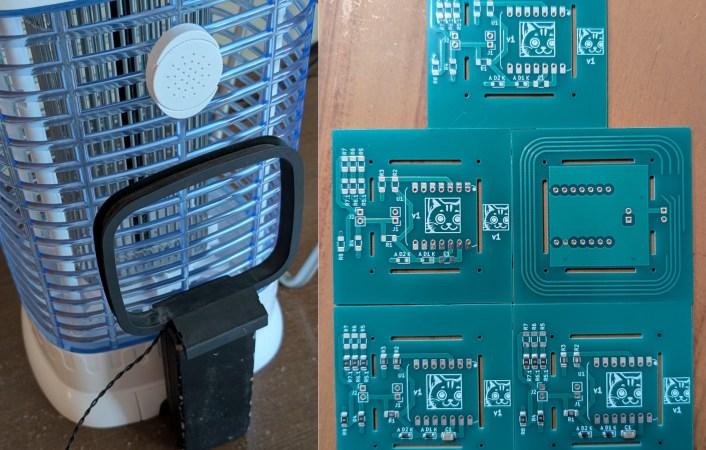
If it’s summer in a warm, humid climate, bugs can be the bane of your existence. A natural solution is to place a passive bug zapper to catch bugs at night. But what if that isn’t fancy enough? [Nicolas Boichat] spices it up with a passive bug zapper that tracks its kill count.

But how exactly do you detect a bug zap? With an antenna, of course! When a bug gets caught, it arcs, creating an electromagnetic pulse. A small loop antenna on the backside of the zapper receives the signal.
Continue reading “Passive Bug Zapper Tracks Its Kill Count”