Image

LineShine Is Fastest Supercomputer At Over 2 Exaflops

There is a phenomenon where as you get older, your sense of scale becomes somewhat fixed in the earlier era that shaped you– things like expecting the Dollar Store to carry items for 1$, or to get a burger and fries for less than twenty bucks– or, in this case, thinking of supercomputers as being petaflop-scale machines. That’s not wrong, per se– most of the world’s fastest machines benchmarks are best measured in petaflops– but when you’re clocking at 2198 of the things, it becomes easier just to say that the LineShine computer can do 2.188 exaflops. At double precision. With CPUs only. Yes, we are impressed.

Even more impressive is that this machine just debuted in China, which means it was built without the benefit of the latest-and-greatest Western chips, thanks to US sanctions. It’s using a made-in-China LX2 CPU with 304 ARMv9 cores onboard. Well, it’s actually using around 46 thousand of them, but who’s counting?

Each CPU actually consists of two separate compute dies and onboard high bandwith memory (HBM) and DRAM– 4GB of HBM and 32GB of DDR5. The 152 ARMv9 CPU cores on each chip are all built with Scalable Vector Extensions (SVE) and Scalable Matrix Extensions (SME), so despite the lack of GPUs LineShine will have no problem doing the sorts of vector processing that is traditional for high-performance computing, given the 13.79 million cores.

On the other hand, the lack of GPUs shows when you change benchmarks– LineShine is number one in the rankings for High Performance Linpack (HPL), but getting outside the 64-bit box, the supercomputer only hits number four on the HPL-MxP mixed-precision benchmark, behind machines that pair their CPUs with accelerators like GPUs or NPUs. That may mollify the American ego, as while their El Capitain was bumped to second place on the HPL list, they can still claim the pole position on HPL-MxP. Which computer is actually more capable depends entirely on what you want to do with it, and neither Lawrence Livermore National Laboratory nor China’s National Supercomputing Centre in Shenzhen advertise their compute queues, though this paper suggests at least one job will be crunching earth observation data.

The definition of a supercomputer has shifted over time, and it’s only a matter of time before LineShine and El Capitain end up on the auction block, like other supercomputers before them. We might question it when it comes to desktops, but for institutional HPC, no amount of computing ever seems to be enough.

Image

The Team Behind The Flipper One Needs Your Help

You’ve probably heard of the Flipper Zero, a pocket-sized device that packs in lots of great hacking potential. The team behind it has now turned their efforts towards developing the Flipper One, and they’re calling out for help from the broader community. 

The Flipper One is not intended to be a replacement or sequel for the Flipper Zero. Instead, it’s designed to exist as a entirely new device in its own segment. The team is hoping to build “the most open and best-documented ARM computer in the world,” as they attempt to create a Linux cyberdeck of grand capability. Where the Flipper Zero has found great use for interrogating and investigating low level communications, like IR and NFC, the Flipper One is intended to go to a higher level, working with protocols like Wi-Fi, 5G, and Ethernet in the networked world.

The new device will be based around a co-processor architecture, where a microcontroller is paired with a capable CPU for great flexibility. It will also feature all the high-speed interfaces you’d expect, like PCI Express, USB 3.0, SATA, and Gigabit Ethernet. It’s a proper, capital-C Computer in that regard. The intention of the team is also to redefine some of the typical Linux experience, by creating GUI wrappers around certain traditional CLI utilities. It should go a long way to giving the software the same cyberdeck feel that the current prototypes embody in their hardware design.

If you want to learn more and get involved, head over to the Flipper One Development Portal and dive in. Alternatively, you might like to get up to speed with some of our prior reporting on the Flipper Zero. Happy hacking!

[Thanks to Andrew for the tip!]

Image

World’s Cheapest ARM Debugger Is Actually RISC-V

[bogdanthegeek] has a lot of experience with the ARM platform, and their latest escapade into working with cheap ARM chips recovered from disposable vapes involved a realization that it was just plain wrong to debug such recovered silicon with something as expensive as a Pi Pico. No, they needed to build a debugger using the super cheap CH32V003.

What follows is an interesting tour around ARM Debug Access Port (DAP) programmers and creating a practical USB-connected device that actually works with modern toolchains. The first problem to be solved was that of host connectivity. These days, it’s USB or go home, which immediately limits the microcontrollers you can choose. Luckily for [Bogdan], they were aware of the excellent work by [cnlohr] on wedging low-speed USB support onto the RISC-V CH32v003 with the software-only bit-banging rv003usb, which provided a starting point. The next issue was to check for interrupt-driven endpoint support (needed for low-speed USB) in the Mac OS X kernel, which they knew was being dropped at an alarming rate (well, at least for full-speed). Luckily, the CMSIS-DAP standard required support for interrupt-driven USB endpoints, so kernel support was likely intact.

Next, [Bogdan] noticed that the DAPLink project had been ported to the bigger, native-USB WCH chips like the CH32V203, so it was a matter of porting this code to the diminutive CH32V003 using the rv003usb stack for the USB support using [cnlohr]’s ch32fun toolchain. There were a few bumps along the way with a lack of clarity in the DAPLink code, and some inconsistencies (across platforms) with the USB library dependencies of the upstream tool pyOCD, but they did get some tools working on at least Mac OS and some others on Linux. Which was nice.

We’ve covered the CH32V003 a fair bit, with people trying to give it all kinds of big-CPU tricks, such as speech recognition (of sorts) or even building a supercluster.

Zynq-7000 banner.

Building A Custom Zynq-7000 SoC Development Board From The Ground Up

In this series of 23 YouTube videos [Rich] puts the AMD Zynq-7000 SoC through its paces by building a development board from the ground up to host it along with its peripherals. The Zynq is part FPGA and part CPU, and while it has been around for a while, we don’t see nearly as many projects about it as we’d like.

[Rich] covers everything from the power system to HDMI, USB, DDR RAM, and everything in between. By the end, he’s able to boot PetaLinux.

Continue reading “Building A Custom Zynq-7000 SoC Development Board From The Ground Up”

Image

Help Propel The Original ARM OS Into The Future

We use ARM devices in everything from our microcontroller projects to our laptops, and many of us are aware of the architecture’s humble beginnings in a 1980s Acorn Archimedes computer. ARM processors are not the only survivor from the Archimedes though, its operating system has made it through the decades as well.

RISC OS is a general purpose desktop operating system for ARM platforms that remains useful in 2025, as well as extremely accessible due to a Raspberry Pi port. No software can stand still though, and if RISC OS is to remain relevant it must move with the times. Thus RISC OS Open, the company behind its development, have launched what they call a Moonshots Initiative, moving the OS away from incremental development towards much bolder steps. This is necessary in order for it to support the next generation of ARM architectures.

We like RISC OS here at Hackaday and have kept up to date with its recent developments, but even we as fans can see that it is in part a little dated. From the point of view of RISC OS Open though, they identify support for 64-bit platforms as their highest priority, and to that end they’re looking for developers, funding partners, and community advocates. If that’s you, get in touch with them!

Image

Ask Hackaday: What Would You Do With The World’s Smallest Microcontroller?

It’s generally pretty easy to spot a microcontroller on a PCB. There are clues aplenty: the more-or-less central location, the nearby crystal oscillator, the maze of supporting passives, and perhaps even an obvious flash chip lurking about. The dead giveaway, though, is all those traces leading to the chip, betraying its primacy in the circuit. As all roads lead to Rome, so it often is with microcontrollers.

It looks like that may be about to change, though, based on Texas Instruments’ recent announcement of a line of incredibly small Arm-based microcontrollers. The video below shows off just how small the MSPM0 line can be, ranging from a relatively gigantic TSSOP-20 case down to an eight-pin BGA package that measures only 1.6 mm by 0.86 mm. That’s essentially the size of an 0603 SMD resistor, a tiny footprint for a 24-MHz Cortex M0+ MCU with 16-kB of flash, 1-kB of SRAM, and a 12-bit ADC. The larger packages obviously have more GPIO brought out to pins, but even the eight-pin versions support six IO lines.

Of course, it’s hard not to write about a specific product without sounding like you’re shilling for the company, but being first to market with an MCU in this size range is certainly newsworthy. We’re sure other manufacturers will follow suit soon enough, but for now, we want to know how you would go about using a microcontroller the size of a resistor. The promo video hints at TI’s target market for these or compact wearables by showing them used in earbuds, but we suspect the Hackaday community will come up with all sorts of creative and fun ways to put these to use — shoutout to [mitxela], whose habit of building impossibly small electronic jewelry might be a good use case for something like this.

There may even be some nefarious use cases for a microcontroller this small. We were skeptical of the story about “spy chips” on PC motherboards, but a microcontroller that can pass for an SMD resistor might change that equation a bit. There’s also the concept of “Oreo construction” that these chips might make a lot easier. A board with a microcontroller embedded within it could be a real security risk, but on the other hand, it could make for some very interesting applications.

What’s your take on this? Can you think of applications where something this small is enabling? Or are microcontrollers that are likely to join the dust motes at the back of your bench after a poorly timed sneeze a bridge too far? Sound off in the comments below.

Continue reading “Ask Hackaday: What Would You Do With The World’s Smallest Microcontroller?”

Image

USB Stick Hides Large Language Model

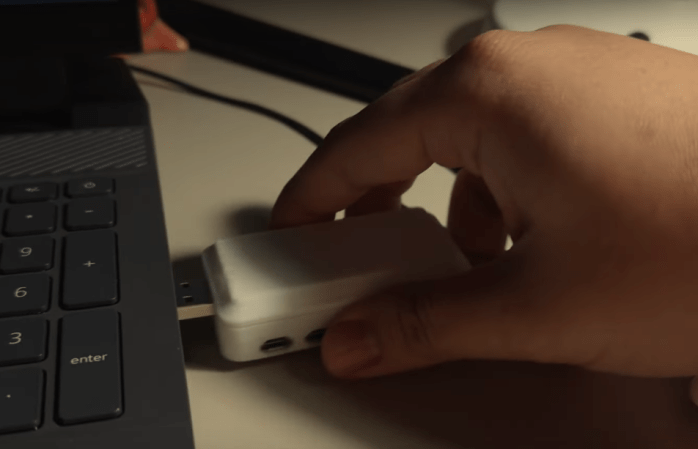
Large language models (LLMs) are all the rage in the generative AI world these days, with the truly large ones like GPT, LLaMA, and others using tens or even hundreds of billions of parameters to churn out their text-based responses. These typically require glacier-melting amounts of computing hardware, but the “large” in “large language models” doesn’t really need to be that big for there to be a functional, useful model. LLMs designed for limited hardware or consumer-grade PCs are available now as well, but [Binh] wanted something even smaller and more portable, so he put an LLM on a USB stick.

This USB stick isn’t just a jump drive with a bit of memory on it, though. Inside the custom 3D printed case is a Raspberry Pi Zero W running llama.cpp, a lightweight, high-performance version of LLaMA. Getting it on this Pi wasn’t straightforward at all, though, as the latest version of llama.cpp is meant for ARMv8 and this particular Pi was running the ARMv6 instruction set. That meant that [Binh] needed to change the source code to remove the optimizations for the more modern ARM machines, but with a week’s worth of effort spent on it he finally got the model on the older Raspberry Pi.

Getting the model to run was just one part of this project. The rest of the build was ensuring that the LLM could run on any computer without drivers and be relatively simple to use. By setting up the USB device as a composite device which presents a filesystem to the host computer, all a user has to do to interact with the LLM is to create an empty text file with a filename, and the LLM will automatically fill the file with generated text. While it’s not blindingly fast, [Binh] believes this is the first plug-and-play USB-based LLM, and we’d have to agree. It’s not the least powerful computer to ever run an LLM, though. That honor goes to this project which is able to cram one on an ESP32.

Continue reading “USB Stick Hides Large Language Model”