Image

PCBs Straight From The Magazine

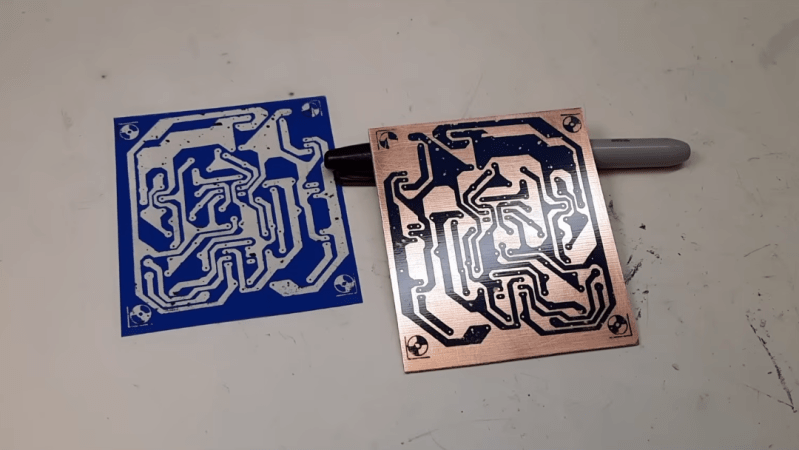
It’s never been easier to get a printed circuit board made. In fact, almost every electronics video out on the internet will incessantly remind you of this fact now. But making a custom PCB wasn’t always as straightforward as sending a KiCad file to a board house. Many DIY methods involve harsh chemicals and tedious processes, but did have the potential benefit of taking much less time than waiting on boards to arrive in the mail. [Bettina Neumryr] is demonstrating one of these older methods, called the toner transfer method, using a circuit that was printed directly in an old magazine.

The first part of the toner transfer method is to create an image that can be printed. Since this circuit came from a magazine, it is first scanned in to a computer and imported into GIMP, where it can be scaled to match the size of the components and then sharpened to make a crisp print. With the image ready, it’s time to print the image onto some toner transfer paper, ensuring that the printer in question is a laser printer which actually uses toner. From there, a sheet of blank copper PCB is prepared and then the toner is transferred by heating, in this case using a laminator. After that its etched, removing all of the copper not protected by the toner, and then the toner itself can be removed which leaves behind the copper traces.

For those of you who were around when toner transfer was in vogue, this video might not have much value. But for anyone who can’t use a board manufacturer for whatever reason or is looking for alternatives, a modern video showing the method could be much more useful and have better context for beginners than videos made a decade or more ago now. Some of those older methods include similar processes using inkjet printers instead, but there are more modern DIY methods as well using lasers or CNC machines too.
Continue reading “PCBs Straight From The Magazine”

Image

3D Print This Retro Desktop Case

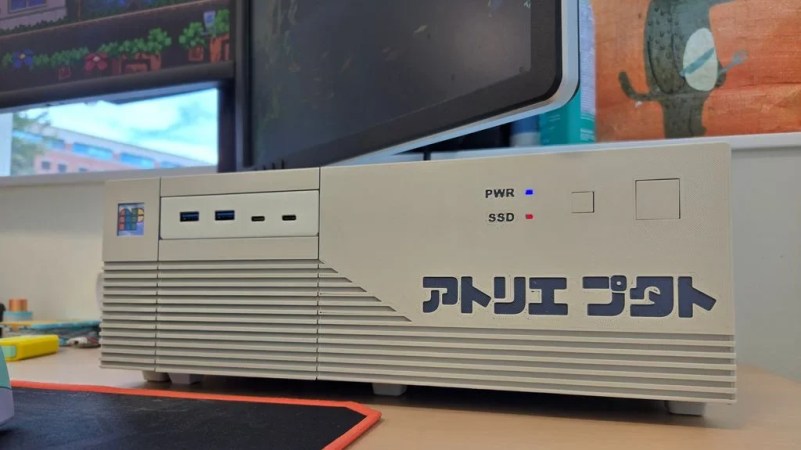
Once upon a time, not every computer lived in a vertical “tower” case. Many decades back a horizontal arrangement was a popular choice, sometimes just referred to as the “desktop” style. [PuTaTuo] is helping to bring it back, with this amazing 3D printed case design.

The case is designed to suit mini-ITX motherboards, while supporting standard ATX-size power supplies. The printed components are all designed to measure less than 220 mm in any dimension to ensure they can easily be produced on smaller printers. The case has a 3.5″ drive bay cutout up front, which you can use for the front panel I/O or a floppy drive if you’re super-retro like that. The front panel is otherwise relatively simple, with buttons for power and reset as well as power and SSD status LEDs.

Assembly is via M3 hardware and heat set inserts. If you’d like to print your own, you can grab the files from Thingiverse or Printables depending on your taste.

We’ve featured some great 3D printed cases over the years, like this colorful build that focuses on ease of access and servicing. The cool thing about designing your own case is you can optimize it to suit your own desires, and customize it to look as cool as you need it to be.

Continue reading “3D Print This Retro Desktop Case”

Image

New Display For Old Multimeter

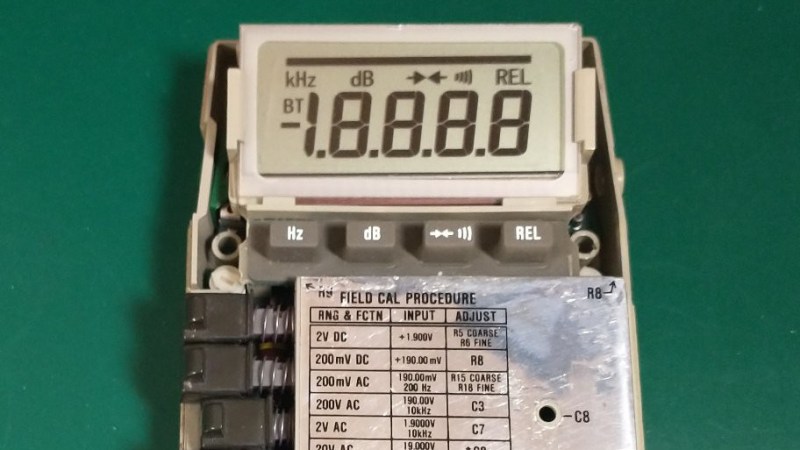
As a company, Fluke has been making electronic test equipment longer than the bipolar junction transistor has been around for. In that time they’ve developed a fairly stellar reputation for quality and consistency, but like any company they don’t support their products indefinitely. [ogdento] owns a Fluke meter that isn’t nearly as old as the BJT but still has an age well outside of the support window, and since the main problem was the broken LCD display they set about building a replacement for this retro multimeter.

Initially, [ogdento] had plans to retrofit this classic multimeter with a modern OLED, but could not find enough space for the display or a way to drive it easily. The next attempt to get something working was to build a custom one-off LCD using a drill press as an end mill, which didn’t work either. But after seeing a Charlieplexed display from [bobricius] as well as this video from EEVblog about designing custom LCDs, [ogdento] was able to not only design a custom PCB and LCD display to match the original meter, but was able to get a manufacturer in China to build them.

The new displays have a few improvements over the old; mostly they are more stylistically inspired by later Fluke models and have a few modern improvements to the LCD itself. There were are few issues during prototyping but nothing that was too hard to sort out, such as ordering the wrong size elastomeric strips initially. For anyone who needs to replace a custom LCD and can’t find replacement parts anymore, this project would be a great starting point for figuring out the process from the ground up.

Image

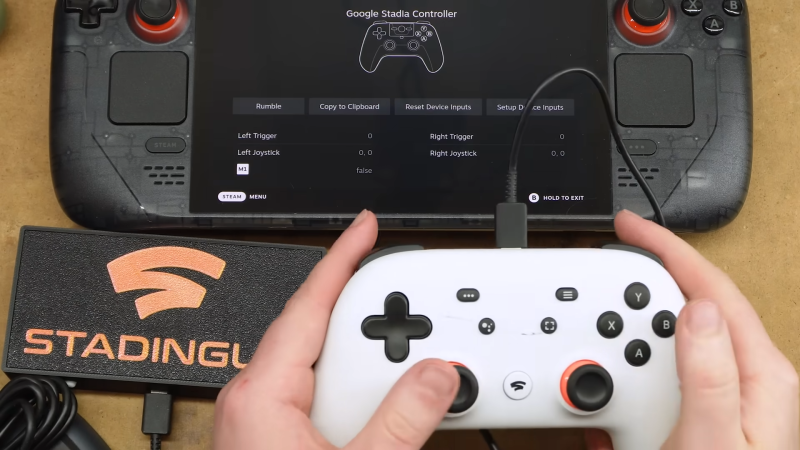
Stadia Controller Reborn As Bluetooth Gamepad Adapter

Tech has a problem, an e-waste problem. Google is a common offender when it comes to this, creating a product just to end support a couple of years later. Thankfully, there are some lasting capabilities left in their defunct Stadia controllers. After hearing about these capabilities, [Bringus Studios] managed to turn this future e-waste into something new: a Bluetooth adapter for game controllers.

To give some credit to Google, once they announced the Stadia program was winding down, they released an updated firmware that let you use the controller as a generic Bluetooth gamepad. But there was also a rather unusual feature added — if another controller is connected to it via USB, its output will be passed along over Bluetooth as if it was coming from the Stadia controller itself.

This would allow you to wirelessly connect an Xbox 360 or PlayStation 3 controller to your computer, for example. But while a neat trick, having the two controllers plugged into each other is a bit awkward. So [Bringus Studios] decided to take the Stadia controller apart and turn it into a dedicated Bluetooth interface.

Continue reading “Stadia Controller Reborn As Bluetooth Gamepad Adapter”

Image

Streaming Music To Cassette

In almost every measurable way, a lossless digital audio file is superior to any analog media. This doesn’t mean that analog audio isn’t valuable though; plenty of people appreciate the compression, ambiance, and other side-effects of listening to a vinyl record or a cassette tape despite the technical limitations. To combine the audio technology of the modern world with these pleasant effects of old analog media, [Julius] built a cassette-based media streamer.

The music playback device takes input from a Bluetooth stream of some sort, converts the digital stream to analog, combines the stereo signal into a mono signal, and then records it to a cassette tape. The tape is then looped through to a playback device which outputs the sound to a single speaker. This has the effect of functioning as a tape delay device, and [Julius] did add input and output jacks to use it as such, but in its default state it has the effect of taking modern streaming through a real analog device and adding the compression and saturation that cassette tapes are known for.

The design of the device is impressive as well, showing off the tape loop and cassette front-and-center with a fluorescent vu meter on the side and a metal case. Getting all of this to work well together wasn’t entirely smooth, either, as [Julius] had to sort out a number of issues with the electronics to keep various electric noises out of the audio signal. Retro analog music players are having a bit of a resurgence right now, whether that’s as a revolt against licensed streaming services or as a way to experience music in unique ways, and our own [Kristina Panos] recently went down an interesting rabbit hole with one specific type of retro audio player.

Continue reading “Streaming Music To Cassette”

Image

Need For Speed Map IRL

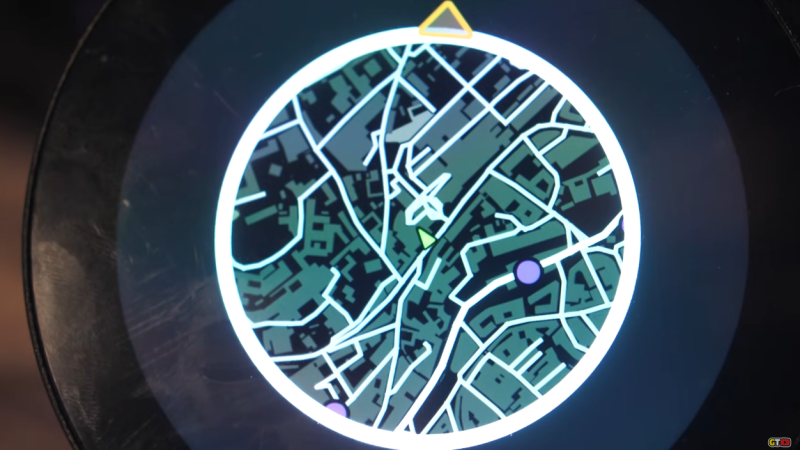
When driving around in video games, whether racing games like Mario Kart or open-world games like GTA, the game often displays a mini map in the corner of the screen that shows where the vehicle is in relation to the rest of the playable area. This idea goes back well before the first in-vehicle GPS systems, and although these real-world mini maps are commonplace now, they don’t have the same feel as the mini maps from retro video games. [Garage Tinkering] set out to solve this problem, and do it on minimal hardware.

Before getting to the hardware, though, the map itself needed to be created. [Garage Tinkering] is modeling his mini map on Need For Speed: Underground 2, including layers and waypoints. Through a combination of various open information sources he was able to put together an entire map of the UK and code it for main roads, side roads, waterways, and woodlands, as well as adding in waypoints like car parks, gas/petrol stations, and train stations, and coding their colors and gradients to match that of his favorite retro racing game.

To get this huge and detailed map onto small hardware isn’t an easy task, though. He’s using an ESP32 with a built-in circular screen, which means it can’t store the whole map at once. Instead, the map is split into a grid, each associated with a latitude and longitude, and only the grids that are needed are loaded at any one time. The major concession made for the sake of the hardware was to forgo rotating the grid squares to keep the car icon pointed “up”. Rotating the grids took too much processing power and made the map updates jittery, so instead, the map stays pointed north, and the car icon rotates. This isn’t completely faithful to the game, but it looks much better on this hardware.

The last step was to actually wire it all up, get real GPS data from a receiver, and fit it into the car for real-world use. [Garage Tinkering] has a 350Z that this is going into, which is also period-correct to recreate the aesthetics of this video game. Everything works as expected and loads smoothly, which probably shouldn’t be a surprise given how much time he spent working on the programming. If you’d rather take real-world data into a video game instead of video game data into the real world, we have also seen builds that do things like take Open Street Map data into Minecraft.

Thanks to [Keith] for the tip!

Continue reading “Need For Speed Map IRL”

Image

Join The The Newest Social Network And Party Like Its 1987

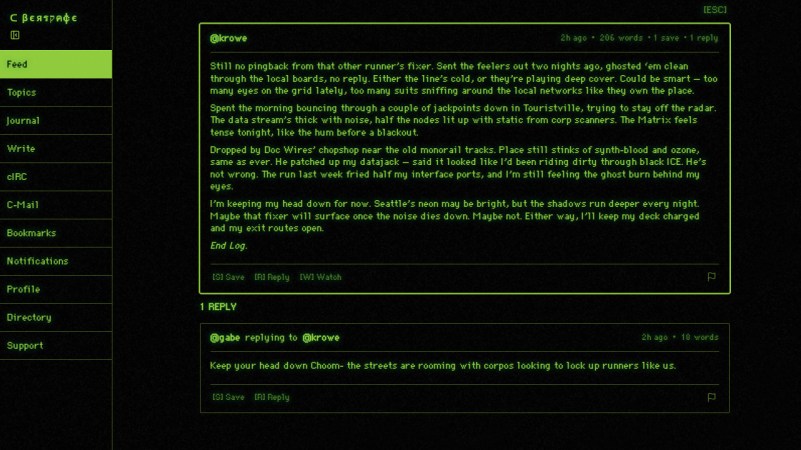
Algorithms? Datamining? Brainrot? You don’t need those things to have a social network. As we knew back in the BBS days, long before anyone coined the phrase “social network”, all you need is a place for people to make text posts. [euklides] is providing just such a place, at cyberspace.online.

It’s a great mix of old and new — the IRC inspired chatrooms, e-mail inspired DMs (“cybermail”) make it feel like the good old days, while a sprinkling of more modern concepts such as friends lists, a real-time feed, and even the late-lamented “poke” feature (from before Facebook took over the world) provide some welcome conveniences.

The pursuit of retro goes further through the themed web interface, as well. Sure, there’s light mode and dark mode, but that’s de rigueur. Threads might not offer a blue-and-white Commodore 64 theme, and you’d have little luck getting Bluesky to mimic the soothing amber glow of a VT-230, but Cyberspace offers that and more.

Continue reading “Join The The Newest Social Network And Party Like Its 1987”