Search the Community
Showing results for tags 'optimazed'.
Found 2 results
-
Version 1.0.0
1 download
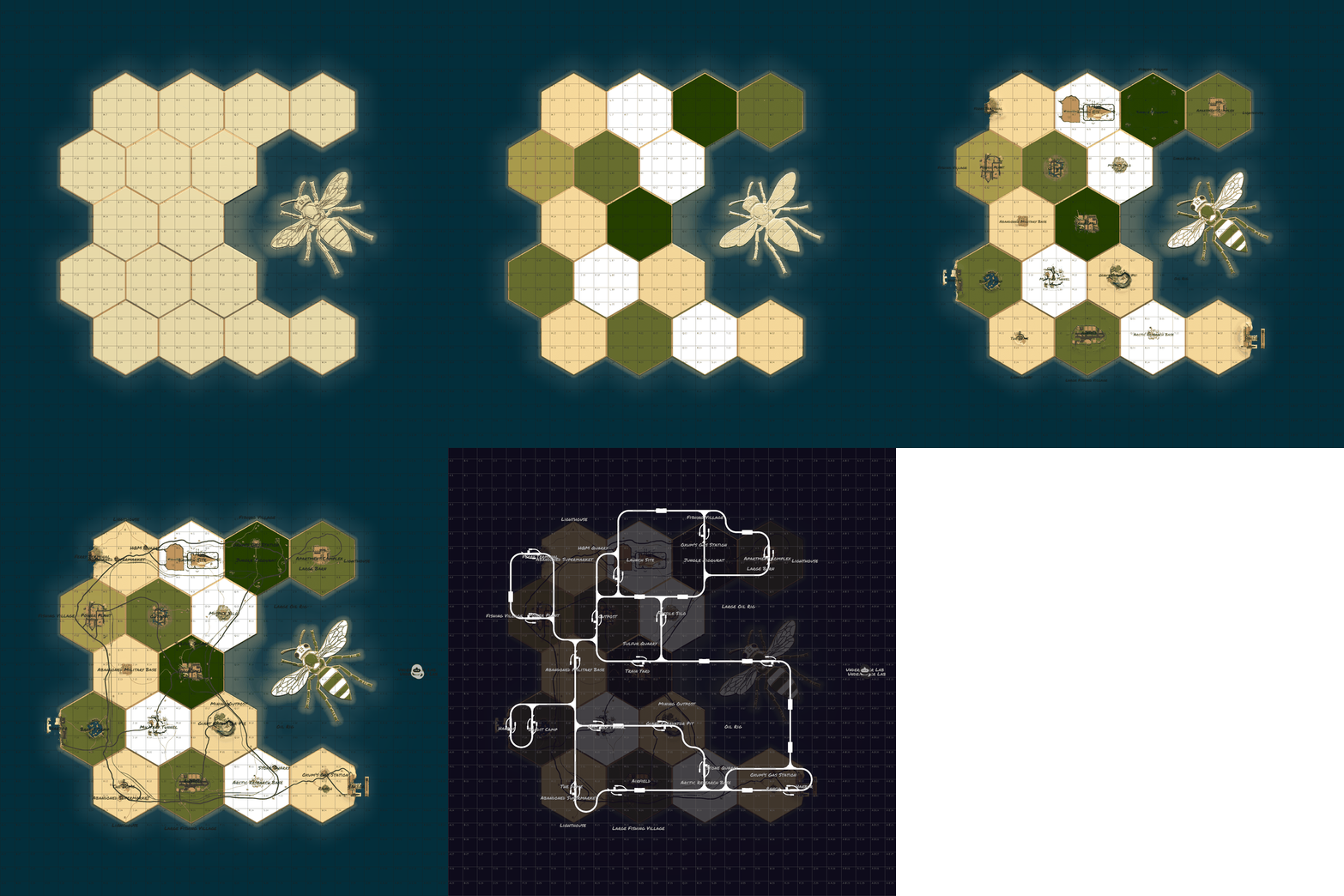
About Hivefall Discover Hivefall, a uniquely crafted Rust map built around a giant honeycomb landscape, where massive hexagonal islands form a one-of-a-kind world and a giant wasp flies toward its hive. Unique Setting: A giant honeycomb-inspired island made up of large hexagonal sectors. Handcrafted Terrain: Each hex features its own terrain, elevation, vegetation, roads, and points of interest. Giant Wasp: A massive handcrafted wasp is integrated into the island's design, creating the impression that it is flying toward its hive. Balanced Gameplay: Monuments, resources, and points of interest are distributed across the hexagonal sectors to encourage exploration and movement around the entire map. Connected World: Roads, railways, and power lines create multiple routes between different parts of the island. Unique Visual Style: The hexagonal terrain and giant wasp create a distinctive visual identity that players will recognize from the very first moment. Performance Focused: The map is designed with optimization in mind, keeping prefab usage under control for stable server performance. All water surrounding the island up to a depth of 10 meters is fresh water. An excellent choice for servers looking to give their players a completely different Rust experience — a world where the island itself becomes the hive. Password Included Map size 4500 Prefab count ~4720 I can help with editing the map for your server Monuments Apartment Complex Supermarket Gas Station Mining Outpost Ferry Terminal Harbor 1 Harbor 2 Jungle Ziggurat Sphere Tank Train Yard Power Plant Airfield Arctic Research Military Base Nuclear Missile Silo Military Tunnel Giant Excavator HQM, Stone, Sulfur Quarry Large Fishing Village Fishing Village Lighthouse Ranch Large Barn Bandit Camp Outpost Underwater Lab Oilrig 1 Oilrig 2$12.00 -
Version 1.1.1
141 downloads
The AdditionalBelt plugin is a useful tool for players who want to get the most out of their game experience. By providing an extra slot in your inventory to carry needed items, this plugin can make gameplay more enjoyable and rewarding. One of the main benefits of using this plugin is that it allows players to carry more items without losing valuable inventory space. This can be especially useful in gameplay moments where inventory management is a key gameplay element, as it allows players to be more efficient and effective in exploration and combat. Feathures: Doesn't stress the server. The whole plugin is made on the mechanics of the game and does not stress the server in any way, no data files, no containers with the creation of new items. Convenient bind switch through "E then R", which allows you to freely switch between belts even in the most intense PvP. Nice UI button next to belt slots for switching inside inventory. It's possible to protect a dropped belt, after which a codelock will be installed on the crate. Video Plugin Demo: Permissions: additionalbelt.enabled - Permission to receive/wear an additional belt additionalbelt.loot.protection - protect a dropped belt from being looted by other players additionalbelt.nodrop - Disable the belt dropout additionalbelt.keep - Saving the belt, returns after respawning Key combination for switching: E then R Default Command: belt (Configurable in the config) Default Config: { "Cooldown between belt switches in seconds": 0.0, "Notify the player in the chat after switching belts?": true, "Command": "belt" } Default Lang: { "NoPermission": "You do not have permission to use this command.", "LootProtection": "This crate is protected, it cannot be looted.", "Title": "Belt of {0}", "Switch": "You switched to an additional belt.", "Cooldown": "You switch between belts too often, you can switch again after {0} seconds.", "Grant": "You have been added an additional belt. Usage: E then R, console command - {0}, chat command - /{0}.", "Revoke": "You have been revoked for an extra belt.", "RevokeWithDrop": "You have been revoked for an extra belt. The belt is dropped next to you, remember to pick up your items." } API: bool HasBelt(ulong playerId) // Find out if a player has an additional belt or not (includes sleepers) List<Item> GetItems(ulong playerId) // Get a list of additional belt items (includes sleepers)$18.00- 20 comments
- 2 reviews
-
- 2
-

-
- #additional
- #belt
- (and 2 more)