Image

Is This The Only Instrument You Need?

When working on an electronic project it’s likely you will find yourself working with a variety of different instruments, be they logic analysers, oscilloscopes, or whatever. These can take up a lot of space, not to mention cost a bundle of cash. [Max.K] came up with PicoLab as a solution, it’s an all-in-one box containing a four-channel oscilloscope, eight-channel logic analyser, GPIOs, a data logger, and serial, SPI, and i2C interfaces. There’s even an adjustable power supply!

Behind it all is an RP2350, in its larger package with more pins, coupled to some custom interface and protection circuitry. Perhaps the cleverest part is its interface, which it serves as a web site on the network card it exposes through the USB port. Any OS that supports a web browser and USB networking can thus use this thing. You can find all the code in a GitHub repository, should you wish to have a go at building one yourself. We like this idea.

Image

A 3D Printed Marble Clock, But It’s Scrolling Text

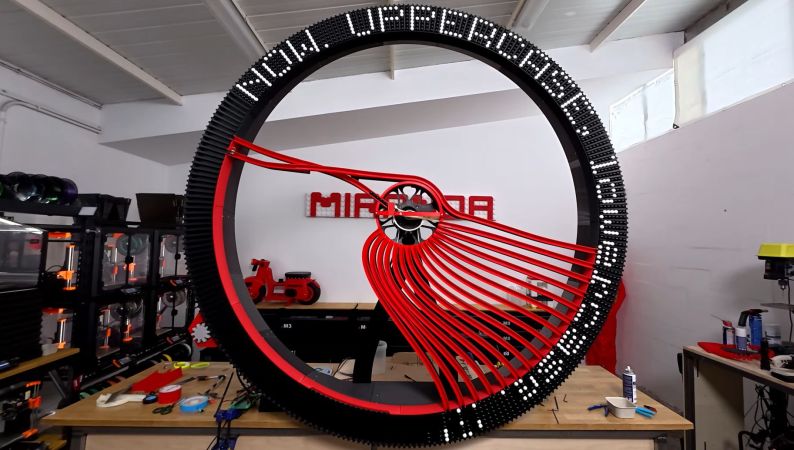
With the topic of marble clocks having been quite well explored at this point, it raises the question of how easy it would be to take the basic principle and create a text display using black and white marbles. As [Ivan Miranda] found out in a recent marble text scroller project, this is far from easy.

The reason why a scrolling text display was picked comes down to not wanting to be limited to a fixed number of digits. This resulted in a round wheel design, with inner steel ball bearings and a stepper motor on both the wheel and an inner selector mechanism. These respectively align the marble channels and pick the right color of marbles to be dropped into any of the wheel’s slots, creating the right sequence of marbles for the target text.

Perhaps the most amazing thing about it is that it’s an absolutely massive structure, yet it’s all 3D printed and bolted together. It took a number of trial-and-error cycles, and debugging issues like the IR sensors getting confused by daylight, but it now mostly seems to work all right.

There are still some remaining issues, such as having to manually home the wheel before starting, and the ratio of black vs white marbles can cause unexpected gaps in the final text. Despite this the text is quite legible and definitely infinite.

Continue reading “A 3D Printed Marble Clock, But It’s Scrolling Text” →

Image

Valve Releases Hardware And CAD Reference For New VR Headset

Valve recently began shipping its long-awaited VR headset, the Steam Frame. Now, there is a hardware reference repository that includes everything a budding modder might need, and then some.

Image
No need to 3D scan or break out the calipers if one wants to design their own add-ons.

Want to design and 3D print some add-ons, or a carrying case, or some other doodad? There’s no need to break out the calipers or 3D scan the hardware. The repository contains STEP format models of the VR core module, head strap, and controllers, so it’s as easy as possible to design things that’ll fit. The location of the IR tracking LEDs embedded in the controllers is also documented, so one can ensure their design doesn’t occlude them.

That’s not all. The Frame has a user-accessible hardware expansion port at its front. This port exposes two interfaces: high-speed MIPI camera and PCI Express. This expansion port is documented in the repository, and even has a simple reference design built in both KiCad and Altium.

We’re glad to see Valve maintain their hacker-friendly hardware design with the Steam Frame. Demand for The Frame outstrips supply so far, so if you’re on the waitlist, you might want to browse the repository and get an early start on whatever customizations you have in mind while you wait for your confirmation. And when you get something working, drop us a note on the tips line!

Image

You Can Make A Microprocessor That’s All Your Own

For a while now we’ve followed the slow progression of affordable integrated circuit fabrication, and through the likes of Tiny Tapeout we’ve seen impressive strides made. But they’re not the only player in the space, and [Breaking Taps] has a video showing their microprocessor built using wafer.space.

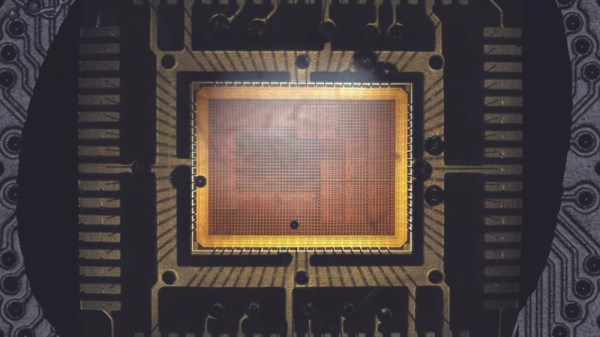
The microprocessor itself is a little unusual, being a transport triggered architecture design with two busses. The whole thing might better be described as a system-on-chip than a microprocessor, as like a microcontroller it contains both memory and peripherals. He’s used Spade to design the thing, and we get an in-depth look at all the steps involved between design and fabrication. It’s a level or two more difficult than passing the DRC standards for your PCB fabricator. The result is a chip carrier with the chip itself visible under clear epoxy. It’s using an old fabrication technology so the silicon is surprisingly big, but unlike Tiny Tapeout’s cell based fabrication the whole chip is the one circuit. Mounting it on a PCB and using a breadboard, he’s able to demonstrate it running simple programs.

It’s clear that having your own IC fabricated is not for everyone, as even though wafer.space has performed minor miracles it’s still a service for people with a few dollars in hand. But look at it this way, we’re still near the start of this particular curve, and we expect that further affordability breakthroughs will follow.

Continue reading “You Can Make A Microprocessor That’s All Your Own” →

Screenshot of the survey webpage, saying "Invitation to participate in a new fun hardware discussion in the PINE64 Community Pine Store may have stopped production on Linux hardware, but that doesn't mean all production has stopped. Hardware like the Pinecil, PineTime and PineVoice that use MCUs will continue production as normal. This is a great opportunity to come up with new ideas for MCU powered hardware. Now that the PinePhone has stopped production, there is a gap in the hardware lineup for a "fun" device. This definition of "fun" boils down to whether a device can have multiple use cases or purposes. The PineTime, PinePhone and PineNote can be considered "fun" as they can be used for multiple purposes and multiple projects can naturally form around them. An example of the opposite would be devices like the Pinecil and PineBuds which serve a single purpose and build less of a community around them as a result (but both are still great). OKAY, SO! We'd like to share some initial ideas on what a cheap fun tinkerers device could be. 1.What hardware do you prefer?Required Please drag these items from most (1) to least (5) preferred. ?Alarm clock ?PinePhone-esque device but MCU powered (attachments possible?) ?Handy multi-tool with screen, fido hardware key, nfc, etc ?Other (next question) ?MP3 player"

What Should Pine64 Build With Microcontrollers?

Pine64 is an open-source-community-centered project of mostly-open hardware, known for such hits as the PinePhone, the Pinecil soldering iron, and the PineTime. Now, the Pine64 project wants to know what kind of MCU-powered device you’d want to see built next, and there’s an online form you can fill out to let them know about any fun ideas they could bring to reality, as we all recover from the second round of Hardware Horrors Of 2020s.

In the age of RAM and storage shortage, it’s evident we’re not about to see a new Pine64 Linux SBC – but there’s plenty that can be done with regular microcontrollers, especially seeing how far modern microcontrollers have come in capabilities. On their Discord server and other linked platforms, you can see the announcement post giving you more details, as well as examples of devices that would fit the bill. An MP3 player? An alarm clock? Some sort of electronics multi-tool? PinePhone-esque device but based on an MCU? Digital camera? Whether you have full-on device ideas or specific feature requests for the aforementioned, check out the form and let them know.

Of course, any suggestions will ultimately have to be considered for viability by the Pine Store, the Pine64 hemisphere that actually decides on what to manufacture, so no promises can be made, but we consider this more than promising enough that you ought to have a say. Pine64 has come incredibly far in the 10 years it’s been around, and despite the troubles, we hope they’re here to stay, doing their thing releasing hardware that so often runs circles around the competition, and dropping by hacker cons all over the globe.

Image

Introducing The Periodic Table Of US Electrical Receptacles

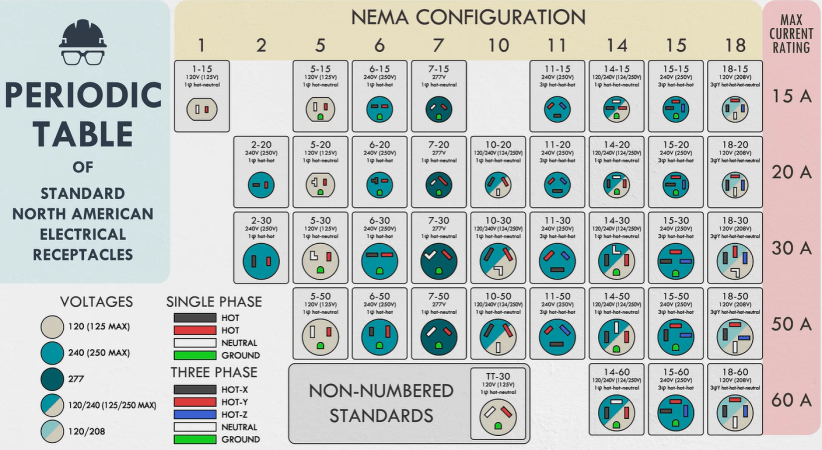
Although things may seem simple on the North American grid as an end-user if you limit yourself to just 120 VAC and NEMA 1-15 and 5-15 connectors, there is a veritable zoo of different voltages and receptacles out there in the NEMA connector catalogue. Recently [Practical Engineering] decided to not only take a look at how many of these defined standards are actually used, but also put them in a nice periodic table style graphic.

Responsible for these standards is the National Electrical Manufacturers Association (NEMA), which as the name says is a collection of manufacturers. Founded in 1926, this US trade association also affects outlet standards in countries like Canada, Mexico, Japan and so on. The caveat here is that compatibility between e.g. a similar looking Japanese 1-15-style plug and a US 1-15 outlet is not guaranteed, even if you ignore voltage and grid frequency differences.

In an ideal world everyone would agree on a set of reasonable connector designs and we could move on, but we live in a world where even today designing your own national connector instead of picking something like the ubiquitous Type F is considered to be reasonable. At least it’s not susceptible to the ‘penny challenge‘ flaw that the NEMA 5-15 connector suffers from, but that’s small comfort.

NEMA connectors are also unique in that they are often polarized, while Type E/F and others rarely are, putting the onus of dealing with AC polarity on the device. This already shows why the NEMA connector diversity exists, as this trade association wanted to have specific connectors for different polarities, different current limits and also the nearly half a dozen of different voltages commonly used throughout the US.

This ‘one connector for a specific combination’ approach means that quite a few of them are not really used in real life, though from a European perspective where you deal with Type C (‘euro plug’) and Type E/F (‘Schuko’)  on ~240 VAC and triple-phase 440 VAC connectors if you run a heavy machine shop or want to fast-charge an EV at home, it’s still a bewildering number of active combinations.

Continue reading “Introducing The Periodic Table Of US Electrical Receptacles” →

Image

Can AI Now Design PCBs That Just Work?

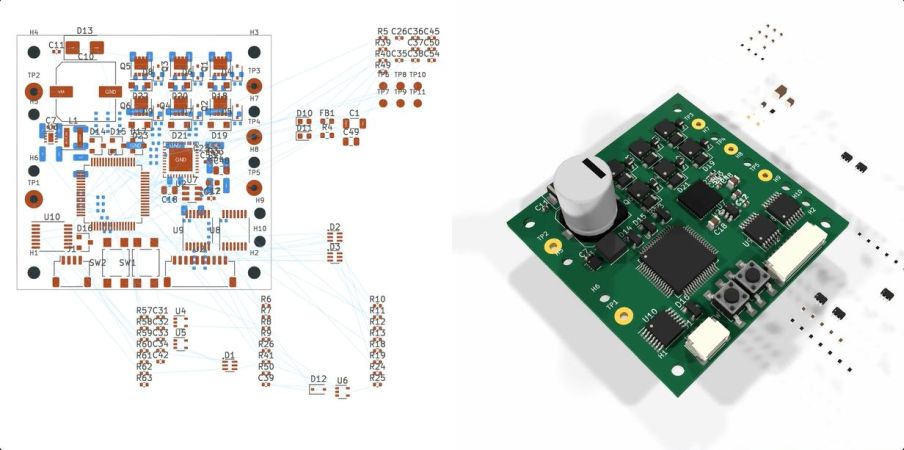
With the recent release of its GPT-6 Astra model, OpenAI explicitly pushed the claim that it is capable of designing complete circuit boards in KiCad, starting from a provided schematic and outputting a fully routed PCB that theoretically could be sent off to be manufactured. This of course raises the question whether this is just a nifty party trick that works under strictly controlled conditions like most auto-routing tools, or whether there’s more to it. In a recent [EEBench] blog post, OpenAI’s claims are put to the test.

Continue reading “Can AI Now Design PCBs That Just Work?” →