The SQL STR is a String Function used to return the string representation of the numeric expression. It converts numeric data into character data (String). Based on the given length and decimal precision, the converted character data (string) is right-justified.
SQL STR syntax
The syntax of the STR function is shown below.
SELECT STR(Float_Expression, Length, Decimal)
FROM [Source]
This SQL Server STR string function returns VARCHAR as a result set. The list of arguments available for STR is:
- Float_Expression: Please specify the valid Expression for which you want to convert as character data. Please specify any expression of a Float data type with decimal points.
- length: This is an optional argument representing the total string length. The value assigned to the length argument includes a decimal point, sign, spaces, and digits. If you omit this argument, then STR() will assign the default length as 10.
- decimal: This is an optional argument, representing the total number of decimal places to display by the string result. The value assigned to the decimal argument must be less than or equal to 16, and if you assign more than 16, then the result will be truncated to 16.
TIP: We must pass a positive number to both the length and decimal arguments. If we assign the length to be less than the number, it returns *.
SQL Server STR Function Example
The STR Function returns the string representation of the float values.
Example 1: The following query returns the string representation of the given number. Here, we haven’t used the length and decimal, so STR() uses the default values.
The query below converts 100 (integer) to a string, and its length is 10 because it is the default length value for STR().
SELECT STR(100)
100Example 2: If we use the second argument (length), the SQL STR function returns the string of the given length. Here, the first SQL SELECT statement returns 1000 because the total length is 4. In the next one, it returns 1000 with 2 empty spaces at the beginning. Here, it won’t return any decimal portion.
SELECT STR(1000.1234, 4)

SELECT STR(1000.1234, 6)
1000
 1000
Example 3: To get the decimal values, use STR() third argument. Here, total length = 7, including the (.) symbol. We need two decimal positions. Total = (4 numbers + 1 dot + 2 decimals) = 7. If the length is 6, it returns 1000.1
SELECT STR(1000.1234, 7, 2)
1000.12Example 4: When we use a shorter length, STR() returns *. Here, 3 is less than the integer length (4), so it prints 3 stars.
SELECT STR(1000.1234, 3, 2)
***Using STR() function on variable
The following query will show you multiple ways to use this function.
DECLARE @Num FLOAT
SET @Num = 786.387

-- No Length, Decimal arguments. @Num value will be rounded
SELECT STR(@Num) AS Result1

-- Length = 7, No Decimal argument.
-- Although length is 7, @Num value will be rounded because decimal places defaults value is 0
SELECT STR(@Num, 7) AS Result2
SELECT STR(@Num, 7, 0) AS Result3

-- Length = 7, Decimals = 1, 2 Resulting string will return 1 and 2 decimal values
SELECT STR(@Num, 7, 1) AS Result4
SELECT STR(@Num, 7, 2) AS Result5

SELECT STR(@Num, 6, 1) AS Result6
-- Length = 5, Decimals = 3.
SELECT STR(@Num, 5, 3) AS Result7
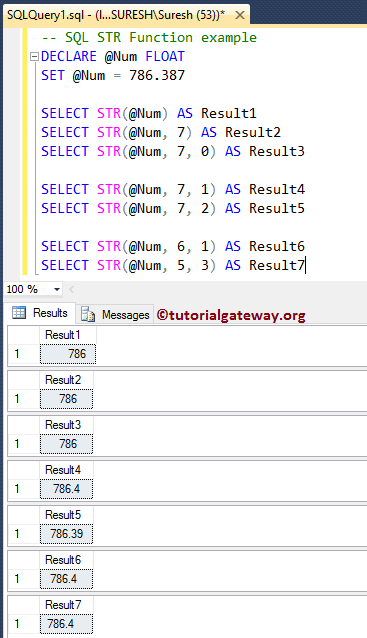
Within the SQL STR function example query, for both statements, Length = 7, and for the first one, No Decimal argument, for the second statement, decimal = 0. Although the length value is 7, the @Num value is rounded because the decimal place default value is 0. Please refer to the list of SQL String Functions from our SQL Server tutorial.
SELECT STR(@Num, 7) AS Result2
SELECT STR(@Num, 7, 0) AS Result3
Here, Length = 5, and Decimals = 3. Although the decimal value is 3, the @Num value is rounded to one because the length value is 5 (and the length of 786.4 is 5, including the decimal point)
SELECT STR(@Num, 5, 3) AS Result7
SQL Server STR Function on numbers
In this example, we will use the STR function with uneven lengths and decimal values. Please refer to the SQL REVERSE and SQL FORMAT functions.
SELECT STR(786.387) AS Result1
SELECT STR(786.387, 3) AS Result2

SELECT STR(786.387, 2) AS Result3
SELECT STR(786.387, 2, 2) AS Result4

SELECT STR(786.387, 9, 5) AS Result5
SELECT STR(FLOOR(786.387), 9, 4) AS Result6
SELECT STR(CEILING(786.387), 9, 4) AS Result7
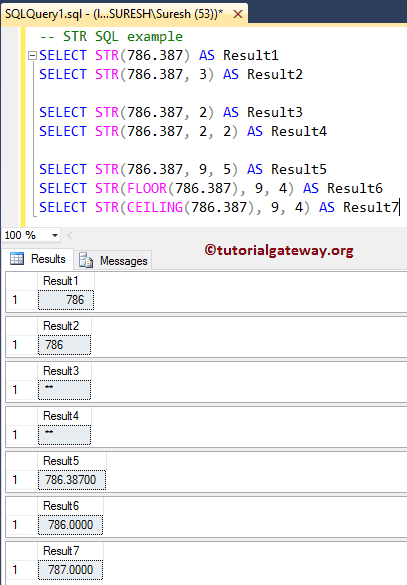
Here, we are assigning the length value less than the left-hand side of the decimal point. The SQL Server LEN will return the output as **
SELECT STR(786.387, 2) AS Result3
SELECT STR(786.387, 2, 2) AS Result4
Next, we apply the STR function to FLOOR and CEILING values. Though the values are rounded to the nearest values, this String Function is returning 4 zeros after the decimal point because we assigned the decimal argument to 4, and length = 9 (length of 787.0000 is 9, including the decimal point). Please refer to the SQL FLOOR and SQL CEILING functions.
SELECT STR(FLOOR(786.387), 9, 4) AS Result6
SELECT STR(CEILING(786.387), 9, 4) AS Result7
Using SQL STR Function on table columns
In this example, we will implement the STR function on the numeric columns. For this demo, We are going to use the below-shown data.
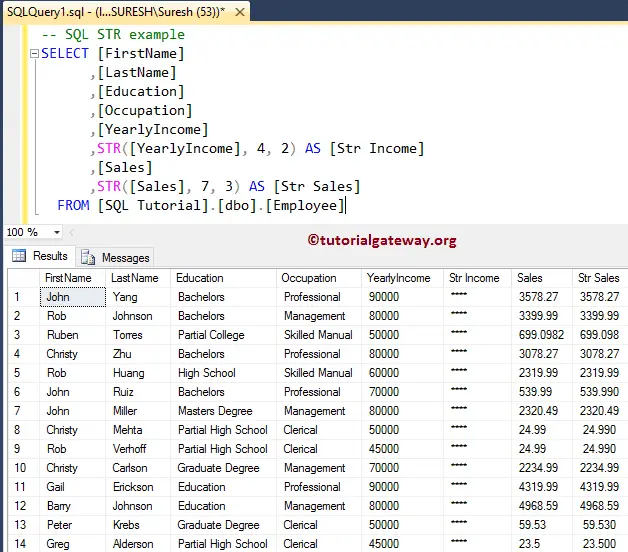
The following STR string function statement will return the string representation of the [Yearly Income] and [Sales] columns.
SELECT [FirstName]
      ,[LastName]
      ,[Education]
      ,[Occupation]
      ,[YearlyIncome]
      ,STR([YearlyIncome], 4, 2) AS [Str Income]
      ,[Sales]
      ,STR([Sales], 7, 3) AS [Str Sales]
  FROM [Employee]
From the below screenshot, you can observe that str Income is returning **** because we assigned the length value less than the yearly income value.