
Operators in Java are symbols, such as +, == and &&, that take one, two or three operands and compute a new value from them. The operator and the types of its operands decide the result, so 7 / 2 gives 3 while 7 / 2.0 gives 3.5.
We use operators in almost every line of code, for example to calculate a ticket total, to compare a value against a limit, to combine conditions in an if statement or to join text for a log message.
The following example uses one operator from each family in a cinema booking app.
int seats = 7;
int rows = 2;
int total = seats * rows + 1;                   // 15, arithmetic
int perRow = seats / rows;                      // 3, integer division
int left = seats % rows;                        // 1, remainder
seats += 3;                                     // compound assignment
int afterBooking = seats;                       // 10
boolean full = seats >= 10;                     // true, relational
boolean open = !full && rows > 0;               // false, logical
String label = full ? "Sold out" : "Book now";  // "Sold out", conditional
int doubled = rows << 1;                        // 4, shift
Object ticket = "A12";
boolean isText = ticket instanceof String;      // true, type comparison
The division seats / rows drops the fraction, because both operands are int. Each operator family gets its own section with the traps that cause real bugs, such as overflow, i = i++ and == on objects, and the precedence table comes last.
1. Types of Operators in Java
The Java Language Specification defines 38 operator tokens. We group them by what they do, and we also group them by the number of operands. A unary operator takes one operand (-x, !done), a binary operator takes two (a + b), and the only ternary operator, ?:, takes three.
| Family | Operators | Example | Result |
|---|---|---|---|
| Arithmetic | + – * / % | 17 % 5 | 2 |
| Unary | + – ++ — ! ~ | -price | The negated value |
| Assignment | = += -= *= /= %= &= |= ^= <<= >>= >>>= | count += 2 | count increased by 2 |
| Relational and equality | < > <= >= == != | age >= 18 | true or false |
| Logical | && || ! & | ^ | paid && seated | true or false |
| Bitwise and shift | & | ^ ~ << >> >>> | 6 & 3 | 2 |
| Conditional | ? : | vip ? 0 : 5 | One of the two values |
| Type comparison | instanceof | obj instanceof String | true or false |
| Lambda arrow | -> | n -> n * 2 | A lambda expression |
The + sign also joins strings, and &, | and ^ work as logical operators on boolean values and as bitwise operators on integers. The :: token of method references is a separator in the JLS, not an operator, and instanceof is a keyword.
2. Arithmetic Operators
The arithmetic operators work on numeric types and follow the usual math precedence, so *, / and % run before + and –. Before the calculation, Java promotes byte, short and char operands to int, and if one operand is a long, float or double, the other one is converted to that wider type.
Say the cinema splits 7 friends into cars of 3 seats. Integer division tells us how many cars are full and the remainder tells us how many friends are left over. Division of integers rounds toward zero, and the result of % takes the sign of the left operand.
int fullCars = 7 / 3;                   // 2
int leftOver = 7 % 3;                   // 1
double share = 7 / 3.0;                 // 2.3333333333333335
int negDiv = -7 / 2;                    // -3, rounds toward zero
int negRem = -7 % 2;                    // -1, sign of the left operand
int floorRem = Math.floorMod(-7, 2);    // 1, always non-negative here
Two more cases produce surprising results. Integer division by zero throws an ArithmeticException, whereas floating-point division by zero returns Infinity or NaN. Integer overflow wraps around without an error, so we use Math.addExact() and its siblings when a wrong total must not go unnoticed.
int noSeats = 0;
int perSeat = 100 / noSeats;                       // ArithmeticException: / by zero
double ratio = 100.0 / noSeats;                    // Infinity
int wrapped = Integer.MAX_VALUE + 1;               // -2147483648
int checked = Math.addExact(Integer.MAX_VALUE, 1); // ArithmeticException: integer overflow
3. Increment and Decrement Operators
The ++ operator adds 1 to a variable, and — subtracts 1. In prefix form (++i), the expression has the new value. In postfix form (i++), the expression has the old value, and the variable changes after it is read.
int sold = 5;
int before = sold++;                    // 5, sold is 6 afterwards
int after = ++sold;                     // 7
int current = sold;                     // 7
The difference matters only when we use the result in the same expression. A classic trap is i = i++, which leaves the variable unchanged, because the old value is assigned back after the increment. On its own line, as in a for loop header, both forms do the same thing.
int visits = 5;
visits = visits++;
int result = visits;                    // 5, not 6
4. Assignment and Compound Assignment
The = operator stores the value of the right side in the variable on the left, and the whole assignment is itself an expression with that value. Assignment is right-associative, so a = b = 0 sets b first and a second.
A compound operator such as += combines an operation with the assignment. A compound assignment casts the result back to the type of the variable, so b += 300 compiles for a byte and overflows without an error, while b = b + 300 does not compile.
byte level = 10;
level += 300;                           // compiles, implicit (byte) cast
byte stored = level;                    // 54, 310 does not fit in a byte
int price = 200;
price -= 50;
price *= 2;
int finalPrice = price;                 // 300
// does not compile: incompatible types: possible lossy conversion from int to byte
byte level = 10;
level = level + 300;The implicit cast is defined in JLS 15.26.2. We prefer an int or long variable for running totals, so the compound operator never has to narrow the result.
5. Relational and Equality Operators
The relational operators <, >, <= and >= compare numbers, and == and != test equality. All of them return a boolean, which is why we use them in if statements and loop conditions.
For objects, == checks whether both sides refer to the same object, not whether they contain the same data. Two String objects with the same text are often different objects, so we compare them with equals().
String movie = new String("Dune");
boolean sameObject = movie == "Dune";       // false
boolean sameText = movie.equals("Dune");    // true
boolean money = 0.1 + 0.2 == 0.3;           // false, rounding error
boolean close = Math.abs(0.1 + 0.2 - 0.3) < 1e-9;   // true
The last two lines show the second trap. A double cannot store most decimal fractions without a tiny rounding error, so we compare floating-point values with a tolerance, or we use BigDecimal for money.
6. Logical Operators and Short-Circuit Evaluation
The logical operators combine boolean values. The && operator returns true only if both sides are true, || returns true if at least one side is true, ! flips the value, and ^ returns true if the two sides differ.
The && and || operators short-circuit, which means they skip the right side once the left side decides the result. We use this as a guard. In a booking form, the coupon code can be null, and && makes sure we call isBlank() only on a real String.
String coupon = null;
boolean hasCoupon = coupon != null && !coupon.isBlank();   // false, no NullPointerException
boolean unsafe = coupon != null & !coupon.isBlank();       // NullPointerException
The single & and | operators always evaluate both sides, so the second line fails. We keep & and | for bit operations and for the rare case where the right side must run for its side effect. The boolean article has more examples of short-circuit evaluation.
7. Bitwise and Shift Operators
The bitwise operators work on the individual bits of integer values. The & operator keeps bits set in both operands, | keeps bits set in either, ^ keeps bits set in only one of the two, and ~ flips every bit. We use them for compact flags, such as the features of a cinema hall stored in one int.
int imax = 0b001;                       // 1
int dolby = 0b010;                      // 2
int recliner = 0b100;                   // 4
int hall = imax | recliner;             // 5, two features set
boolean hasDolby = (hall & dolby) != 0; // false
int withDolby = hall | dolby;           // 7
int withoutImax = withDolby & ~imax;    // 6
The shift operators move bits left or right. A left shift by one doubles a value until it overflows. The >> operator keeps the sign bit, so negative numbers stay negative, whereas >>> fills the left side with zeros and treats the value as unsigned.
int shiftedLeft = 3 << 2;               // 12
int signed = -16 >> 2;                  // -4
int unsigned = -16 >>> 28;              // 15
int inverted = ~5;                      // -6
8. The instanceof Operator and Pattern Matching
The instanceof operator checks whether an object is an instance of a type and returns false for null. Since Java 16 (JEP 394), it can also declare a pattern variable, which removes the cast that used to follow every check.
Object payment = "UPI-123";
boolean isText = payment instanceof String;          // true
int length = payment instanceof String s ? s.length() : 0;   // 7
Object nothing = null;
boolean nullCheck = nothing instanceof String;       // false
The pattern variable s is in scope only where the check succeeded. The pattern matching for instanceof article covers the scoping rules in detail.
9. The Conditional Operator and String Concatenation
The conditional operator condition ? a : b returns a when the condition is true and b otherwise. It is an expression, so we can assign its result or pass it to a method, and the ternary operator article covers its type rules and nesting.
When at least one operand of + is a String, the operator joins text instead of adding numbers. Java evaluates + from left to right, so the position of the first String decides which numbers are still added.
int adults = 1;
int kids = 2;
String wrong = "Tickets: " + adults + kids;       // "Tickets: 12"
String right = "Tickets: " + (adults + kids);     // "Tickets: 3"
String first = adults + kids + " tickets";        // "3 tickets"
String none = "Seat " + null;                     // "Seat null"
Inside a long loop, a StringBuilder is faster than repeated +, as the string concatenation performance article measures.
10. Operator Precedence and Associativity
Precedence decides which operator runs first when an expression mixes several of them, and associativity decides the order among operators of the same level. Multiplication has higher precedence than addition, so 2 + 3 * 4 is 14, and parentheses override the order, so (2 + 3) * 4 is 20.
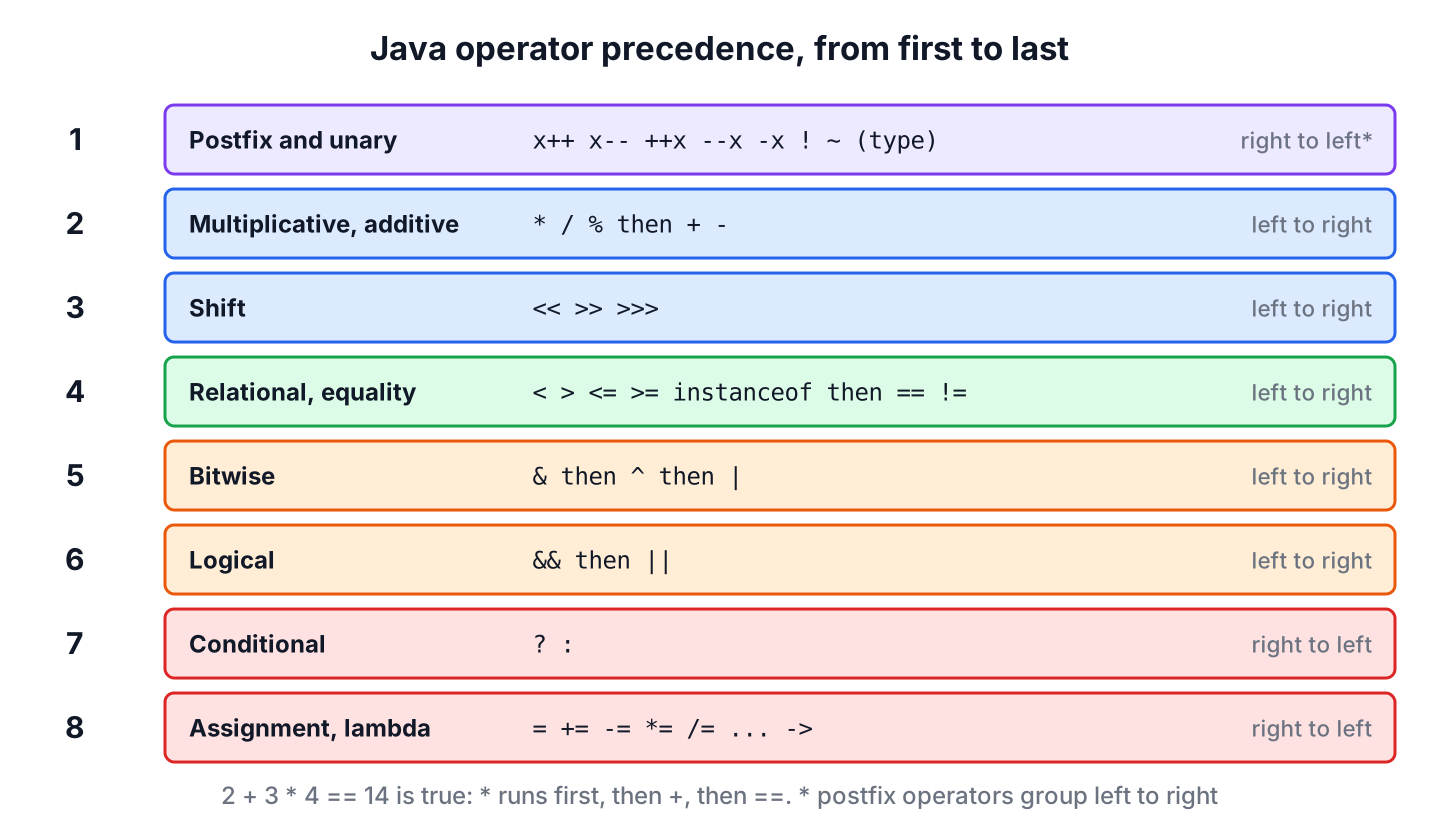
| Level | Operators | Associativity |
|---|---|---|
| 1 (highest) | Postfix x++ x– | Left to right |
| 2 | Unary ++x –x +x -x ~ ! and cast (type) | Right to left |
| 3 | Multiplicative * / % | Left to right |
| 4 | Additive + – | Left to right |
| 5 | Shift << >> >>> | Left to right |
| 6 | Relational < > <= >= instanceof | Left to right |
| 7 | Equality == != | Left to right |
| 8 | Bitwise AND & | Left to right |
| 9 | Bitwise XOR ^ | Left to right |
| 10 | Bitwise OR | | Left to right |
| 11 | Logical AND && | Left to right |
| 12 | Logical OR || | Left to right |
| 13 | Conditional ? : | Right to left |
| 14 (lowest) | Assignment = += -= *= /= %= &= ^= |= <<= >>= >>>= and lambda -> | Right to left |
A common surprise is that & binds weaker than ==, so flags & mask == 0 means flags & (mask == 0) and does not compile for int values. We add parentheses whenever an expression mixes operator families, because the reader of the code should not need the table.
int base = 2 + 3 * 4;                   // 14
int grouped = (2 + 3) * 4;              // 20
int chained = 20 - 5 - 3;               // 12, left to right
boolean mixed = 5 > 3 && 2 > 4 || 1 < 2; // true, && before ||
11. Java Operators FAQs
Overloading, the difference between = and ==, and the two right shifts trip up beginners and experienced developers alike.
11.1. Can we overload operators such as + for our own classes?
No. We cannot define what + or == mean for our own classes. The only built-in overloading is + for String concatenation, so for types such as BigDecimal we call methods like add() and compareTo().
11.2. What is the difference between = and == in Java?
The = operator assigns a value, and == compares two values. Writing if (count = 5) does not compile, because the condition must be a boolean. With boolean variables, if (done = true) compiles and always runs, so we write if (done) instead.
11.3. What is the difference between >> and >>>?
Both shift the bits right. The >> operator copies the sign bit into the empty positions, so -16 >> 2 is -4, whereas >>> fills them with zeros, so the result of shifting a negative number is a large positive number. For positive numbers, both give the same result.
12. Conclusion
Java operators fall into a few families, namely arithmetic, unary, assignment, relational, logical, bitwise, conditional and instanceof. Most of them behave as expected, and the bugs come from a handful of rules, such as integer division, overflow that wraps, compound assignments that cast, and == comparing object identity.
We prefer && and || for conditions because they short-circuit, use equals() for objects and a tolerance for double values, and add parentheses wherever precedence is not obvious at first glance. The Java tutorial continues with statements and control flow, where these operators do most of their work.
13. References
- JLS 25, Expressions
- JLS 25, Operators
- Oracle Java Tutorials, Operators
- JEP 394, Pattern Matching for instanceof
- Math Javadoc (Java 25)
Happy Learning !!

