
The Java switch statement evaluates one expression and jumps to the case label whose constant matches its value, or to default when no label matches. It replaces a long if-else chain that compares the same variable against many fixed values.
We use a switch statement to map status codes, enum constants, menu options or command names to actions. Since Java 21, it can also branch on the type of an object with pattern labels.
The following example prints a message for an HTTP status code.
int statusCode = 404;
switch (statusCode) {
    case 200:
        System.out.println("OK");
        break;
    case 404:
        System.out.println("Not Found");      // printed
        break;
    default:
        System.out.println("Unexpected status");
}
Notice the break after each case, because without it the execution continues into the next case. We cover that fall-through behavior, the allowed types and label rules, the arrow form from Java 14, null and pattern labels from Java 21, and switch expressions, which return a value with arrows or yield and must cover every input.
1. How the switch Statement Picks a Case
Java evaluates the selector expression in parentheses once. It compares the value with each case constant and jumps to the first match. From there, it runs the statements in order until it reaches a break, a return, a throw or the end of the switch block.
If no constant matches, Java jumps to the default label. Without a default label, nothing in the switch runs. The following example is an order-tracking method from an online shop, built on an enum of order states.
enum OrderStatus { NEW, PAID, SHIPPED, DELIVERED, CANCELLED }static String nextStep(OrderStatus status) {
String step;
switch (status) {
case NEW:
step = "wait for payment";
break;
case PAID:
step = "pack the items";
break;
case SHIPPED:
step = "track the parcel";
break;
default:
step = "nothing to do";
}
return step;
}String paid = nextStep(OrderStatus.PAID); // "pack the items"
String done = nextStep(OrderStatus.DELIVERED); // "nothing to do"Inside the case labels, we write the enum constants without the class name, such as case PAID. The last group needs no break, because the switch block ends there anyway.
2. Fall-Through and the break Statement
A case label in the colon form only marks an entry point. It does not end the previous case, so a case without a break falls through into the statements of the next case. A forgotten break is the most common switch bug.
static String nextStepBuggy(OrderStatus status) {
    String step = "";
    switch (status) {
        case NEW:
            step = "wait for payment";      // no break, falls through
        case PAID:
            step = "pack the items";
            break;
        default:
            step = "nothing to do";
    }
    return step;
}
String wrong = nextStepBuggy(OrderStatus.NEW); // "pack the items", the NEW value is overwrittenFall-through is useful when several cases share the code that follows. A streaming service builds the feature list of a plan this way, where each higher plan includes everything from the plans below it.
static List<String> features(String plan) {
    List<String> list = new ArrayList<>();
    switch (plan) {
        case "premium":
            list.add("4K");                 // falls through
        case "standard":
            list.add("HD");                 // falls through
        case "basic":
            list.add("SD");
            break;
        default:
            throw new IllegalArgumentException("Unknown plan: " + plan);
    }
    return list;
}
List<String> premium = features("premium"); // [4K, HD, SD]
List<String> basic = features("basic"); // [SD]
List<String> gold = features("gold"); // IllegalArgumentException: Unknown plan: gold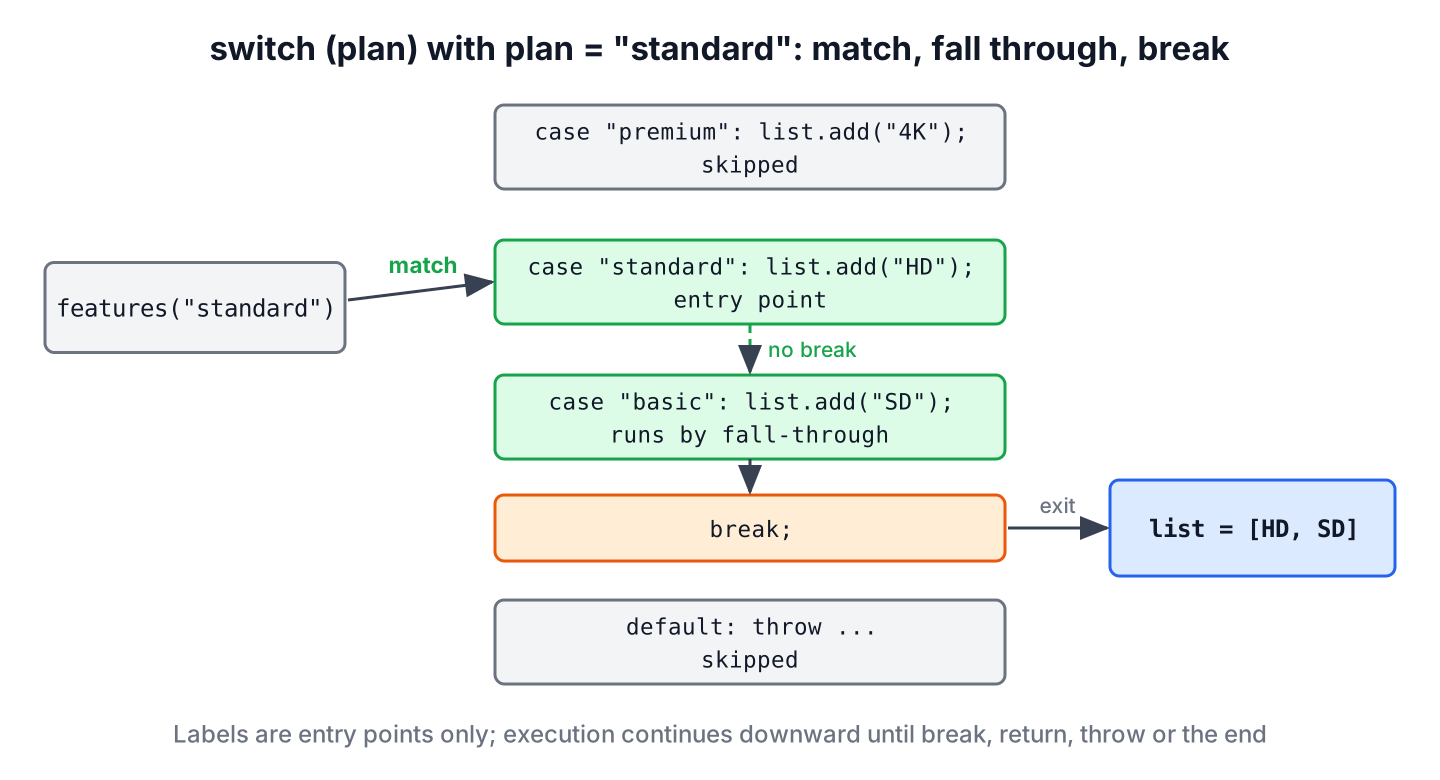
When we fall through on purpose, we mark it with a // falls through comment, so that a reviewer does not add the missing break. The compiler flag -Xlint:fallthrough warns about every fall-through, and @SuppressWarnings(“fallthrough”) on the method silences the warning where it is intended. When several labels share one block, we stack them, either as case DELIVERED: case CANCELLED: or, since Java 14, as case DELIVERED, CANCELLED:.
3. Types a switch Statement Accepts
The JLS allows a selector of type char, byte, short, int or any reference type. Constant labels work only with the classic types, and any other reference type needs pattern labels.
| Selector type | Since | Label kind |
|---|---|---|
| int, char, short, byte and their wrappers | Java 1.0 (wrappers Java 5) | Constants |
| Enum types | Java 5 | Enum constants |
| String | Java 7 | String literals and constants |
| Any other reference type, such as Object or a sealed interface | Java 21 | Type and record patterns |
| long, float, double, boolean | Preview since Java 23, not final in Java 25 (JEP 507) | Constants and primitive patterns |
A String switch compares with equals(), so it is case-sensitive. A return inside a case also leaves the switch, so the following method needs no break.
static int shippingDays(String country) {
    switch (country) {
        case "IN":
            return 3;
        case "US", "CA":
            return 7;
        default:
            return 14;
    }
}
int india = shippingDays("IN"); // 3
int lower = shippingDays("in"); // 14, case-sensitive
int fixed = shippingDays(" in ".strip().toUpperCase(Locale.ROOT)); // 3On Java 25, a switch on a long still fails without preview features.
// does not compile: primitive patterns are a preview feature and are disabled by default
long amount = 0L;
switch (amount) {
    case 0L -> System.out.println("free");
    default -> System.out.println("paid");
}
4. Rules for case Labels and default
Every case constant must be a compile-time constant, such as a literal, an enum constant or a final variable initialized with a constant. A final variable that gets its value from a method call is not a constant, so the compiler rejects it.
// does not compile: constant expression required
final int limit = Integer.parseInt("3");
int quantity = 3;
switch (quantity) {
    case limit:
        System.out.println("at the limit");
        break;
}
The compiler also rejects two labels with the same value and a constant that does not fit the selector type. For example, case 150 on a byte selector fails with “possible lossy conversion from int to byte”, because a byte holds -128 to 127.
// does not compile: duplicate case label
int code = 200;
switch (code) {
    case 200:
        System.out.println("OK");
        break;
    case 200:
        System.out.println("Again");
        break;
}
The default label is optional and can appear anywhere in the block, not only at the end. When it is not the last group, it needs its own break, or it falls through like any other case.
5. Arrow Labels in a switch Statement
Since Java 14 (JEP 361), a case can use an arrow, case X ->, instead of a colon. An arrow case runs only its own expression, block or throw statement and never falls through, so it needs no break.
static String nextStepArrow(OrderStatus status) {
    String step;
    switch (status) {
        case NEW -> step = "wait for payment";
        case PAID -> step = "pack the items";
        case SHIPPED -> {
            String carrier = "DHL";
            step = "track the parcel with " + carrier;
        }
        default -> step = "nothing to do";
    }
    return step;
}
String shipped = nextStepArrow(OrderStatus.SHIPPED); // "track the parcel with DHL"One switch block uses either arrows or colons, never both. The arrow form is still a statement here, because it assigns step and returns nothing itself. The default case is needed here even if we list all five enum constants, because the compiler does not treat a switch statement over an enum without patterns as exhaustive, so step would not be definitely assigned. For new code, we prefer arrows, as they remove the fall-through bug entirely.
6. null Handling and Pattern Labels
A classic switch throws NullPointerException when the selector is null, before it checks any case. Since Java 21 (JEP 441), we handle the value with a case null label instead of a separate if in front of the switch.
static String statusLabel(String status) {
    String text;
    switch (status) {
        case null -> text = "no status";
        case "PAID", "SHIPPED" -> text = "in progress";
        default -> text = "other";
    }
    return text;
}
String missing = statusLabel(null); // "no status"
String progress = statusLabel("PAID"); // "in progress"
int days = shippingDays(null); // NullPointerExceptionJava 21 also added type patterns, record patterns and when guards to switch, which record patterns and pattern matching covers in depth. The following example prints a receipt line for a sealed payment type.
sealed interface Payment permits Card, Wallet, Cash {}record Card(String last4) implements Payment {}record Wallet(String provider) implements Payment {}record Cash() implements Payment {}static String receipt(Payment payment) {
String line;
switch (payment) {
case Card c when c.last4().equals("0000") -> line = "test card";
case Card c -> line = "card ending " + c.last4();
case Wallet(String provider) -> line = "paid with " + provider;
case Cash _ -> line = "cash";
}
return line;
}String card = receipt(new Card("4242")); // "card ending 4242"
String test = receipt(new Card("0000")); // "test card"
String wallet = receipt(new Wallet("UPI")); // "paid with UPI"The guarded case must come before the plain Card c case, or the compiler reports it as dominated. In Cash _, the _ is an unnamed pattern variable, standard since Java 22 (unnamed patterns).
A switch statement that uses patterns, case null or a non-classic selector type must be exhaustive. The sealed interface lets the compiler see that the three records cover every Payment, so receipt() needs no default. A switch over Object with only a String case does not compile.
// does not compile: the switch statement does not cover all possible input values
Object value = 42;
switch (value) {
    case String s -> System.out.println(s);
}
7. Switch Expressions
A switch statement performs actions, whereas a switch expression produces a value that we assign, return or pass to a method. Switch expressions were a preview feature in Java 12 and 13 and became standard in Java 14 (JEP 361), together with the arrow labels from section 5.
7.1. Arrow Labels That Produce a Value
In a switch expression, the expression to the right of the arrow is the value of the whole switch when that case matches. One label can list several constants separated by commas, and the expression ends with a semicolon after the closing brace, because the switch is part of a statement.
static String nextStepExpression(OrderStatus status) {
    return switch (status) {
        case NEW -> "wait for payment";
        case PAID -> "pack the items";
        case SHIPPED -> "track the parcel";
        case DELIVERED, CANCELLED -> "nothing to do";
    };
}
String step = nextStepExpression(OrderStatus.NEW); // "wait for payment"
String closed = nextStepExpression(OrderStatus.CANCELLED); // "nothing to do"Compared with section 1, the variable step, the five break statements and the default label are gone. A case can also throw an exception instead of producing a value, as in case X -> throw new IllegalStateException().
7.2. Returning a Value From a Block With yield
When a case needs more than one statement, we write a block after the arrow and end it with the yield statement. The yield statement gives the value to the enclosing switch expression, whereas return leaves the whole method, so a return inside a switch expression does not compile.
static int deliveryDays(String country, boolean express) {
    return switch (country) {
        case "IN" -> express ? 1 : 3;
        case "US", "CA" -> {
            int base = 7;
            yield express ? base - 4 : base;
        }
        default -> 14;
    };
}
int fast = deliveryDays("US", true); // 3
int slow = deliveryDays("CA", false); // 7
int other = deliveryDays("FR", true); // 14A switch expression can also use the colon form, where every value comes from a yield, and the colon form keeps its fall-through, so a group without yield or throw continues into the next one.
static int deliveryDaysColon(String country) {
    return switch (country) {
        case "IN":
            yield 3;
        case "US", "CA":
            yield 7;
        default:
            yield 14;
    };
}
int canada = deliveryDaysColon("CA"); // 7The word yield is a contextual keyword, not a reserved one, so a variable may still be called yield. A method named yield() must be called with a qualifier, such as this.yield(1) or Thread.yield(), because an unqualified yield(1) is read as a yield statement.
7.3. Switch Expressions Must Be Exhaustive
A switch expression must produce a value for every possible input, so the compiler checks that the cases are exhaustive. For an enum or a sealed type, listing every constant or subtype is enough. For int, String and the other classic types, the cases can never cover every value, so a default is required.
// does not compile: the switch expression does not cover all possible input values
int code = 200;
String text = switch (code) {
    case 200 -> "OK";
    case 404 -> "Not Found";
};
For an enum, we leave out default on purpose, so the compiler reports every switch expression that misses a new constant. When someone adds RETURNED to OrderStatus, nextStepExpression() stops compiling until we decide what a returned order means. A default label would hide that decision.
The check happens at compile time. If the enum changes and only the enum class is recompiled, for example in a library upgrade, the old switch expression meets a constant it does not know and throws a MatchException at runtime. Before Java 21, the same situation threw an IncompatibleClassChangeError.
7.4. switch Statement vs switch Expression
Both forms share the label syntax, so the choice depends on whether the cases perform actions or compute one value.
| Aspect | switch statement | switch expression |
|---|---|---|
| Result | Runs statements, no value | Evaluates to one value |
| Exhaustive | Only with patterns, case null or a non-classic type | Always |
| Colon form fall-through | Yes, needs break | Yes, a group ends with yield or throw |
| Leaving a case early | break or return | yield or throw, never return |
| Typical use | Logging, calling methods, several actions per case | Mapping an input to a value |
A switch statement that assigns a variable in every case is a sign that a switch expression fits better. The expression form removes the temporary variable, and the compiler checks that no case is missing.
8. switch Statement FAQs
Fall-through, the default label and switch performance come up most often after the first switch statement.
8.1. Is break required in a Java switch statement?
Not by the compiler. In the colon form, a case without break, return or throw falls through into the next case, which is a bug unless it is intended. Arrow cases never fall through and need no break.
8.2. Is the default case mandatory?
No, for a classic switch statement. It is required when the switch must be exhaustive, such as a switch over Object with patterns, unless the cases already cover every value of a sealed type or enum.
8.3. Can a switch statement use long, double or boolean?
Not in standard Java 25. These types need the preview feature from JEP 507, enabled with –enable-preview. In standard code, we convert the value first or use if-else for ranges.
8.4. Does a switch statement run faster than an if-else chain?
For many dense integer cases, the compiler can emit a jump table, which avoids comparing every value. For a handful of cases, the JIT compiler makes both forms equally fast, so we pick the one that reads better.
9. Conclusion
The switch statement jumps to the case whose constant matches the selector and runs the code from there until a break or the end of the block. Fall-through causes most bugs, so we prefer arrow labels, and we comment every intended fall-through in the colon form.
Labels must be unique compile-time constants of a compatible type. Since Java 21, case null, type patterns and when guards turn the statement into a type-safe branch over sealed hierarchies, and a switch expression is the better choice whenever each case only produces a value.
10. References
- JLS 25, The switch Statement
- Java 25 Language Guide, Switch Expressions and Statements
- JEP 361, Switch Expressions
- JEP 441, Pattern Matching for switch
- JEP 507, Primitive Types in Patterns, instanceof, and switch (Third Preview)
Happy Learning !!

