

Java string templates were a preview feature in Java 21 and Java 22 that embedded expressions in a string, as in STR.”Hi \{name}”, and they were withdrawn in JDK 23, so Java 25 has no string templates at all. Code with STR, FMT or RAW does not compile on JDK 23 or later, even with –enable-preview.
We still need to put values into text every day, for log lines, error messages, emails and reports. In Java 25, we do it with formatted(), String.format(), concatenation, StringBuilder, MessageFormat and text blocks.
The following example builds the same order message three ways on Java 25, with the result of each line in the comment.
String name = "Alex";
int items = 3;
String formatted = "Hi %s, you have %d items".formatted(name, items);   // "Hi Alex, you have 3 items"
String joined = "Hi " + name + ", you have " + items + " items";        // "Hi Alex, you have 3 items"
String message = MessageFormat.format("Hi {0}, you have {1} items", name, items); // "Hi Alex, you have 3 items"
Notice that none of the three lines needs a preview flag. We look at what happened to string templates, show the preview syntax so we can recognize it in old code, and compare the replacements with their pitfalls, including SQL and HTML, where plain formatting is not safe.
1. Are String Templates Available in Java?
No. String templates went through two preview rounds and were removed from the compiler and the class library. The feature was found unsuitable in its current form, and there was no consensus on a better design, so JDK 23 shipped without it.
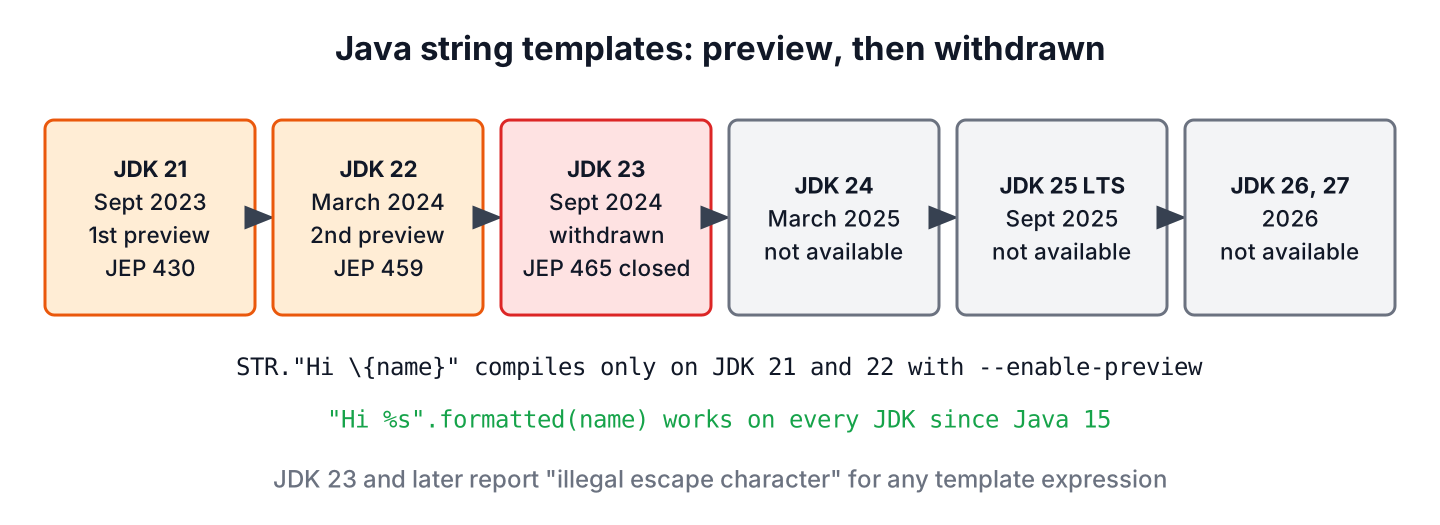
A third preview, JEP 465, was planned for JDK 23 with the goal to finalize the feature unchanged. Its status is Closed / Withdrawn, and no new JEP for string templates exists up to Java 27.
| JDK | Status of string templates | JEP |
|---|---|---|
| 21 (Sept 2023) | First preview, needs –enable-preview | JEP 430 |
| 22 (March 2024) | Second preview, no changes | JEP 459 |
| 23 (Sept 2024) | Withdrawn, removed from javac and java.lang | JEP 465 (withdrawn) |
| 24, 25 LTS, 26, 27 | Not available | None |
The design problem was not the idea of interpolation. The discussion on the amber-spec-experts list questioned the processor syntax with STR. in front of every template and whether a template should be a String at all. The language team decided that shipping a final version it was not sure about would be worse than shipping nothing.
2. The Preview Syntax in Old Code
Articles and sample projects from 2023 and 2024 still show string templates, so we need to recognize the syntax. A template expression had a processor, a dot and a string literal with embedded expressions written as a backslash followed by braces.
// does not compile: string templates were removed in JDK 23
String name = "Alex";
String plain = STR."Hi \{name}!";
String money = FMT."Total %.2f\{24.5}";
StringTemplate raw = RAW."Hi \{name}!";
The three processors did different jobs.
- STR replaced each embedded expression with its value and returned a String. It was imported into every source file.
- FMT also read the Formatter specifier written right before each expression. It had to be imported from java.util.FormatProcessor.
- RAW returned an unprocessed StringTemplate object that other code could validate or turn into SQL or JSON.
On JDK 25, the compiler does not know the syntax anymore. It stops at the backslash, because the backslash followed by a brace is not a valid escape sequence in a normal string literal.
Orders.java:3: error: illegal escape character
String plain = STR."Hi \{name}!";
                        ^
The same error appears with –enable-preview, because there is no preview code left to enable. Only JDK 21 and JDK 22 compile these lines, and only with –enable-preview –release 21 or 22, which restricts the project to these two versions and prevents an upgrade to a later JDK.
3. String Formatting in Java 25 Without Templates
Each replacement fits a different job. The choice depends on whether the text is short, built in a loop, translated or sent to another system.
| Approach | Since | Best for | Watch out for |
|---|---|---|---|
| “…”.formatted(args) | Java 15 | Most messages with a few values | Wrong specifier for the type throws IllegalFormatConversionException |
| String.format(Locale, …) | Java 5 | Numbers and dates for a given locale | Without a Locale, the output depends on the server settings |
| Concatenation with + | Java 1.0 | Two or three values in one line | Long chains get hard to read |
| StringBuilder | Java 5 | Text built in a loop | Not thread-safe, which is rarely a problem for local variables |
| MessageFormat | Java 1.1 | Translated text from resource bundles | A single quote starts a quoted section |
| Text block plus formatted() | Java 15 | Multi-line emails, JSON samples, reports | Values are not escaped for JSON or HTML |
| PreparedStatement, template engines | – | SQL, HTML and other languages | Never build these by formatting strings |
3.1. formatted() and String.format()
The instance method formatted() is the closest replacement for STR and FMT. It takes the same format specifiers as String.format(), such as %s for any value, %d for integers and %.2f for two decimals, but reads from left to right like a template.
String dish = "soup";
double price = 4.5;
String line = "%-8s|%6.2f|".formatted(dish, price);            // "soup    |  4.50|"
String us = String.format(Locale.US, "%,.2f", 1234.5);          // "1,234.50"
String de = String.format(Locale.GERMANY, "%,.2f", 1234.5);     // "1.234,50"
String bad = "%d items".formatted("three");                     // IllegalFormatConversionException: d != java.lang.String
When the text goes to users in different countries, we pass a Locale, because the decimal and grouping separators come from it. The last line fails at runtime, because javac does not check format strings. IntelliJ IDEA flags many mismatches in the editor, and tests catch the rest.
The printf-style formatting article lists every specifier, width and flag in detail.
3.2. Concatenation and StringBuilder
For two or three values, the + operator is the most readable choice, and since Java 9 the compiler turns it into an optimized call to StringConcatFactory. Inside a loop, each += creates a new string, so we use a StringBuilder and convert it once at the end.
List<String> dishes = List.of("soup", "salad", "bread");
StringBuilder receipt = new StringBuilder("Order:");
for (String item : dishes) {
    receipt.append(' ').append(item);
}
String text = receipt.toString();                                // "Order: soup salad bread"
String list = String.join(", ", dishes);                        // "soup, salad, bread"
When we only need a separator between elements, String.join() or Collectors.joining() is shorter than a loop. The string concatenation performance article compares the options with benchmarks.
3.3. MessageFormat for Translated Text
The MessageFormat class uses numbered placeholders such as {0} and {1}, so a translator can move the values in a sentence without touching Java code. We use it with resource bundles in apps that show the same message in several languages.
String en = MessageFormat.format("{0} ordered {1} dishes", "Alex", 2);   // "Alex ordered 2 dishes"
String fr = MessageFormat.format("{1} plats pour {0}", "Alex", 2);       // "2 plats pour Alex"
String broken = MessageFormat.format("It's {0}", "Alex");               // "Its {0}"
String fixed = MessageFormat.format("It''s {0}", "Alex");               // "It's Alex"
A single quote in a MessageFormat pattern starts a quoted section, so the apostrophe disappears and every placeholder after it is printed as text. We write two single quotes for one apostrophe, which matters in English and French messages. Numbers in {1} are also formatted with the default locale, so 12345 prints as 12,345 on a US server.
3.4. Text Blocks With formatted() for Multi-Line Text
A food delivery app sends an order confirmation email with a greeting, the dishes and the total. Before Java 15, such text was a chain of + and \n that nobody wanted to edit. A text block keeps the layout as it appears in the email, and formatted() fills in the values.
String customer = "Alex";
List<String> order = List.of("soup", "salad", "bread");
String email = """
        Hi %s,
        your order of %d dishes (%s) is on its way.
        Total %.2f EUR
        """.formatted(customer, order.size(), String.join(", ", order), 13.5);
long emailLines = email.lines().count();                          // 3
Hi Alex,
your order of 3 dishes (soup, salad, bread) is on its way.
Total 13.50 EURThe closing triple quote sets the indentation, so the lines start at the left margin. We keep a text block template in a constant, and each call to formatted() returns a new string.
3.5. Values in SQL and HTML
A big goal of string templates was safety, because a RAW template let a library check each value before building SQL or HTML. Formatting user input into those languages is still the root cause of SQL injection and cross-site scripting, and Java 25 has no language feature for it.
For SQL, we send the values separately from the statement with a PreparedStatement. The driver never treats the value as SQL, so a customer named ‘ OR ‘1’=’1 finds no orders instead of all of them.
static List<String> findDishes(Connection connection, String customer) throws SQLException {
    String sql = "SELECT dish FROM orders WHERE customer = ?";
    try (PreparedStatement statement = connection.prepareStatement(sql)) {
        statement.setString(1, customer);
        try (ResultSet rows = statement.executeQuery()) {
            List<String> found = new ArrayList<>();
            while (rows.next()) {
                found.add(rows.getString("dish"));
            }
            return found;
        }
    }
}
For HTML pages and HTML emails, we use a template engine that escapes values by default. Java projects mostly pick one of four engines, which differ in template syntax and in how errors show up.
- Thymeleaf uses natural HTML templates and is the default view technology in many Spring Boot apps.
- Apache FreeMarker is a general text template engine for HTML, emails and configuration files.
- Mustache.java implements the logic-less Mustache syntax that also exists in JavaScript and other languages.
- jte compiles templates to Java classes, so template errors show up at build time.
4. Migrating Preview Code From STR, FMT and RAW
A project that turned on –enable-preview on JDK 21 or 22 has to rewrite every template expression before it can move to Java 25. Most expressions map one to one to formatted(), which keeps the reading order of the template.
| Preview code (JDK 21, 22) | Java 25 replacement |
|---|---|
| STR.”Hi \{name}!” | “Hi %s!”.formatted(name) or “Hi ” + name + “!” |
| STR.”\{a} + \{b} = \{a + b}” | “%d + %d = %d”.formatted(a, b, a + b) |
| FMT.”%05d\{id}” | “%05d”.formatted(id) |
| STR with a multi-line text block | Text block followed by .formatted(…) |
| RAW plus a custom processor for SQL | PreparedStatement with ? placeholders |
| RAW plus a custom processor for JSON | A JSON library such as Jackson, which escapes the values |
The compiler finds every template for us, because each one fails with illegal escape character on JDK 23 or later. The Java 21 features overview marks string templates as withdrawn, and the Java features by version table shows the status of every other preview feature.
5. Java String Templates FAQs
Most questions come from preview code in 2023 and 2024 tutorials that stopped compiling after a JDK upgrade.
5.1. Can we use string templates with –enable-preview on Java 25?
No. The –enable-preview flag turns on preview features that exist in the running JDK, and JDK 23 and later have no string template code at all. Only JDK 21 and JDK 22 compile STR templates, with –enable-preview and the matching –release value.
5.2. Will string templates come back in a future Java version?
Not in any release planned so far. As of Java 27 (September 2026), no JEP proposes a new design. Project Amber has said it wants to revisit the idea, so a future version may bring a different syntax, and we should not keep preview-era code in the hope that it compiles again.
5.3. Does Java have string interpolation like Python f-strings?
No. Java has no built-in interpolation in string literals. The closest option is formatted() on a string or a text block, which keeps the text in one piece and puts the values at the end. Kotlin, which runs on the JVM, has interpolation with $name in its own string literals.
5.4. Is String.format() slower than concatenation?
Yes. String.format() and formatted() parse the format string on every call, whereas the compiler turns + into an optimized concatenation. For a log line or an email, the difference does not matter. In a loop that runs millions of times, we use concatenation or a StringBuilder.
5.5. What replaced the StringTemplate class?
Nothing. The java.lang.StringTemplate interface and the java.util.FormatProcessor class were preview APIs, and both were removed in JDK 23 together with the syntax. Code that used RAW to validate values moves to PreparedStatement, a template engine or a JSON library.
6. Conclusion
String templates existed only as a preview in JDK 21 and JDK 22, and JDK 23 removed them. Java 25 has no STR, FMT or RAW, and code that uses them fails with illegal escape character.
For everyday text, formatted() gives the most template-like code, concatenation is fine for short lines, and StringBuilder belongs in loops. Translated messages go through MessageFormat with doubled apostrophes, multi-line text goes into text blocks, and SQL or HTML always goes through PreparedStatement or an escaping template engine.
7. References
- Oracle, Significant Changes in JDK 23
- JEP 430, String Templates (Preview)
- JEP 465, String Templates (Third Preview), withdrawn
- Formatter Javadoc (Java 25)
- MessageFormat Javadoc (Java 25)
Happy Learning !!


4.4 is inaccurate. You can use double quotes in an embedded expression without escapes, but you still have to escape in string fragments.
Jim, thanks for the comment. Can you please share an example of what you are suggesting?
Your example in 4.4 is wrong and would not compile:
String msg = STR.”The first name is \{filePath} exists in the “SQL Database”.”;
Jim was saying that this would work:
String msg = STR.”The first name is \{filePath} exists in the \{“SQL Database”}.”;
However that doesn’t actually include the double quotes in the msg. For that, you need to use a text block like so:
String msg = STR.”””
The first name is \{filePath} exists in the “SQL Database”.
“””;
Thanks Gary. I updated the answer.