
A Java chatbot built with AIML is a rule-based bot that matches what the user types against patterns written in AIML (Artificial Intelligence Markup Language), an XML format, and replies with the answer of the best-matching rule; Program AB is the Java library that loads these rules and runs the conversation. Every answer is written by a person, so the bot replies the same way every time and never makes facts up.
We use an AIML chatbot for a small, fixed set of questions, such as opening hours, order status steps or a help desk menu, where predictable answers matter more than free conversation. For open questions, modern Java chatbots call a large language model (LLM) through an HTTP API, and we build both kinds in this article.
The following example loads a bot named chef from AIML files and asks it three questions.
Path botsHome = Path.of("src/main/resources").toAbsolutePath();
Bot bot = new Bot("chef", botsHome.toString());
Chat chat = new Chat(bot);
String hello = chat.multisentenceRespond("Hello");                      // "Hi! Ask me about recipes."
String egg = chat.multisentenceRespond("How long do I boil an egg");    // "Boil an egg for 9 minutes."
String rice = chat.multisentenceRespond("how long do I boil rice");     // "I do not know the time for rice yet."
Notice that the questions match regardless of letter case, and that the rice question matched a wildcard rule that copied the word rice into the answer. We look at the current status of AIML and Program AB, set up the library on Java 25, write AIML rules, add custom categories, and build an LLM-based chatbot with plain HttpClient, including a hybrid of both.
1. AIML and Program AB Today
AIML describes a bot as a list of categories. Each category has a pattern, which is the user input in uppercase words with optional wildcards, and a template, which is the answer. The interpreter normalizes the input, finds the most specific matching pattern and returns the template, so the bot is a large, readable lookup table with a few extras such as variables and redirects.
Program AB is the reference implementation of the AIML 2.0 draft. Its status matters before we depend on it.
- The last official release is 0.0.4.3, and its Ab.jar dates from February 2013. The Google Code project page is archived, and the download still works from the archive.
- Program AB is not on Maven Central. A community repackaging, org.goldrenard:ab, was published only to JCenter, which no longer serves it, so the old Maven coordinates do not resolve.
- The 0.0.4.3 jar runs on Java 25 without changes.
Program AB is unmaintained, so we use it for small, self-contained bots and keep it behind our own interface, so that replacing it later touches one class. The comparison with LLM-based bots decides when AIML is still the better tool.
| Aspect | AIML bot (Program AB) | LLM-based bot |
|---|---|---|
| Answers | Written by us, identical every time | Generated, can vary and can be wrong |
| Unknown questions | Falls back to a default answer | Answers almost anything |
| Cost | Free, runs in the JVM | Paid per token, or a local model that needs a GPU |
| Latency | An in-memory lookup | A network call plus generation time, often seconds |
| Data privacy | Nothing leaves the server | Text goes to the provider unless the model runs on our hardware |
| Effort | Every answer needs a rule | A system prompt and, for company data, retrieval (RAG) |
2. Setting Up Program AB
Since no Maven repository serves Program AB, we download the distribution and install its jar into the local Maven repository once. After that, the project declares a normal dependency instead of the old system scope, which Maven deprecated.
curl -LO https://storage.googleapis.com/google-code-archive-downloads/v2/code.google.com/program-ab/program-ab-0.0.4.3.zip
unzip program-ab-0.0.4.3.zip -d program-ab

mvn install:install-file -Dfile=program-ab/lib/Ab.jar \
    -DgroupId=org.alicebot.ab -DartifactId=ab -Dversion=0.0.4.3 -Dpackaging=jar
<dependency>
<groupId>org.alicebot.ab</groupId>
<artifactId>ab</artifactId>
<version>0.0.4.3</version>
</dependency>A team build needs the same jar on every machine, so we upload it once to the company repository manager, such as Nexus or Artifactory, with the same coordinates. The zip also contains a sample bot named super with about 26 AIML files of small talk, which is a good reference for AIML syntax.
Program AB expects a fixed folder layout. The constructor new Bot(“chef”, path) looks for path/bots/chef, and the rules go into its aiml subfolder.
src/main/resources/
  bots/
    chef/
      aiml/      chef.aiml          (our rules)
      aimlif/    CSV cache written by Program AB
      config/    bot properties, optional
      sets/      word lists for <set> patterns, optional
      maps/      key-value maps for <map>, optional
3. Java AIML Chatbot Example
Our example bot helps users of a recipe app with cooking times. The rules file contains a greeting, a redirect, two boiling questions, a name memory and a catch-all category.
<?xml version="1.0" encoding="UTF-8"?>
<aiml version="2.0">
  <category>
    <pattern>HELLO</pattern>
    <template>Hi! Ask me about recipes.</template>
  </category>
  <category>
    <pattern>HI</pattern>
    <template><srai>HELLO</srai></template>
  </category>
  <category>
    <pattern>HOW LONG DO I BOIL *</pattern>
    <template>I do not know the time for <star/> yet.</template>
  </category>
  <category>
    <pattern>HOW LONG DO I BOIL AN EGG</pattern>
    <template>Boil an egg for 9 minutes.</template>
  </category>
  <category>
    <pattern>MY NAME IS *</pattern>
    <template><think><set name="name"><star/></set></think>Nice to meet you, <get name="name"/>.</template>
  </category>
  <category>
    <pattern>WHAT IS MY NAME</pattern>
    <template>Your name is <get name="name"/>.</template>
  </category>
  <category>
    <pattern>*</pattern>
    <template>Sorry, I only know a few recipe questions.</template>
  </category>
</aiml>
The Java side needs two classes. A Bot loads the rules once and can be shared, and a Chat holds one conversation, including variables such as the user’s name, so a web app creates one Chat per user session. Setting MagicBooleans.trace_mode to false stops Program AB from printing a debug line for every matched input, while its startup lines about loaded categories stay.
MagicBooleans.trace_mode = false;                                      // no debug line per match
Bot bot = new Bot("chef", Path.of("src/main/resources").toAbsolutePath().toString());
Chat chat = new Chat(bot);
String hi = chat.multisentenceRespond("hi");                           // "Hi! Ask me about recipes."
String intro = chat.multisentenceRespond("My name is Lokesh");         // "Nice to meet you, Lokesh."
String name = chat.multisentenceRespond("What is my name");            // "Your name is Lokesh."
String other = chat.multisentenceRespond("What is Java");              // "Sorry, I only know a few recipe questions."
A console version needs a loop that stops cleanly instead of calling System.exit(). On Java 25, the IO class reads console input in one call, and a null result at the end of input stops the loop cleanly.
static void runConsole(Chat chat) {
    while (true) {
        String line = IO.readln("You: ");
        if (line == null || line.equalsIgnoreCase("q")) {
            break;                                     // end of input or quit
        }
        if (!line.isBlank()) {
            IO.println("Bot: " + chat.multisentenceRespond(line));
        }
    }
}
You: Hello
Bot: Hi! Ask me about recipes.
You: How long do I boil an egg
Bot: Boil an egg for 9 minutes.
You: q4. AIML Patterns and Templates
AIML is XML, so every tag must be closed and special characters escaped. A handful of tags covers most bots, and the table shows them with the behavior we saw in the chef bot.
| Tag | Where | What it does |
|---|---|---|
| <pattern> | Category | Input to match, in uppercase words; punctuation and case are normalized |
| * and _ | Pattern | Wildcards for one or more words; _ has priority over exact words, * has the lowest priority |
| <star/> | Template | Inserts the words that the wildcard matched, such as rice |
| <srai> | Template | Sends a new input to the bot, so HI reuses the HELLO answer |
| <set> and <get> | Template | Stores and reads a variable of the current Chat |
| <think> | Template | Runs the content without printing it |
| <random> with <li> | Template | Picks one of several answers |
| <that> | Category | Matches only when the bot’s previous answer was a given text, for follow-up questions |
Pattern priority explains the egg and rice answers in the intro. The exact pattern HOW LONG DO I BOIL AN EGG wins over HOW LONG DO I BOIL *, which wins over the catch-all *, so we add specific rules next to a general one without reordering anything. The order of categories in the file does not matter.
5. Adding Custom Categories
To teach the bot new answers, we add categories to an existing file or create a new .aiml file in the aiml folder. Each file is a complete <aiml> document, so splitting the rules by topic, such as baking.aiml and boiling.aiml, keeps each review small.
<?xml version="1.0" encoding="UTF-8"?>
<aiml version="2.0">
  <category>
    <pattern>HOW LONG DO I BAKE BREAD</pattern>
    <template>Bake a 500 g loaf for 35 to 40 minutes at 220 degrees Celsius.</template>
  </category>
</aiml>
Program AB reads the .aiml files at startup when they are newer than its CSV cache in the aimlif folder, so a restart of the bot picks up the new category. The method bot.writeAIMLIFFiles() writes that cache, which shortens startup for bots with thousands of categories.
A chatbot is only as good as its rules. We log every input that ends in the catch-all category and review the log weekly, because those questions show which rules users need next.
6. Building an LLM Chatbot in Java
An LLM chatbot sends the conversation to a model and shows the generated reply. Most providers, and local runtimes such as Ollama, accept the same request format, a POST to /v1/chat/completions with a model name and a list of messages, each with a role (system, user or assistant) and content. Supporting this format keeps our code independent of one vendor, so switching providers means changing the URL, the key and the model name.
The following class uses only the JDK’s HttpClient and Jackson 3.2.3 for JSON. It keeps the message history, because the model remembers nothing between calls, and it sends the whole history with every question.
record Message(String role, String content) { }

record ChatRequest(String model, List<Message> messages) { }
public class LlmChat {
private final HttpClient http = HttpClient.newBuilder()
.connectTimeout(Duration.ofSeconds(10))
.build();
private final JsonMapper json = JsonMapper.builder().build();
private final List<Message> history = new ArrayList<>();
private final URI endpoint;
private final String apiKey;
private final String model;
public LlmChat(URI endpoint, String apiKey, String model, String systemPrompt) {
this.endpoint = endpoint;
this.apiKey = apiKey;
this.model = model;
history.add(new Message("system", systemPrompt));
}
public String ask(String question) throws IOException, InterruptedException {
history.add(new Message("user", question));
String body = json.writeValueAsString(new ChatRequest(model, history));
HttpRequest request = HttpRequest.newBuilder(endpoint)
.timeout(Duration.ofSeconds(60))
.header("Content-Type", "application/json")
.header("Authorization", "Bearer " + apiKey)
.POST(HttpRequest.BodyPublishers.ofString(body))
.build();
HttpResponse<String> response = http.send(request, HttpResponse.BodyHandlers.ofString());
if (response.statusCode() != 200) {
history.removeLast(); // keep the history consistent
throw new IOException("LLM call failed with HTTP " + response.statusCode());
}
String answer = json.readTree(response.body()).at("/choices/0/message/content").asString();
history.add(new Message("assistant", answer));
return answer;
}
}The request body and the response path are the two places where providers must agree. The statements show the JSON that ask() sends and how it reads a reply.
JsonMapper json = JsonMapper.builder().build();
String body = json.writeValueAsString(new ChatRequest("some-model", List.of(new Message("user", "Boil an egg?"))));   // {"model":"some-model","messages":[{"role":"user","content":"Boil an egg?"}]}
String reply = """
        {"choices":[{"index":0,"message":{"role":"assistant","content":"Boil it for 9 minutes."}}]}
        """;
String answer = json.readTree(reply).at("/choices/0/message/content").asString();   // "Boil it for 9 minutes."
We create the client with the provider’s values and keep the API key out of the source code, for example in an environment variable. For a local model in Ollama, the URL is http://localhost:11434/v1/chat/completions and the key can be any text.
static LlmChat chefAssistant() {
    String key = Objects.requireNonNullElse(System.getenv("LLM_API_KEY"), "local");
    return new LlmChat(URI.create(System.getenv().getOrDefault("LLM_URL", "http://localhost:11434/v1/chat/completions")),
            key, System.getenv().getOrDefault("LLM_MODEL", "llama3.2"),
            "You help users of a recipe app with cooking times. Answer in two sentences or less.");
}
A plain HTTP client is fine for one bot. For streaming replies, tool calling, retrieval from company documents (RAG) and switching providers by configuration, a framework saves work. Spring AI and LangChain4j both support many model providers, including local models with Ollama, and the RAG chatbot example shows a bot that answers from our own documents.
7. Combining AIML and an LLM in One Bot
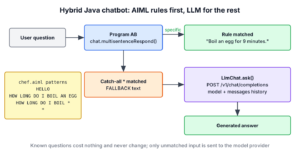
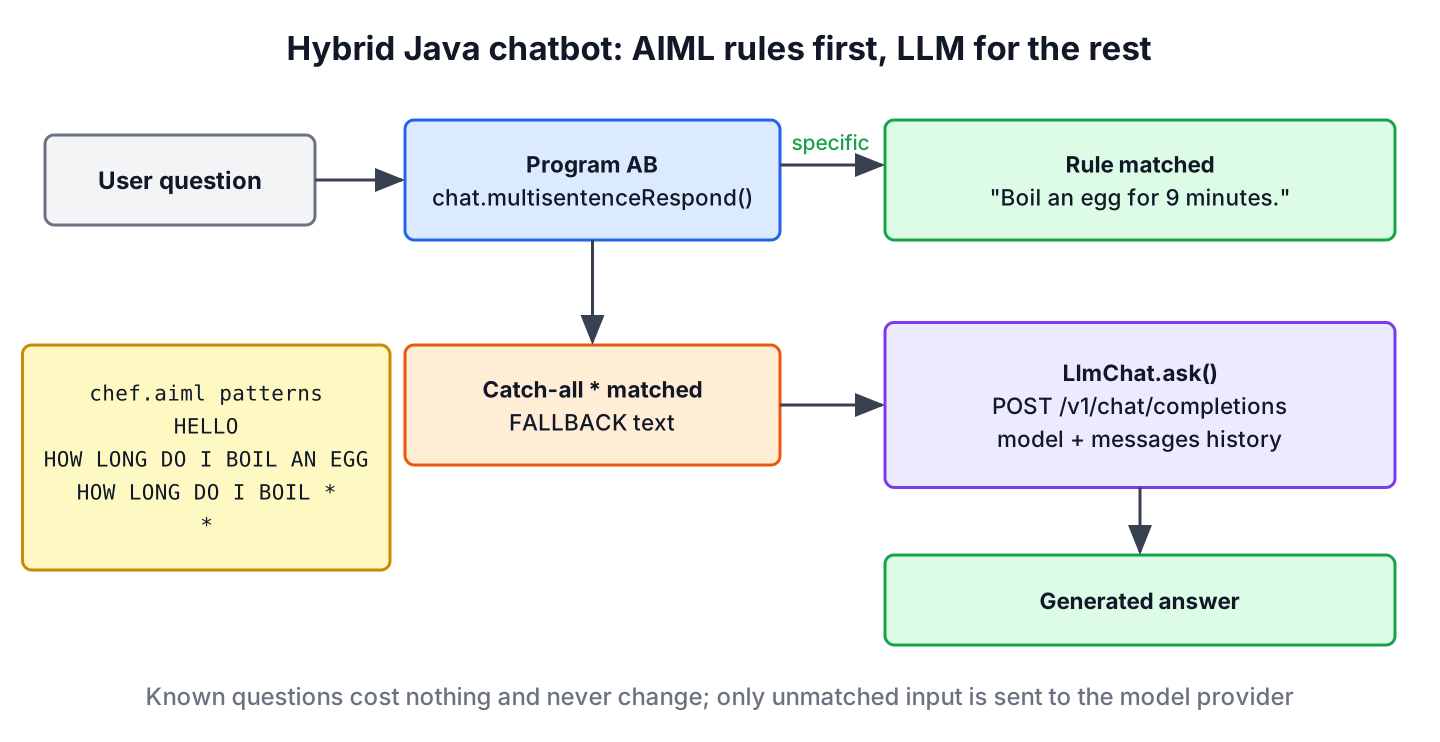
Say the recipe app’s support bot gets the same twenty questions all day, such as delivery times and how to cancel an order, plus an occasional open question about a dish. Sending every message to an LLM costs money on each call and may produce a wrong cancellation policy. A hybrid bot answers known questions from AIML and sends only unmatched input to the LLM.
public class SupportBot {
    static final String FALLBACK = "Sorry, I only know a few recipe questions.";

    private final Chat aiml;
    private final LlmChat llm;

    public SupportBot(Chat aiml, LlmChat llm) {
        this.aiml = aiml;
        this.llm = llm;
    }

    public String reply(String question) throws IOException, InterruptedException {
        String answer = aiml.multisentenceRespond(question);
        if (FALLBACK.equals(answer)) {                 // only the catch-all rule matched
            return llm.ask(question);
        }
        return answer;
    }
}
The catch-all category from section 3 marks the hand-over, so we compare the answer with its fixed text. Policies and prices stay under our control in AIML, and the LLM handles the long tail of questions. The weekly log of questions that went to the LLM shows which rules to add next.
8. Java Chatbot FAQs
Readers who find an old AIML tutorial want to know whether AIML still has a place next to LLMs and how to get Program AB running today.
8.1. Is AIML still used?
Yes, but mostly for small, rule-based bots and in teaching. New general-purpose assistants use LLMs. AIML remains useful when every answer must be approved, must work offline, or must cost nothing per message.
8.2. Where can I download Program AB?
From the Google Code archive of the project, as shown in section 2. No public Maven repository serves it today, so we install Ab.jar into the local or company repository.
8.3. Does Program AB work with Java 17, 21 or 25?
Yes. The 0.0.4.3 jar has no dependencies on removed JDK APIs that our examples touch, and the chef bot runs on Java 25. The library is unmaintained, so security fixes will not come.
8.4. Can I build a chatbot in Java without an external API?
Yes. An AIML bot runs fully inside the JVM, and an LLM can run on our own machine with Ollama, which exposes the same /v1/chat/completions endpoint on localhost that the LlmChat class calls.
8.5. How does an LLM chatbot remember the conversation?
The model does not remember it, so we send the history with every request. The LlmChat class keeps a list of messages and adds each question and answer, and long conversations need trimming or summarizing to stay within the model’s context window.
9. Conclusion
An AIML chatbot answers from rules we write, with patterns, wildcards, redirects and variables, and Program AB runs those rules in Java. The library is old and unmaintained, but its last jar still runs on Java 25 once we install it into a Maven repository.
For open questions, an LLM chatbot built on HttpClient and the common chat completions format works with many providers and with local models. Combining both, with AIML for known questions and an LLM for the rest, keeps answers controlled and costs low, and Spring AI or LangChain4j take over when the bot needs streaming, tools or RAG.
10. References
- Program AB project archive
- AIML 2.0 specification draft
- HttpClient Javadoc (Java 25)
- Ollama OpenAI-compatible API
Happy Learning !!


SIr your web based Chatbot was build or not can you plz share with us
I came across such problem, let’s say I added few categories, ran AddAIML program, tested them and they work fine, then I added few more categories and ran the AddAIML program again, the problem is that it deletes the latest categories that I added and restores the files so that the only categories that appear there are the very first ones that i’ve created.
An excellent article to begin with AIML. need more clarification on AIML code so that we can customize it based on our requirement. i am looking for Web based bot.
great article . I would appreciate to get web based version
Thanks Sajal. For All, I downloaded application from this link “Download Java Chatbot Source Code” above and able to run application on eclipse(after importing this maven project).
Could help me how to install it
Guys try this project in intelij community edition it will work…..
how to track session if two users are concurrently chatting with bot?
Great leaning! Thanks
what does MagicBooleans are for?Also, what files are written and where, by the statement ” bot.writeAIMLFiles();”??
Where can I look for documentation to understand this code ?
Exception in thread “main” java.lang.Error: Unresolved compilation problems:
MagicBooleans cannot be resolved to a variable
Bot cannot be resolved to a type
Bot cannot be resolved to a type
How to solve this error?
Hi, were you able to convert it to a web based module?
Yes
can you share how we can convert this code in web based module?
Hi Vinod, Can you let em know how you converted this to web ?
hi will u share how to convert it as web?
Servlet.service() for servlet [dispatcher] in context with path [/Insert] threw exception [Handler dispatch failed; nested exception is java.lang.NoClassDefFoundError: org/alicebot/ab/Bot] with root cause
java.lang.ClassNotFoundException: org.alicebot.ab.Bot
i got this error after converting this into web based…alicebot is not working in web based module
someone help me to clear this error
in the target folder there is two files .classpath and .project but this files not contain in the source folder you are provided
also
when it runs it displays no main class
How to stop bot going outside for getting response?
how to convert this to web based chat?
How to solve this issue –
javax.net.ssl.SSLPeerUnverifiedException: peer not authenticated
at sun.security.ssl.SSLSessionImpl.getPeerCertificates(Unknown Source)
at org.apache.http.conn.ssl.AbstractVerifier.verify(AbstractVerifier.java:128)
at org.apache.http.conn.ssl.SSLSocketFactory.connectSocket(SSLSocketFactory.java:572)
at org.apache.http.impl.conn.DefaultClientConnectionOperator.openConnection(DefaultClientConnectionOperator.java:180)
at org.apache.http.impl.conn.ManagedClientConnectionImpl.open(ManagedClientConnectionImpl.java:294)
at org.apache.http.impl.client.DefaultRequestDirector.tryConnect(DefaultRequestDirector.java:640)
at org.apache.http.impl.client.DefaultRequestDirector.execute(DefaultRequestDirector.java:479)
at org.apache.http.impl.client.AbstractHttpClient.execute(AbstractHttpClient.java:906)
at org.apache.http.impl.client.AbstractHttpClient.execute(AbstractHttpClient.java:805)
at org.apache.http.impl.client.AbstractHttpClient.execute(AbstractHttpClient.java:784)
at org.alicebot.ab.utils.NetworkUtils.responseContent(NetworkUtils.java:50)
at org.alicebot.ab.Sraix.sraixPannous(Sraix.java:111)
at org.alicebot.ab.Sraix.sraix(Sraix.java:42)
at org.alicebot.ab.AIMLProcessor.sraix(AIMLProcessor.java:385)
at org.alicebot.ab.AIMLProcessor.recursEval(AIMLProcessor.java:1050)
at org.alicebot.ab.AIMLProcessor.evalTagContent(AIMLProcessor.java:246)
at org.alicebot.ab.AIMLProcessor.recursEval(AIMLProcessor.java:1040)
at org.alicebot.ab.AIMLProcessor.evalTemplate(AIMLProcessor.java:1133)
at org.alicebot.ab.AIMLProcessor.respond(AIMLProcessor.java:187)
at org.alicebot.ab.AIMLProcessor.respond(AIMLProcessor.java:162)
at org.alicebot.ab.Chat.respond(Chat.java:115)
at org.alicebot.ab.Chat.respond(Chat.java:140)
at org.alicebot.ab.Chat.multisentenceRespond(Chat.java:165)
at com.Chatbot.main(Chatbot.java:41)
Robot : I used my lifeline to ask another robot, but he didn’t know.
I’m going to try a search
Hi Toufiq,
Did you find an answer. I’m too getting same error message.
Hi Toufiq and Defi,
Did you find any resolution for this exception.
I’m also facing the same issue.
Did you find any resolution for this issue ?
Hey guys,
have you find solution for this error. I am also facing the same problem . if anyone resolved it. please, update the method to resolve that.
try this project in intelij community edition ..
Guys,
It’s trying to connect to a restful web services, which has SSL enabled. As of now, it’s trying to hit “https://ask.pannous.com/api” or “https://weannie.pannous.com/api” for web service answers.
I will recommend those who want to build answer to it, either go register and get a customer id and credentials in https://alicebot.org/ or download the sources for programab.jar and change the restful service url to your own.
Thanks
go get the solution bro i face same problem
plz reply if anyone get the solution of this error
How can we maintain and retain (to be able to retrieve later) the state of a chat ?? Could we build the chat object through some id (session id) ??
Hi Kalyan,
Did you find the solution, even I am working on the same. I wanted to store the chat session/context and retrieve later.
–Naveen
Hi Naveen,
We can save the chat history if we are running application in eclipse IDE
First, excelent article
I have a question, I did you example but when I create a new aiml file in PT-BR the robot not understood my language. what’s up ?