

REST-assured is a Java library for testing HTTP APIs, where a test describes the request in given(), sends it in when(), and checks the response in then() with Hamcrest matchers. It hides the HTTP client code, so a test reads like the API documentation it checks, and this REST-assured tutorial builds such tests step by step with JUnit.
We use REST-assured for integration tests of REST services, for contract checks between teams, and for smoke tests that run against a deployed environment after each release. It works with JUnit and TestNG, and it reads both JSON and XML responses.
The following example sends a GET request for one task of a to-do API and checks the status code and two fields of the JSON body.
@Test
void findsOpenTask() {
    given()
        .pathParam("id", 1)                        // GET /api/tasks/1
    .when()
        .get("/tasks/{id}")
    .then()
        .statusCode(200)                           // passes, the API returned 200
        .body("title", equalTo("Buy milk"))        // passes, title is "Buy milk"
        .body("done", is(false));                  // passes, done is false
}
Notice that the field names in body() are paths into the JSON document, not Java getters. The sections cover the setup, a local API to test against, requests with parameters, body checks, extraction, reusable specifications, authentication, logging and schema validation. Request bodies for POST and PUT get their own guide in REST-assured POST and PUT examples.
1. How a REST-assured Test Reads
Every REST-assured test has the same three parts, borrowed from the behavior-driven style of writing tests. The names are only methods on a fluent API, so there is no Gherkin file and no Cucumber runner involved.
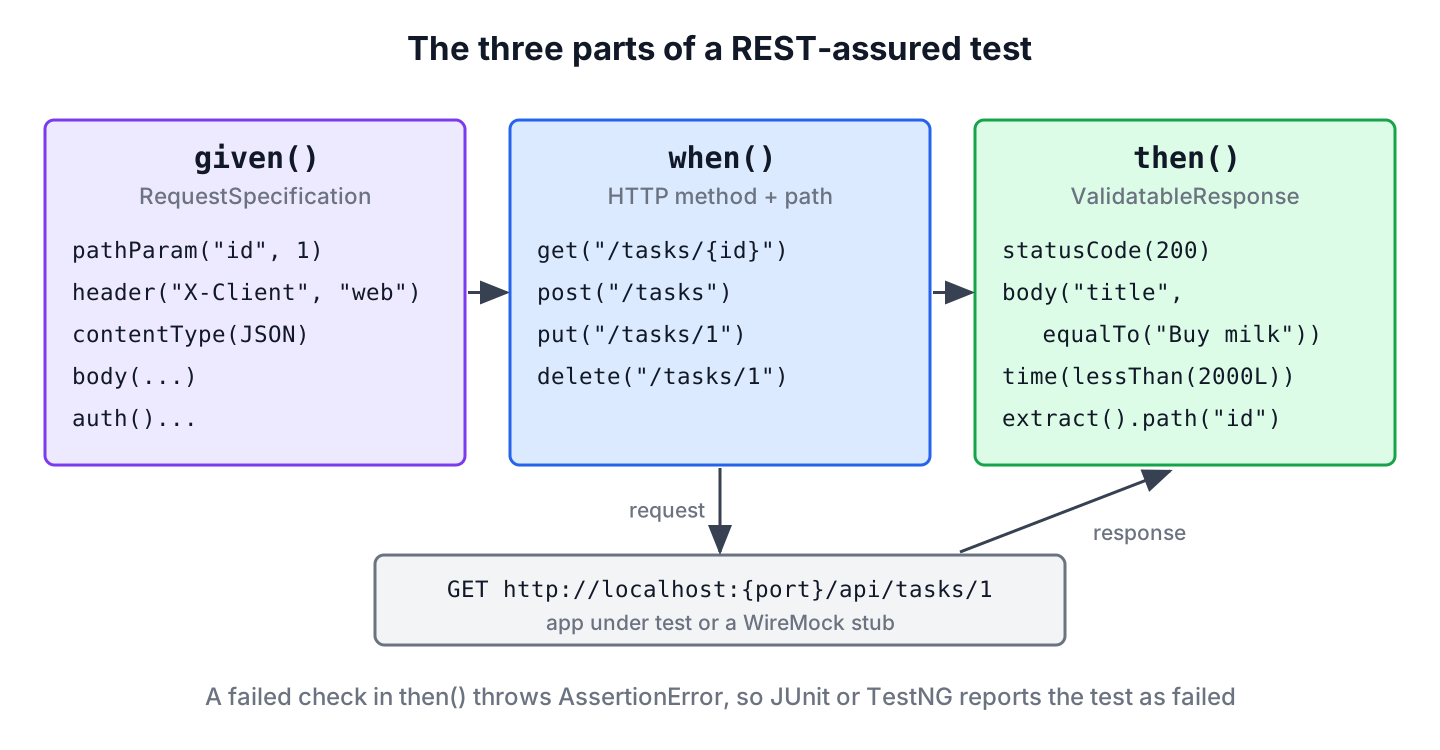
| Part | What goes there | Typical methods |
|---|---|---|
| given() | Everything about the request before it is sent | pathParam(), queryParam(), header(), contentType(), body(), auth() |
| when() | The HTTP method and the path | get(), post(), put(), patch(), delete() |
| then() | Checks on the response | statusCode(), header(), body(), time(), extract() |
Both given() and when() are optional. A call such as get(“/tasks/1”).then().statusCode(200) is valid, and we keep the long form when the request has parameters, because the three blocks make the test quick to scan. To write the methods without a class prefix, we add three static imports to the test class.
import static io.restassured.RestAssured.*;
import static io.restassured.matcher.RestAssuredMatchers.*;
import static org.hamcrest.Matchers.*;
2. Adding REST-assured to a Maven Project
The rest-assured artifact brings everything a JSON or XML test needs, including the json-path and xml-path modules, Groovy and Hamcrest. We add it with the test scope next to JUnit.
<dependency>
  <groupId>io.rest-assured</groupId>
  <artifactId>rest-assured</artifactId>
  <version>6.1.0</version>
  <scope>test</scope>
</dependency>
<dependency>
  <groupId>org.junit.jupiter</groupId>
  <artifactId>junit-jupiter</artifactId>
  <version>6.1.3</version>
  <scope>test</scope>
</dependency>
Since version 6.0.0, REST-assured requires Java 17 or later and uses Groovy 5. The examples use REST-assured 6.1.0, JUnit 6.1.3, WireMock 3.13.2 for the local API and Java 25.
We can add two optional dependencies. To send and read Java objects as JSON, put a JSON library on the test classpath, such as tools.jackson.core:jackson-databind (Jackson 3) or Gson. For JSON Schema checks, add io.rest-assured:json-schema-validator with the same version as REST-assured. Older guides list json-path, xml-path and rest-assured-common as separate dependencies, but they arrive transitively.
3. A Local API to Test Against
Tests that call a public demo API fail when that API changes, rate-limits us or needs a key. In a real project, REST-assured calls our own application, for example a Spring Boot application started with @SpringBootTest(webEnvironment = RANDOM_PORT), and we set RestAssured.port from @LocalServerPort. For this tutorial, a WireMock server plays the to-do API, so every test runs offline.
class TaskApiStubs {

    static void register() {
        WireMock.stubFor(WireMock.get("/api/tasks/1")
                .willReturn(WireMock.okJson("{\"id\":1,\"title\":\"Buy milk\",\"done\":false}")));
        WireMock.stubFor(WireMock.get(WireMock.urlPathEqualTo("/api/tasks"))
                .withQueryParam("done", WireMock.equalTo("false"))
                .willReturn(WireMock.okJson("[{\"id\":1,\"title\":\"Buy milk\",\"done\":false},"
                        + "{\"id\":2,\"title\":\"Pay rent\",\"done\":false}]")));
        WireMock.stubFor(WireMock.get("/api/tasks/99")
                .willReturn(WireMock.jsonResponse("{\"error\":\"Task 99 not found\"}", 404)));
        WireMock.stubFor(WireMock.post("/api/tasks")
                .withRequestBody(WireMock.matchingJsonPath("$.title"))
                .willReturn(WireMock.jsonResponse("{\"id\":3,\"title\":\"Water plants\",\"done\":false}", 201)
                        .withHeader("Location", "/api/tasks/3")));
        WireMock.stubFor(WireMock.put("/api/tasks/1")
                .willReturn(WireMock.okJson("{\"id\":1,\"title\":\"Buy milk\",\"done\":true}")));
        WireMock.stubFor(WireMock.patch("/api/tasks/1")
                .willReturn(WireMock.okJson("{\"id\":1,\"title\":\"Buy oat milk\",\"done\":false}")));
        WireMock.stubFor(WireMock.delete("/api/tasks/1").willReturn(WireMock.noContent()));
        WireMock.stubFor(WireMock.get("/api/me").withBasicAuth("lokesh", "secret")
                .willReturn(WireMock.okJson("{\"user\":\"lokesh\"}")));
        WireMock.stubFor(WireMock.get("/api/me/tasks")
                .withHeader("Authorization", WireMock.equalTo("Bearer abc123"))
                .willReturn(WireMock.okJson("[]")));
    }
}
The test class starts WireMock with @WireMockTest, which picks a random free port, and points REST-assured at it before each test. The static fields RestAssured.port and RestAssured.basePath apply to every request, so the tests only write paths such as /tasks/1.
@WireMockTest
class TaskApiTest {

    @BeforeEach
    void pointRestAssuredAtStub(WireMockRuntimeInfo wireMock) {
        RestAssured.port = wireMock.getHttpPort();
        RestAssured.basePath = "/api";
        TaskApiStubs.register();
    }

    @Test
    void unknownTaskReturns404() {
        get("/tasks/99")
        .then()
            .statusCode(404)
            .body("error", equalTo("Task 99 not found"));
    }
}
By default, REST-assured sends requests to http://localhost:8080. Besides port and basePath, we can set RestAssured.baseURI for another host, and RestAssured.reset() restores all defaults. The other test methods in this tutorial belong to the TaskApiTest class.
4. GET Requests with Path and Query Parameters
A path parameter fills a placeholder in the URL template, and a query parameter goes after the question mark. REST-assured encodes both, so a value with spaces or an ampersand cannot break the URL.
@Test
void listsOpenTasks() {
    given()
        .queryParam("done", false)
        .accept(ContentType.JSON)
    .when()
        .get("/tasks")
    .then()
        .statusCode(200)
        .body("size()", is(2))
        .body("title", hasItems("Buy milk", "Pay rent"))
        .body("done", everyItem(is(false)));
}
The path title on a JSON array collects the field from every element into a list, which is why hasItems() works on it. For several parameters at once, queryParams(Map) and pathParams(Map) take a map. The method param() picks query parameters for GET and form parameters for POST, so the explicit names are clearer.
5. Checking the JSON Body with GPath
The strings in body(“…”) are GPath expressions, the same syntax that Groovy uses to walk through JSON. The JsonPath class evaluates them outside of a request, which helps when we write a new expression or debug a failing one.
JsonPath path = JsonPath.from("{\"tasks\":[{\"id\":1,\"title\":\"Buy milk\",\"done\":false},{\"id\":2,\"title\":\"Pay rent\",\"done\":true}]}");
String first = path.getString("tasks[0].title");                      // "Buy milk"
List<String> titles = path.getList("tasks.title");                    // [Buy milk, Pay rent]
List<String> open = path.getList("tasks.findAll { !it.done }.title"); // [Buy milk]
String second = path.getString("tasks.find { it.id == 2 }.title");    // "Pay rent"
int count = path.getInt("tasks.size()");                              // 2
The closures find and findAll filter a list by a condition. The same expressions work inside then().body(…), and the JsonPath tutorial covers the separate Jayway JsonPath syntax with the $. prefix, which REST-assured does not use.
JSON numbers with a decimal point come back as Float, so equalTo(12.5) fails against them because 12.5 is a double. We write equalTo(12.5f), or switch the number type to Double or BigDecimal in JsonPathConfig.
Object price = JsonPath.from("{\"price\":12.5}").get("price");
String type = price.getClass().getSimpleName();                      // "Float"
double asDouble = JsonPath.from("{\"price\":12.5}").getDouble("price");   // 12.5
6. Creating, Updating and Deleting Resources
The other HTTP methods follow the same pattern as GET. For POST, PUT and PATCH, we set the content type and pass a body, which can be a String, a Map, a Java object or a file.
@Test
void createsUpdatesAndDeletesTask() {
    given()
        .contentType(ContentType.JSON)
        .body(Map.of("title", "Water plants"))
    .when()
        .post("/tasks")
    .then()
        .statusCode(201)
        .header("Location", endsWith("/tasks/3"))
        .body("id", equalTo(3));

    given()
        .contentType(ContentType.JSON)
        .body(Map.of("title", "Buy milk", "done", true))
    .when()
        .put("/tasks/1")
    .then()
        .statusCode(200)
        .body("done", is(true));

    given()
        .contentType(ContentType.JSON)
        .body(Map.of("title", "Buy oat milk"))
    .when()
        .patch("/tasks/1")
    .then()
        .statusCode(200)
        .body("title", equalTo("Buy oat milk"));

    delete("/tasks/1").then().statusCode(204).body(emptyString());
}
PUT replaces the whole task, so the body carries every field, while PATCH changes only the fields it sends. The POST and PUT guide from the intro covers the details of request bodies, such as POJOs, files, form data and object mappers. APIs that expect XML need a few extra settings, which sending XML requests with REST-assured explains.
7. Extracting Values from a Response
Some tests need a value from one response for the next request, such as the id of a task we created. The extract() method ends the checks and returns the value, and the Response object gives access to the status, headers and body.
record Task(int id, String title, boolean done) {}@Test
void extractsCreatedTask() {
Response response = given()
.contentType(ContentType.JSON)
.body(Map.of("title", "Water plants"))
.post("/tasks");
int id = response.path("id");
String location = response.header("Location");
Task task = response.as(Task.class);
assertEquals(3, id);
assertEquals("/api/tasks/3", location);
assertEquals(new Task(3, "Water plants", false), task);
int sameId = get("/tasks/1").then().statusCode(200).extract().path("id");
assertEquals(1, sameId);
}The as(Task.class) call needs Jackson, Gson, Johnzon or Yasson on the classpath, and REST-assured picks the first one it finds in that order. A failed check before extract() stops the test, so we never work with a value from a wrong response.
8. Reusing Settings with Specifications
Say an app has 40 API tests, and each one sends the same headers and expects JSON with status 200. Copying these settings into every test means 40 edits when a header changes. A RequestSpecification and a ResponseSpecification keep the shared parts in one place.
@Test
void reusesSpecifications() {
    RequestSpecification taskApi = new RequestSpecBuilder()
            .setAccept(ContentType.JSON)
            .addHeader("X-Client", "web")
            .build();
    ResponseSpecification okJson = new ResponseSpecBuilder()
            .expectStatusCode(200)
            .expectContentType(ContentType.JSON)
            .build();

    given()
        .spec(taskApi)
    .when()
        .get("/tasks/1")
    .then()
        .spec(okJson)
        .body("id", equalTo(1));
}
In a larger suite, we create the specifications once in a @BeforeAll method or a base class, or assign them to RestAssured.requestSpecification and RestAssured.responseSpecification to apply them to every request. Settings in the test itself override the ones from the specification.
9. Sending Credentials
REST-assured supports the common authentication schemes through auth(). Basic authentication has two modes. The plain basic() waits for the server to answer 401 with a challenge before it sends the credentials, whereas preemptive().basic() sends them with the first request, which most APIs expect.
@Test
void sendsBasicAndBearerCredentials() {
    given()
        .auth().preemptive().basic("lokesh", "secret")
    .when()
        .get("/me")
    .then()
        .statusCode(200)
        .body("user", equalTo("lokesh"));

    given()
        .auth().oauth2("abc123")
    .when()
        .get("/me/tasks")
    .then()
        .statusCode(200);
}
Despite its name, oauth2(token) does not run an OAuth 2 flow. It only adds the header Authorization: Bearer abc123, so the test must get the token first, for example from a test token endpoint or a fixed token in the test profile. Keep real credentials out of the test code and read them from environment variables.
10. Logging Requests When a Test Fails
A failed check prints the expected and actual values, but not the full request and response. Logging every request floods the build output, so the useful setting logs only when a check fails.
@Test
void logsOnlyOnFailure() {
    given()
        .log().ifValidationFails()
    .when()
        .get("/tasks/1")
    .then()
        .log().ifValidationFails()
        .statusCode(200);
}
To turn the same behavior on for all tests, call RestAssured.enableLoggingOfRequestAndResponseIfValidationFails() once in a @BeforeAll method. For a quick look during development, log().all() prints everything, and log().body() or log().headers() print one part.
11. Validating a Response Against a JSON Schema
Field checks prove that the values are right, while a JSON Schema proves that the shape is right, for example that no required field disappeared after a refactoring. The json-schema-validator module adds the matcher matchesJsonSchema().
@Test
void taskMatchesSchema() {
    String schema = """
            {
              "type": "object",
              "required": ["id", "title", "done"],
              "properties": {
                "id": {"type": "integer"},
                "title": {"type": "string"},
                "done": {"type": "boolean"}
              }
            }
            """;
    get("/tasks/1").then().body(matchesJsonSchema(schema));
}
In real projects, the schema lives in src/test/resources and the test uses matchesJsonSchemaInClasspath(“task-schema.json”). The matcher comes from the static import io.restassured.module.jsv.JsonSchemaValidator.*.
12. Checking the Response Time
The time() check compares the response time with a Hamcrest matcher, in milliseconds unless we pass a TimeUnit. It works as a guard against a call that suddenly takes seconds, for example after an index was dropped.
@Test
void respondsWithinTwoSeconds() {
    get("/tasks/1").then().time(lessThan(2000L));
    get("/tasks/1").then().time(lessThan(2L), TimeUnit.SECONDS);
}
The measured time includes the HTTP client setup and the JVM warm-up of the first request, so a single test is not a performance test. Use generous limits here, and a load testing tool such as JMeter or Gatling for real latency numbers.
13. REST-assured vs Other API Testing Tools
REST-assured sends real HTTP requests to a running server, which can be our app, a deployed environment or a stub. Other tools trade that for speed or for a different audience.
| Tool | Sends real HTTP | Best fit |
|---|---|---|
| REST-assured | Yes | API tests in Java against any server, in any framework |
| MockMvc | No, calls Spring MVC in memory | Fast controller tests in Spring applications |
| RestTestClient (Spring Framework 7) | Either, bound to MockMvc or to a live server | Spring tests that want one fluent client for both modes |
| WebTestClient | Either | WebFlux applications and reactive endpoints |
| Postman with Newman | Yes | Manual exploration and collections shared with non-Java teams |
REST-assured also has a spring-mock-mvc module with RestAssuredMockMvc, which keeps the given(), when() and then() syntax while it calls MockMvc in memory. Teams that already know REST-assured get fast controller tests without a second API to learn.
14. REST-assured Tutorial FAQs
New REST-assured users want to know how it relates to BDD, XML, TestNG and Postman, and why some numbers do not match.
14.1. Is REST-assured a BDD framework?
No. REST-assured borrows the given(), when() and then() names from behavior-driven development, but tests are plain JUnit or TestNG methods. To write Gherkin feature files, we combine REST-assured with Cucumber and call it from the step definitions.
14.2. Can REST-assured test SOAP and XML APIs?
Yes. REST-assured sends any request body and reads XML responses with GPath and XPath. A SOAP call is a POST with an XML envelope and the matching Content-Type, which the XML guide from section 6 shows.
14.3. Does REST-assured work with TestNG?
Yes. REST-assured has no dependency on a test framework, so given(), when() and then() work in TestNG @Test methods the same way. Failed checks throw AssertionError, which both frameworks report as a failure.
14.4. Should we use REST-assured or Postman?
Use both for different jobs. Postman is good for exploring an API by hand and sharing collections, whereas REST-assured tests live in the code base, run in the build and use Java for test data and assertions. Many teams start in Postman and move the stable checks into REST-assured.
14.5. Why does a test fail with a number that looks equal?
REST-assured returns JSON decimals as Float and whole numbers as Integer, or Long when they are too big for an int. Compare with equalTo(12.5f) or change the number type in JsonPathConfig, as shown in section 5.
15. Conclusion
A REST-assured test describes the request in given(), sends it in when() and checks the response in then(). GPath expressions such as tasks.findAll { !it.done }.title reach into the JSON body, and extract() hands values to the next request.
For a suite that stays readable, we point REST-assured at a local server, reuse settings through specifications, log only failed requests and add a JSON Schema check for the shape of key responses. Requests with JSON and XML bodies have their own guides, linked in section 6.
16. References
- REST-assured Usage guide
- REST-assured Getting Started
- REST-assured changelog
- Hamcrest Matchers Javadoc
- WireMock JUnit Jupiter extension
Happy Learning !!

