
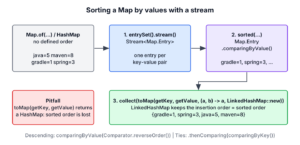
To sort a Map by values in Java, we stream its entrySet(), sort the entries with Map.Entry.comparingByValue() and collect them into a LinkedHashMap, which keeps the entries in the sorted order. A HashMap has no order of its own, so the sorted result is always a new map or a list of entries.
Sorting a map by values is what a dashboard needs when it shows the most searched words first or ranks players from a map of scores.
The following example sorts a map of word counts in both directions and picks the two most frequent words.
Map<String, Integer> wordCounts = Map.of("java", 5, "spring", 3, "maven", 8, "gradle", 1);

Map<String, Integer> ascending = wordCounts.entrySet().stream()
        .sorted(Map.Entry.comparingByValue())
        .collect(Collectors.toMap(Map.Entry::getKey, Map.Entry::getValue, (a, b) -> a, LinkedHashMap::new));   // {gradle=1, spring=3, java=5, maven=8}

Map<String, Integer> descending = wordCounts.entrySet().stream()
        .sorted(Map.Entry.comparingByValue(Comparator.reverseOrder()))
        .collect(Collectors.toMap(Map.Entry::getKey, Map.Entry::getValue, (a, b) -> a, LinkedHashMap::new));   // {maven=8, java=5, spring=3, gradle=1}

List<String> topTwo = wordCounts.entrySet().stream()
        .sorted(Map.Entry.comparingByValue(Comparator.reverseOrder()))
        .limit(2)
        .map(Map.Entry::getKey)
        .toList();                                                                                            // [maven, java]
Notice that the source map is a Map.of() map with no defined iteration order, and the results still come out in a fixed order, because the LinkedHashMap and the List keep the order of the sorted stream. In the rest of the post, we look at the comparator itself, break ties between equal values, sort maps whose values are objects, handle null values, and see why a TreeMap with a value comparator loses entries.
1. Map.Entry.comparingByValue()
The interface Map.Entry has a static method comparingByValue() that returns a Comparator comparing two entries by the natural order of their values. The values must implement Comparable, such as Integer, String or LocalDate.

A second overload, comparingByValue(Comparator), compares the values with a comparator we pass. With Comparator.reverseOrder(), it sorts the values in descending order, and with a key extractor such as Comparator.comparing(Product::price), it sorts objects by one of their fields.
Comparator<Map.Entry<String, Integer>> byValue = Map.Entry.comparingByValue();
Comparator<Map.Entry<String, Integer>> byValueDesc = Map.Entry.comparingByValue(Comparator.reverseOrder());
Comparator<Map.Entry<String, Integer>> byValueDescToo = Map.Entry.<String, Integer>comparingByValue().reversed();
int firstIsSmaller = byValue.compare(Map.entry("gradle", 1), Map.entry("java", 5));   // -1
The third line needs the type witness <String, Integer>, because the compiler cannot infer the generic types of comparingByValue() when reversed() is called on its result. Passing Comparator.reverseOrder() as an argument avoids the witness, which is why we use it in the examples.
2. Java Program to Sort a Map by Values
The full program has three steps. We turn the map into a stream of entries with entrySet().stream(), sort the stream with the comparator, and collect the sorted entries into a LinkedHashMap. The collector Collectors.toMap() with four arguments lets us choose the map type.
2.1. Ascending Order or Natural Order
The following program sorts the word counts in the natural order of the values, from the smallest count to the largest. We collect the entries in a LinkedHashMap because it maintains the insertion order, and the stream inserts the entries in sorted order.
Map<String, Integer> wordCounts = Map.of("java", 5, "spring", 3, "maven", 8, "gradle", 1);

LinkedHashMap<String, Integer> sortedMap = wordCounts.entrySet()
        .stream()
        .sorted(Map.Entry.comparingByValue())
        .collect(Collectors.toMap(
                Map.Entry::getKey,
                Map.Entry::getValue,
                (oldValue, newValue) -> oldValue, LinkedHashMap::new));   // {gradle=1, spring=3, java=5, maven=8}
The four arguments of toMap() are the key mapper, the value mapper, a merge function and a map factory. The merge function never runs here, because the keys of a map are unique, but the overload that takes LinkedHashMap::new requires it. With the two-argument toMap(), the result is a HashMap and the sorted order is lost.
2.2. Descending Order
As we saw in section 1, we pass Comparator.reverseOrder() to comparingByValue() to sort the values in reverse order, from the largest count to the smallest.
Map<String, Integer> wordCounts = Map.of("java", 5, "spring", 3, "maven", 8, "gradle", 1);

LinkedHashMap<String, Integer> sortedMap = wordCounts.entrySet()
        .stream()
        .sorted(Map.Entry.comparingByValue(Comparator.reverseOrder()))
        .collect(Collectors.toMap(
                Map.Entry::getKey,
                Map.Entry::getValue,
                (oldValue, newValue) -> oldValue, LinkedHashMap::new));   // {maven=8, java=5, spring=3, gradle=1}
Since Java 21, LinkedHashMap implements SequencedMap, so the sorted map gives us the first and the last entry, and a reversed view, without another sort.
Map<String, Integer> wordCounts = Map.of("java", 5, "spring", 3, "maven", 8, "gradle", 1);
LinkedHashMap<String, Integer> sortedMap = wordCounts.entrySet().stream()
        .sorted(Map.Entry.comparingByValue(Comparator.reverseOrder()))
        .collect(Collectors.toMap(Map.Entry::getKey, Map.Entry::getValue, (a, b) -> a, LinkedHashMap::new));
Map.Entry<String, Integer> most = sortedMap.firstEntry();          // maven=8
Map.Entry<String, Integer> least = sortedMap.lastEntry();          // gradle=1
SequencedMap<String, Integer> ascending = sortedMap.reversed();    // {gradle=1, spring=3, java=5, maven=8}
3. Breaking Ties Between Equal Values
When two entries have the same value, the stream keeps them in the iteration order of the source map. For a HashMap or a Map.of() map, that order is not defined, so the output can change between runs or Java versions. We add the key as a second sort key to get the same output every time.
Map<String, Integer> wordCounts = Map.of("java", 5, "kotlin", 5, "maven", 8, "ant", 1);
Comparator<Map.Entry<String, Integer>> byCountThenWord = Map.Entry.<String, Integer>comparingByValue(Comparator.reverseOrder())
        .thenComparing(Map.Entry.comparingByKey());

LinkedHashMap<String, Integer> sortedMap = wordCounts.entrySet().stream()
        .sorted(byCountThenWord)
        .collect(Collectors.toMap(Map.Entry::getKey, Map.Entry::getValue, (a, b) -> a, LinkedHashMap::new));   // {maven=8, java=5, kotlin=5, ant=1}
Whenever two values can be equal, we add a second sort key, because otherwise the order of the tied entries depends on the hash order of the source map. The post on sorting by multiple fields shows longer thenComparing() chains.
4. Real-World Example: Top Search Terms
A shop logs every search term that users type. The dashboard shows the three most frequent terms, so we count the terms into a map with Collectors.groupingBy(), sort the map entries by count in descending order, and keep the first three with limit().
List<String> searchLog = List.of("shoes", "bag", "shoes", "hat", "bag", "shoes", "belt", "hat", "bag", "scarf");
Map<String, Long> counts = searchLog.stream().collect(Collectors.groupingBy(term -> term, Collectors.counting()));

List<Map.Entry<String, Long>> topThree = counts.entrySet().stream()
        .sorted(Map.Entry.<String, Long>comparingByValue().reversed().thenComparing(Map.Entry.comparingByKey()))
        .limit(3)
        .toList();                                                   // [bag=3, shoes=3, hat=2]
The result is a List of entries instead of a map, which is the simpler type when the caller only loops over the top items. The tie-breaker on the key decides that “bag” comes before “shoes”, since both have three searches. A map with Long values works the same way, because Long is Comparable.
5. Sorting a Map Whose Values Are Objects
When the values are records or other objects, we pass a comparator for the value type to comparingByValue(). The following example is a product catalog that maps a product code to a Product record with a name and a price in cents.
record Product(String name, int priceCents) {

    @Override
    public String toString() {
        return name + "@" + priceCents;
    }
}
Map<String, Product> catalog = Map.of(
"p1", new Product("mug", 1200),
"p2", new Product("pen", 250),
"p3", new Product("lamp", 3900));
List<String> cheapestFirst = catalog.entrySet().stream()
.sorted(Map.Entry.comparingByValue(Comparator.comparingInt(Product::priceCents)))
.map(Map.Entry::getKey)
.toList(); // [p2, p1, p3]
LinkedHashMap<String, Product> byName = catalog.entrySet().stream()
.sorted(Map.Entry.comparingByValue(Comparator.comparing(Product::name)))
.collect(Collectors.toMap(Map.Entry::getKey, Map.Entry::getValue, (a, b) -> a, LinkedHashMap::new)); // {p3=lamp@3900, p1=mug@1200, p2=pen@250}The same idea sorts a Map<String, List<String>> by the size of each list, with comparingByValue(Comparator.comparingInt(List::size)).
6. Sorting a Map With null Values
A HashMap accepts null values, for example a price that is not known yet. Two things break on such a map. The natural order calls compareTo() on null, and Collectors.toMap() throws a NullPointerException for any null value, even when the comparator handles it.
Map<String, Integer> prices = new HashMap<>();
prices.put("mug", 12);
prices.put("lamp", null);
prices.put("pen", 3);

LinkedHashMap<String, Integer> broken = prices.entrySet().stream()
        .sorted(Map.Entry.comparingByValue(Comparator.nullsLast(Comparator.naturalOrder())))
        .collect(Collectors.toMap(Map.Entry::getKey, Map.Entry::getValue, (a, b) -> a, LinkedHashMap::new));   // NullPointerException
We keep nullsLast() in the comparator and replace toMap() with forEachOrdered(), which puts each entry into the LinkedHashMap in the sorted order. The post on sorting with null values explains nullsFirst() and nullsLast().
Map<String, Integer> prices = new HashMap<>();
prices.put("mug", 12);
prices.put("lamp", null);
prices.put("pen", 3);

LinkedHashMap<String, Integer> sortedPrices = new LinkedHashMap<>();
prices.entrySet().stream()
        .sorted(Map.Entry.comparingByValue(Comparator.nullsLast(Comparator.naturalOrder())))
        .forEachOrdered(e -> sortedPrices.put(e.getKey(), e.getValue()));
LinkedHashMap<String, Integer> result = sortedPrices;              // {pen=3, mug=12, lamp=null}
7. Why a TreeMap With a Value Comparator Loses Entries
Some tutorials build a TreeMap with a comparator that looks up the values of the original map. A TreeMap treats two keys as the same key when its comparator returns 0, so keys with equal values collapse into one entry.
Map<String, Integer> wordCounts = Map.of("java", 5, "kotlin", 5, "maven", 8);
TreeMap<String, Integer> byValue = new TreeMap<>(Comparator.comparing(wordCounts::get));
byValue.putAll(wordCounts);
int size = byValue.size();                                         // 2
One of “java” and “kotlin” is gone, and the comparator also breaks get() for keys that are not in the original map. A TreeMap is the right tool for sorting a map by keys, and the stream with a LinkedHashMap is the right tool for sorting by values.
8. Sort Map by Values FAQs
After the first sorted map works, developers ask what happens to the source map and how to get only the highest value.
8.1. Can We Sort a HashMap by Value in Place?
No. A HashMap orders its entries by the hash codes of the keys, and it has no method to change that order. We create a new LinkedHashMap or a List of entries that holds the sorted order, as in section 2.
8.2. Does Sorting Change the Original Map?
No. The stream reads the entries of the source map and builds a new map, so the source map keeps its content and its order. Later changes to the source map do not show up in the sorted copy.
8.3. How Do We Get the Key With the Highest Value?
We use max() with the same comparator instead of sorting the whole map, because finding one maximum takes O(n) time, whereas sorting takes O(n log n). The post on finding the largest and smallest value in a Map covers more variants.
Map<String, Integer> wordCounts = Map.of("java", 5, "spring", 3, "maven", 8, "gradle", 1);
String mostFrequent = wordCounts.entrySet().stream().max(Map.Entry.comparingByValue()).map(Map.Entry::getKey).orElseThrow();   // "maven"
8.4. Is There a Map That Stays Sorted by Value?
No, the JDK has no map that keeps its entries sorted by value as they change. When the values change often and we need the order each time, we sort on demand, or we keep a separate TreeSet of entries with a comparator on the value and on the key as a tie-breaker, so equal values do not collapse.
9. Conclusion
To sort a map by values, we stream its entries, sort them with Map.Entry.comparingByValue() and collect them into a LinkedHashMap with the four-argument Collectors.toMap(). For descending order, we pass Comparator.reverseOrder(), and for object values, a comparator on a field.
A second sort key on the map key makes the output stable when values tie, limit() gives the top entries, and forEachOrdered() replaces toMap() when values can be null. Our Java sorting guide collects the posts for lists, arrays and keys.
10. References
- Map.Entry Javadoc (Java 25)
- Collectors Javadoc (Java 25)
- LinkedHashMap Javadoc (Java 25)
- SequencedMap Javadoc (Java 25)
Happy Learning !!


Is it possible to sort the below list by values in descending order followed by keys in descending order?
Unsorted Map : {alex=1, charles=1, david=1, brian=2, elle=1}Refer to Comparator.thenComparing()