

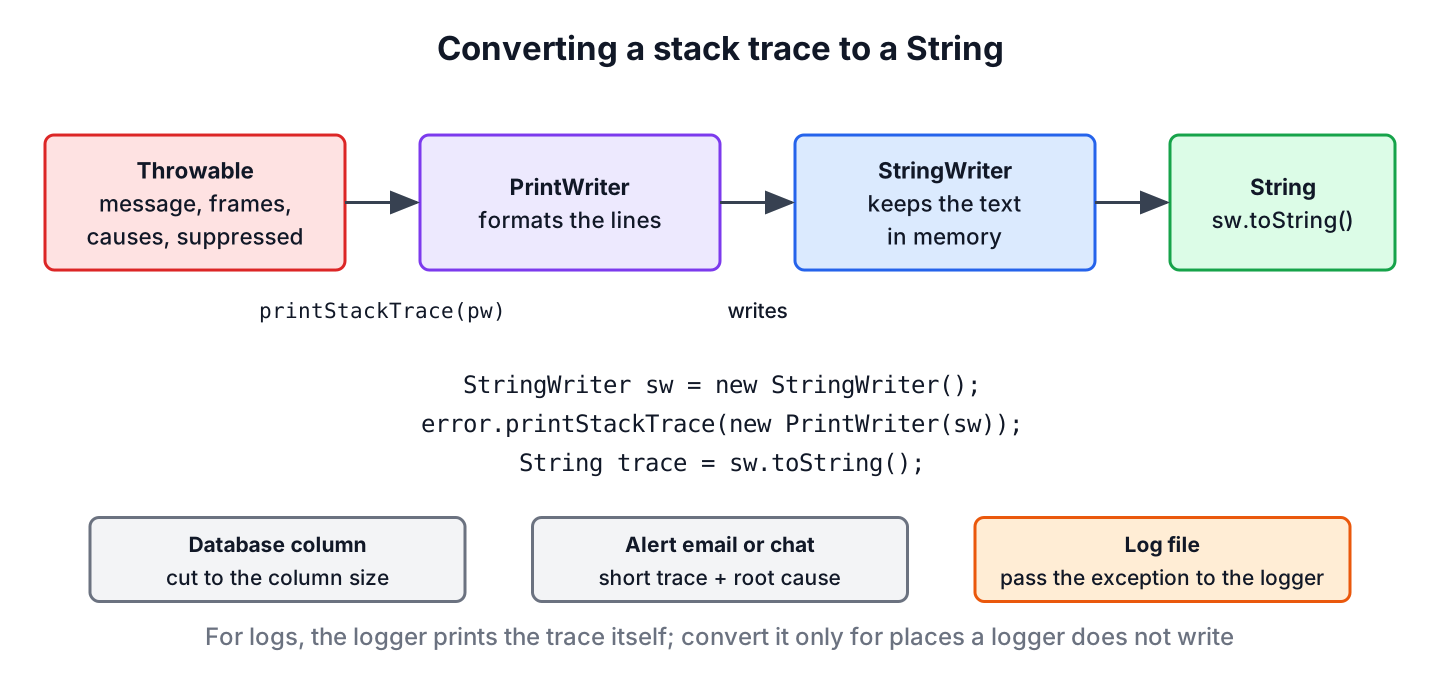
Java has no single method that returns a stack trace as text, so to convert an exception stack trace to a String we pass a PrintWriter that wraps a StringWriter to printStackTrace() and call toString() on the StringWriter. The result is the same text that printStackTrace() prints to the console, including the causes.
We need the stack trace as a String when we store a failure in a database column, attach it to an alert email or a chat message, or show it on an internal admin page. A three-line helper covers all of these cases.
The following example converts the stack trace of a failed payment into a String.
Exception error = new IllegalStateException("Payment failed");
StringWriter sw = new StringWriter();
error.printStackTrace(new PrintWriter(sw));
String trace = sw.toString();
boolean header = trace.startsWith("java.lang.IllegalStateException: Payment failed");   // true
boolean frames = trace.contains("\tat ");                                              // true
The first line of the trace holds the exception class and message, and each following line starts with a tab and at. The sections that follow turn the code into a helper, read every part of the output, build a shorter custom trace, get the trace of the current thread, and look at when logging the exception is the better choice.
1. Converting With StringWriter and PrintWriter
The method Throwable.printStackTrace(PrintWriter) writes the trace to any PrintWriter instead of System.err. A StringWriter collects everything written to it in memory, so wrapping it in a PrintWriter sends the trace into a buffer that we read with toString().
static String stackTraceOf(Throwable error) {
    StringWriter sw = new StringWriter();
    error.printStackTrace(new PrintWriter(sw));
    return sw.toString();
}
Throwable failure = new IllegalStateException("Report rendering failed", new FileNotFoundException("monthly.tpl"));
String text = stackTraceOf(failure);
boolean hasHeader = text.startsWith("java.lang.IllegalStateException: Report rendering failed"); // true
boolean hasCause = text.contains("Caused by: java.io.FileNotFoundException: monthly.tpl"); // trueThe helper needs no try-with-resources block. Closing a StringWriter has no effect, the PrintWriter holds no file or socket, and the PrintWriter(Writer) constructor adds no buffer of its own, so the full text is in the StringWriter as soon as printStackTrace() returns.
2. What the Stack Trace String Contains
A real trace often has more than the top exception. The following output comes from a report job where reading a template fails, the job wraps the error in an IllegalStateException, and closing the output file fails as well, which the job records as a suppressed exception.
java.lang.IllegalStateException: Report rendering failed
	at com.howtodoinjava.core.string.ReportJob.render(ReportJob.java:18)
	at com.howtodoinjava.core.string.ReportJob.main(ReportJob.java:25)
	Suppressed: java.io.IOException: Could not close output file
		at com.howtodoinjava.core.string.ReportJob.render(ReportJob.java:19)
		... 1 more
Caused by: java.io.FileNotFoundException: monthly.tpl
	at com.howtodoinjava.core.string.ReportJob.readTemplate(ReportJob.java:12)
	at com.howtodoinjava.core.string.ReportJob.render(ReportJob.java:16)
	... 1 more
Each kind of line has a fixed meaning, and knowing them helps when we search the stored text later.
| Line starts with | Meaning |
|---|---|
| The exception class | The result of toString(), the class name followed by the message |
| at | One stack frame, with class, method, file and line number, most recent call first |
| Suppressed: | An exception added with addSuppressed(), often from closing a resource, indented one level |
| Caused by: | The exception passed as the cause, from getCause(), printed after the main trace |
| … 1 more | Frames that are the same as the last frames of the enclosing trace, left out to avoid repeating them |
The root cause is the last Caused by: section, not the first line. Here the first line says the report failed, while the cause says which file was missing.
3. Building a Shorter Trace From getStackTrace()
A full trace from a Spring Boot application can have more than a hundred frames, most of them from the framework. When we send the trace to a chat channel or a ticket, a short version with the first frames and the root cause is easier to read. The method getStackTrace() returns the frames as a StackTraceElement[], so we build our own text.
static String shortTrace(Throwable error, int maxFrames) {
    String frames = Arrays.stream(error.getStackTrace())
            .limit(maxFrames)
            .map(frame -> "    at " + frame)
            .collect(Collectors.joining("\n"));
    return error + "\n" + frames;
}
static Throwable rootCause(Throwable error) {
Throwable cause = error;
while (cause.getCause() != null && cause.getCause() != cause) {
cause = cause.getCause();
}
return cause;
}Throwable jobError = new IllegalStateException("Report rendering failed", new FileNotFoundException("monthly.tpl"));
String compact = shortTrace(jobError, 3);
boolean firstLine = compact.startsWith("java.lang.IllegalStateException: Report rendering failed"); // true
long frameLines = compact.lines().filter(line -> line.startsWith(" at ")).count();
boolean limited = frameLines <= 3; // true
String root = rootCause(jobError).toString(); // "java.io.FileNotFoundException: monthly.tpl"The shortTrace() helper leaves out causes and suppressed exceptions, which printStackTrace() includes. We use it for notifications and keep the full trace from section 1 in the log or the database.
4. Getting the Stack Trace of the Current Thread
Sometimes we want to know who called a method without any exception, for example to find out which code path opens a database connection. Creating an exception only to print its trace works, but StackWalker, added in Java 9, reads the frames of the current thread lazily and lets us stop after a few.
List<String> callers = StackWalker.getInstance()
        .walk(stack -> stack.limit(3).map(StackWalker.StackFrame::toString).toList());
boolean hasCallers = !callers.isEmpty();                                   // true
String callerText = String.join("\n", callers);
StackTraceElement[] threadFrames = Thread.currentThread().getStackTrace();
String firstFrame = threadFrames[0].getMethodName();                       // "getStackTrace"
The older Thread.currentThread().getStackTrace() returns all frames at once, and its first element is the getStackTrace() call itself. To read the stack of another thread, such as a stuck worker, a thread dump with jstack is the better tool.
5. Logging the Exception vs Storing the String
When the goal is a log line, we do not convert the trace ourselves. SLF4J, Logback and Log4j 2 print the full stack trace when the exception is the last argument of the log call, and the logging pattern controls the format.
Logger log = LoggerFactory.getLogger("reports");
Throwable renderError = new IllegalStateException("Report rendering failed");
log.error("Report job {} failed", 42, renderError);
Converting the trace to a String makes sense when it has to go somewhere a logger does not write. For example, a batch scheduler keeps a history of job runs in a job_runs table, and the admin page shows the error of each failed run. The column error_detail is a VARCHAR(4000), so the job converts the trace and cuts it to fit before the insert.
static String fitColumn(String text, int maxLength) {
    if (text == null || text.length() <= maxLength) {
        return text;
    }
    return text.substring(0, maxLength - 3) + "...";
}
Throwable runError = new IllegalStateException("Report rendering failed", new FileNotFoundException("monthly.tpl"));
String detail = fitColumn(stackTraceOf(runError), 4000);
boolean fits = detail.length() <= 4000; // true
String tooLong = fitColumn("x".repeat(5000), 4000);
int storedLength = tooLong.length(); // 4000A stack trace never belongs in an HTTP response to an external client. It shows class names, library versions and file paths that help an attacker, so a REST API returns a short error message and an ID, and the full trace stays in the log. The exception handling best practices guide covers this in more depth.
6. Using ExceptionUtils From Apache Commons Lang
Projects that already use Apache Commons Lang (artifact commons-lang3) can call ExceptionUtils.getStackTrace(), which does the same StringWriter work in one call. The class also has getRootCause() and getRootCauseMessage() for the last exception in the cause chain.
Throwable libError = new IllegalStateException("Report rendering failed", new FileNotFoundException("monthly.tpl"));
String libTrace = ExceptionUtils.getStackTrace(libError);
boolean sameText = libTrace.equals(stackTraceOf(libError));                  // true
String rootMessage = ExceptionUtils.getRootCauseMessage(libError);           // "FileNotFoundException: monthly.tpl"
The JDK helper from section 1 gives the same text, so adding the library only for this method is not worth it. The Java String tutorial links more String conversion guides.
7. Stack Trace to String FAQs
Once the trace is a String, questions turn to what it includes and where it is safe to send.
7.1. Does the String include the cause of the exception?
Yes. The method printStackTrace() prints the whole cause chain as Caused by: sections and every suppressed exception as a Suppressed: section. Building the text from getStackTrace() gives only the frames of the top exception.
7.2. What does “… 1 more” mean in a stack trace?
The cause or suppressed exception shares its last frames with the exception that encloses it. Java prints the frames that differ and replaces the shared ones with … n more, so no frame is lost, only repeated lines are left out.
7.3. What is the difference between getMessage(), toString() and the stack trace?
The method getMessage() returns only the message, toString() returns the class name and the message, and the stack trace adds the frames and the causes.
Throwable sample = new IllegalStateException("Payment failed");
String message = sample.getMessage();       // "Payment failed"
String summary = sample.toString();         // "java.lang.IllegalStateException: Payment failed"
7.4. Why does a stack trace sometimes have no frames?
The JVM can drop the frames of exceptions it throws very often in hot code, such as a NullPointerException in a tight loop, to save time. The HotSpot option -XX:-OmitStackTraceInFastThrow keeps them. An exception class can also skip the frames on purpose with the four-argument Throwable constructor and writableStackTrace set to false.
8. Conclusion
A PrintWriter around a StringWriter turns any stack trace into a String with one printStackTrace() call, and the result includes causes and suppressed exceptions. The getStackTrace() array gives a shorter custom format, and StackWalker reads the current thread without an exception.
For log files, we pass the exception to the logger and let it print the trace. We convert the trace ourselves for databases, alerts and admin pages, cut it to the size of the target, and never send it to external clients.
9. References
- Throwable (Java SE 25)
- StringWriter (Java SE 25)
- StackWalker (Java SE 25)
- SLF4J FAQ, logging exceptions
- ExceptionUtils (Apache Commons Lang)
Happy Learning !!

