Image

Trying To Get Linux Running On A Nokia E6

The Nokia E6 is a smartphone from back in the old days when Symbian was a thing. [fluffleswaffled] has been doing the work to get the ancient handset running Linux instead, because that’s ultimately cooler than what the phone shipped with out of the box.

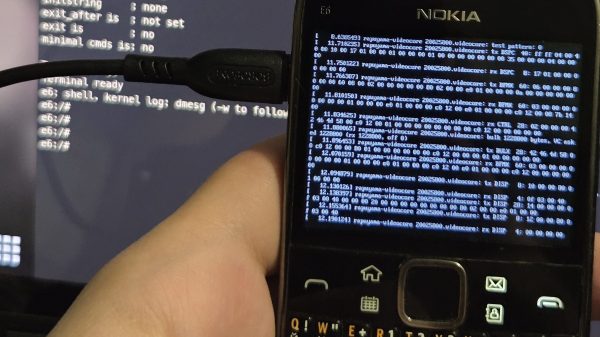
There isn’t an unlocked bootloader on the E6, so instead, [fluffleswaffled] used an altogether different route to boot Linux. A Symbian app is used to load the kernel and device tree into RAM, at which point the MMU and caches are turned off and the device jumps into Linux. It’s a one-way trip, from which there is no way back to Symbian without a power cycle. The setup nets a terminal on the phone’s own screen, and the hardware keyboard and touchscreen are functional. The display is controlled by a Broadcom VideoCore III, with [fluffleswaffled] capturing messages from Nokia’s original display driver to create a custom kernel driver that replays them.

There’s an issue, though. The phone doesn’t stay in Linux land for long — it always resets within a couple minutes of booting into the alternative OS. [fluffleswaffled] believes this is because the phone’s baseband chip is supervising the application processor, and killing things once it’s detected that the Symbian mobile stack has stopped running. They’re hoping that someone with experience with Nokia basebands or the relevant hardware can point them in the right direction to get this hack running for more than 3.5 minutes at a time.

There probably isn’t a great deal of utility in getting Linux running on a 2011 smartphone, but we love the hustle nonetheless. We’ve seen this done before, though, and it’s always interesting to learn what it takes to get the OS booting on a new platform. If you’re whipping up similar hacks in your home lab, don’t hesitate to let us know on the tipsline.


Image

Linux Kernel Drops AI Tag Requirement, Uses Meta AI For Code Reviews

Since we last covered the way that the Linux Kernel project has been dealing with the influx of code created using LLM-based coding assistants, all the way back in April, things have changed a lot, with most recently the Linux maintainers deciding to fully drop the requirement to mark LLM-assisted commits with the Assisted-by tag.

While not a fully uncontroversial decision – as also reported by Phoronix – with key maintainers already having made this decision it seems certain to proceed. This is not the only change made fairly recently, with a ‘Sashiko’ bot introduced that is supposed to handle code reviews.

In a July LKML post [Linus Torvalds] defends this decision, with a follow-up post in August by [Jakub Kicinski] it being stated that budget has been secured for using Meta’s LLMs, using said LLM-based resources for reviewing patches, as well as creating and editing commit messages. As noted by [Jakub] they’re running multiple frontier models on each patch to try and weed out confabulations.

Whether this will prove to be the right decision remains to be seen. Whereas most open source projects have firmly banished or heavily curtailed LLM-based contributions on slop, copyright as well as licensing grounds, the Linux Kernel project may be an interesting experiment in what the outcome of the exact opposite approach will be.

Image

No More Windows For The Dutch Government, Ze Kiezen Nu Linux

The events of the last few years have caused many in Europe to re-evaluate their reliance on large offshore technology companies, with a corresponding move to home-grown EU-based alternatives. It’s one thing when individuals or companies do this, but another entirely when it’s an entire country. So the news that the Netherlands is building their own Linux distribution to replace Microsoft Windows in government installations, is not inconsequential. The Tweakers site linked  actively breaks out of Google Translate, so you may have to rely on your browser’s translation tool if you are not a Dutch speaker.

The Digitaal Autonome Werkomgeving Overheid, or Digital Autonomous Work Environment, is a distro based upon NixOS, itself originally a product of a Dutch university. It comes complete with all the office and collaboration applications needed to replace Windows, and is reported to have been tested already by a small group of Dutch government workers.

The influence of this move is likely to be a huge one for Microsoft, given that governments have huge numbers of operating system seats. But perhaps more important than the OS itself are the extras that Microsoft would like to sell to its OS customers, such as AI services. We’d expect that there will be managers in Redmond paying close attention to Europe in the wake of this move.

Meanwhile the Netherlands has a vibrant hacker community, and we can imagine that this move will be welcomed in those quarters. All Netherlands government online services are accessed through an ID verification app called DigID, and it’s a lament we’ve heard from our Dutch friends that this only works with Windows, Android and Apple platforms. If this means a Linux version will appear on the back of an NL government Linux distro, we know some people who will be very happy indeed.

NL flag: SpinnerLaserzthe2nd, CC0. Tux: Larry Ewing (lewing@isc.tamu.edu) and The GIMP. Attribution.

Image

How Pixar Stopped Worrying And Learned To Love Linux

If you weren’t already aware, it will probably come as no surprise to hear that the pioneering computer-animation studio Pixar built its early workflow on Silicon Graphics SGI workstations. These were beefy Unix machines that, as the name implied, were developed for graphical work. When the age of the RISC workstation came to a close, many Unix users were pushed onto Windows NT — but not at Pixar. At Pixar, they learned to love the penguin.

It comes down to hardware rather than software. You know the story: PCs got faster and cheaper with different vendors competing for a giant market, while the world of RISC workstations couldn’t keep its lead. Pixar would have been happy staying on Unix workstations, even SGIs if that had been a practical option — but with every project increasing the load on the render farms, it wasn’t. Yet Pixar’s entire workflow was predicated on a Unix environment. They had written a couple million lines of code for their internal use, and really didn’t want to port it over to Windows, even after a mistaken rm command nearly cost the world Toy Story 2.

The path of least resistance would be to port to something more similar to IRIX’s Unix environment, something POSIX compliant. That path led Linux, and by 2001, the port was done. By 2003, a new render farm using Xeon processors brought the whole studio to Linux and x86, which has since become an industry standard.

We’re left with only two questions: one, why didn’t more industries — like the CAD/CAM world — that were also reliant on Unix Workstations follow Pixar and Hollywood onto Linux, and two, why did Pixar go with Linux instead of some variety of BSD? [Crierlon] doesn’t address either question, but we’re betting some of you might have an idea. Let us know in the comments if you have the inside scoop; inquiring minds want to know!

Continue reading “How Pixar Stopped Worrying And Learned To Love Linux” →

Image

A Hotspot Becomes A Handheld

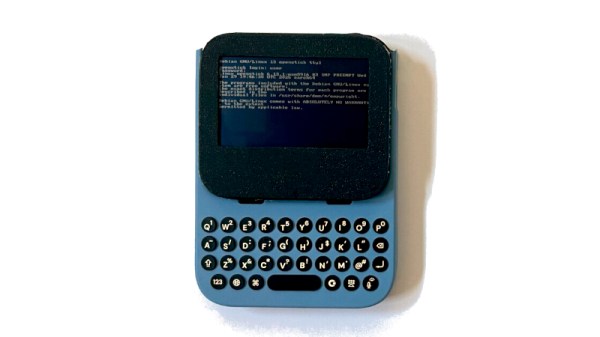
A Linux handheld computer is, in theory, easy and inexpensive given the availability of single-board computers, but in practice the budget invariably edges well into three figures. There’s an interesting alternative from [bkovac] that won’t break the bank as much, using a cheap 4G wireless hotspot, an iPhone USB keyboard case accessory, and, though a cheaper display could suffice, a fancy Adafruit Sharp memory display.

The hotspot is available from AliExpress for around 20 dollars/Euros/pounds, and it’s referred to by its model number, MF800. It’s powered by a Qualcomm MSM8916, also known as the Snapdragon 410, which you might have found in a budget cellphone early in the last decade. Importantly, though, it’s supported by mainstream Linux, and while it’s by no means the fastest on the block, it can be a poor man’s alternative to a Raspberry Pi. It comes with a small SPI display, but this project replaces it with a much bigger Sharp SPI memory display.

Continue reading “A Hotspot Becomes A Handheld” →

Image

Running Linux 6.11 On The ESP32-S3 With A Few Tweaks

With the Xtensa Lx7 twin CPU cores in the ESP32-S3 running at a relatively zippy 240 MHz and accompanying PSRAM of up to 16 MB, you might find yourself wondering whether it could run Linux. As [Paulneja] demonstrates with Linux kernel 6.11, the answer is a ‘yes’, though with the usual caveats.

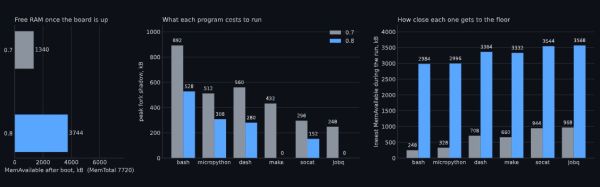
What complicates matters with the ESP32-S3 is that it lacks certain amenities that spoiled OSes like Linux have come to take for granted, such as a Memory Management Unit (MMU). To deal with this, the NOMMU Linux configuration was used, along with a custom fork() implementation. Although the previous 0.7 version sort-of worked, the current 0.8 release is the first that manages to actually boot reliably and has a usable amount of RAM available after boot.

You can see the comparison between the two versions in the header image, with v0.8 having a blistering 3.7 MB available after booting and with overall resource usage and performance having improved massively. Note that only one core is available to Linux, with the other used by the typical FreeRTOS ESP-IDF stack to provide WiFi and Bluetooth.

This was all run on an ESP32-S3 with the N16R8 configuration, meaning 16 MB Flash that’s also used for writable storage and 8 MB of octal PSRAM. As for practical applications, it’s noted by [Paulneja] that this is a research project, though one could imagine this being an embedded Linux project along the lines of a network router running something like BusyBox.

Image

Linux Fu: Speak Up!

Apparently, people hate typing. As every movie and TV show suggests, the future is talking to computers. There was a time when speech recognition was complex and not very good. But these days, even our lowly phones can do a pretty good job of speech recognition. Of course, one problem is that your phone probably isn’t actually doing the speech recognition. It sends it to the big business of your choice to interpret. I’ve been using Handy, a speech recognition system that works well for me. I’ve also looked at some that didn’t.

After all, it is sometimes nice to dictate to your computer, and it would be even nicer if you could keep your data local. On Windows, oddly enough, there is a well-developed speech feature that, as far as I can tell, almost no one talks about or uses. One video estimates that 99% of users don’t use it. Linux, of course, has many options, but historically, these have been difficult to set up or finicky.

Of course, the good news is that many of the Linux tools are open source and the models are quite good. That means other people have had the freedom to fork the tools and make them easier to use, at least in theory. The licensing of the models themselves may be different, but those will be hard to modify, anyway and they generally work well. The biggest problems on Linux isn’t the technology itself, but the tremendous variety of systems and setups.

Suppose you want to write a speech-to-text program. Will it work on ARM? What desktops will it integrate with? Can it use a GPU? What kind? What about specialized instructions in some CPUs? Then there’s the forced input situation; typing into arbitrary programs once you know what the user said. On X11, it is easy, but Wayland needs different handling.

A Shortcut

I’ve thought about using my phone with KDE Connect, which is an excellent program. It can let you use your phone as a keyboard and mouse for your Linux computer. Unfortunately, it is aimed at character-at-a-time input, and I’ve never found a way to make it work with voice.

Besides, the phone is beaming all the data to “the cloud.” You probably type things you’d rather not broadcast to the ether.

I had looked at Speech Note before, but it is sort of a speech recognition notepad. I didn’t find it seamless, and it didn’t work well on my system anyway. Vocalinux looks nice, but a quick test kept complaining that my Intel extensions were not available. Makes sense, since I have an AMD CPU. Even though the documentation said it should work, I was never able to get it to work.

The Easy Way

Turns out the application that worked readily on my machine was Handy. Keep in mind, Handy is just another tool that uses one of several models out there, along with other open-source tools. You might need to install some tools to deal with your system like xdotool or dotool, but they are probably already installed anyway. That isn’t to minimize the value of Handy. It is — well — Handy. You don’t have to load and configure models, set up a bunch of system-level hooks, or install a bunch of libraries. You install it, and it works.

You can configure it. The best model for you, for example, may depend on your machine and the languages you speak. You can configure the hotkeys and how the app types into your computer. But it does all the work of downloading and configuration. Continue reading “Linux Fu: Speak Up!” →