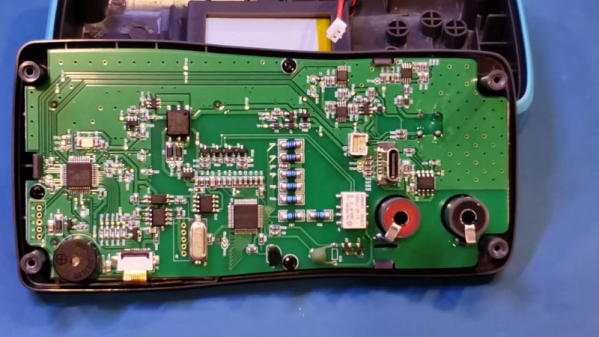
YouTube, like the Internet, has its plusses and minuses. On the plus side, you can find information on just about anything. On the minus side, you don’t always know if that information is of any value. On the plus side, you can connect to experts who have an uncanny knack for explaining things. On the negative side, you can find people who — let’s just say aren’t. Lucky for us, [Kerry Wong] is very knowledgeable about test instruments, so when we see a review from him, like the one for the ZOYI ZT-XC1 LCR meter and multimeter, we know we will get good information. Check out that review in the video below.
It used to be unusual to have an LCR meter that could measure inductance or capacitance in a home lab. But now it isn’t a big deal, and many multimeters and testers can at least attempt to read these quantities.
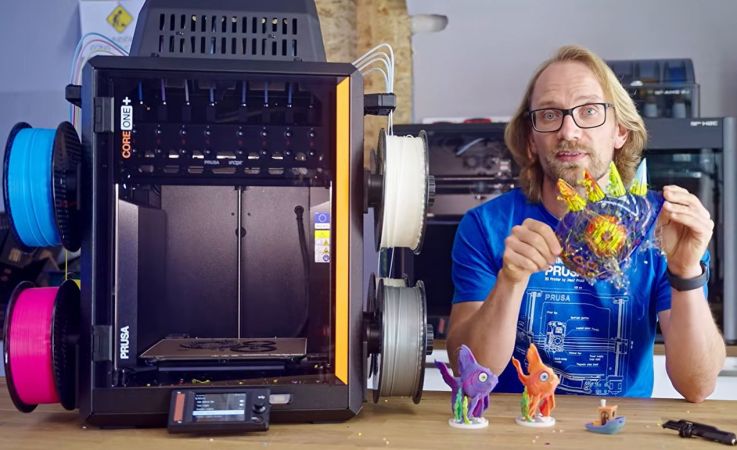
The Prusa Core One+ INDX is an interesting upgrade to the base FDM printer by Prusa, featuring eight independent extruders – hence the INDX – that in theory should allow for multi-material and multi-color printing with very little purge waste. As [Thomas Sanladerer] found out during his experiences with this printer, there are a lot of issues with this machine, including the ability – or lack thereof – to print with non-Prusa filament.
Although the premise is solid, with a claimed 0.013 grams of purge waste per color or material change along with pretty nice dual-gear Bondtech extruders, the first major hurdle that [Thomas] encountered was that the mandatory calibration sequence on starting a print is designed to only work with Prusa’s own filament and its specific material properties. This resulted in an inability to print with Voxel PLA until [Thomas] removed this sequence manually from the g-code.
This is when [Thomas] found out that the entire print sequence uses the material presets for Prusa’s filament, resulting in a failed print. The results from the manual calibration are also not saved despite the display claiming it does, making this calibration on starting a print absolutely mandatory.
Other issues found are the useless position of the camera as it’s now blocked-off by the INDX hardware, with even manual peeking into the print chamber being heavily obscured by the contraption that holds the extruders. This makes even checking that filament has loaded correctly is borderline impossible, never mind ogling the printing process.
Although there’s a lot to like about this INDX upgrade to the Core One+, the above and other issues discussed in the video make it look somewhat shaky next to competitors like the Bambu Lab H2C and Snapmaker U1, as well as Prusa’s own XL toolchanger printers. During [Thomas]’s print test comparison between the XL and the Core One+ INDX there was no contest that the XL simply works, whereas the INDX even struggles with some Prusa filaments.
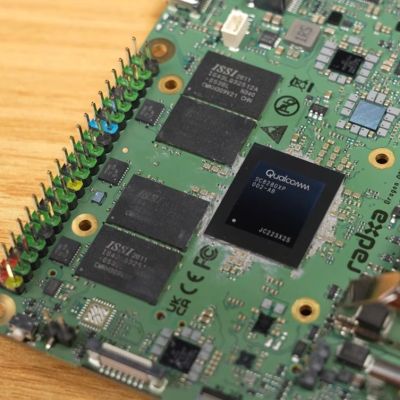
Although the asking price of $209 plus shipping seems high for the Radxa Dragon Q8B, featuring the Qualcomm SC8280XP and 8 GB of LPDDR4X, this is 2026, and amid the RAMpocalypse, even the 8 GB LPDDR4X-equipped Raspberry Pi 5 now costs $175. This, to [Jeff Geerling], makes it fair to directly compare the two to see whether you may want to consider this board for more intense computing purposes.
There’s also a written summary of the results and details in a GitHub issue, though the direct comparison with the Raspberry Pi 5 is in the video.
Although this Qualcomm SoC isn’t new, its primary use is for Windows laptops, which gives somewhat of a hint as to what its performance may be like, tempered by the fact that it was announced in 2021.
The Dragon QXB offers about 2x everything over the RPi5, plus Windows and UEFI support. For Linux, it appears that you still need customized images, which seems perplexing in light of the UEFI aspect. You also have to pick between different Linux images from Radxa and use their Rsetup update tool, making it a less than newbie-friendly offering.
There are many benefits to spending time in the park, but perhaps few of them have a Hackaday angle. There’s a park in Germany you might want to make an exception for, and it lies in the Ruhrpott city of Duisburg.
I was lucky enough last month to join a friend as she toured Germany for the first time with a caravan. It’s a large country with many beautiful places, so her choice might seem unexpected at first sight. The Ruhrpott, or Ruhr area, is a loose conurbation of industrial cities that loosely follows the river Ruhr on its trip to the Rhine on the western edge of the country. It’s close to deposits of coal and iron ore, so just like similar areas in other countries, it became a centre for heavy industry. Today that continues, but as you might expect it’s also dotted with the remains of former industries. It’s one of those which is our subject for today, and it offers a very unusual opportunity.
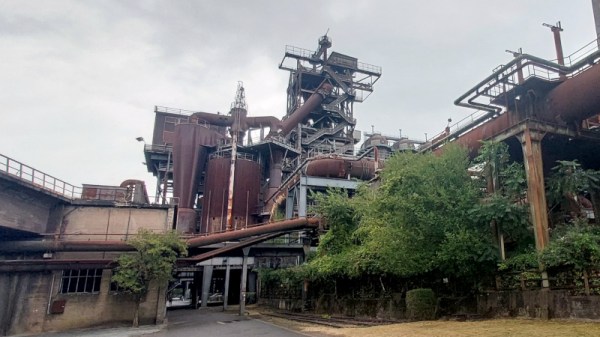
Looking out over the former ore bunkers shows just how huge this site is.
Landschaftspark Duisburg-Nord is a forest park on the northern side of the city of Duisburg. But of course that’s not the whole story, because until 1985 it was the site of the Thyssen ironworks. In rehabilitating the site they chose to keep the main structures of the ironworks intact as they reclaimed the surrounding polluted industrial land, so today it may be one of the few places in the world where you can free of charge get up-close and personal with a fully-intact and preserved blast furnace. The site has three of them remaining along with their associated ore and gas processing plants, and the largest and newest, blast furnace number 5, is a structure you can climb to its top. If you’ve ever been curious about iron smelting, this is the place to come. Continue reading “Places To Visit: Landschaftspark Duisburg-Nord”→
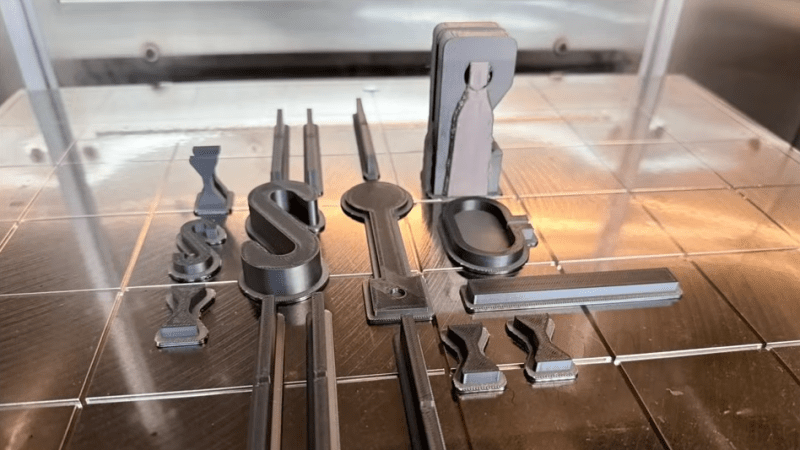
[Igor] of [My Tech Fun] set out to discover what differences, if any, can be found between parts printed in PC-ABS filament on an industrial 3D printer, and those from prosumer-grade machines and filament. His video is full of his usual attention to detail as he compares a test suite of parts printed at home in Polymaker PC-ABS with those from a Stratasys Fortus 450mc using proprietary PC-ABS filament.
PC-ABS is a filament that strives to deliver the benefits of both polycarbonate and ABS. It’s durable and has fantastic impact resistance, but it costs a bit more than either PC or ABS and requires a heated chamber.
In the end, PC-ABS from a home printer compares favorably to an industrial system, at a fraction of the price.
[Igor] has previously compared industrial ABS with comsumer ABS, but what made him curious about PC-ABS in particular was the large difference in print temperatures between Polymaker PC-ABS, and Stratasys’s own proprietary PC-ABS.
[Igor] prints Polymaker filament at 280º C in a 60-65º C chamber, whereas the Stratasys filament prints at 325º C with a chamber temperature of 95º C. That’s quite a difference. The industrial printer has over double the print time, to boot. Would test objects printed from the industrial filament, on an industrial machine, be noticeably different from those printed at home?
To find out, [Igor] orders a test suite of parts from a company with a Stratasys Fortus 450mc (who was also kind enough to take a short video of the machine in action) and prints his own on both a Prusa Core One L, and a Bambu Labs H2D. He then proceeds to compare them in a variety of ways while testing them to destruction.
What’s the bottom line? The industrial prints have better dimensional accuracy, but the home prints have the edge in appearance. When it comes to performance the differences are mostly minor, and not always in the industrial system’s favor. Broadly speaking, PC-ABS from the home workshop compares very favorably from an expensive industrial system and proprietary filament, at a fraction of the price. See it for yourself in the video, embedded just below.
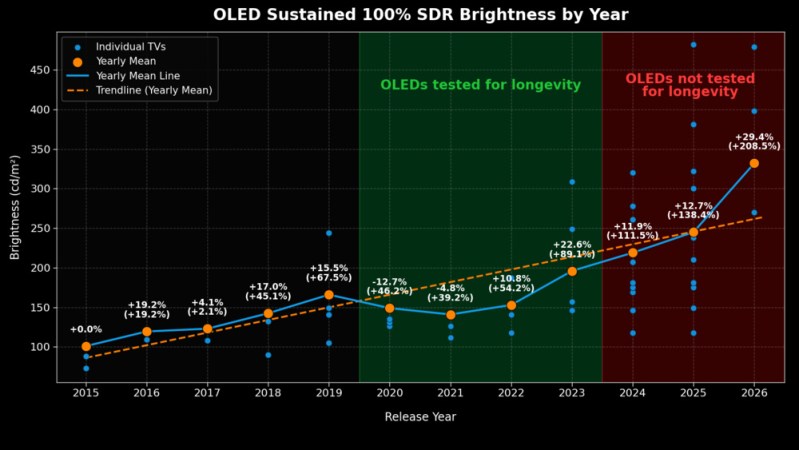
OLED displays solve many of the problems suffered by LC displays, including color fidelity, dynamic range and power usage. That said, especially in the early days OLED gained a reputation for dim screens, short lifespans and burn-in. Over time better organic dyes were developed, along with burn-in prevention methods that have made OLEDs much closer to LCDs in terms of longevity. In a recent comparison between OLED TVs by RTings it’s however clear that between 2017 and 2023 there haven’t been any major advances beyond bumps in brightness.
The relatively dim screens were a major problem, as they prevented OLEDs from displaying HDR content. This issue has been well and truly addressed, as confirmed by RTings’ testing, but after an over 10,000 hours stress test that simulates about 10 years of regular use at maximum SDR brightness, especially static elements like the CNN TV banner happily burned in even on the newest models with all burn-in prevention measures enabled.
Here the biggest take-away is probably that even if the expected panel lifespan at full brightness is still the same, this higher brightness budget means that you can gain some lifespan by cranking the brightness way down. It’s also essential to keep features like pixel refresh cycles enabled, as demonstrated by [Hardware Unboxed] and their abuse of a QD-OLED monitor where a worst-case 6,000 hour stress-test managed to create some impressive levels of burn-in from uneven subpixel wear.
My initial experience with a 3D printer came in 2020, when I got access to a buddy’s Creality LD-002R SLA printer. This was one of those awkward transition phases for SLA printers, where inefficient RGB LCDs finally got replaced by monochrome LCD panels, thus massively reducing the required exposure time and increasing the LCD panel’s lifespan.
The closely related Creality LD-002H is a monochrome SLA printer, but as this wasn’t the one that this friend opted for we had to learn the ropes on this more old-school printer. In terms of specifications this meant a build volume of 119 mm x 65 mm x 160 mm to play with and a claimed 26.1 µm resolution. Despite some struggles along the way, this machine churned out impressively high levels of detail with whatever cheap resin we threw at it, and even the post-printing processing became easy once we added a flex plate to the build plate and tweaked the cleaning and curing steps.
Despite all these positives, we both drifted away from resin printing, mostly due to the still messy and smelly printing process. FDM printers seemed like a better deal, especially after said buddy got his mittens on a used IDEX FDM printer. I would eventually go through a rather loathsome Creality Ender V2 experience before ending up with my current-day Elegoo Neptune 4, and resin printing seemed to be a thing of the past for me. Until recently, that is.

 Although the premise is solid, with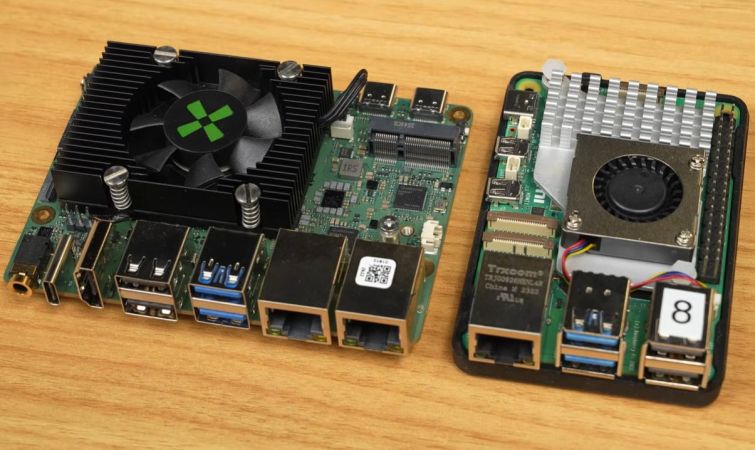
 Although the asking price of $209 plus shipping seems high for the Radxa Dragon Q8B, featuring the Qualcomm SC8280XP and 8 GB of LPDDR4X, this is 2026, and amid the RAMpocalypse, even the 8 GB LPDDR4X-equipped Raspberry Pi 5 now costs $175. This, to [Jeff Geerling],