Image

Clotty The Custom Period Tracker Can, Of Course, Run DOOM

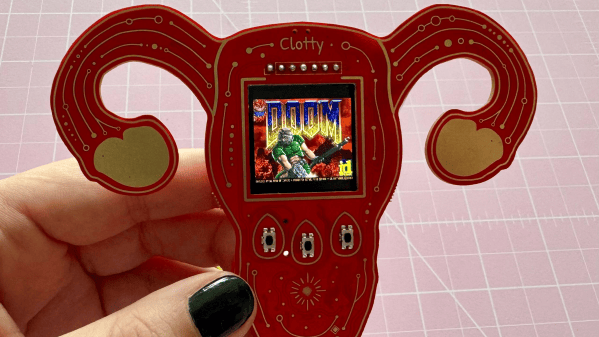
[kati]’s Clotty might run DOOM and game-ify the menstrual tracking process with a playful Tamagotchi-like aspect, but don’t let that distract you. It is, at its heart, a personal menstrual cycle tracking device that is defined as much by what it does do as what it doesn’t.

Image
Clotty brings a Tamagotchi-like playfulness to the table.

What doesn’t it do? Well, it will never quietly upload one’s menstrual tracking data to a remote server. Nor will it harvest, mishandle, disclose, or sell that same data. Shamefully, that alone sets it far apart from the wide range of period tracking services and apps out there. Also setting it apart is its cheerful lack of discretion. As [kati] puts it, she wanted Clotty’s design to scream “HELLO I AM A PERIOD TRACKING DEVICE” and at this she absolutely succeeded.

Clotty uses an RP2040, color LCD display, and a small variety of sensors built into a palm-sized, uterus-shaped PCB complete with touchpad ovaries. Right now it’s still in its early stages, and basically at the point that everything works hardware-wise and the essentials are there for software, but it’s still in active development. Keep an eye on Clotty’s GitHub repository for updates as features get fleshed out.

Of course, as [kati] observes, the core validity of a device can be defined by whether it can run DOOM, which of course Clotty can. You can find [kati]’s fork of RP2040-DOOM here.

[kati] has a knack for designing effective hardware that gamifies functions and incorporates a playfulness to the design that’s a delight to see. Take a moment to check out her Slightly Sentient D20 which is another excellent example of the kind of work she does.

Image

Easy Theremin Uses ESP32

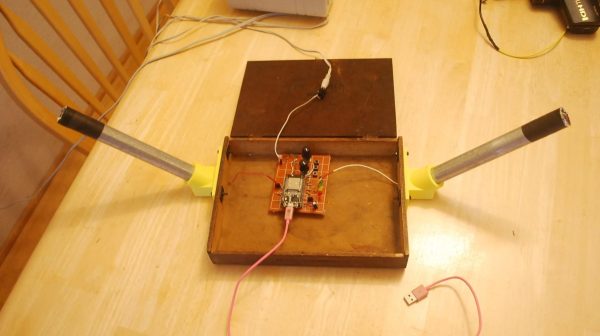
The Theremin is that classic electronic musical instrument that makes those weeee-ohhhhh noises which were so popular in mid-century science fiction movies. Mid-last-century, that is, because this century is just beginning. In any case, you could build one with old-school analog electronics, or you could go a more modern route, as [ericCycles] did.

The build relies almost entirely on an ESP32 microcontroller with minimal supporting circuitry. Like any other Theremin, pitch and volume are controlled by moving hands closer or farther away from two antenna. In this case, the ESP32 uses its capacitive touch circuitry to detect effectively detect hand proximity to the two antenna in question, and uses those values to control the pitch and volume of a synthesized waveform. That waveform is then pumped out over the onboard digital-to-analog converter for playback on external speakers.

If you want to build a simple Theremin-like instrument quickly and easily, it’s hard to beat the simplicity on offer here. We’ve featured some other fun variants over the years, too, like this version that uses time-of-flight sensors for the human interface.

Continue reading “Easy Theremin Uses ESP32” →

Image

Digital Guitar Of The Future Has No Strings

Electric guitars are great, but they’re just so 20th century. You’d think decades of musicians riffing on the instrument would mean there are no hacks left in the humble axe. You’d think so, but you’d be wrong. [Michael], for one, has taken it upon himself to reinvent the electric guitar for the digital era.

Gone are the strings, and the frets have vanished as well. The neck of this guitar is one long custom PCB, looking very sleek with black solder mask. Gold pads serve as touch sensors to give tone data over i2c (from unspecified touch sensing chips) to the Amtel Mega 32u4 at the heart of the build.

With no strings, strumming won’t work, so a laptop-style touchpad serves instead. That means every user interaction with this guitar is with capacitive touch sensors talking i2c. The X and Y coordinates of the touch, along with pressure are sent to the processor over the i2c bus, triggering an interrupt and offering quite a bit of opportunity for sound control.

Said sound control is, of course, done in MIDI. This lets the guitar control a whole variety of synths and/or software, and of course [Michael] is using more futuristic-sounding synths than a pack of guitar samples. That said, what exactly goes on with the MIDI controls is left frustratingly vague. Obviously fretting provides note selection, but does the touchpad just send a “note start” command, or are the X, Y and pressure data used in interesting ways? Is there multitouch support? The video doesn’t say.

How, exactly, the obviously-plastic body of the guitar was manufactured is also left unsaid. Is it a large resin print? SLS? It looks injection-molded, but that makes no sense for a one-off prototype. On the other hand, it looks like he’s selling these, so it may very well be an injection-molded production case we’re seeing being assembled here, and not a prototype at all.

For all the video leaves us wanting more information, we can’t help but admit the end product both looks and sounds very cool. (Skip to the 4:50 mark in the embedded video to hear it in action.) The only thing that would improve it would be a hurdy-gurdy mode. Thanks to [Michael] for the tip, and remember  we want to hear tips about all the weird and wonderful hacked-together instruments you make or find on the web.

Continue reading “Digital Guitar Of The Future Has No Strings” →

Image

Silicone Tubing As Springs For Capacitive Touch Buttons

Capacitive touch buttons are a great way to turn just about any (non-conductive) surface into a button, but people generally dislike the lack of tactile feedback.  [KontinuumLab] apparently agreed and decided to experiment a bit with ways to make such buttons more springy. You can check out the results of those experiments in the video below. There are a few ways to add some spring to buttons and switches like these, including compliant mechanisms in the (3D-printed) plastic structure, but this isn’t always an option in a project. A separate plastic spring can be added, but they aren’t very durable. A metal spring works great but can be a bit of a hassle to integrate and they aren’t as cheap as the other options. So what about everyone’s favorite keyboard switch, the rubber dome type?

Silicone tubing is plentiful and (generally) cheap. It can be selected for just the right springiness and dimensions, and in the automated test that [KontinuumLab] ran, it is also very durable in this application. When your goal is to have a switch that activates at the end of the travel, this may work a treat, with the size of the silicone tube determining the travel before the finger gets close enough to trigger the switch. As rubber dome keyboards demonstrate, this is a highly reliable technology, though this version ditches the typical membrane for the capacitive touch sensor.

Sometimes, a metal spring is the right option, of course, such as when you want to make a surface a touch sensor and the PCB is at the other side of the enclosure. The fun part is that we have all of these options to make our projects work, with many being very affordable to hobbyists. Not all touch sensors require a finger, either.

Thanks to [BrightBlueJim] for the tip.

Continue reading “Silicone Tubing As Springs For Capacitive Touch Buttons” →

Image

MIDI Spoon Piano Is Exactly What You Think It Is

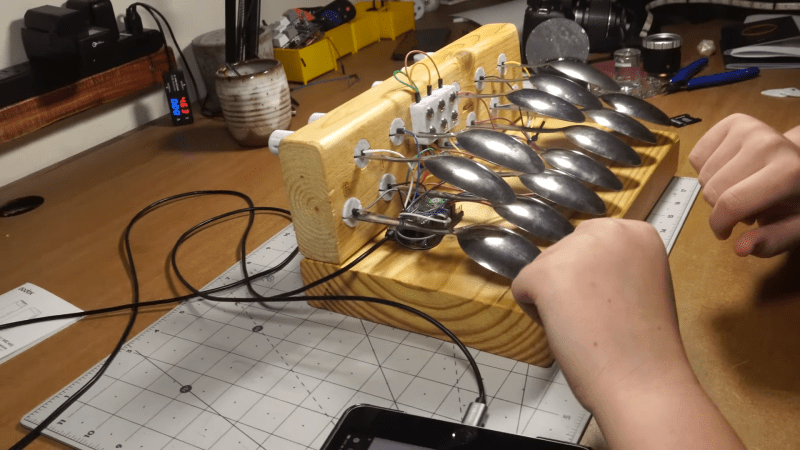
Pianos traditionally had keys made out of ivory, but there’s a great way to avoid that if you want to save the elephants. You can build a keyboard using spoons, as demonstrated by [JCo Audio]. 

The build relies on twelve metal spoons to act as the keys of the instrument. They’re assembled into a wooden base in a manner roughly approximating the white and black keys of a conventional piano keyboard, using 3D-printed inserts to hold them in place. They’re hooked up to a Raspberry Pi Pico via a Pico Touch 2 board, which allows the spoons to be used as capacitive touch pads. Code from [todbot] was then used to take input from the 12 spoons and turn it into MIDI data. From there, hooking the Pi Pico up to a PC running some kind of MIDI synth is enough to make sounds.

It’s a simple build, but a functional one. Plus, it lets you ask your friends if they’d like to hear you play the spoons. The key here is to make a big show of hooking your instrument up to a laptop while explaining you’re not going to play the spoons a la the folk instrument, but you’re going to play a synth instead. Then you should use the spoon keyboard to play emulated spoon samples anyway. It’s called doubling down. Video after the break.

Continue reading “MIDI Spoon Piano Is Exactly What You Think It Is” →

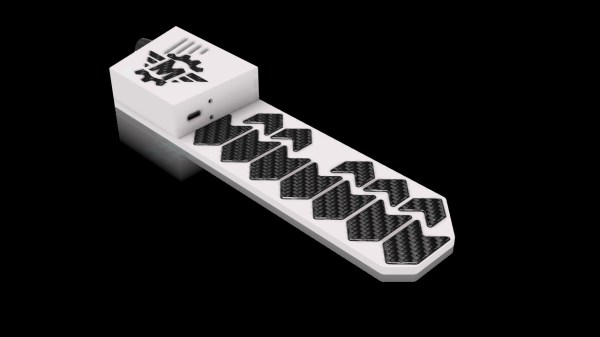
A capacitive touch MIDI instrument that doubles as a bookmark.

MIDI Bookmark Marks The Spot Where Work And Play Intersect

Have you ever wanted to take a break from reading or studying to just rock out for a few blissful minutes? If you’re anything like us, you like to rock out most of the time and take the occasional break to do your reading. Either way, you really can’t go wrong with this MIDI bookmark from [Misfit Maker].

The guts of a MIDI bookmark.This slick little bookmark may look 3D printed, but it’s all carefully-cut foam board in two thicknesses. Even the keys are made foam board — they’re just wrapped in carbon fiber so they look extra cool.

Underneath that carbon fiber is a layer of aluminium tape to make them capacitive. [Misfit Maker] recommends using copper tape instead because it allows for wires to be soldered directly to the keys.

The brains of this beauty is in the form of an ESP32 which is controlling an MPR-121 capacitive touch sensor. If you’d like to make one of these for yourself, there are plenty of helpful GIFs embedded in the thorough write-up. Be sure to check out the brief demo after the break.

If you want to easily MIDI-fy something and use touch inputs, you can’t really go wrong with the Raspberry Pi Pico, which does capacitive touch natively. Check out this MIDI kalmiba to learn more.

Continue reading “MIDI Bookmark Marks The Spot Where Work And Play Intersect” →

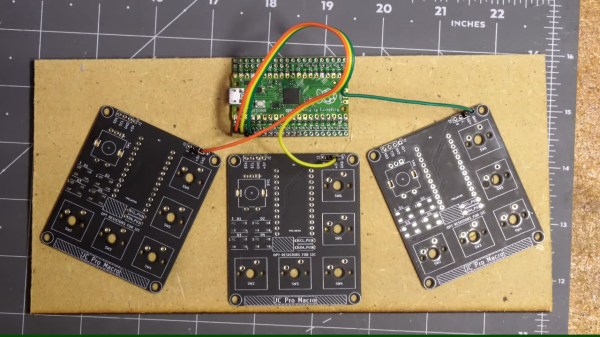
The board in question, with a Pi Pico soldered on, with old PCBs for macropads being used as captouch electrodes

Give Your Pi Pico Captouch Inputs For All Your Music Needs

Unlike many modern microcontrollers, RP2040 doesn’t come with a native capacitive touch peripheral. This doesn’t mean you can’t do it – the usual software-driven way works wonderfully, and only requires an external pullup resistor! In case you wanted a demonstration or you have a capacitive touch project in mind, this lighthearted video by [Jeremy Cook] is a must watch, and he’s got a healthy amount of resources for you in store, too!

In this video, [Jeremy] presents you with a KiCad schematic and an PCB design you can use to quickly add whole 23 capacitive touch sensing inputs to a Pi Pico! The board is flexible mechanically, easy to assemble as [Jeremy] demonstrates, and all the pins involved can still be used as regular GPIOs if you’d like. Plus, it’s fully open-source, can easily be assembled on your own, and available on Tindie too!

Of course, such a board doesn’t get created for no reason – [Jeremy] has a healthy amount of musical creations and nifty ideas to show off. We quite liked the trick of using old PCBs as capacitive touch sensing, using copper fills as electrodes – which has helped create an amusing “macropad of macropads”, and, there’s quite a bit more to see.

If capacitive touch projects ever struck a chord with you and you enjoy music-related hacking, [Jeremy]’s got a whole YouTube channel you ought to check out. Oh, and if one of the musical projects in the video caught your eye, it might just be the one we’ve featured previously! Continue reading “Give Your Pi Pico Captouch Inputs For All Your Music Needs” →