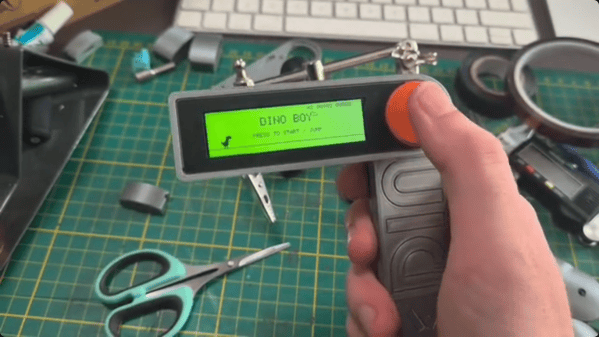
Those of us who grew up in the 70s and 80s might be familiar with the Atari 2600 console and its now relatively unrecognizable (by modern standards) controller with only a single button and stiff whole-hand joystick. By comparison, the Steam Deck has somewhere around 24 buttons and two joysticks depending on how they are counted. But even the Atari might be providing more user inputs than are really necessary for quality gaming. Take a look at the Dinoboy, a handheld console with only a single button.
Part of what makes this system work is that it’s playing the classic dinosaur jumping game first included in Google Chrome which loads when the browser can’t connect to the Internet, and the user’s single input was the space bar. In this case, the handheld has its single button where the user’s thumb naturally rests. The console itself is in two parts, hinged where the button is placed. When unfolded, the top half reveals a wide screen and the bottom half is held by the hand. The screen supports two color formats, a black and white style and another which replicates the dot matrix display of the original Game Boy.
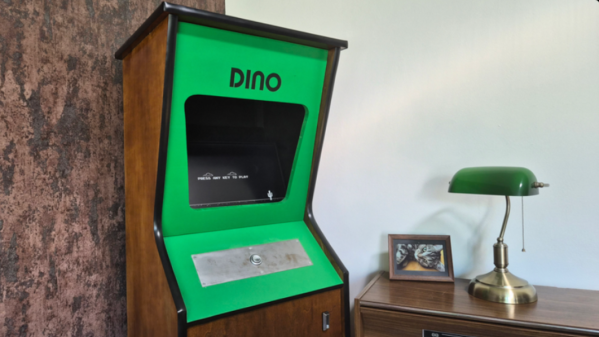
The small handheld console has another trick up its sleeve too. [Paul], the system’s creator, built it as a way to stop doomscrolling so along with having this quick-deploying game on hand, there’s also an NFC tag hidden near the hinge which, when swiped passed a phone, also turns that phone’s airplane mode on. It’s a double-whammy of removing the gamer from the dark patterns and algorithms dominating the mainstream Internet. And, this isn’t [Paul]’s only dinosaur jumper console either. We recently featured a similar (but much larger) build of his housed in a classic arcade-style cabinet.
Back when Google ran a functional search engine, there used to be all kinds of quirky, fun antics hidden in their products. From Easter eggs in certain search results, to a flight simulator hidden in Google Maps, to funny, engaging April Fools jokes, it was a lighter, less corporate time. Now, though, to recreate any of that early Google magic, we have to do it on our own, and [Paul] has come up with an arcade cabinet for the classic Google Chrome dinosaur game that does just that.
Although the Dinosaur Game is still available in modern versions of Google Chrome, it lends itself almost perfectly to an arcade cabinet. Built from 18 mm plywood, the cabinet is standard DIY arcade fare with a built-in shelf to house the electronics and a 4:3 flatscreen monitor for a display. The Raspberry Pi 3B is also just enough to run the game, but the software running on it is unique. The Pi runs an operating system called FullPageOS, which automatically loads a modified version of the Dino jumper in full-screen mode. It’s been changed to look more like an arcade game than a browser Easter egg, with features like a leaderboard and an automatic-play screensaver mode, and the build is rounded out by a cactus-shaped scratching post to accompany the cabinet.
As for gameplay, we couldn’t ask for a simpler user interface. A single button is all that’s needed for this game, and it’s surprisingly engaging. It is a bit large for a single-button game, even with its reduced-width cabinet, so if you’re looking for something smaller, you could always base it on a tabletop arcade system instead.
Knitwear can protect you from a winter chill, but what if it could keep you safe from the prying eyes of Big Brother as well? [Ottilia Westerlund] decided to put her knitting skills to the test for this anti-surveillance sweater.
[Westerlund] explains that “yarn is a programable material” containing FOR loops and other similar programming concepts transmitted as knitting patterns. In the video (after the break) she also explores the history of knitting in espionage using steganography embedded in socks and other knitwear to pass intelligence in unobtrusive ways. This lead to the restriction of shipping handmade knit goods in WWII by the UK government.
Back in the modern day, [Westerlund] took the Hyperface pattern developed by the Adam Harvey and turned it into a knitting pattern. Designed to circumvent detection by Viola-Jones based facial detection systems, the pattern presents a computer vision system with a number of “faces” to distract it from covered human faces in an image. While the knitted jumper (sweater for us Americans) can confuse certain face detection systems, [Westerlund] crushes our hope of a fuzzy revolution by saying that it is unsuccessful against the increasingly prevalent neural network-based facial detection systems creeping on our day-to-day activities.
The original Game Boy was the greatest selling handheld video game system of all time, only to be surpassed by one of its successors. It still retains the #2 position by a wide margin, but even so, they’re getting along in years now and finding one in perfect working condition might be harder than you think. What’s more likely is you find one that’s missing components, has a malfunctioning screen, or has had its electronics corroded by the battery acid from a decades-old set of AAs.
That latter situation is where [Taylor] found himself and decided on performing a full restoration on this classic. To get started, he removed all of the components from the damaged area so he could see the paths of the traces. After doing some cleaning of the damage and removing the solder mask, he used 30 gauge wire to bridge the damaged parts of the PCB before repopulating all of the parts back to their rightful locations. A few needed to be replaced, but in the end the Game Boy was restored to its former 90s glory.
This build is an excellent example of what can be done with a finely tipped soldering iron while also being a reminder not to leave AA batteries in any devices for extended periods of time. The AA battery was always a weak point for the original Game Boys, so if you decide you want to get rid of batteries of any kind you can build one that does just that.
There’s no doubting the utility of the trusty solderless breadboard, but you have to admit they’re less than perfect. They’re not ideal for certain types of circuits, of course, but that’s less of a problem than those jumper wires. The careless will end up with their components hopeless tangled in a rat’s nest of jumpers, while the fastidious will spend far more time making the jumpers neat and tidy than actually prototyping the circuit itself. What to do?
One way to crack this nut is to make the solderless breadboard jumperless, too. That’s the idea behind “breadWare” a work-in-progress undertaken by [Kevin Santo Cappuccio]. The idea is to adapt a standard breadboard so that connections between arbitrary pairs of common contact strips — plus the power rails — can be made in software. The trick behind this is a matrix of analog CMOS switch chips, specifically the MT8816AP. Each chip’s 128 crosspoint switches can handle up ± 12 volts, so there are plenty of circuits that can use these programmable silicon jumpers.
[Kevin] is currently on version 0.2, which is sized to fit under a solderless breadboard and make a compact package. He shared details on how he’s connecting to the breadboard contacts, and it looks like a painful process: pull out the contact, cut a small tab at the gutter-end, and bend it down so it forms a lead for a through-hole in the PCB. It seems like a lot of work, and there must be a better way; [Kevin] is clearly open to suggestions.
A solderless breadboard is a place where ideas go to become real for the first time. Usually, this is a somewhat messy affair, with random jumpers flying all about the place, connecting components that can be quickly swapped to zero in on the right values, or to quickly change the circuit topology. Breadboards aren’t the place to make circuit artwork.
That is, however, not always the case, and we’ve seen more than a few examples from [Ben Eater] on breadboarding that approaches the circuit sculpture level of craftsmanship. And like any good craftsman, [Ben] has shared some of his breadboarding tips and tricks in a new video. Starting with a simple 555 blinkenlight project that’s wired up in the traditional anything-goes fashion, [Ben] walks us through his process for making a more presentation-worthy version.
His tools are high-quality but simple, with the wire strippers being the most crucial to good results. Surprisingly, [Ben] relies most heavily on the simple “scissors-style” strippers for their versatility, rather than the complicated semi-automatic tools. We found that to be the biggest take-home from the video, as well as the results of practice. [Ben] has done tons of this type of breadboarding before, which means when he “eyeballs” stripping 0.3 inches of insulation, he can do it down to a ten-thousandth precision.
Granted, there’s not much new here, but watching this video is a little like watching [Bob Ross] paint — relaxing and strangely compelling at the same time. You can get more of the same with pretty much any of his videos that we’ve covered, like this 6502 breadboard computer build. We’ve also seen [Eater]-inspired builds that are pretty impressive, like this full-8-bit breadboard computer.
The announcement of Autodesk’s changes to the Fusion 360 personal use license terms this week caused quite a dustup. Our article on the announcement garnered a lot of discussion and not a few heated comments. At the end of the day, though, Autodesk is going to do what it’s going to do, and the Fusion 360 user community is just going to have to figure out how to deal with the changes. One person who decided to do something other than complain is Justin Nesselrotte, who came up with a quick and easy bulk export tool for Fusion 360. This gets to the heart of the issue since the removal of export to STEP, IGES, and SAT files is perhaps the most painful change for our community. Justin’s script automatically opens every design and exports it to the file type of your choice. Since the license changes go into effect on October 1, you’d better get cracking if you want to export your designs.
Over on Twitter, Hackaday superfriend Timon gives us a valuable lesson in “you get what you pay for.” He found that a bunch of his header pin jumper cables weren’t even remotely assembled properly. The conductors of the jumper wire were only loosely inserted into the terminal’s crimp, where apparently no crimping pressure had been applied. The wires were just rattling around inside the crimp, rather than making sold contact. We’ve covered the art and science of crimping before, and it’s pretty safe to say that these jumpers are garbage. So if you’re seeing weird results with a circuit, you might want to take a good, close look at your jumpers. And as always, caveat emptor.
The GNU Radio Conference wrapped up this week, in virtual format as so many other conferences have been this year, and it generated a load of interesting talks. They’ve got each day’s proceedings over on their YouTube channel, so the videos are pretty long; luckily, each day’s stream is indexed on the playbar, so along with the full schedule you can quickly find the talks you’re interested in. One that caught our eye was a talk on the Radio Resilience Competition, a hardware challenge where participants compete head-to-head using SDRs to get signals through in an adversarial environment. It sounds like a fascinating challenge for the RF inclined. More details about registering for the competition can be had on the Radio Resilience website.
You know those recipe sites that give you a few choices on what to make for dinner based on the ingredients you have on hand? We always thought that was a clever idea, and now something like it has come to our world. It’s called DIY Hub, and it aims to guide makers toward projects they can build based on the parts they have on hand. Users create projects on the site, either hosting the project directly on the site or providing a link to projects on another site. Either way, the project’s BOM is cataloged so that users can find something to build based on parts stored in their “Garage”. Granted, most of us suffer from the exact opposite problem of not knowing what to build next, but this could be an interesting tool for stimulating the creative process, especially for teachers and parents. It’s currently in beta, and we’d love to see a few Hackaday.io projects added to the site.
And finally, we got a tip to an oldie but a goodie: How to Build a Castle. No, we don’t expect to see a rash of 13th-century castle builds gracing our pages anytime soon — although we certainly wouldn’t be opposed to the idea. Rather, this is a little something for your binge-watching pleasure. The BBC series, which was actually called Secrets of the Castle, was a five-part 2014 offering that went into great detail on the construction of Guédelon Castle, an experimental archaeology project in France that seeks to build a castle using only the materials and methods available in the 1200s. The series is hosted by historian Ruth Goodman and archaeologists Peter Ginn and Tom Pinfold, and it’s great fun for anyone interested in history and technology.