Template specs
- HTML Template Built with Tailwind CSS v4 and Alpine.js v3. Shipped with pre-compiled CSS, changes via Tailwind CLI.
- Next.js Template Built with Next.js 16 (App Router) plus TypeScript support - and Tailwind CSS v4.
- Vue Template Basic app built with Vue v3, Tailwind CSS v4, Vite v6.
About this template
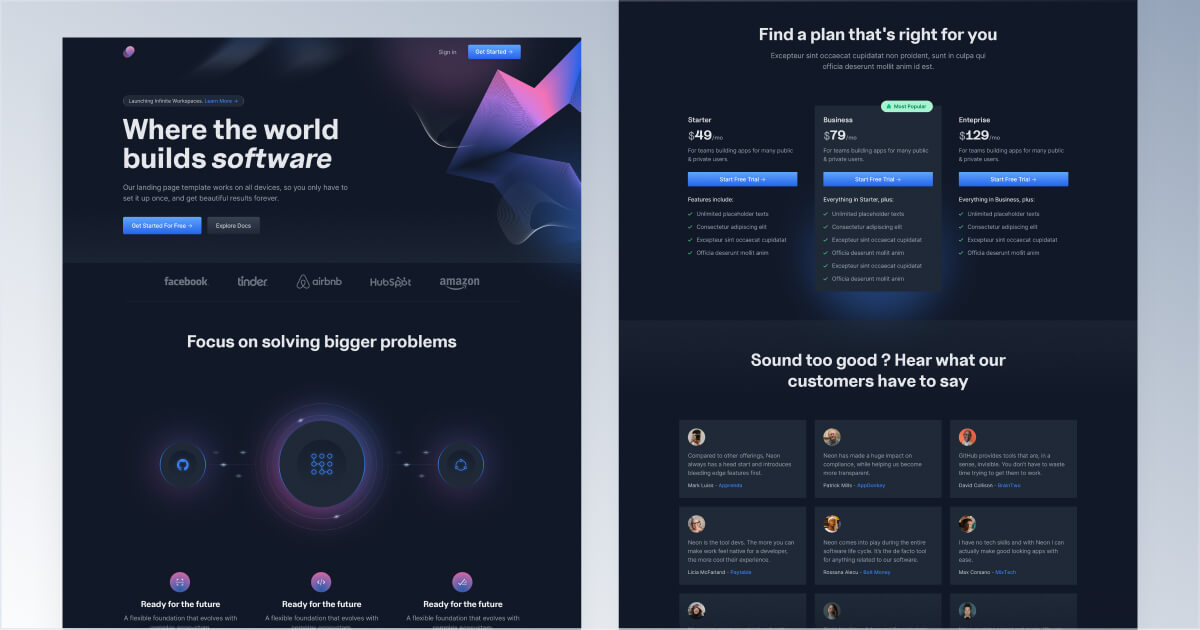
Neon is a superb choice for businesses that need to quickly create a landing page for a new product or validate business ideas. With its flexible layout and elements, you can create a professional page that captures your brand essence and entertains your audience.
The dark layout of Neon is perfect for highlighting key features and benefits of your product or service. The vivid colours and unique typography help draw attention to the most influential information, ensuring that your visitors are active and interested in what you offer.
What’s included
Neon offers a stunning home page with handcrafted custom illustrations, icons, carousels, pricing information, and testimonials. In addition to the home page, the template includes several key user account management pages, including sign-in, sign-up, and password reset pages.
Built for
With its flexible design and comprehensive set of features, Neon is the perfect solution for building a wide range of landing pages, including SaaS, Web3, crypto, tech, and more.
Changelog
July 7, 2026 Update
A tooling and maintenance refresh across every edition.
HTML
- Add local dev server with live reload (
pnpm run devnow runs the Tailwind watcher and Browsersync together) - Bundle the Tailwind CLI as a dependency
- Upgrade Tailwind CSS to 4.3.2 and update other dependencies
- Add favicon pack (SVG, PNGs, ICO, and web manifest)
- Standardize README and page titles
- Update footer with real internal links, Cruip.com copyright, and social links
Next.js
- Upgrade to Next.js 16.2.10 and React 19.2.7
- Update to Tailwind 4.3.2
- Remove unused API route
- Move AOS init into a client component to improve static rendering
- Clean up dependencies and move types to devDependencies
- Add ESLint and Prettier configuration with import sorting
- Add favicon pack (SVG, PNGs, ICO, and web manifest)
- Update layout metadata and page description
- Update footer with real internal links, Cruip.com copyright, and social links
Vue
- Upgrade Vue to 3.5.39 and Vue Router to 5.1.0
- Upgrade to Tailwind 4.3.2
- Upgrade Vite to 8.1.3 and @vitejs/plugin-vue to 6.0.7
- Remove insecure
process.envexposure and unused resolve alias from the Vite config - Add a real favicon set (SVG, PNGs, ICO, and web manifest)
- Add ESLint (flat config with eslint-plugin-vue) and Prettier, and lint/format all files
- Update footer with real internal links, Cruip.com copyright, and social links
FAQ
- Yes! You can use this template for an unlimited number of personal and commercial projects. These can include commercial landing pages, websites, or SaaS applications that end users pay to access.
- If you're a freelancer or agency, you can use this templates for your client projects. Please be aware that the final outcome must still adhere to our Terms & License agreement.
- Yes, you can take sections from one template to another, but since every template has a custom tailwind.config.json file it may require a bit of review work. For example, if you want to paste a section of Cube into Neon, you'll have to swap any
font-hkgroteskclass from Cube code tofont-uncut-sans. Also, you might want to check that the color classes match the color scheme of the destination template. - Unfortunately, we cannot provide support for using frameworks or site generators that are not explicitly advertised as compatible with our templates. However, you can set up your own environment and import the necessary components or elements from our templates into your application. By doing so, you will be able to customize the integration to meet your specific needs.
- A Figma file is available for this template. However, since our primary focus is on providing quality code for developers, this design file serves solely as a visual reference and is not organized into complex auto layouts or dynamic components. You can download a free Figma file from our public page to see how our design files are structured.
