Template specs
- HTML Template Built with Tailwind CSS v4 and Alpine.js v3. Shipped with pre-compiled CSS, changes via Tailwind CLI.
- Next.js Template Built with Next.js 16 (App Router) plus TypeScript support - and Tailwind CSS v4. Including examples of the new data fetching model developed by the React team.
- Vue Template Basic app built with Vue v3, Tailwind CSS v4, Vite v6.
About this template
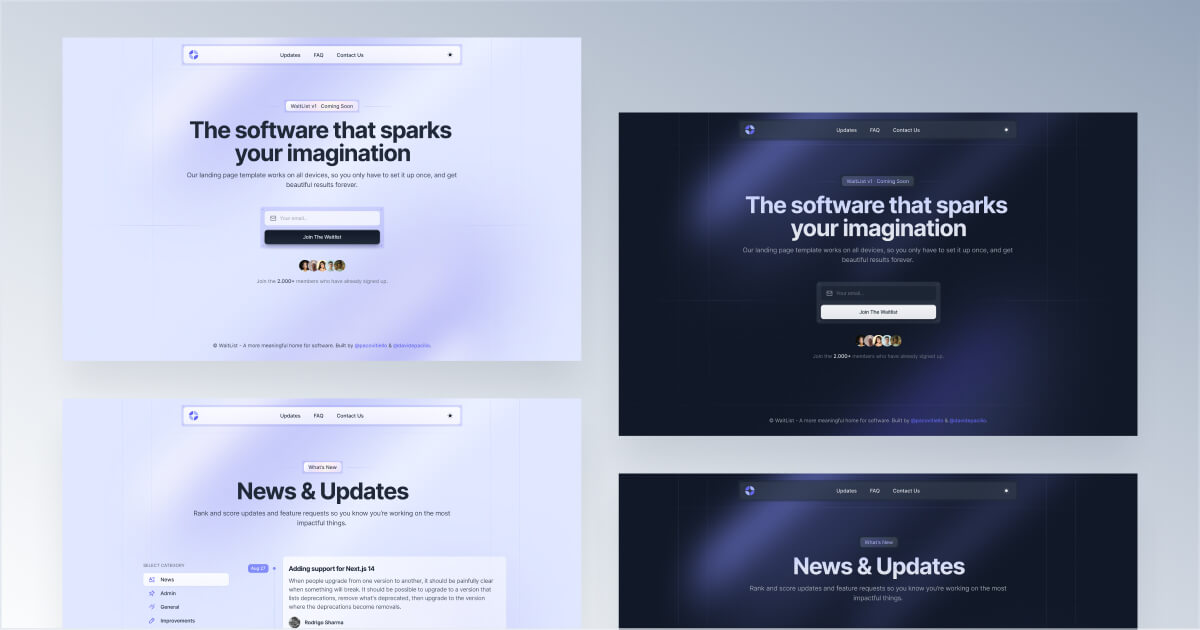
Waitlist, as the name suggests, is a user-friendly coming soon landing page template specifically designed for modern tech products. This template is an excellent starting point for startups looking to collect email addresses and build a dedicated audience before a product launch.
In addition to a main page with a prominent input form, this product is equipped with three additional layouts that aim to deliver a comprehensive experience during the development phase. In detail, it includes a FAQ section that functions similarly to a knowledge base, a changelog design with a list of posts in chronological order, and a contact page for visitors to get in touch.
At Cruip, we care deeply about aesthetics, so this product is available in two layout options (white and dark), features attractive indigo gradients, and incorporates simple shapes that are highly customizable and adaptable.
What’s included
This template includes four pre-designed pages and two layout variants that are easily changeable using the top switcher in the header section. Last but not least, every page is designed to work seamlessly with your workflow so that you can integrate any components with your favourite tools.
Built for
Waitlist is available for every tech product that seeks a simple starting point to collect email addresses and build an audience before the takeoff.
Changelog
July 7, 2026 Update
A cross-edition maintenance release that upgrades every edition to Tailwind CSS 4.3.2 and the latest framework dependencies, with added dev tooling, dependency cleanup, and linting and formatting setup.
HTML
- Add a local dev server with live reload (
npm run devnow runs the Tailwind watcher and Browsersync together) - Bundle the Tailwind CLI as a dependency
- Upgrade Tailwind CSS to 4.3.2 and update other dependencies
Next.js
- Upgrade to Next.js 16.2.10 and React 19.2.7
- Update to Tailwind 4.3.2
- Remove unused API route
- Clean up dependencies and move types to devDependencies
- Add ESLint and Prettier configuration with import sorting
Vue
- Upgrade Vue to 3.5.39 and Vue Router to 5.1.0
- Upgrade to Tailwind 4.3.2
- Upgrade Vite to 8.1.3 and @vitejs/plugin-vue to 6.0.7
- Remove insecure
process.envexposure and unused resolve alias from the Vite config - Add a real favicon set (SVG, PNGs, ICO, and web manifest)
- Add ESLint (flat config with eslint-plugin-vue) and Prettier, and lint/format all files
FAQ
- Yes! You can use this template for an unlimited number of personal and commercial projects. These can include commercial landing pages, websites, or SaaS applications that end users pay to access.
- If you're a freelancer or agency, you can use this templates for your client projects. Please be aware that the final outcome must still adhere to our Terms & License agreement.
- Yes, you can take sections from one template to another, but since every template has a custom tailwind.config.json file it may require a bit of review work. For example, if you want to paste a section of Cube into Neon, you'll have to swap any
font-hkgroteskclass from Cube code tofont-uncut-sans. Also, you might want to check that the color classes match the color scheme of the destination template. - Unfortunately, we cannot provide support for using frameworks or site generators that are not explicitly advertised as compatible with our templates. However, you can set up your own environment and import the necessary components or elements from our templates into your application. By doing so, you will be able to customize the integration to meet your specific needs.
- A Figma file is available for this template. However, since our primary focus is on providing quality code for developers, this design file serves solely as a visual reference and is not organized into complex auto layouts or dynamic components. You can download a free Figma file from our public page to see how our design files are structured.
