
Check and manage your disk space
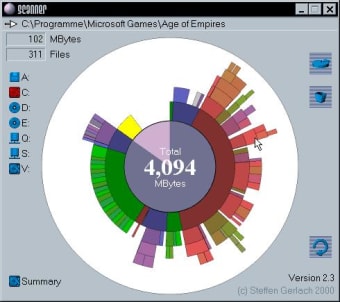
Scanner is a free system utility software that allows you to check how much your files are taking up space on your PC via a pie chart. Developed by Steffen Gerlach, this is a disk space analyzing and management tool that offers a visual representation of your storage.
Top Recommended Alternative
Similar to TreeSize, Scanner can display the diagnostics of your PC—although the focus of this program is solely on your disk space and nothing else. It uses a multi-level chart to show the different directories within your PC memory, which is very helpful.
No good built-in tool
When doing a maintenance check on your PC disk space, the process usually isn’t a laborious affair. Even non-tech-savvy users can easily access the Properties of each directory by right-clicking them. The more knowledgeable of them can check the overall status of the devices and drives by opening File Explorer and visiting “This PC” on the sidebar. The “Uninstall a Program” option from the Control Panel also shows the exact size of an application on your system.
However, from a visual standpoint, these don’t actually display the sizes and space taken up in an easier manner. The closest and best representation of this is the ring pie chart shown when you check Properties. However, it only has two sides to it: Free Space and Used Space. You won’t know the individual slice of used space for each file and program that you have with just this alone. Thus, at this point, you have to turn to a third-party program such as Scanner.
A handy free disk analyzer
As a system tool, Scanner operates on a simple premise: report diagnostics using as little computer resources as possible. It’s lightweight, portable, and doesn’t even require installation—simply unpack its ZIP file and run its EXE file to use it whenever. It automatically scans your PC and then displays your large files in colored concentric circles—also called a “sunburst chart.” In this manner, you can check how your disk space is divided in each directory and drive, which is accessible on the left side of the interface.
If you hover your cursor over a particular circle, it will reveal the folder path, total size, and the total number of files. The program also allows you to set automatic scans on individual local drives, directly access the “Add/Remove” function in the Control Panel, and zoom in and out of the circles. However, as useful as this tool is, it lacks advanced features like the option to get a full statistical report. It’s meant to be light so it doesn’t perform any resource-extensive actions on your PC.
Simple and straightforward
All in all, Scanner by Steffen Gerlach is a handy little software if you want more accurate data on your used and remaining disk space. Not only does it show how much space your files are taking up, but it also allows you to delete programs through it and open file paths. However, it would be a much better choice if it had some advanced features like a full report you can share or print.