
Quick Answer
Put ? after a group to make it optional, for example (?P<area>[A-Z]{2})?. The whole pattern can still match when the group is absent; match.group('area') then returns None. Use named groups for readable results and (?:...) when grouping is needed without capturing.
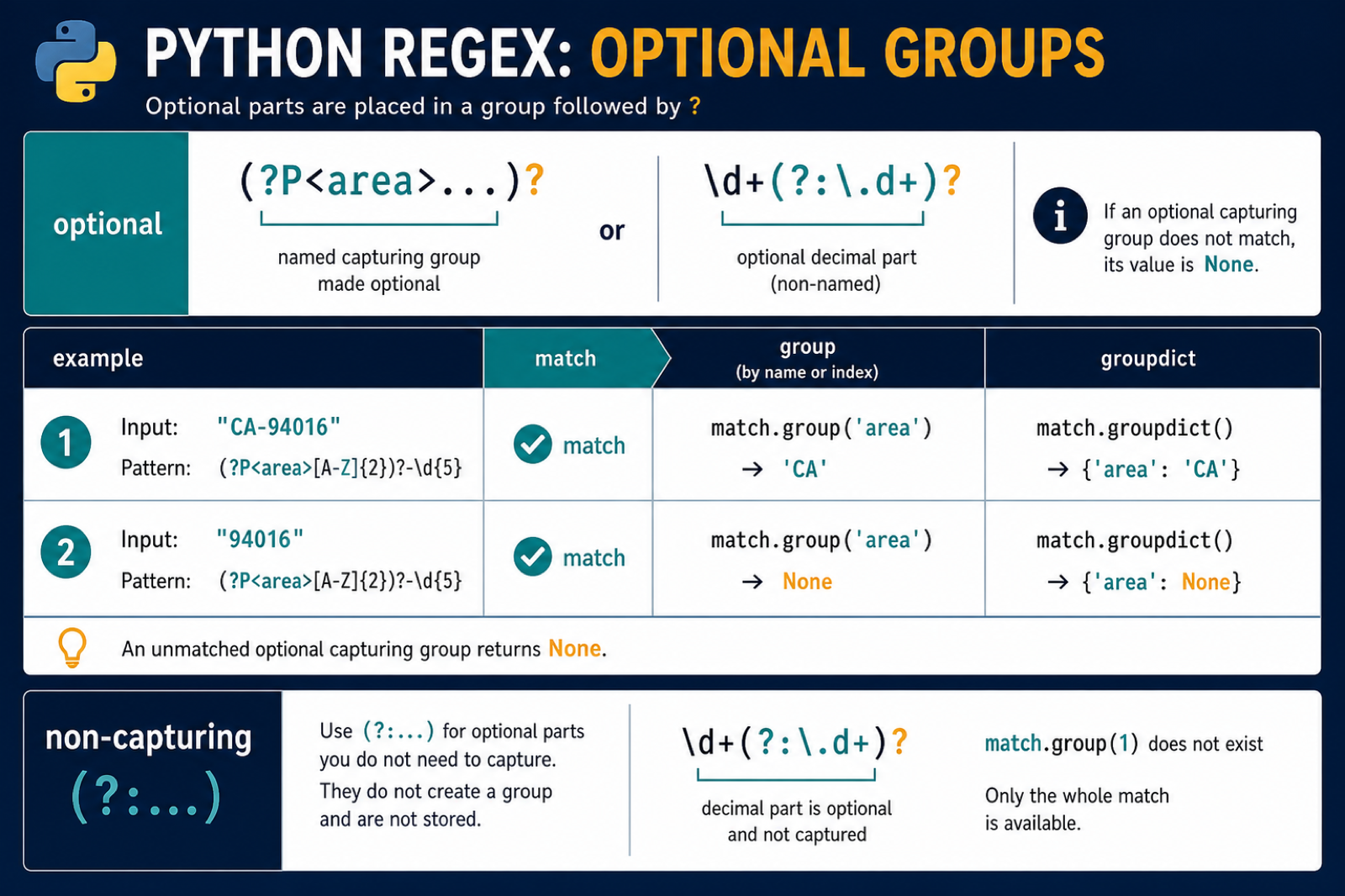
An optional regex group matches text that may appear zero or one time. In Python, the ? quantifier makes the previous token or group optional.
The main references are Python’s re module documentation, the regular expression syntax guide, and the docs for match objects.
Optional groups are useful for URLs, units, prefixes, suffixes, dates, and log lines where a section is sometimes present. The main rule is to check the match and handle missing capture values explicitly.
Optional syntax is powerful, but it can also make a pattern too permissive. Before adding ?, decide which part of the input is required and which part may be absent.
When the optional section carries data you will read later, give it a name or assign a clear default immediately after matching.
Make One Character Optional
The simplest optional pattern puts ? after one character.
import re

pattern = r"colou?r"

for text in ["color", "colour", "colouur"]:
    match = re.fullmatch(pattern, text)
    print(text, bool(match))
The u? part means the letter u may appear once or not at all.
Use fullmatch() when the entire string should fit the pattern.
If you use search() instead, the optional part may match inside a larger string. That can be correct for log scanning but surprising for validation.
Make A Whole Group Optional
Put the group in parentheses and add ? after the closing parenthesis.
import re

pattern = r"(https://)?example\.com"

for text in ["https://example.com", "example.com"]:
    match = re.fullmatch(pattern, text)
    print(text, bool(match))
This matches either the full URL prefix or no prefix.
If you do not need to capture the optional text, use a noncapturing group.
Capturing only the values you plan to read keeps group indexes easier to maintain.
Use A Noncapturing Optional Group
(?:...) groups pattern syntax without creating a captured value.
import re

pattern = r"(?:https://)?(?P<host>example\.com)"
match = re.fullmatch(pattern, "https://example.com")

if match:
    print(match.group("host"))
    print(match.groups())
The URL prefix participates in matching but does not appear as a separate captured group.
This keeps group numbers stable when the optional part is only structural.
Stable group numbers matter when existing code already calls group(1) or group(2). Adding a new capturing group can shift those indexes.
Handle A Missing Optional Capture
When an optional capture group is absent, its group value is None.
import re

pattern = r"size=(?P<number>\d+)(?P<unit>kg)?"

for text in ["size=10kg", "size=10"]:
    match = re.fullmatch(pattern, text)
    if match:
        unit = match.group("unit") or "units"
        print(match.group("number"), unit)
First check that the whole pattern matched. Then choose a default for the optional group.
This avoids confusing a missing group value with a failed pattern match.
That distinction is important because a missing optional capture is normal, while a missing whole match usually means the input did not fit the pattern.
Use Optional Groups In Dates
Optional groups are helpful when a date may include a time section.
import re

pattern = r"(?P<date>\d{4}-\d{2}-\d{2})(?:T(?P<time>\d{2}:\d{2}))?"

for text in ["2026-07-09", "2026-07-09T14:30"]:
    match = re.fullmatch(pattern, text)
    if match:
        print(match.group("date"), match.group("time") or "00:00")
The time part is optional, but the date part is required.
For real date validation, parse the matched values with datetime after the regex check.
Regex can check the shape of a date string, but it does not know whether every calendar date is valid.
Avoid Overly Broad Optional Patterns
Too many optional pieces can make a regex match text you did not intend. Keep required anchors and required fields clear.
import re

pattern = r"^user:(?P<name>\w+)(?:\s+role:(?P<role>\w+))?$"

for text in ["user:ada role:admin", "user:ada", "role:admin"]:
    match = re.fullmatch(pattern, text)
    print(text, bool(match))
The anchors and required user: section prevent unrelated text from matching.
The practical rule is to make only the truly optional section optional, check the whole match, and provide defaults for optional captures before using them.
If a pattern becomes hard to explain, split the parsing into two steps. A simpler required match followed by small optional checks is often easier to test.
Also distinguish optional groups from repeated groups. ? means zero or one occurrence, * means zero or more, and + means one or more. Choosing the smallest correct quantifier makes later debugging easier.
Write tests for both forms of the input: one where the optional section is present and one where it is absent. That catches group-default mistakes early.
When optional text appears in the middle of a pattern, make the surrounding required text specific enough to stop accidental partial matches.
If a match result is surprising, print match.groups() and match.groupdict() during debugging. That shows which optional captures were present and which ones returned None.
Remove those debug prints after the parser behavior is covered by tests.
Use raw strings for regex patterns so backslashes stay readable.
Read an Optional Named Group Safely
A named capture makes optional data easier to consume than a numeric group. Check for None before calling string methods, because an unmatched optional group is not the same as an empty string.
import re

pattern = re.compile(r"(?P<area>[A-Z]{2})?-?(?P<number>\d{5})")
for value in ["CA-94016", "94016"]:
    match = pattern.fullmatch(value)
    print(match.groupdict())
For the second value, area is None. Use match.groupdict().get('area') or '' only when your application explicitly wants to normalize the missing value to an empty string.
Capture Only What You Need
Capturing groups affect the shape of methods such as findall(). If a group exists only to apply a quantifier or alternation, use a non-capturing group (?:...) so later code does not receive an unnecessary tuple or renumbered capture.
import re

print(re.findall(r"(?:https?://)?example\.com", "example.com https://example.com"))
print(re.findall(r"(https?://)?example\.com", "example.com https://example.com"))
Use fullmatch() when the complete input must conform, search() when the pattern can occur inside larger text, and named groups when the result is part of an application data structure.
For broader pattern and fallback handling, compare regex newline matching with conditional imports. Read regex new line and python conditional import for the related workflow.
Frequently Asked Questions
How do I make a Python regex group optional?
Put the question mark quantifier after the group, such as (abc)?. For a named group, use a form like (?P<name>abc)?.
What does an unmatched optional regex group return?
match.group() for that capture returns None when the optional group did not participate in the match.
What is the difference between a capturing and non-capturing group?
A capturing group stores text for group() or findall(), while (?:…) groups the pattern without adding a captured result.
Should I use named groups for optional regex values?
Named groups improve readability and let you use groupdict(). Always handle None before applying string operations to an optional capture.
