 Blogmaker

A focused editor that stays out of your way
Write, organize, and schedule posts in one workspace, with private notes and Writing insights to help polish each draft.
Fully hosted. SEO-ready. No maintenance.
Trusted by thousands of bloggers, writers, and content marketers worldwide.
What matters most
Write and schedule posts, match your brand, and grow your audience—all in one place.
Write, organize, and schedule posts in one workspace, with private notes and Writing insights to help polish each draft.
Editable metadata, schema, sitemaps, social cards, and one-click AI suggestions help every post get discovered.
Match your brand with colors, typography, layouts, and newsletter forms in Design Studio. Preview every device before publishing.
Collect emails, send newsletters, and let readers contact you directly with native forms.
Search free stock media, upload your own files, or add YouTube, podcasts, forms, maps, and custom widgets.
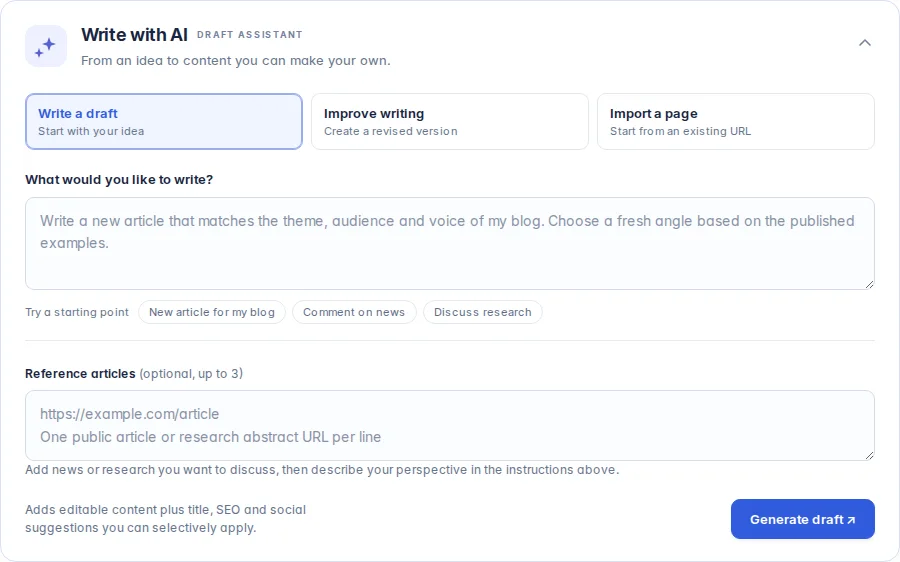
Create editable drafts and improve your writing with AI. Review every change before you publish.
Privacy-first analytics show traffic, sources, and the posts and pages readers value most.
Publish on your own domain while Blogmaker handles hosting, HTTPS, backups, updates, and support.
Features vary by plan. Compare what’s included. Hosting at /blog is available on Expert and Advanced.
Design Studio
Shape your blog beside a live preview. Open a component to highlight it on the page, adjust its appearance, and publish when it feels right.
Some controls depend on your plan. Compare plans or explore the Design Studio guide.

Your website + your new blog
Follow an example from an existing website to a published blog. Open each step to see the work involved. No account needed.
/blog hosting: Expert or Advanced
Design Studio on every plan.
example.comYOUR BLOGMAKER BLOGexample.com/blogOn Expert or Advanced, save example.com/blog in Settings > Domain > /subdirectory. Keep a separate Blogmaker origin, such as myblog.bmaker.app.
Configure your host to forward only /blog and its children to that origin. Use the Cloudflare, Netlify, or other-host instructions in Domain settings, then run Verify setup. Your other pages stay with your existing host.
A host must support a reverse proxy; DNS alone cannot route a path. If yours cannot, use blog.example.com instead.
/blog/hello-world → /blog/hello-worldREDIRECT A CHANGED ADDRESS/news/hello-world → /blog/hello-worldAlready have posts? Share your export and current URL list with support to review import scope. Keep the same public paths where supported and map any changed paths before switching.
For an old URL outside /blog, set a permanent redirect at your existing host. Use Blogmaker redirects for paths it serves. Check internal links and images too; importing content does not guarantee unchanged URLs.
Match your colors, typography, and layout in Design Studio. Expert and Advanced include custom navigation so readers can move between your site and blog.
example.com/blog/hello-worldWrite or import a draft, inspect its preview, and review its search and sharing details. Publish when it is ready. For a migration, prepare and review the imported content before switching the public route.
After connecting the route, test old URLs, redirects, images, navigation, and forms. Check canonical URLs, the sitemap, and feed at the public address. Verify setup confirms the connection; these checks confirm the reader experience.
Use the setup and launch checklist →Connect with MCP
Connect a compatible AI assistant to your blog through MCP. Sign in, choose your blog, and approve access without sharing an API key.
Writing, uploads, publishing, and analytics are included with Advanced. Eligible lower plans can read public content.
You ask
“Write a post announcing our spring collection. Use these product notes, include an FAQ, and save it as a Blogmaker draft for review.”
In Blogmaker
DraftYour article, ready to review in the editor.
Review the draft, refine it, then ask your assistant to publish.
Create with AI
Start with an editable draft that matches your blog, or ask for a revised version of what you wrote.
Writing tools are included with Advanced. Included with every plan: one-click AI SEO & metadata.
In the past, I've used Medium, Ghost, and WordPress, but I wanted a solution that was powerful and simple at the same time. Blogmaker checks all the boxes!
 Justin Jackson
I've been a user for many years now. I used to blog on Medium and WordPress, and Blogmaker is 100x better, not to mention the excellent caring support.
 Ronen Sabag
Running a blog has got more complex over the years, with plugins, themes, and management. Blogmaker removes all of that and just lets you publish your posts under your own domain.
 Helen Ryles


Infinitely easier than using WordPress and other blogging services I tried in the past
Capterra 4.9A great company with great support and a plethora of features at an accessible price
Trustpilot 4.7Blogmaker combines the simplicity of hosted tools such as Substack, Blogger, and Medium with the ownership and customization associated with self-managed tools such as Ghost and WordPress.
Blogmaker removes the maintenance and complexity traditionally associated with WordPress blogs while preserving the flexibility needed to publish and grow a professional blog.
The best part: we made migrating from WordPress to Blogmaker easy.
If you're looking for an antithesis to WordPress that hits all the right notes, look no further than Blogmaker. There's a lot to love about this platform, but what truly stood out to me was how easy it was to start a blog with Blogmaker, all while offering some really powerful features.
 Maliha M
Built for reliability, performance, and long–term ownership, Blogmaker supports hundreds of blogs and thousands of published articles.
Powering modern blogs for content, SEO/AEO, news, marketing, authority building, journaling, photography, expert insight, and more.
Start with your export and a list of current URLs. We can review the import scope with you, plan any redirects, and check the content and design before switching your live blog.
Blogmaker made migrating from Ghost straightforward. With direct help from the founder, I was able to get everything running exactly as I wanted. The whole experience was refreshingly personal.
 Benjamin Boman
Meticulously crafted to fit every aspect of writing and publishing, Blogmaker removes the complexity from the process of running and maintaining a professional blog.
Blogmaker is a hosted blogging platform created for anyone who wants to publish content online. Both individuals and businesses find it a perfect fit for their online content publishing needs.
Absolutely! Blogmaker is also built for companies that want to publish content professionally, strengthen their brand authority, and grow through search and content marketing. It provides the infrastructure, performance, and reliability needed to operate a business blog without technical overhead.
Yes. You can manage multiple blogs, each with its own plan and settings. Switch between them without having to log in to a separate account.
Yes. We can assist you by providing guidance during setup to ensure your blog launches smoothly and confidently.
Unlike traditional CMS platforms, Blogmaker requires no plugins, updates, security management, or maintenance. The platform is optimized and managed for performance, reliability, and SEO from day one, allowing teams to focus on publishing and business growth instead of technical upkeep.
Yes. You fully own your content, domain, and audience. Blogmaker provides the infrastructure to publish and manage your blog while ensuring your assets remain under your control.
Yes. You can connect your domain or serve the blog within a /subdirectory of your main website. This helps strengthen domain authority and ensures your content contributes directly to your brand presence.
Yes. Blogmaker includes built-in SEO infrastructure such as metadata controls, schema markup, sitemaps, performance optimization, and social preview cards to help your content rank and appear professional when shared.
No. Blogmaker works out of the box with a simple publishing workflow. Advanced users can extend functionality using custom CSS, code injections, APIs, and integrations. Most customization options, including Design Studio, are already built in.
Yes. Blogmaker supports multiple authors, making it suitable for companies managing collaborative publishing across departments or content teams.
Blogmaker includes built-in newsletter tools, subscriber management, social sharing features, and private content options that help you build direct relationships with your audience and grow engagement.
Blogmaker runs on optimized infrastructure with secure hosting, SSL, monitoring, and automatic backups. Accounts can add two-step verification with a passkey, security key, or authenticator app, so a stolen password alone cannot sign in. This ensures fast performance, strong security, and dependable uptime for business-critical publishing.
Yes. Connect a compatible AI assistant through MCP to work on your Blogmaker blog, or use API v2 for your own tools and automations. MCP draft editing, image uploads, publishing, and analytics require Advanced. Sign in, choose a blog, and approve the assistant's permissions before it can access your content.
Blogmaker is a blogging platform for anyone wanting to publish content online about their business, expertise, products and services, SEO, travel, authority building, or personal interests. It's also a great fit for anyone wanting to attach a /blog to an existing website built on platforms such as WordPress, Carrd, Webflow, Framer, or Lovable.
Blogmaker is a breeze to set up and you can have your first published article in minutes.
There's nothing to install, and no extra hosting to pay for.
Blogmaker is the best no nonsense way to do SEO. Simple and effective. It just works! One of the best blogging platforms I've ever used, and I've used many.
 Ayush
Blogmaker is the most straightforward blogging platform. There is a lot of care and thought put into it. It has everything you need to run a well polished blog.
 Tiago Silva
An absolutely amazing blogging platform. Much simpler than WordPress or Ghost. Been using it for years and I won't be going back to any of other tools.
 Ankit Ghosh
Blogmaker makes it easy to just focus on writing. I don't have to worry about hosting issues or upgrading software. Blogmaker removes a lot of the roadblocks.
 Mario Rodriguez
Blogmaker is everything you can ask for in a clean content–focused platform. It's unmatched compared to anything I've tried! It's easy to learn and customize.
 Kyle Anacker
Love the clean UI and simplicity and its Settings section is packed with powerful features. Using it with an AI writer to auto-publish SEO content is seamless.
 Pramod
© BlogMaker LLC