
I am an alert. Visible as you’ve clicked on the toggle interaction above. Click the toggle again to hide me.
Interactions
Create dynamic user experiences with interactions
Perform various actions in response to user and browser events. All without touching a single line of code.
Interaction Essentials
Triggers, actions and targets
Each interaction consists of a trigger, an action and a target. All set through an easy-to-use visual interface. Typical interactions are open a popup, show or hide content, toggle classes or attributes on scroll, click, hover, viewport enter or leave, and more.
Learn more about Interactions
Interaction Trigger
Respond to clicks, hovers, scrolling, and other browser events.
Use Filter Submit (Start/End) to show a loading indicator during an AJAX filter submission or close a filter panel when the request finishes.
With WooCommerce, show a popup after a successful cart item addition, removal, or quantity change.

Interaction Action
Perform specific and highly customizable actions in response to your interaction trigger. Actions like show/hide an element or popup, setting HTML attributes, running animations, or dynamically loading query loop results.

Interaction Target
Specify the element that your interaction should target. Whether it's the element itself, a custom CSS selector, or a popup – you control the impact of your interactions with absolute precision.
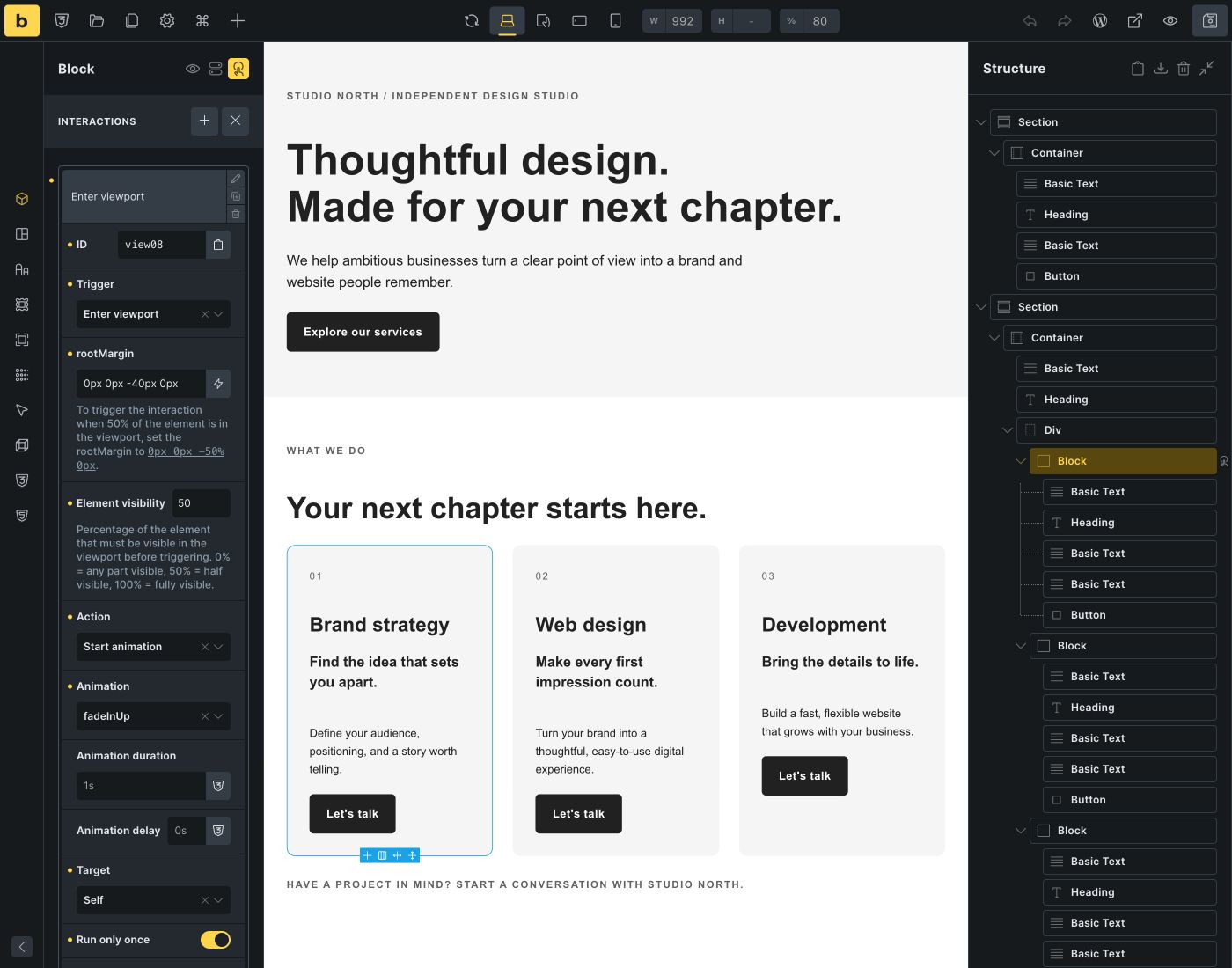
Viewport interactions
Control when viewport interactions run
Start an animation when half of a card becomes visible, rather than as soon as its edge enters the viewport. Set the visible percentage, adjust the detection boundary with root margin, and use a custom CSS selector when the action should affect another element.
A small but fine selection of common interactions
Hover me
(animate)
(animate)
Click me
(open popup)
(open popup)
Click to show/hide
(toggle attribute)
(toggle attribute)

Interaction Conditions
Get even more granular with interaction conditions
Not only can you set up unlimited interactions, you can also define interaction conditions. So your interactions are only performed when those conditions are met.
Unlock advanced capabilities by setting conditions based on browser storage (window, sessionStorage, localStorage).
