Leaderboard
-

JorgeB
Moderators26Points87618Posts -
alturismo
Moderators15Points10483Posts -
ironicbadger
Administrators11Points1400Posts -
Thorsten
Members9Points344Posts



Popular Content
Showing content with the highest reputation since 09/22/26 in all areas
-
4 pointsUnraid OS 7.3.3 is the latest stable release, bringing security fixes, Linux kernel 6.18.54-Unraid, Docker 29.8.2, ZFS 2.4.4, Unraid API 4.37.5-2, and improvements to File Manager and the WebGUI. We recommend upgrading to receive the security fixes in this release. The changes below are cumulative compared with Unraid OS 7.3.2. Security This release hardens first-time root-password setup and privileged terminal requests, blocks unsafe API-key authorization redirects, improves UPnP remote-access discovery, and safely handles guest-agent content in VM Manager. The cumulative 7.3.3 changelog includes these notable package security updates compared with 7.3.2: OpenSSL 3.5.7 → 3.5.8-2. Samba 4.22.10-2_LT → 4.22.11-2_LT. PHP 8.4.23-1_LT → 8.4.26-1_LT. nginx 1.30.3-1_SBo_LT → 1.30.4-1_SBo_LT. The full 7.3.3 release notes contain the package-by-package changelog and security annotations. Linux Kernel The Linux kernel is updated to 6.18.54-Unraid. Docker Docker engine is updated from 29.5.3 to 29.8.2. Docker Manager retains the shared default icon when a container without its own icon is removed or updated. Thanks to chodeus for this fix. Storage / File Manager ZFS is updated from 2.4.3 to 2.4.4. This release also fixes failures that could interrupt access to user shares or prevent file operations from completing: File Manager copy and move operations to exclusive user shares no longer fail with a symlink-depth error. The user-share filesystem, shfs, no longer deadlocks when concurrent file-lock requests exhaust its FUSE worker pool. An shfs assertion failure that could make /mnt/user unavailable has been fixed. WebGUI / System Configure the physical power button under Settings > Power Options to shut down, reboot, or do nothing. Stopped-array utilization is displayed correctly, and used/free statistics remain visible for a mounted Boot Device while the array is stopped. Names, logs, and other WebGUI values are displayed as text rather than interpreted as HTML. Networking / Hardware Additional drivers and firmware support Intel, MediaTek, and Realtek wireless hardware. Virtualization Hyper-V kernel support covers graphics, ballooning, storage, keyboard, VMBus, utilities, and VSOCK components. Unraid API Updated dynamix.unraid.net to 4.37.5-2. See the Unraid API changelog. Base Distro This release updates the underlying system packages with security fixes and maintenance improvements. It includes 319 package updates compared with Unraid OS 7.3.2. See the full release notes for the complete package list. Known Issues No new release-specific known issues are listed. See the 7.3.2 release notes for previously documented issues. Rolling Back See the 7.3.2 release notes for rollback guidance and compatibility limitations. Upgrading For step-by-step upgrade instructions, see Updating Unraid. Questions about your license? See the Licensing FAQ. Release Links Unraid 7.3.3 Release Notes4 points
-
4 pointsUnraid 7.4 makes it easier to see what your server is doing and manage what’s running. Track Mover progress, keep background tasks in view, and control your Docker containers’ memory use and network connections - all from the web interface. Unraid 7.4.0-rc.1 is ready for testing ahead of the stable release. This is a release candidate so please install on a test system. Security The cumulative 7.4 changes validate OpenTerminal inputs before shell commands, display guest-agent network-interface names as text, and anonymize public IPv6 addresses in diagnostics. Community contributions also remove curl -k from public notification agents, restoring certificate verification. The 7.4.0-rc.1 release uses the same base package versions as 7.3.3. Notable security-related packages compared with beta.3: OpenSSL 3.5.8-2 - unchanged from beta.3. Samba 4.22.11-2_LT - unchanged from beta.3. PHP 8.4.24-1_LT → 8.4.26-1_LT. nginx 1.30.4-1_SBo_LT - unchanged from beta.3. The release-diff report annotates a pcre2 security update and a util-linux update referencing CVE-2026-78408. See the full release notes for package details. Linux Kernel The Linux kernel advances from 6.18.52-Unraid in beta.3 to 6.18.54-Unraid. Docker You can now connect a container to multiple custom networks. Those connections stay in place when you update or recreate the container. Advanced View adds a memory limit field, giving you control over how much memory each container can use. The Add/Edit form also previews your container’s icon, with a fallback if the image is missing or invalid. Update checks now support OCI images and refresh local image information. Fixes also prevent repeated attempts to load missing icons, preserve the shared default icon, and display the correct creation date for orphaned images. Docker Engine is updated to 29.8.2. Storage / File Manager Mover now shows progress and status, so you can see how file transfers are going. It also preserves hard links between files in different subfolders of the same share. File Manager keeps the source file if a move between shares on different pools or drives fails. Exclusive shares stay under /mnt/user, keeping navigation consistent. Fixes to the user-share filesystem prevent freezes and a crash that could make shares unavailable. Drive identification now supports SGPIO/IBPI-capable controllers when SES is unavailable. You can also start an encrypted array by entering a valid passphrase and pressing Enter. ZFS remains at 2.4.4, rebuilt for the updated Linux kernel. WebGUI / System A new task tray brings background plugin, Docker, and virtual machine operations into one place. Queue tasks and reopen them from any browser tab to check progress. Task windows also adjust to your screen size. Plugin installs now show progress as it happens. Update checks run independently, so one slow plugin no longer holds up the whole page. Plugins with available updates stay at the top, and failed checks show an explanation instead of incorrectly reporting “up to date.” You can configure your server’s physical power button under Settings > Power Settings > Power Button. These settings also work alongside the Dynamix System Buttons plugin. Other fixes License checks retry after temporary connection problems. Stopped arrays show their offline status instead of 100% utilization. Boot-device space usage remains visible when the array is stopped. Networking / Hardware Since beta.3, the firmware inventory adds 12 files for Intel wireless, MediaTek Bluetooth, Marvell, and Realtek Bluetooth hardware. The cumulative 7.4 series also expands Intel, MediaTek, and Realtek wireless support, including RTW88 8812A/8814A/8821A and RTW89 8851BU/8852BU. It adds controller, sensor, and audio-codec support, provides the optional netconsole module, and aligns network defaults with Fedora’s sysctl baseline. Virtualization Unraid 7.4 adds support for running under Hyper-V, including drivers for storage, memory management, keyboards, and communication with the host. This release also fixes an unnecessary warning during VM startup and updates QEMU helper messages. Unraid API Updated dynamix.unraid.net from 4.37.4-5 in beta.3 to 4.37.5-2. See the Unraid API changelog. Base Distro This release updates the underlying system packages with security fixes and maintenance improvements. It includes 41 package updates since beta.3 and uses the same base package versions as Unraid OS 7.3.3. See the full release notes for the complete package list. Known Issues The current rc.1 draft lists no new release-specific known issues and refers to the 7.4.0 release notes for previously documented issues. Rolling Back The current rc.1 draft lists no release-specific rollback warnings. See the 7.4.0 release notes for prior guidance. Upgrading For step-by-step upgrade instructions, see Updating Unraid. Questions about your license? See the Licensing FAQ. Release Links Unraid 7.4.0-rc.1 Release Notes Community contributions Thanks to junkerderprovinz for live plugin-install progress Mainfrezzer for the registry User-Agent and OCI support Joly0 for the Docker fallback-loop fix chodeus for the shared-icon and orphan-image date fixes Sacred-Shadow for removing curl -k from public notification agents4 points
-
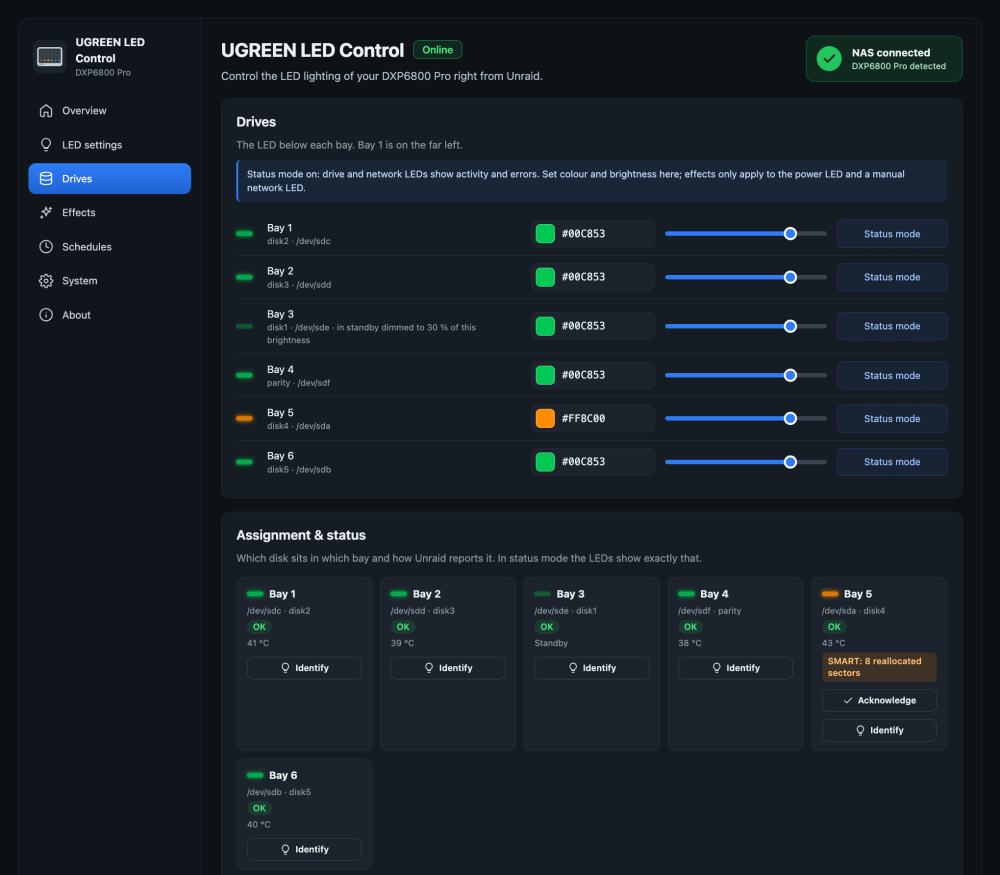
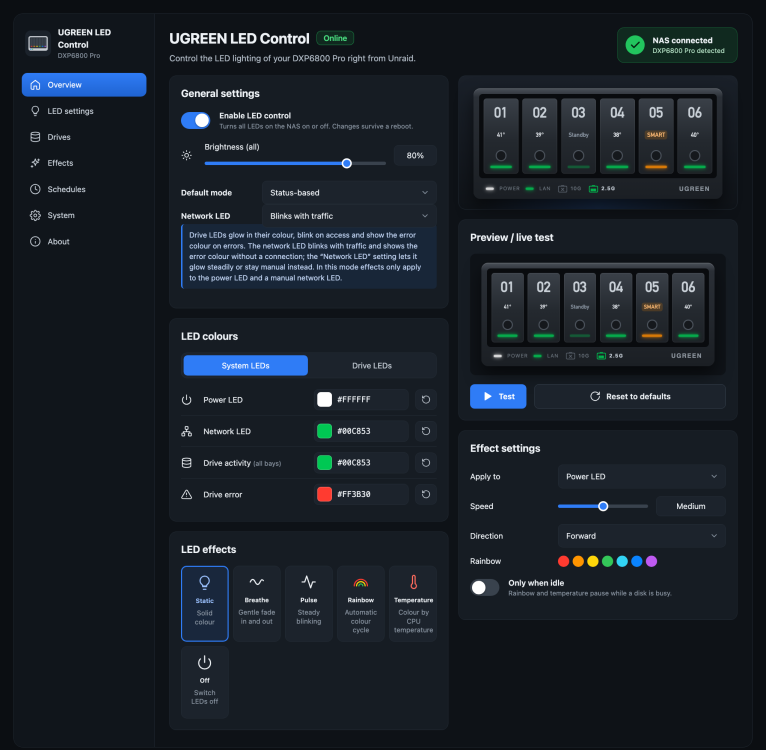
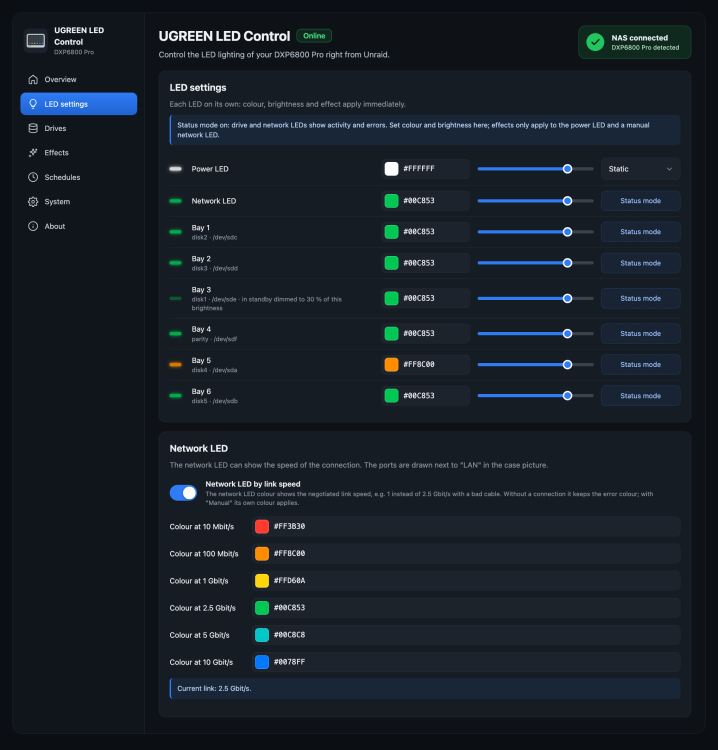
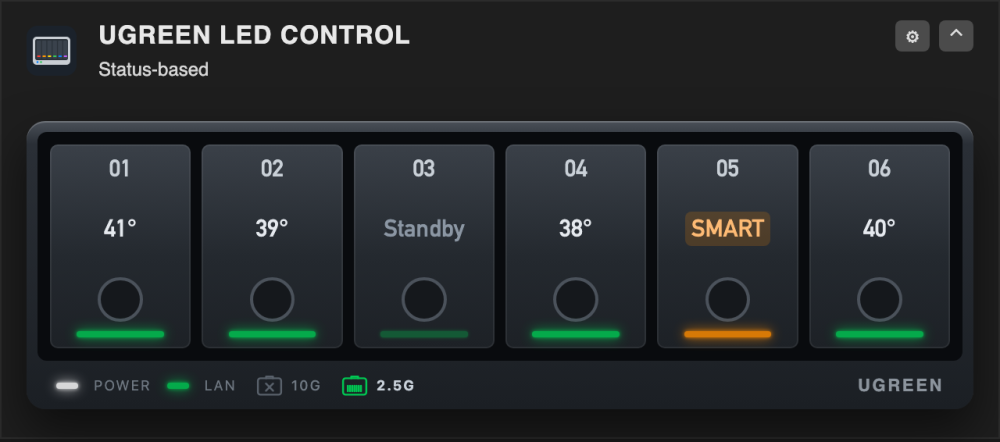
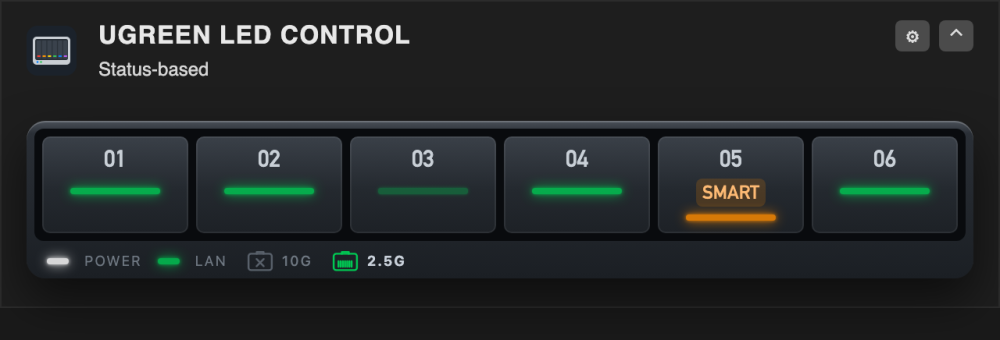
UGREEN LED ControlUGREEN LED Control lets you use the front LEDs of UGREEN DX/DXP NAS devices under Unraid. You set colour, brightness and effect for every LED from a web interface, and a status mode turns the bay and network LEDs into a live view of your array: disk activity, disk errors, SMART warnings, parity checks and standby. Night mode, Unraid alerts and a shutdown signal on the power LED, and a dashboard tile are included. It talks to the LED controller directly over I²C. No kernel module is needed, so Unraid updates with a new kernel don't break it. Project statusCurrent version: 0.23.0. The plugin is developed and used daily on a DXP6800 Pro with Unraid 7.3.3. Users have confirmed it on the DXP4800, DXP4800 Plus, DXP4800 Pro and DXP8800 Plus – thank you! Feedback from owners of other models is very welcome. The full list of changes is in the release notes. RequirementsUnraid 7.0 or newer A UGREEN DX/DXP NAS (LED controller at address 0x3a on the SMBus I801 adapter) No other LED plugin running. If you use ugreenleds-driver, uninstall it first: both would write the same LEDs. FeaturesWeb interface under Settings → User Utilities, with a live picture of the case showing the real LED colours and each bay's temperature or state Colour, brightness and effect per LED: static, breathe and pulse (run by the controller itself), rainbow and CPU temperature (with speed, direction and "only when idle") Status mode: bay LEDs blink on disk activity, switch to an error colour for disabled or missing disks, warn on rising SMART values (reallocated, pending, uncorrectable sectors, read/write errors) with an "Acknowledge" button, and breathe during parity checks and rebuilds. Spun-down disks can stay normal, dim, switch off or pulse slowly. Optionally each bay shows its disk's temperature, based on Unraid's own warning and critical limits. The network LED can blink with traffic, only show the link (steady, error colour without link or gateway), or stay manual with its own colour and effect Network LED by link speed: one colour per speed (10M, 100M, 1G, 2.5G, 5G, 10G), all changeable. A link that negotiated less than it could, for example 1G instead of 2.5G or 10G because of a bad cable, stands out at a glance Network ports in the case picture: next to the LAN LED each port is drawn as an RJ45 socket with its speed ("2.5G", "10G"), in the colour of that speed; a port without a link is a dimmed socket with a cross and the speed it supports Shutdown and reboot signal: the power LED blinks or breathes in a colour of your choice from the moment Unraid stops the array during a shutdown or reboot (a plain array stop doesn't trigger it), with a test button Night mode: dim or switch off the LEDs at fixed times, also across midnight; the brightness slider keeps showing your day setting Unraid alerts: the power LED blinks while Unraid has unread warnings or alerts Identify a bay: blink one bay white for 30 seconds before you pull a disk Compact dashboard tile with the live LEDs of every bay (a state is only written out for an error or SMART warning); the view with temperatures is a setting Dark, light or "same as Unraid" colour scheme; interface in English, German and Spanish Every setting saves on change and survives a reboot Supported modelsModel Bays → SATA ports Bay assignment DXP6800 Pro ata3, ata4, ata5, ata6, ata1, ata2 tested (developed on it) DXP8800 Plus ata1 … ata8 tested by miskcoo, confirmed by users DXP4800 / Plus / Pro ata1 … ata4 confirmed by users DX4600 Pro ata1 … ata4 tested by miskcoo DX4700, DXP2800 ata1 … ataN reported by users The System page shows which applies to your device. Use "Identify" on the Drives page to check that the right bay blinks. The DXP2800 V1.2 and the GT models aren't supported yet. InstallationPlugins → Install Plugin, paste this URL and click Install: https://raw.githubusercontent.com/alexanderschubert/ugreen-led-control/main/plugin/ugreen-led-control.plgThe plugin has been submitted to Community Applications and is waiting for review. Until it's listed there, install it with the URL above; updates show up under Plugins as usual (Check for Updates). First stepsOpen Settings → User Utilities → UGREEN LED Control. On the System page, check that the LED controller is found. On the Drives page, press "Identify" on each bay and check that the right one blinks. Pick your colours and brightness, then switch the default mode to Status-based if you want activity and error display. Under LED settings → Network LED you can colour the network LED by link speed. Set up night mode, Unraid alerts and the shutdown signal if you like (System page). Under System → Appearance you can change the colour scheme, the language and the dashboard tile. Coming from ugreenleds-driverUninstall ugreenleds-driver, then install this plugin and reboot once. UGREEN LED Control doesn't need the led_ugreen kernel module; it unloads it if an older setup left it behind. How it worksA small static tool (ugreen-led-i2c, written in Go) talks to the LED controller through /dev/i2c-N, using the protocol documented by miskcoo/ugreen_leds_controller. A shell backend and a status daemon read Unraid's own state (disks.ini, var.ini, cached SMART data, notifications) and never wake sleeping disks. The plugin loads the Intel SMBus driver itself if Unraid hasn't. The shutdown signal hangs on the array stop that Unraid runs during a shutdown or reboot. Settings are stored in /boot/config/plugins/ugreen-led-control/leds.cfg. Screenshots [Screenshot: Overview] [Screenshot: Drives page] [Screenshot: LED Settings] [Screenshot: dashboard tile with Temps] [Screenshot: dashboard tile Compact] SupportQuestions and problems: please post in this thread and include your NAS model and Unraid version the plugin version (System page) the output of these commands: /usr/local/emhttp/plugins/ugreen-led-control/backend/ugreen-led-ctl status /usr/local/emhttp/plugins/ugreen-led-control/backend/ugreen-led-ctl smbus /usr/local/emhttp/plugins/ugreen-led-control/backend/ugreen-led-i2c probeBug reports and feature requests are also welcome on GitHub Issues. Source code: github.com/alexanderschubert/ugreen-led-control TranslationsThe interface is available in English, German and Spanish. Another language? The texts are in a single file; the README explains how to export them as a template and check a translation. Pull requests or a JSON in an issue are both fine. Creditsmiskcoo for working out the LED controller protocol and the bay layouts ich777 for the ugreenleds-driver plugin, which showed how LED control can work on Unraid ivolution for the Spanish translation and many careful suggestions everyone in this thread who tested on their model and reported what they found License and disclaimerMIT licensed. This is a community project and not affiliated with UGREEN. It only writes to the LED controller, but use it at your own risk.
 3 points
 -
3 pointsVersion 2026.10.16 is now out! Changelog: - Support multi-dataset replication using a single shared SSH key across multiple destination datasets [#38] - Support custom SSH ports for remote BuddyBackup destinations - Configurable daily snapshot time with 1-minute cron heartbeat and asynchronous backup triggers [#25] (from your suggestion @cherrybullet ) - Native atomic ZFS recursion and automatic baseline snapshots for newly created child datasets [#36] - Automatically restore receiver user and group configuration across server reboots [#37] (fix for your issue @Bladeinger ) - Auto-suggest destination sub-dataset paths from source dataset and detect duplicate destinations [#26]3 points
-
Sorry but I can't reproduce this error nor do I know why this happens. I run the container on my own Server (granted I'm not on Unraid anymore) and have no issues whatsoever.3 points
-
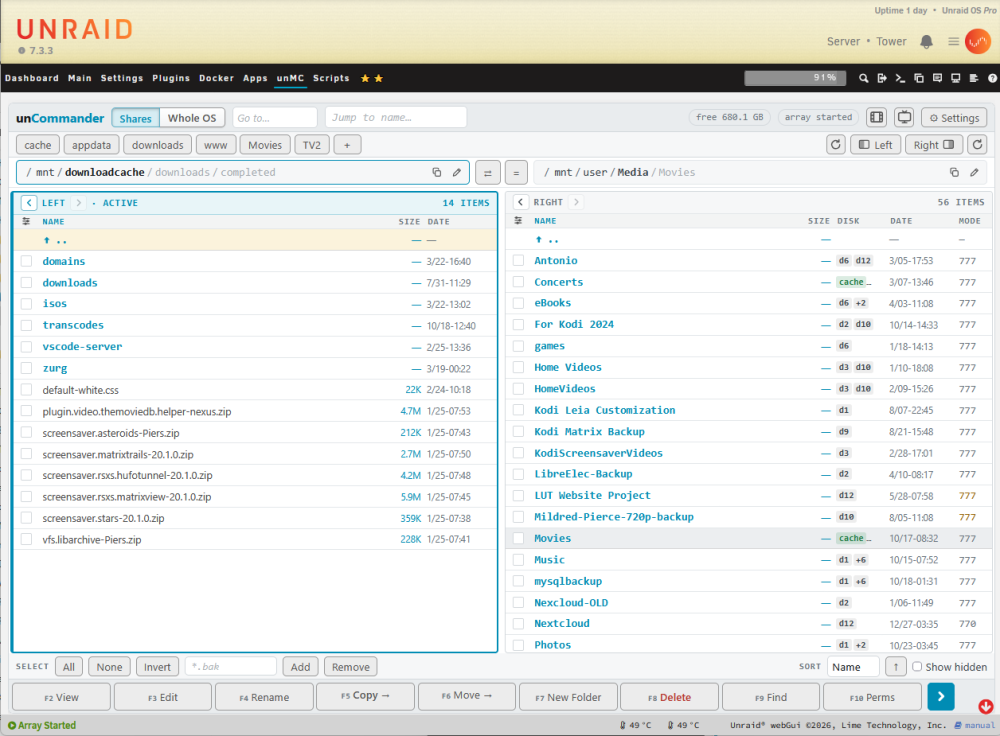
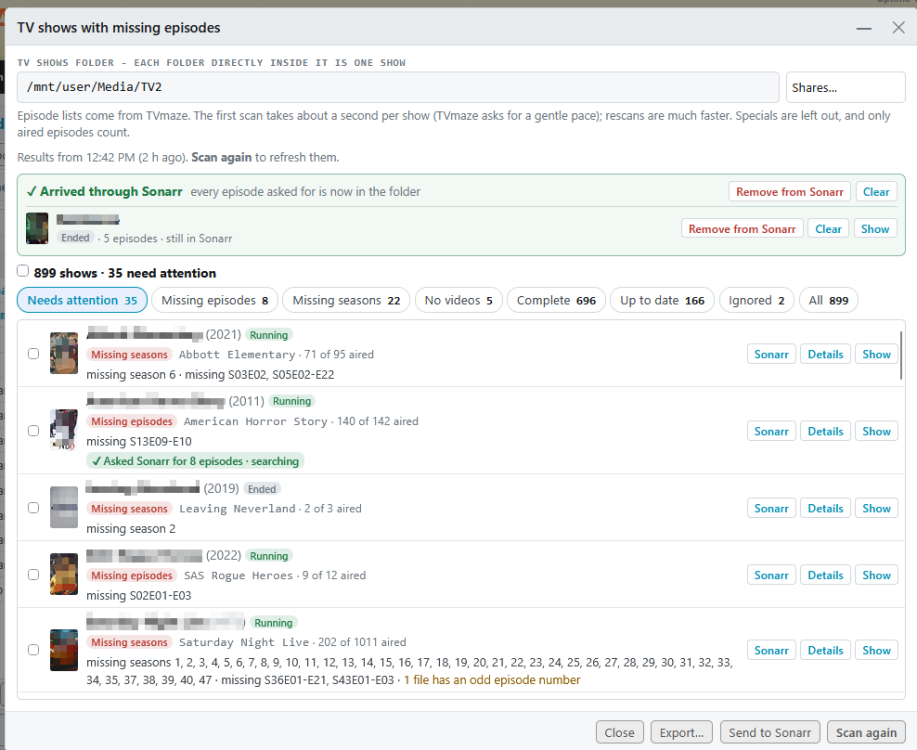
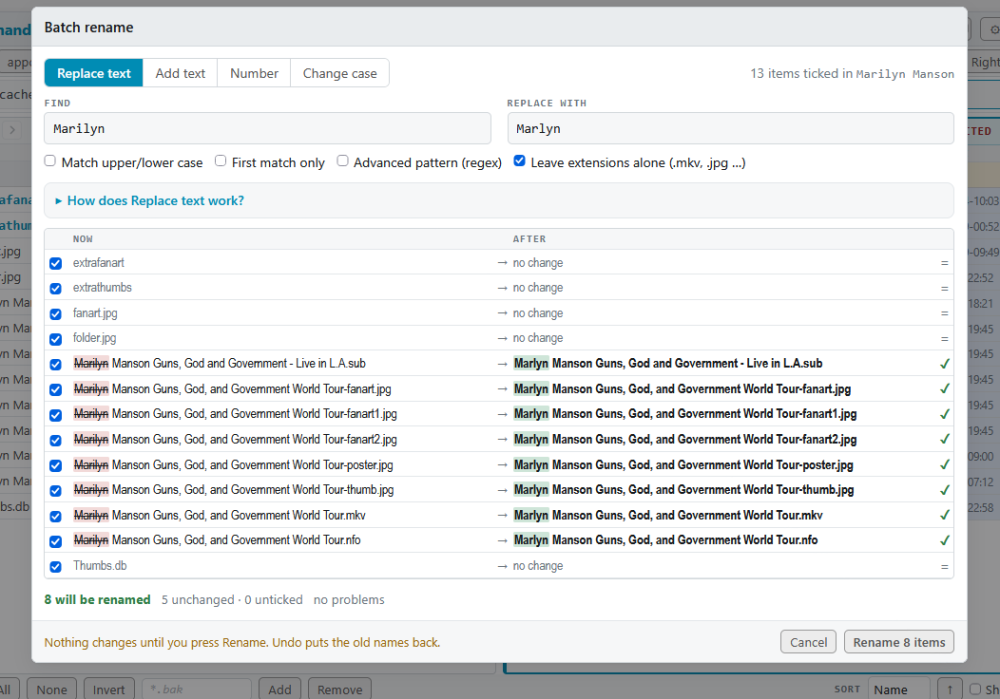
Hi everyone, I've used Midnight Commander on my servers for well over a decade, and I always missed it when I was on the unRAID web UI - especially on my iPad. So I built: A FAST proper two-pane file manager that lives in its own tab of the unRAID menu bar. Two folders side by side. Pick files on one side, press Copy or Move, and they go to the other side. If you know Midnight Commander, Norton Commander or Total Commander you'll feel at home straight away - F5 copies, F6 moves, Tab switches panes, Insert ticks. If you don't, everything also has a button, and it works great with a finger on a tablet. Made with Claude AI WHAT IT DOES File management - Copy, move, rename, new folder, delete, permissions and find - with F-keys, buttons or taps - Copies and moves run as background jobs with progress - close the tab and they keep going, and you get a notification when they finish - Delete goes to a trash on the same share or disk; Restore puts things back where they came from (or delete for good when you want the space now) - Undo for rename, move, delete, new folder and even copies - Before anything is overwritten you see a list, and the old versions are kept in the trash - Batch rename with a live before/after preview - all-or-nothing, with one Undo - Compress to .zip / .tar.gz; extract .zip, .rar (incl. RAR5), .7z, .tar.gz and more - Folder sizes in the background, and Compare two folders (including subfolders) - Viewer and editor for config files, scripts, compose files, logs, .nfo and more, with colour highlighting; picture and PDF viewer - Disk column: see which disk(s) or pool a file in /mnt/user really lives on - Copy/move guard: it refuses things that would destroy data, like copying a disk folder onto the same folder in its share Made for unRAID - Starts at /mnt: shares, every disk and pool, Unassigned Devices, plus /boot - Optional "Whole OS" view: one tap and the top becomes / - /boot, /etc, /var, /tmp and the rest, just like MC on the console (switch it on in Settings first) - Practice mode for learning without risk - anything that could change your files is locked - Optional auto-refresh when other programs change a folder Media tools (Settings > Tools, or the little film / TV buttons next to Settings) - Empty folders on disks - finds the leftover empty folders Unraid's share view hides, and removes them safely - Movie folders without a video - folders with only posters, .nfo files or a sample left. Send them back to Radarr to download again into the same folder - TV shows with missing episodes - checks every show folder against its episode list on TVmaze (no account or key needed) and shows exactly what's missing, season by season. Shows numbered differently from TVmaze are checked against Sonarr's numbering, and a "What's wrong" box explains anything odd in plain words - Sonarr integration - get a show's missing episodes (or one season) with one tap. Shows Sonarr doesn't have are added with their existing folder and only the missing episodes are wanted; whole missing seasons are also searched as season packs. If Sonarr downloads something but won't import it ("matched to series by ID"), unCommander can import it for you Make it yours - Text size per device - bigger text on the desktop, normal on the iPad, without zooming the rest of unRAID - A Midnight Commander theme: blue panels, cyan bars, yellow ticked files - Your own CSS with live preview and a colour picker, sounds, shortcut buttons for your favourite folders, and you can rename the menu tab - All keyboard shortcuts are listed in Settings > Keyboard See more screenshots at my GitHub Repository INSTALL Pending Community Apps) listing - STAY TUNED. - Apps tab: search for "unCommander" and click Install, or Manual Install - Plugins > Install Plugin, and paste: https://raw.githubusercontent.com/hernandito/unCommander/main/uncommander.plg Then reload the page - unCommander appears in the menu bar. Requires unRAID 6.12 or newer. Your settings are kept on the flash drive (/boot/config/plugins/uncommander). Removing the plugin leaves them, and any trash folders, in place. GOOD TO KNOW - Nothing runs in the background unless you start it, and the tools only read your files until you choose to change something - The TV tool uses TVmaze's free public API, politely paced - 7-Zip (for .rar and .7z) is downloaded once at install from the official 7-Zip releases, checksum-checked, and kept inside the plugin's own folder LINKS - GitHub (source, full user guide, issues): https://github.com/hernandito/unCommander - User guide: https://github.com/hernandito/unCommander/blob/main/docs/USER-GUIDE.md This is the first public release, so I'd love to hear how it works for you - bugs, ideas and screenshots of your setups are all welcome in this thread or on GitHub. Enjoy!
 2 points
 -
https://www.youtube.com/watch?v=YokafZ9WVeI Eli (Director of Product) and Alex (Head of Product Marketing) work through your top questions from Reddit. We discuss licensing, the move to Fedora, plugins, Docker Compose, security, and when you can try it.2 points
-
2 pointsI've pushed hotfix version 2026.10.18 that should solve this issue. Give it a test! The problem was that the usb boot drive is formatted as FAT32, and Unraid mounts it without execution file permissions, which disallows running a script file from its filename and shebang only. To work around this, you can either type "bash /boot/config/plugins/buddybackup/hooks/pre-snapshot.sh" in the hook field, or just update the plugin since it will now detect this and automatically execute the hooks via bash (or set shebang interpreter) when needed.2 points
-
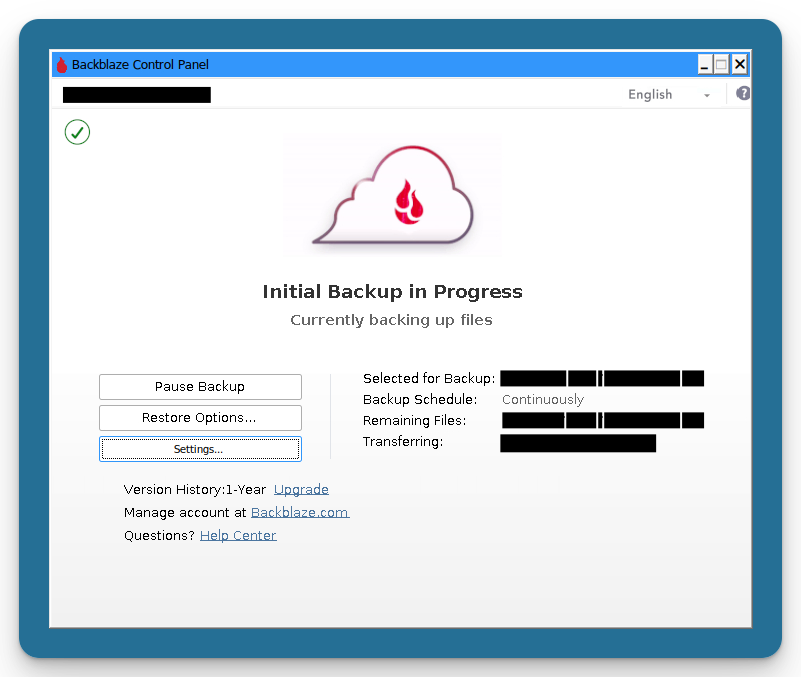
Hi all, This is the support thread for Backblaze 64 (iamfoz/backblaze-64-personal-wine-container). What it isBackblaze 64 runs the 64-bit Backblaze Personal Backup 10.x Windows client under Wine, packaged in a jlesage GUI base image so you get a web/VNC desktop in your browser. It's a fork of @JonathanTreffler's Backblaze Personal Wine container, re-engineered for the 10.x client (which dropped 32-bit and pre-Windows 10 support). It downloads the official Backblaze client from Backblaze's own servers at install time - no Backblaze software is redistributed in the image. I've done no proper benchmarking, but the slimmed-down machine template seems snappier running on my Unraid VM. I had been reliant on the upstream project and grew concerned when there was no movement since last December to resolve the issues with the new client. I am actively using this project myself and plan to ensure it continues to operate properly as new versions of the client are released. Who it's forUnraid (and other Docker) users who already pay for Backblaze Personal Backup and want to back up their array/shares with the unlimited Personal Backup plan, instead of running it on a separate Windows/Mac machine. Some tinkering may be required if you have a complex permissions setup - this is a community volunteer project, not a commercial product. My own use case is I moved several USB-attached drives connected to a Mac Mini into a JBOD USB enclosure and then used Unraid to manage the file storage. The previous system was being backed up by Backblaze and there has been no material change in the data or volume being backed up. Installing on UnraidOption A: Community Applications (once listed): open the Apps tab, search for Backblaze (it appears as Backblaze64), and click install. Option B: Add the template URL manually: on the Docker tab, click Add Container, and paste this into the Template field: https://raw.githubusercontent.com/iamfoz/backblaze-64-personal-wine-container/main/templates/backblaze-personal-backup.xml Key settings in the template: Config (/config) → /mnt/user/appdata/Backblaze64 - persistent Wine prefix + Backblaze config. Must survive restarts. Backup Source (Drive D) (/drive_d) → map the host path you want to back up. Must be read-write - Backblaze writes a .bzvol folder into each drive's root to track it. Repeat with /drive_e, /drive_f, etc. for more locations. UID/GID default to 99 / 100 (nobody/users), which matches Unraid user-share ownership. Change only if your data is owned by a different user/group. Accessing the GUI and signing inOpen the WebUI on port 5800: http://<YOUR-UNRAID-IP>:5800(Port 5900 is also exposed for a direct VNC client if you prefer.) First-run flow: On first launch, you may see Wine setting itself up / updating for a couple of minutes - let it finish. The first screen of the Backblaze installer renders a bit rough under Wine, but it works. Type your Backblaze account email into the field and press Enter. (If the screen looks blank, hover the mouse over the white pixel in the top-left corner - it'll clear and the UI will draw.) Enter your password and press Enter. Tip: the web interface clipboard helps, but odd characters/keyboard-locale mismatches can mangle input - a long password without special characters is the most reliable. Let Backblaze analyse your drives, then click OK. Recommended: if your config folder lives inside your backup source (the default on Unraid), add an exclusion to avoid an upload loop. Open Backblaze Settings → Exclusions → Add Folder, navigate to My Computer → (D:) → appdata → Backblaze64, and click OK. As with any normal install, buy/assign a license for this computer in your Backblaze dashboard. Known limitationsCosmetic "Permission Issue … bzdata\bzreports" warning. A false positive - Backblaze's self-check misbehaves under Wine, but it writes there fine and backups run normally. Safe to ignore. amd64 only. linux/amd64 is fully supported; arm64 is not currently supported. A previous "unstyled control panel" issue (black background / blank dialogs) is fixed - the container now creates the hyphen-named skin-asset aliases at startup, so the panel renders correctly on first launch. Reporting bugsPlease search existing issues first, then open one here if needed: https://github.com/iamfoz/backblaze-64-personal-wine-container/issues PRs welcome if you find a fix; it helps everyone. CreditsHuge thanks to @JonathanTreffler, whose Backblaze Personal Wine Community Container this is forked from; to @Atemu, the project's original author; and to @jlesage for the GUI base image. Happy backing up!
 2 points
 -
2 pointswenn du ein Fritz Box user bist, du solltest dringend mal ein Update vornahmen, 6.12.... ist schon ne Weile her. Es gab ein großes "Freeze" Problem mit Fritz (und anderer Hardware) welche die mac als führendes System nutzen, daher erstmal bitte Update durchführen, in der alten Version macht es wenig Sinn nach Fehlern zu suchen. Ebenso in den Docker Einstellungen auf macvlan einstellen, besonders wenn Docker mit eigener IP genutzt werden.2 points
-
2 pointswas heißt denn "Abstürze" ? harte Neustarts, friert der Server ein, ... ? bei ersterem, kannst du dir das wahrscheinlich sparen da fast immer Hardware bedingt, bleibt nur trial & error, wenn zweiteres dann 1/ syslog to flash aktivieren 2/ nach dem nächsten crash die komplette diagnostics hochladen und generell ja, immer eine komplette diag ... wenn man Hilfe möchte.2 points
-
So I moved some drives to diferent controllers so all the array is on the original onbourd controller. AND IT WORKS. Spare sata was in use with CD writer which I hardly use. Thank you for you help It gives me faith in humanity that you guys helped someone that you dont know, so much2 points
-
Hi there, With the upcoming release of Unraid 8 and its major transition from Slackware to a Fedora-based system (uCore), I was wondering if the team is planning to introduce native support for Podman as an alternative to Docker? Not a replacement for docker compose, because I actually use docker compose a lot. Since Fedora embraces Podman out of the box, it feels like a great opportunity to offer a rootless, daemonless container runtime natively within the Unraid webGUI. Maybe for reiforced security? I am aware of the existing community efforts and plugins, but I would love to know if there are any official roadmap plans for this.2 points
-
Hallo zusammen Ich möchte euch mein Plugin vorstellen: das Unraid Secretary Office (USO) — ein kleines Sekretariat direkt in Unraids Weboberfläche. Alle virtuellen Mitarbeitenden kümmern sich um einen Teil des Servers, sagen dir, was auffällt, und zeigen dir vor jeder Änderung genau, was passieren wird. Alles auf einen Blick, mit Bildern: https://uso.dropnook.app/de/ Bereit für Unraid 7.4 — das ganze Team ist auf der 7.4-Beta getestet, auch mit dem neuen Mover. Das Team Die Werkzeuge von helmi1987 (MediaCache, Ordner zusammenführen, SmartMover) stecken in Jack Streamer und Frau Moverelli — danke für die Mithilfe an Helmi1987! Zwei Server, ein Team Zwei Unraid-Server mit dem Sekretariat bewahren gegenseitig Kopien ihrer Backups auf — nach jedem Backup gehen nur die Änderungen hinüber. Jedes Backup trägt auch die Konfigurationen selbst mit (XML, UEFI, TPM, Template, Dump …). Fällt ein Server aus, kann der Partner-Server die bei ihm verfügbaren Backups wiederherstellen. Installation Unraid 7.3.3 oder neuer, getestet auch auf Unraid 7.4. Plugins → Install Plugin, diese Adresse einfügen: https://github.com/dropnook/UnraidSecretaryOffice/releases/latest/download/unraid-secretary-office.plg (Der Eintrag in den Community Applications ist in Prüfung.) Dann «Sekretariat» in der Menüleiste öffnen, die vorgeschlagenen Mitarbeiter einstellen und loslegen. Falls du das Plugin über das Terminal installieren willst: plugin install https://github.com/dropnook/UnraidSecretaryOffice/releases/latest/download/unraid-secretary-office.plg Support Fragen auf Deutsch gerne hier. Ein englischer Support-Thread folgt, sobald das Plugin in den Community Applications ist. Fehler, Wünsche und Fragen können auch anonym direkt aus dem Sekretariat übermittelt werden (⋯ → «Problem oder Wunsch melden…»): Manche finden die Namen der Mitarbeiter und die ganze Büro-Idee vielleicht albern — für mich passt es: Ich liebe Unraid seit Jahren, und etwas Spass war schon immer mit dabei. unGrüsse Benj

 2 points
 -
2 pointsYep, plugins are fixed for me too, thanks Binhex! I had to do a force update from the docker page to get the version with the fix when using the :latest tag. docker exec binhex-delugevpn cat /etc/image-build-info # expect IMAGE_RELEASE_TAG=2.2.0-7-09 or later While troubleshooting the broken plugins I also discovered I was using two out-of-date plugins that have newer versions by new maintainers in new repos. If anyone else are using these it's probably a good idea to install the newer versions ltConfig https://github.com/zakkarry/deluge-ltconfig/releases/tag/v2.1.1 Also see tuning tips here: https://forum.deluge-torrent.org/viewtopic.php?t=56921 AutoRemovePlus http://github.com/tote942 points
-
2 pointsOk, it seems to work again. 🤷♂️ Thanks @BRiT to have reacted and let me know. 😂2 points
-
2 pointsMoin zusammen, seit kurzem läuft noch Home Assistant in der VM. Habe mein komplettes "smarthome" von Apples Siri auf Home Assistant mit Zigbee umgestellt. Lang hab ich mich dagegen gewehrt :P Hätte ich es mal eher gemacht. Es ist einfach geil was man mit HA machen kann. Die Unraid kiste läuft immer noch und hat gestern noch eine Backup UPS bekommen. Jetzt läuft Unraid noch 60-75 min weiter falls der Strom mal ausfällt und kann wenn die UPS nur noch wenig Akku hat auch Ordnungsgemäß runter fahren. Bei den HDD Preisen möchte ich kein risiko eingehen :P2 points
-
Thank You @JorgeB Very easy to repair and now everything work fine. thank again for help and quick answer :)2 points
-
2 pointsauch noch ein paar Punkte von mir: das war mir neu/unklar und hab das mal nachgelesen: für den reinen Betrieb braucht xfs quasi nichts, aber wenn xfs_repair notwendig wird, könnte es RAM-hungrig werden: demnach kämst du bei 14TB HDD so schnell in Richtung von eher 32GB als 16GB.... stimmt, aber diese Info ist auch fast 20 Jahre alt.... Wenn man hierzu genauer sucht: Diese Logik basiert primär auf der Anzahl an Inodes (Dateien auf der Platte) kommt noch aus einer Zeit, als Festplatten recht klein waren und bezog sich auf den Anwendungsfall im Datacenter von extrem vielen kleinen Dateien (Mailserver etc), also Millionen Dateien pro TB. Selbst dann war der RAM weniger das Problem, da dann auf den SWAP ausgewichen wurde. Heutzutage kommen -wie bei Dir mit Jellyfin- typischerweise vergleichsweise wenige große Dateien vor und dort reduziert sich der RAM-Bedarf schon wieder extrem ("bei 14TB Kapazität benötigt xfs_repair je nach Anzahl Dateien typischerweise zwischen 4 und 8GB RAM, selten mehr als 6GB"). Also ist der RAM bei xfs denke ich unkritisch und daher iirc auch hier im Forum bislang kein Thema gewesen... Bei wilden zfs-Konstrukten mag das anders sein. Naja, nur weil das Netzwerk 2,5GE kann, heißt das ja noch lange nicht, dass die auch durchgängig übertragen werden, da gehört ja noch einiges mehr zu. Das ist oft ein Denkfehler, das Netzwerk (oder den Maximalspeed einer HDD/NVMe) alleine zu betrachten. Da ist ja noch mehr beteiligt (und da steht für mich das Filesystem recht weit hinten in der Kette der beeinflussenden Faktoren): Quell-System (wie schnell kriegt das System die Daten überhaupt losgeschickt (HDD/SSD, CPU, Dateigröße/-anzahl, Betriebssystem/Anwendung,...)?) Anbindung Quell-System ans Netzwerk (LAN, WLAN) Netzwerk (beteiligte Geräte, Konfiguration, z.B. flow-control an/aus, ausreichende routing/switching Kapazität?) Anbindung Ziel-System ans Netzwerk (LAN, WLAN) Performance des Ziel-Systems (wie schnell kriegt das System die Daten von der Netzwerkkarte zum Speicher? CPU/RAM-Auslastung, PCIe Anbindung der Geräte, SMB/NFS, RAID-Controller...) Speicher Geschwindigkeit (z.B. SATA ca. 250MB/s, NVMe PCI3.0X4 ca. 4GB/s,... mit den zusätzlich einschränkenden Faktoren, die @DataCollector beschrieben hat) Dateisystem (sicherlich im Bereich des Messbaren) das kann also überall haken. Erst wenn alle Komponenten mitspielen bzw. richtig ausgelegt sind, erreichst Du auch die gewünschten Übertragungsraten. Vielleicht ist das ugreen NAS auch einfach so ausgelegt, dass es die >1GE nur über einen SSD-Cache ausreizen kann, wenn überhaupt...2 points
-
2 pointsIrgendwie hast Du mir direkt geschrieben und zusätzlich im Forum (mehr oder minder dasselbe). Da ich schon direkt geantwortet habe, lasse ich das hier erst einmal mal offen. (Ggf. werde ich für die Nachwelt das etwas kondensiert hier einfügen. Aber im Moment ist es spät am Tag. Sorry.) Edit: hier die Zusammenfassung meiner Antwort für die geneigte Leserschaft. Zu btrfs wurde von mir darauf hingewiesen, dass bei doch diversen Problemen, sich btrfs als Ursache herauskristallisierte und ich aus dem Grund btrfs nicht mehr als empfehlenswert ansehe. Einzeldatenträger (und somit auch das klassische unraid Array): xfs Dateisystem Datenträger, welche in einem Raidverbund betrieben werden sollen: zfs raid. 16 GB Arbeitsspeicher: "nur" 16GB sind kein Problem für xfs und auch nicht für zfs. 16GB Ram sind eigentlich schon ziemlich gut/viel. Schreibgeschwindigkeit beim Schreiben auf Festplatten: Habe mitgeteielt, dass die Physik eben so ist und die Festplatten (egal ob nun zfs Raid1 im Pool oder unraid klassisches Array 1D+1P) eben so sind und man dort (je nach Füllstand, Schreibposition, Anzahl und Größe der Dateien) eben beim direkten Schreiben bei den Festplatten nur irgendwas zwischen ca. 100-200 MByte/s erwarten kann. Erst ein (SSD) Cache könnte da beschleunigen (bis dieser voll ist). (PS.: Mir scheint es wurde mehrfach xfs und zfs verwechselt.)2 points
-
2 pointsThere were no functional changes to the plugin, in fact no code file was touched - so it's a connection issue more likely than not. https://github.com/desertwitch/NUT-unRAID/commit/ff3353f14c1d046f1eb2451c31ba9df723559a47 With the plugin now in maintenance mode I will not be fixing this minor annoyance, but thanks for the heads up nevertheless.2 points
-
This is marvellous, thank you! I was so disappointed that the previous plugin was obsolete, but now my DXP4800-Plus shines again. Thanks again!2 points
-
Plugin author here, sorry for the trouble. JorgeB's diagnosis is spot on: the companion replaces how the API lists disks (so it doesn't wake spun-down drives), and that code reported sizes as a few bytes instead of the real value, so every disk failed the Internal Boot size check. This is fixed in U-Manager Companion 2026.10.04.1, released today. Updating the plugin from the Plugins page is enough: the fix applies immediately and no reboot or uninstall is needed. If you already removed it to set up internal boot, you can reinstall it and disk sizes will now be reported correctly. GitHub issue for reference: https://github.com/jandrop/u-manager-companion/issues/3 Longer term, I'd rather not patch the API for this at all. I've opened a work intent on the Unraid API to fix the spin-up problem upstream (https://github.com/unraid/api/issues/2105, building on https://github.com/unraid/api/issues/2018). If it's accepted and lands, the companion can drop this patch and the API will handle disks on its own. Thanks @JorgeB for tracking it down.2 points
-
2 points
-
Hi everyone, as many of you might have noticed, I haven't been around much lately, so I wanted to let you know that I've moved on and am no longer actively maintaining my plugins and drivers for Unraid. The driver compilation will remain in place as long as the drivers compile and no major issues come up, though testing has gotten a lot harder for me these days. If one of my plugins stops working for you, feel free to fork it and republish it on the CA App, I'd be happy about that! I'll still stop by from time to time and fix whatever I can. I don't think this will have a big impact anyway, since Unraid is switching to a new base distribution in the near future, which would have meant redoing the plugin compilation and everything around it anyway. It was a lot of fun. I learned a lot and had many great conversations with the people here on the Forums and Discord, and also with the whole Unraid Team. Thanks for everything, guys! Take care, everyone!2 points
-
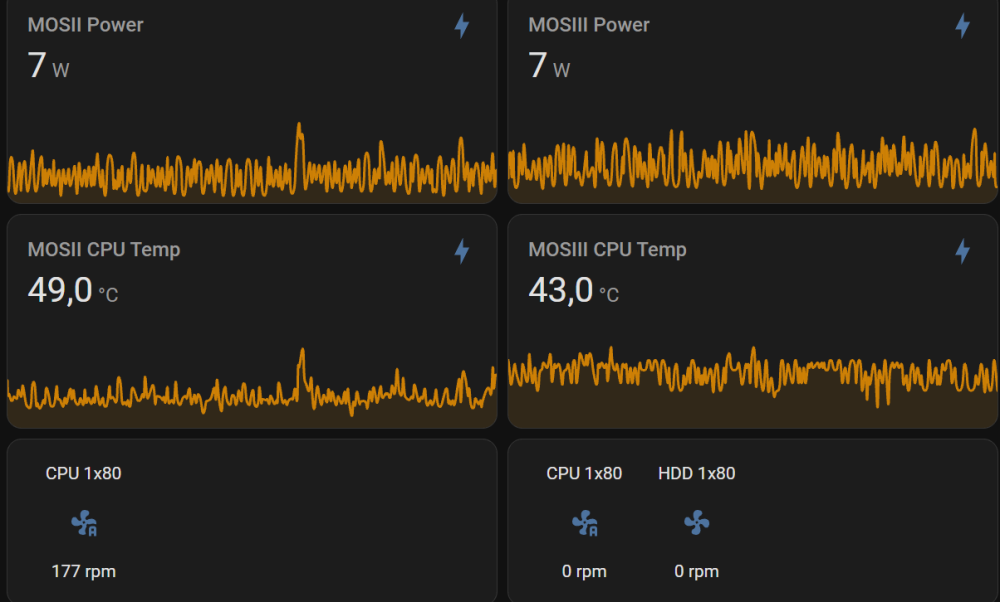
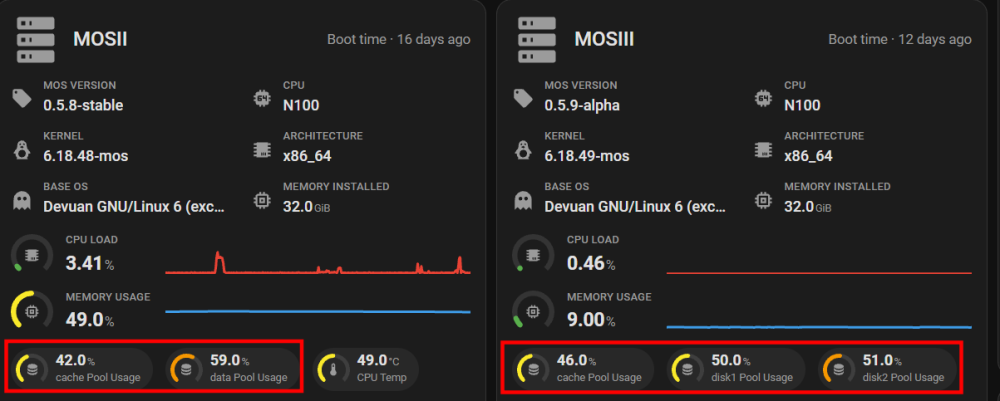
das ist nicht wirklich viel ... zfs raid ist beispielsweise ein Preis den man zahlt naja, kommt drauf an was du machst Beispiel zweier n100 er Systeme beide mit einer 2.5G Karte bestückt, beide mit 160W pico psu, beide mit 32GB Ram ddr4 3200 ein System mit nur 2x sata SSD, ein System mit 1x nvme, 2x HDD (spindown 99%), System links, da laufen ~ 30 Dockers, sicherlich mehr Anwendungen wie du aktuell nutzt, abseits diverser plugins und scripts ;) vorher hatte ich noch ein Gaming VM Setup (performant), aber da nach meinem letztjährigen Umzug keine HDMI Verkabelung vernünftig umsetzbar war habe ich den entfernt (ist jetzt meiner Tochter Ihr Gaming Rig), hier dann "versteckt" im Wohnzimmer einen Gaming PC gesetzt welcher halt nur bei Bedarf Power braucht. Desktop PC ist auch zu Laptop/s mit Docking gewechselt und nur bei Bedarf ON. kurz, auch von mir, gehen stromsparende (Definition ... ?) Systeme im homelab, auf jeden Fall. mein Gaming und Desktop VM Setup (ink. 2 NV dGPU's, Wakü, 11 Lüfter, 2x nvme, 3x hdd, usw) war mit ~ 50 Watt im idle auch stromsparend ;) für das was es war ;) ist auch immer eine Frage der Definition.
 2 points
 -
2 pointsUnraid OS 7.4.0-beta.3 is available on the next branch. This beta fixes Mover hard-link handling and user-share filesystem issues, includes package and security updates, and updates the Linux kernel to 6.18.52-Unraid. We recommend that beta testers upgrade to receive the included security fixes and help validate the changes. As always, please run beta builds on a test server, not production. What’s New in Beta.3 Mover preserves hard links when progress tracking is enabled, including files in separate subfolders of the same share. shfs no longer deadlocks under concurrent file-lock requests or crashes on an internal unlink assertion that could make /mnt/user unavailable. Includes package updates and security fixes. The following sections highlight cumulative changes compared with Unraid OS 7.3.2, including features introduced in earlier 7.4 betas. Containers / Docker Docker container templates support multiple custom networks, with additional network attachments retained when containers are recreated or updated. The Docker Add/Edit forms preview the container icon URL, with a fallback when the URL is empty or invalid. Advanced View includes a Memory limit field for Docker containers. Registry update checks accept OCI image manifests and indexes. Dashboard icon fallback handling no longer retries indefinitely when the fallback image is unavailable. Storage Mover progress and status tracking is available, with the hard-link preservation fix described above. Drive-location identification supports SGPIO/IBPI-capable controllers when SES is unavailable. File Manager moves between user shares on different pools or drives no longer silently remove the source file when a transfer fails. Stopped arrays show offline and filesystem status instead of 100% utilization, and Boot Device used/free statistics remain visible while the array is stopped. Pressing Enter in an encrypted array passphrase field starts the array when the passphrase is valid. WebGUI / System Background operations from plugins, Docker, and virtual machines can be queued and managed from a shared task tray, with foreground recall from any browser tab. Configure the physical power button under Settings → Power Settings → Power Button → Physical power button. Foreground task sheets scale with the browser viewport while retaining saved-width and mobile behavior. Plugin update checks run independently, so a slow or unreachable plugin does not hold up the whole Installed Plugins page. Validation failures remain visible with an explanation. License checks retry after transient network or service availability issues. Power Options retains both the Power Mode and Power Button tabs when Dynamix System Buttons is installed, and no longer shows the virtualization warning on bare-metal servers. Networking / Hardware Additional drivers and firmware support Intel, MediaTek, and Realtek wireless hardware. Added support for additional PlayStation, Nintendo, Steam, and Logitech controllers, hardware sensors, and audio codecs. Linux netconsole is available as an optional module for network-based kernel crash diagnostics. Network defaults are aligned with Fedora’s /etc/sysctl.conf baseline. Virtualization Added kernel support for Hyper-V virtualization, including storage, balloon, keyboard, and virtual-socket modules. VM startup no longer logs a PHP deprecation warning when the QEMU location lookup produces no output. Security OpenTerminal validates request inputs before they are used by shell commands. VM Manager displays guest-agent-supplied network-interface names as text rather than active HTML. Diagnostics anonymization hides public IPv6 addresses and related diagnostic output. The cumulative 7.4.0 changelog includes these notable package security updates compared with 7.3.2: OpenSSL 3.5.7 → 3.5.8-2 — 10 CVEs addressed: CVE-2026-14456, CVE-2026-14457, CVE-2026-18798, CVE-2026-54874, CVE-2026-63072, CVE-2026-63073, CVE-2026-63074, CVE-2026-63075, CVE-2026-63076, and CVE-2026-75803. Samba 4.22.10-2_LT → 4.22.11-2_LT — 6 CVEs addressed: CVE-2026-6949, CVE-2026-58216, CVE-2026-58218, CVE-2026-58221, CVE-2026-58222, and CVE-2026-58224. PHP 8.4.23-1_LT → 8.4.24-1_LT — 4 CVEs addressed: CVE-2026-7260, CVE-2026-9672, CVE-2026-17543, and CVE-2026-17544. nginx 1.30.3-1_SBo_LT → 1.30.4-1_SBo_LT — CVE-2026-60005. See the full 7.4.0 release notes for the package-by-package changelog and associated CVE references. Linux Kernel The Linux kernel is updated to 6.18.52-Unraid. Unraid API The included dynamix.unraid.net package is updated to 4.37.4-5. See the Unraid API changelog for details. Base Distro Compared with Unraid OS 7.3.2, the cumulative changelog lists 1 package added (ledctl 1.1.0), 1 package downgraded (shared-mime-info to 2.4-3), and 319 packages updated. Known Issues See the 7.3.2 release notes for previously documented known issues. Rolling Back No new release-specific rollback warnings are documented. See the 7.3.2 release notes for earlier rollback guidance. Reporting Issues Please report issues on Unraid OS Prerelease (Bugs & Feedback). Include your hardware details, steps to reproduce, and relevant logs. Thank you for testing. Upgrading For step-by-step upgrade instructions, see Updating Unraid. Questions about your license? See the Licensing FAQ. Release Links Unraid 7.4.0-beta.3 Release Notes Report issues here2 points
-
2 pointswarum nicht ? und wenn deine Sammlung nur ripped wird ohne encoding braucht es auch keine GPU (die GTX braucht es dann nicht einmal).2 points
-
2 pointsAs promised, i have switched it over to direct pulls from jellyfin directly, so the latest image is now built against latest, which at the time of this post is 12.1, please pull down at your convienience. Note:- It is HIGHLY recommended that you copy your config folder for jellyfin before you perform the update, that way you can always roll back the container and configuration to the previous version if things go pete tong.2 points
-
2 pointsAnyone that wants to try this, I ported this to the new version of UNRAID 7.3.2 that I have. It shows all my old snapshots and allows me to action on them. I have not tested a restore etc yet. plugin install https://raw.githubusercontent.com/dlang123/ZFS-Master-Unraid/main/zfs.master.plg I will post it up to Community Apps after the holiday weekend if it all still looks good.2 points
-
1 pointUnraid 7.3.2 is a security and bugfix release with an updated Linux kernel, a critical WebGUI security fix, Docker VLAN networking improvements, and 70+ updated base packages. This update is recommended for all users. Release Docs Bug Reports here please!1 point
-
1 pointnatürlich gar nicht 😂 ja ok, ich hatte das so verstanden, als würden die Ryzens degenerieren, das hörte sich so an als käme das öfter vor....und davon hab ich halt noch nie gehört und wollte nur zum Ausdruck bringen, dass ich durchaus auch einige ältere Systeme im Einsatz habe, die keinerlei Anzeichen diesbzgl. machen. Beruflich setzen wir außer in Mitarbeiter Laptops keine Comsumer CPUs ein, daher hab ich da auch keine Erfahrungswerte, hab aber auch noch nie mitbekommen, dass wir im RZ Umfeld defekte CPUs tauschen. das denke ich auch, bin wie gesagt gespannt auf das Ergebnis1 point
-
1 pointIch kann dir nur raten das mal deutlich länger zu testen!!! Zur Not mal 24 Stunden am Stück. Du hast ja selber schon gesagt, dass das innerhalb 24 Stunden auftritt. Um also sicher zu gehen, dass es nicht mehr auftritt, solltest du das auch mal mindestens 24 Stunden laufen lassen. Vor allem: sollte er dir dann anzeigen, das sich ein Kern verrechnet, ist die CPU defekt.1 point
-
1 pointAber wie repräsentativ ist deine persönliche Erfahrung denn? Ich habe beruflich damit zu tun und da werden nicht 5 abgezählte PCs für die Familie gebaut, sondern deutlich mehr. Wenn von 1000 CPUs eine kaputt geht ist das schon viel. Normalerweise halten die ewig. Aber nichtsdestotrotz kann jede CPU den Hardwaretod finden. Meistens ist es ja "nur" ein Kern, der fehlerhaft ist und sich schlicht "verrechnet" oder der integrierte Speichercontroller hat eine Macke. Tatsache ist aber, so kann man mit dem Ding nicht mehr wirklich arbeiten, denn die Konsequenzen wären dann entweder ständige sporadische Abstürze oder aber, das System friert komplett ein. Das CPUs sterben ist dennoch sehr selten! Seit AM5 gibt es die Sockelprobleme aber auch bei AMD, denn ab dem AM5 Sockel setzen die wie Intel auch auf einen LGA Sockel. Da können dann auch die Pins wie bei den Intel Sockeln verbiegen.1 point
-
Ich denke das ist ein Thema für den Herstellersupport1 point
-
Your previous log does capture a substantial stall: multiple Unraid services, including the WebGUI and Docker, were blocked waiting for filesystem reads. There is no recorded OOM-kill decision that identifies the cause. The diagnostics’ memory snapshot was collected after reboot, so it cannot show memory availability during that stall. Your later measurements make immich_server memory growth worth investigating. Facial recognition runs between the server container and PostgreSQL, so relatively low machine-learning container usage is consistent with that workload. Also, the 1,106 max events indicate attempts to exceed the container’s memory limit—not 1,106 OOM kills. The separate oom and oom_kill counters matter here. Keep the memory limits in place for now, with room for Unraid, PostgreSQL, Redis, and other applications. Avoid continually raising the server limit. Please provide the exact Immich version, approximate library/face count, and timestamped server logs and memory readings from your current test. Does memory eventually level off and the rebuild finish, or does it keep growing until it reaches the limit? If the host slows again, collect fresh diagnostics before rebooting, if possible. The memory and I/O measurements from that same period will help distinguish memory pressure from a separate read stall.1 point
-
I managed to fix it by manually editing the pool config file and recreate the boot pool by booting from USB afterwards. When recreating the boot pool, I had to first erase and delete the pool, otherwise it would still only identify one drive. For those facing the same issues, these are the steps I took: Open terminal and run nano /boot/config/pools/<POOLNAME>.cfg In my situation: /boot/config/pools/cache.cfg Remove the lines referencing the diskID that is not being added properly In my situation, I removed these lines: diskId.1="WD_BLACK_SN850P_for_PS5_2000GB_23299P441504" diskIdSlot.1="-" diskSize.1="0" Reboot & start the array, it should start properly now. Back up your data in the pool to a separate disk. Boot Unraid from USB drive Click on the pool name and select Erase Pool. Remove Pool afterwards Recreate internal boot using configuration wizard After reboot, start array and format data partition in boot pool Restore data from backup1 point
-
I did not know this. It may have broken at some point and mine is cached already so mine is still loading. I'll add it to the list. I think I'll have the fixes in sooner than expected. I'll post here once they are in. Including the one you said. I'd like to say I appreciate the feedback. Really put a smile on my face. Additionally any problems you see, please call them out. I only realize something is wrong when it's not working or you guys tell me. I'm OCD so I really do pay attention to detail1 point
-
just to reiterate what others have said here, thank you so much for all your work @ich777 - it really was greatly appreciated. Looking ahead, I'm still on 7.3.2, but curious what others experience of using the forked version linked above has been like with 7.4.0 beta?1 point
-
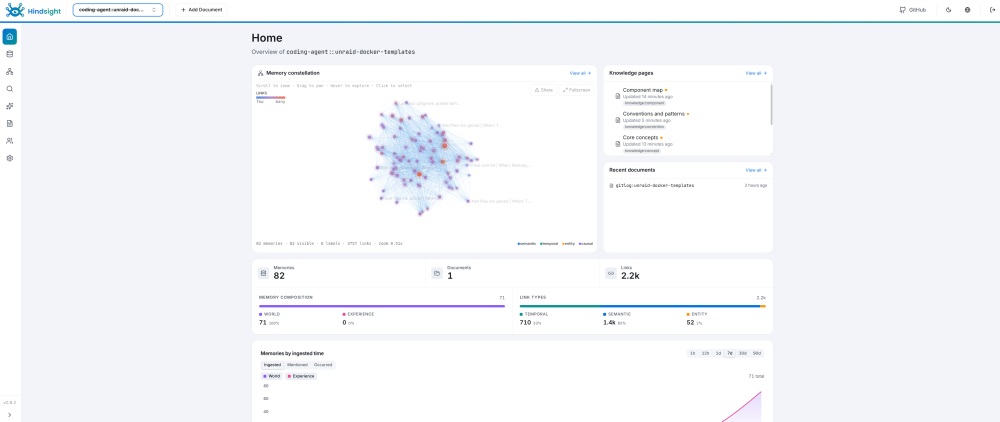
Hindsight is a memory server for AI agents. Your agents save what they work out to it and search it back later, so they stop re-deriving the same decisions every session. It speaks MCP, so anything with MCP support can talk to it: Claude Code, Cursor, Codex, Pi, Grok CLI, and the rest. I put a template together for it. It runs the official upstream image, which carries the API, the web dashboard, the search models and its own PostgreSQL, so there is nothing else to stand up alongside it. Setup guide: https://github.com/PikkonMG/unraid-docker-templates/blob/main/docs/HINDSIGHT.md Project: https://github.com/vectorize-io/hindsight Upstream docs: https://hindsight.vectorize.io Do this before you hit ApplyThe container runs as uid 1000 and will not chown its own appdata, so make the folder yourself first. On the Unraid terminal: mkdir -p /mnt/user/appdata/hindsight chown -R 1000:1000 /mnt/user/appdata/hindsight chmod 700 /mnt/user/appdata/hindsightSkip it and the container comes up, then immediately says /home/hindsight/.pg0 is not writable. Stop it, run those lines, start it again. It does not use the usual PUID and PGID variables. It needs a modelHindsight uses a language model of its own to pull facts out of whatever your agents send it. That is separate from whatever model your agents are running on, and it never talks to you directly. Point it at an Ollama box on your LAN, or paste in a key for OpenAI, Anthropic, Gemini, Groq, OpenRouter, DeepSeek or Ollama Cloud. Going the Ollama route, the model has to support tool calling or the reflect feature will not work. Use your server IP in the endpoint field, not localhost, since localhost inside the container is the container. Ports and keys8888 is the API and the MCP endpoint. 9999 is the dashboard. There are three keys. Memory API key and Web UI backend key have to hold the same value, and that is the one your agents send as a bearer token. Web UI login key is a separate one, and it is what you type to get into the dashboard. Connecting your agentsUpstream ships an installer that detects the agents you already have and wires them all up. Run it on the machine you code from, not on the server. I have only run this on Linux, so I cannot tell you how it behaves on Windows or Mac. npx @vectorize-io/hindsight-coding-agents install all \ --server self-hosted \ --api-url http://MY-UNRAID-IP:8888 \ --api-token MY-MEMORY-API-KEYThat covers Claude Code, Codex, Cursor, opencode, Pi and a few more. After it runs, each repo gets its own memory bank automatically, seeded from your commit history. Anything it does not cover is a plain MCP endpoint. One bank per project, named in the URL: http://MY-UNRAID-IP:8888/mcp/MYBANK/with an Authorization: Bearer MYTOKEN header. The guide has the config block for Cursor, Oh My Pi, plain Pi, Grok CLI and Claude Desktop, which is the one awkward case because its connector dialog has nowhere to put a bearer token. First save on a cold model takes a while, mine was about half a minute on a local one, because Ollama has to load the model before it can do anything. It settles down after that. BackupsStorage lives at /mnt/user/appdata/hindsight. The database runs inside the container but writes out to there, so it survives restarts, updates and rebuilds. Stop the container before you back that folder up. Post here if something breaks on the Unraid side and I will take a look. Bugs in Hindsight itself are better raised on their tracker: https://github.com/vectorize-io/hindsight/issues
 1 point
 -
Bevor das jetzt hier ausartet schließe ich wirklich besser den Thread. Zusammenfassend soll das hier ja keine "KI" Diskussion werden. Zum Titel Bist du ein Unraid Profi weil du jemand anderen dein System konfigurieren lässt (in deinem Fall einer KI namens Codex), sicher Nein. Kannst du dein System "einfach" ohne großes Wissen zum Laufen bringen mit deinen Wünschen mit Hilfe dessen, sicher Ja. Das wurde ja jetzt breit ausgerollt und diskutiert. ob das jetzt gut ist oder nicht, macht einen separaten Thread dazu auf und da kann man das allgemein gerne separat diskutieren. Closed1 point
-
Nun gut, ich glaube, wir finden hier keinen Konsens. Der Thread sollte m.E.n. geschlossen werden.1 point
-
Nö, habe ich nicht. Werde ich wohl sicher auch nicht. Warum sollte ich dem Agenten (Voll) Zugriff auf meine privaten Daten usw geben? Solange ich die Dinge auch anders klären kann. Hatten das Thema erst vor kurzem in einem Home Assistent Forum. Da hat ein User auch dem Agenten Zugriff auf sein System gegeben. Sich dann gewundert, warum dieser aus seinen Finanz Dokumenten aus Paperless zitiert hat, SSH Zugänge kannte, Passwörter kannte und angeboten hat, diese doch besser zu ändern. Das alles ist dann sicher in die Cloud ab geflossen. Aber hey, zumindest kennt er nun jemanden, der sich an sein Passwort erinnert, falls er es mal vergisst. Klar, ich mache auch einige komplexe Dinge per KI, aber Zugriff auf mein System gibt es nicht. Es kann jeder machen, wie er möchte, aber man sollte sich dem Risiko bewusst sein und im Ernstfall nicht hinterher rum heulen.1 point
-
I signed up for a forum account just to say thank you since I use some of your templates and community apps! I'm just starting to write Unraid templates and hope to give back to the community.1 point
-
Kann ich als langjähriger Informatiker nur unterschreiben. Ich bin mittlerweile 50 und nutze KI selbst täglich – beruflich wie auch privat. KI ist ein unglaublich mächtiges Werkzeug und kann einem enorm viel Arbeit abnehmen. Aber sie hat eben auch ihre Tücken und macht manchmal Dinge, die man weder erwartet noch wollte. Gerade deshalb sollte man zumindest verstehen, was die KI da eigentlich macht, und Ergebnisse auch kritisch hinterfragen können. Ein Punkt, den man dabei ebenfalls nicht unterschätzen sollte, ist der Umgang mit sensiblen Daten. Wer einer KI bzw. einem KI-Agenten weitreichenden Zugriff auf sein Unraid-System gibt, sollte sich bewusst sein, dass dieser dabei unter Umständen auch mit Konfigurationen, API-Tokens, SSH-Keys, Passwörtern oder anderen Zugangsdaten in Berührung kommen kann. Man sollte sich daher genau anschauen, welche Daten an den jeweiligen Dienst übertragen werden können, welche Berechtigungen man erteilt und wie der Anbieter mit diesen Daten umgeht. Am Ende ist KI eben ein Werkzeug – und wie gut oder sicher das Ergebnis wird, hängt auch stark davon ab, wie man damit umgeht. Daher kann ich meinem Vorredner nur zustimmen. 👍1 point
-
Unraidprofi? Da wurde ein Dienstleister (KI) beauftragt und der Kunde ist mit der Auftragsererfüllung bis jetzt zufrieden.1 point
-
Zeig doch einmal ein Problem und den Dialog um es zu lösen und die Lösung. Wäre ein pragmatischer Ansatz.1 point
-
Interessanter fände ich, welche konkreten Probleme du mit deinen VMs hattest und wie Codex diese letztendlich gelöst bzw. optimiert hat. Gerade ein paar Beispiele mit den Änderungen wären spannend – dann hätte die Allgemeinheit auch etwas davon und könnte vielleicht ähnliche Probleme damit lösen. 🙂1 point
-
der Fehler sitzt meist ca. 60 cm vor dem Bildschirm 😬 nunja, meine persönliche Meinung, 9 von 10 Dinge lassen sich selbst lösen mit etwas initiative und lesen. Bevor ich mein System an eine KI zum Einrichten gebe sollte das wohl überlegt sein, wenn dabei ein Lerneffekt kam und ein besseres Verständnis für mein System, na denn, wenn ich aber (meist) nicht mal weiß warum es jetzt vordergründig besser wurde und was eine KI umgesetzt hat ... Sagen wir mal so, beim nächsten Thema auch besser die KI fragen, und woher nimmt eine KI Ihr "Wissen", sie liest die Themen, die docs, Forenbeiträge, Lösungsansätze, ... und baut daraus eine "Lösung", wenn jetzt was schief läuft weiß man meist gar nicht mehr warum ... Nutze ich auch mal KI, ja klar, besonders wenn ich meine persönlichen scripts und co auch mal verschlanken will da die mit der Zeit gewachsen sind, ich sicherlich mal die ein oder andere Sache zu umständlich drin habe oder so, aber wenn ich sehe wie oft selbst da etwas "kaputt" geht und mir dann die KI sagt, "stimmt, du hast Recht, da haben wir uns verrannt ..." wäre mir persönlich der Ansatz für mein System zu konfigurieren doch sehr gewagt. Aber, es ist der Zahn der Zeit, ich kann nur anmerken sich einfach mal etwas in die Thematik zu arbeiten anstelle stumpf einer KI zu sagen "mach mal", ist aber meine ganz persönliche Meinung dazu. Enjoy dein jetzt laufendes System und Top wenn alles so geklappt hat, aber das als "Ratschlag" zu vermerken, ui ui ui ;)1 point
-
1 point^^^ And that is the entire reason why I will not take over the maintenance / updates on this plugin. I don't believe in the entire concept of it. I've only kept it published as people would complain about it's disappearance. But, since there are no takers on anyone wanting to maintain it, it is going to die its death that should have happened a long time ago.1 point











.thumb.png.82525a49249230fa1171279e3d5122c7.png)