Summary: in this tutorial, you’ll learn how to use the JavaScript Array flat() method to flatten an array.
Introduction to the JavaScript Array flat() method #
ES2019 introduced the Array.prototype.flat() method that creates a new array with all the elements of the subarrays concatenated to it recursively up to a specified depth.
Here’s the syntax of the flat() method:
let newArray = array.flat(depth)In this syntax:
depth: This optional parameter specifies how deep the method should flatten the nested arrays. The default is 1.
In practice, you’ll find the flat() method useful when working with nested arrays.
JavaScript Array flat() method examples #
Let’s take some examples of using the flat() method.
Basic flat() method example #
The following example uses the flat() method to flatten an array of numbers:
const numbers = [1, 2, [3, 4, 5]];
const flatNumbers = numbers.flat();
console.log({ flatNumbers });
console.log({ numbers });Output:
{ flatNumbers: [ 1, 2, 3, 4, 5 ] }
{ numbers: [ 1, 2, [ 3, 4, 5 ] ] }In this example, we don’t pass the depth argument into the flat() method so it defaults to 1.
The flat() method concatenates all the elements of the nested array [3,4,5] to the elements of the new array:
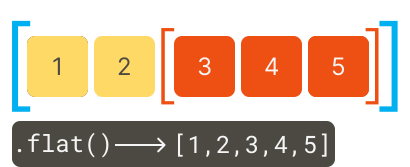
Note that the flat() method creates a new array and doesn’t change the original array.
Using the depth argument #
The following example uses the flat() method to flatten an array with two-level depth by using a depth argument:
const numbers = [1, 2, [3, 4, 5, [6, 7]]];
const flatNumbers = numbers.flat(2);
console.log(flatNumbers);Output:
[1, 2, 3, 4, 5, 6, 7]When you don’t know the depth level, you can pass the Infinity into the flat() method to recursively concatenate all elements of the sub-arrays into the new array:
const numbers = [1, 2, [3, 4, 5, [6, 7, [8, 9]]]];
const flatNumbers = numbers.flat(Infinity);
console.log(flatNumbers);Output:
[ 1, 2, 3, 4, 5, 6, 7, 8, 9 ]Working with arrays with empty slots #
If an array has empty slots, you can use the flat() method to remove them, like this:
const numbers = [1, 2, , 4, , 5, [6, 7]];
const sequence = numbers.flat();
console.log(sequence);Output:
[ 1, 2, 4, 5, 6, 7 ]Flatting API response data #
Some API responds with nested arrays. The flat() method can help you to process this data easily. For example:
const data = [
{ id: 1, tags: ['javascript', 'es6'] },
{ id: 2, tags: ['html', 'css'] },
{ id: 3, tags: ['react', ['redux', 'hooks']] },
];
const allTags = data.map((item) => item.tags).flat(Infinity);
console.log(allTags);Output:
[ 'javascript', 'es6', 'html', 'css', 'react', 'redux', 'hooks' ]In this example, we use the map() method to return arrays of tags from the data array and call the flat() method to flatten the nested arrays.
Note that JavaScript also offers the flatMap() which is more efficient than calling the map() and flat() consecutively.
Summary #
- Use the Array
flat()method to flatten an array with the nested arrays. - Use the
depthargument to specify how deep the nested arrays should be flattened.
Thank you for your feedback!
