Summary: In this tutorial, you will learn how to use the JavaScript Array splice() method to delete existing elements, insert new elements, and replace elements in an array.
JavaScript Array type provides a very powerful splice() method that allows you to insert, replace, and delete an element from an array.
The splice() method modifies (or muate) the original array. To create a new array from the original with some element inserted, deleted, and replaced, you can use the toSpliced() method.
Deleting elements using the splice() method #
To delete elements in an array, you pass two arguments into the splice() method as follows:
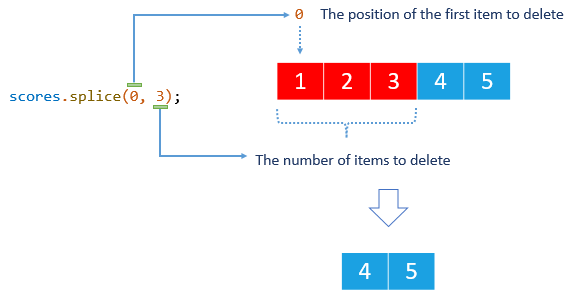
const removedElements = array.splice(start, deleteCount);The start argument specifies the position of the first item to delete and the deleteCount argument determines the number of elements to delete.
The splice() method changes the original array and returns an array that contains the deleted elements. For example:
let scores = [1, 2, 3, 4, 5];
let deletedScores = scores.splice(0, 3);
console.log({ scores });
console.log({ deletedScores });Output:
{ scores: [ 4, 5 ] }
{ deletedScores: [ 1, 2, 3 ] }How it works.
First, define an array scores that includes five numbers from 1 to 5.
let scores = [1, 2, 3, 4, 5];Second, delete three elements of the scores array starting from the first element.
let deletedScores = scores.splice(0, 3);Third, display the scores array and return value to the console:
console.log(deletedScores); // [1, 2, 3]The following picture illustrates how scores.splice(0,3) works:
Inserting elements using the JavaScript Array splice() method #
You can insert one or more elements into an array by passing three or more arguments to the splice() method with the second argument is zero.
Here’s the syntax for inserting a new element:
Array.splice(start, 0, new_element_1,new_element_2,...);In this syntax:
- The
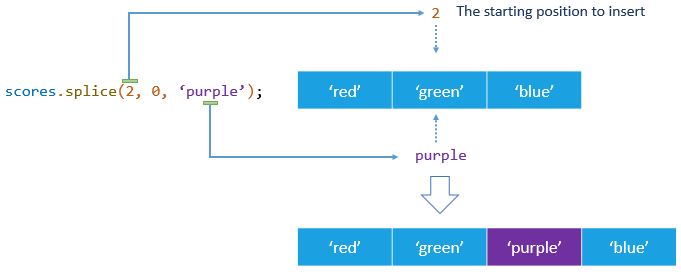
startargument specifies the starting position in the original array in which the new elements will be inserted. - The second argument is zero (
0) that instructs thesplice()method not to delete any array elements. - The third argument, fourth argument, and so on are the new elements inserted into the array.
The following example uses the splice() method to insert a new element after the second position of an array:
const colors = ['red', 'green', 'blue'];
colors.splice(2, 0, 'purple');
console.log(colors);Output:
[ 'red', 'green', 'purple', 'blue' ]First, define an array that includes three strings:
const colors = ['red', 'green', 'blue'];Second, insert a new element after the second element.
colors.splice(2, 0, 'purple');Third, display the array to the console:
console.log(colors);The following picture illustrates how the insertion works:
You can insert more than one element by passing the fourth argument, the fifth argument, and so on to the splice() method like this:
const colors = ['red', 'green', 'blue'];
colors.splice(1, 0, 'yellow', 'pink');
console.log(colors);Output:
[ 'red', 'yellow', 'pink', 'green', 'blue' ]Replacing elements using the JavaScript Array splice() method #
The splice() method lets you insert new elements into an array while simultaneously deleting existing elements.
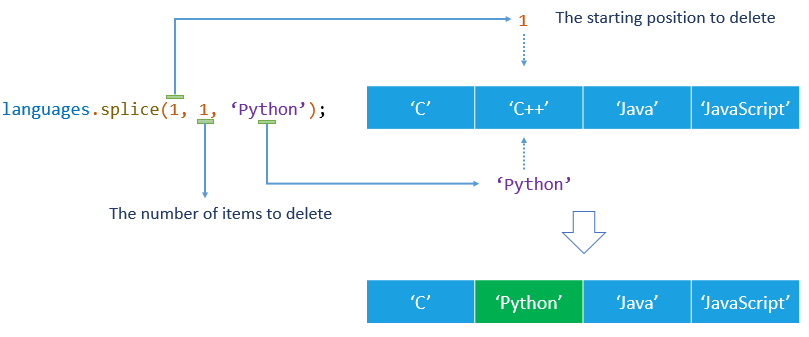
To do this, you pass at least three arguments: the second argument specifies the number of items to delete, and the third argument indicates the element to insert.
Note that the number of elements to delete need not be the same as the number of elements to insert.
For example:
let languages = ['C', 'C++', 'Java', 'JavaScript'];
languages.splice(1, 1, 'Python');
console.log(languages);Output:
[ 'C', 'Python', 'Java', 'JavaScript' ]How it works.
First, define an array of four strings:
let languages = ['C', 'C++', 'Java', 'JavaScript'];Second, replace the second element with a new one.
languages.splice(1, 1, 'Python');Third, display the languages array to the console:
console.log(languages);The following figure illustrates the replacement works:
You can replace one element with multiple elements by passing more arguments into the splice() method as follows:
let languages = ['C', 'C++', 'Java', 'JavaScript'];
languages.splice(2, 1, 'C#', 'Swift', 'Go');
console.log(languages);Output:
[ 'C', 'C++', 'C#', 'Swift', 'Go', 'JavaScript' ]The statement deletes one element from the second element i.e., Java and inserts three new elements into the languages array.
In this tutorial, you have learned how to use the JavaScript Array splice() method to delete existing elements, insert new elements, and replace elements in an array.
Thank you for your feedback!
