Summary: in this tutorial, you’ll about the JavaScript Array flatMap() method that maps each element in an array using a mapping function and flattens the result into a new array.
Introduction to JavaScript Array flatMap() method #
The flatMap() method works like chaining the map() method followed by the flat(1) method in a single call:
const newArray = array.map(callbackFn).flat(1);The flatMap() method first maps each element in an array using a mapping function (callbackFn) and then flattens the results into a new array.
Here’s the syntax of the flatMap() method:
let newArray = array.flatMap(callbackFn, thisArg);The flatMap() method takes two parameters:
callbackFnis the mapping function that has the same syntax as the one defined in themap()method:
function callback(currentValue, index, array);thisArgargument is a value to use asthiswhen inside thecallbackFnfunction.
Note that the flatMap() method doesn’t modify the original array.
JavaScript Array flatMap() examples #
Let’s take some examples of using the flatMap() method.
1) Basic JavaScript Array flatMap() method example #
The following example uses the flatMap() method to calculate the square roots of positive numbers in an array:
const numbers = [-2, 0, 4, 9];
const results = numbers.flatMap((n) => (n >= 0 ? Math.sqrt(n) : []));
console.log({ results });Output:
{ results: [ 0, 2, 3 ] }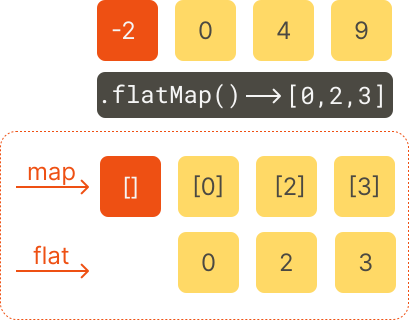
How it works.
First, define an array that stores numbers both negative and positive numbers:
const numbers = [-2, 0, 4, 9];Second, use the flatMap() method to map each positive number to its square root and a negative number to an empty array [], and flatten the array into a single result:
const results = numbers.flatMap((n) => (n >= 0 ? [Math.sqrt(n)] : []));Third, display the result to the console:
console.log({ results });2) Extracting words from sentences #
The following example uses the flatMap() method to create an array of words from sentences:
let sentences = [
'JavaScript is good',
'JavaScript is nice',
'JavaScript is fun',
];
let words = sentences.flatMap((s) => s.split(' '));
console.log(words);Output:
['JavaScript', 'is', 'good', 'JavaScript', 'is', 'nice', 'JavaScript', 'is', 'fun']How it works.
First, define an array that stores sentences:
let sentences = [
'JavaScript is good',
'JavaScript is nice',
'JavaScript is fun',
];Second, use the flatMap() method to split each sentence into an array of words using the split() method, and flatten the arrays of words into a single array of words:
let words = sentences.flatMap((s) => s.split(' '));Third, display the result in the console:
console.log(words);3) Using the flatMap() method to process API responses #
The following example shows how to use the flatMap() to process API response:
const posts = [
{ id: 1, tags: ['javascript'] },
{ id: 2, tags: ['react', 'react native'] },
{ id: 3, tags: ['redux', 'zustand'] },
];
const allTags = posts.flatMap((p) => p.tags);
console.log(allTags);Output:
[ 'javascript', 'react', 'react native', 'redux', 'zustand' ]How it works.
First, define an array of the posts that stores the API response:
const posts = [
{ id: 1, tags: ['javascript'] },
{ id: 2, tags: ['react', 'react native'] },
{ id: 3, tags: ['redux', 'zustand'] },
];Second, use the flatMap() method to get the tags array from each post in the posts array and flatten the result array:
const allTags = posts.flatMap((p) => p.tags);Third, display the allTags in the console:
console.log(allTags);Summary #
- Use the
flatMap()method to create a new array by applying a mapping function to each element and flattening the result array with a depth of 1.
Thank you for your feedback!
