Summary: in this tutorial, you will learn how to use the JavaScript Array find() method to return the first element in an array that satisfies a test function.
Introduction to the JavaScript Array find() method #
The Array find() method returns the first element in an array, which satisfies a provided test function.
Here’s the syntax of the find() function:
const match = array.find(callbackFn)The find() method accepts a callback function that executes on every element of the array.
The callbackFn function returns either a truthy or falsy value. If the matching element is found, the callbackFn returns a truthy value or falsy value otherwise.
The callback has the following syntax:
callbackFn(element, index, array)The callbackFn function takes three arguments:
elementis the current element.indexthe index of the current element.arraythe array that thefind()was called upon.
The find() method executes the callbackFn function for each element in the array until the callbackFn returns a truthy value or there are no more elements to check.
If the callback returns a truthy value, the find() immediately returns the element and stops searching. Otherwise, it returns undefined.
thisArg #
The find() method accepts a second optional argument thisArg:
find(callbackFn, thisArg)The thisArg is used as this inside the callbackFn function.
Note that if you want to find the index of the matching element, you can use the findIndex() method
JavaScript Array find() method examples #
Let’s take some examples of using the Array find() method.
Basic Array find() method example #
The following example uses the find() method to search for the first even number in an array of numbers:
const numbers = [1, 2, 3, 4, 5];
const x = numbers.find((e) => e % 2 == 0);
console.log({ x });Output:
{ x: 2 }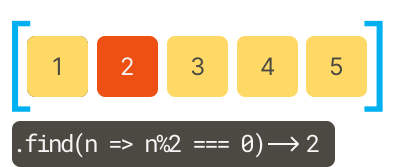
Using the find() method with an array of strings #
The following example uses the find() method to search for the name that includes "au" in an array of strings:
const names = ['Joe', 'Paul', 'George', 'Paulia'];
const match = names.find((name) => name.includes('au'));
console.log({ match });Output:
{ match: 'Paul' }Using the find() method with an array of object #
The following example uses the find() method to find the todo object with the id 2:
const todos = [
{
id: 1,
text: 'Learn JavaScript',
isCompleted: false,
},
{
id: 2,
text: 'Master React',
isCompleted: false,
},
{
id: 3,
text: 'Build an App ',
isCompleted: false,
},
];
const todo = todos.find((todo) => todo.id === 2);
console.log(todo);Output:
{ id: 2, text: 'Master React', isCompleted: false }Summary #
- Use the
find()method to find the first element in an array that satisfies a provided testing function.
Thank you for your feedback!
