Summary: in this tutorial, you will learn how to use the JavaScript Array lastIndexOf() method to return the last index of a matching element in an array or -1 if no matching is found.
Introduction to JavaScript Array lastIndexOf() method #
The Array lastIndexOf() method returns the index of the last matching element in an array or -1 if there is no matching element.
Here’s the syntax of the lastIndexOf() method:
const index = array.lastIndexOf(searchElement, fromIndex)The lastIndexOf() method accepts two arguments:
searchElementis the element to locate in the array.fromIndexis a zero-based index at which the method starts searching. ThefromIndexparameter is optional.
Note that the lastIndexOf() method searches for the elements from the end of the array to the beginning array, starting from the fromIndex.
If you omit the fromIndex, the indexOf() method starts searching from the end of the array.
The fromIndex argument can be a positive or negative integer.
If fromIndex is positive, the method starts searching from the fromIndex backward to the beginning of the array.
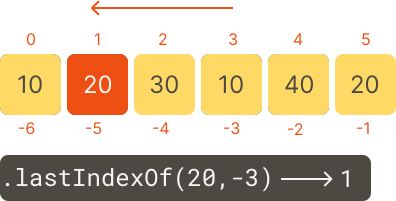
If fromIndex is negative (-array.length <= fromIndex < 0), a negative fromIndex counts back from the end of the array. The method also searches backward from the end of the array.
If fromIndex < - array.length, the method does not search and return -1.
The lastIndexOf() method uses the strict equality comparison algorithm for comparing the searchElement with the elements in the array when searching.
JavaScript Array lastIndexOf() method examples #
Let’s take some examples of using the lastIndexOf() method.
Basic JavaScript Array lastIndexOf() method example #
The following example uses the lastIndexOf() method to locate the number 20 in the scores array:
const scores = [10, 20, 30, 10, 40, 20];
const index = scores.lastIndexOf(20);
console.log({ index });Output:
{ index: 5 }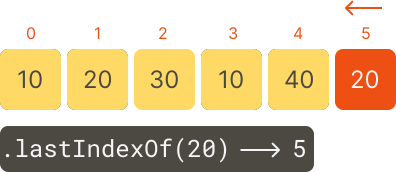
Using the fromIndex argument #
The following example uses the lastIndexOf() method to locate the number 20 in the scores array starting from the index 2:
const scores = [10, 20, 30, 10, 40, 20];
const index = scores.lastIndexOf(20, 2);
console.log({ index });Output:
{ index: 1 }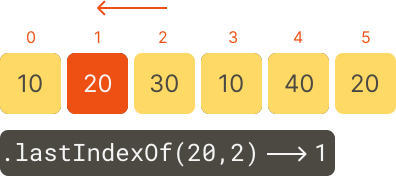
Using a negative fromIndex argument #
The following example uses the lastIndexOf() method to locate the number 20 in the scores array starting from a negative index -3:
const scores = [10, 20, 30, 10, 40, 20];
const index = scores.lastIndexOf(20, -3);
console.log({ index });Output:
{ index: 1 }Output:
Summary #
- Use the JavaScript array
lastIndexOf()method to return the index of the last matching element in the array.
Thank you for your feedback!
