Summary: In this tutorial, you will learn how to use the JavaScript Array with() method to return a new array with a value at an index changed to a new value.
Introduction to the JavaScript Array with() method #
The Array with() method returns a new array with an element at a specified index replaced by a new one.
Here’s the syntax of the with() method:
let newArray = array.with(index, value)In this syntax:
indexis a zero-based index at which you want to replace the element.indexcan be positive or negative. A negative index counts back from the end of the array.valueis a new value that the method assigns at the givenindex.
The with() method returns a new array with the element at index replaced with value.
Note that the with() method does not modify the original array.
JavaScript Array with() method examples #
Let’s take some examples of using the Array with() method.
Basic Array with() method example #
The following example uses the Array with() method to replace the element at the index 2 with the value 20:
const numbers = [1, 2, 3];
const newNumbers = numbers.with(1, 20);
console.log({ numbers });
console.log({ newNumbers });Output:
{ numbers: [ 1, 2, 3 ] }
{ newNumbers: [ 1, 20, 3 ] }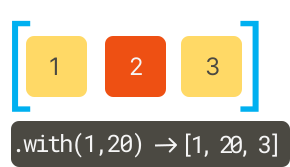
Using the Array with() method with an array of objects #
The following example uses the with() method to update the second object in an array and return a new array:
const todos = [
{ id: 1, title: 'Learn HTML', completed: true },
{ id: 2, title: 'Learn CSS', completed: false },
{ id: 3, title: 'Learn JavaScript', completed: false },
];
const newTodos = todos.with(1, { ...todos[1], completed: true });
console.log({ newTodos });Output:
{
newTodos: [
{ id: 1, title: 'Learn HTML', completed: true },
{ id: 2, title: 'Learn CSS', completed: true },
{ id: 3, title: 'Learn JavaScript', completed: false }
]
}How it works.
First, define an array of todo objects:
const todos = [
{ id: 1, title: 'Learn HTML', completed: true },
{ id: 2, title: 'Learn CSS', completed: false },
{ id: 3, title: 'Learn JavaScript', completed: false },
];Each todo object has three properties: id, title, and completed.
Second, update the completed property of the second todo object to true and return a new array:
const newTodos = todos.with(1, { ...todos[1], completed: true });In this syntax:
1indicates that thewith()will replace the second element in an array.{ ...todos[1], completed: true }creates a new todo object from the existing one and updates only the completed property to false.
Third, display the newTodos to the console:
console.log({ newTodos });Summary #
- Use the JavaScript Array
with()method to return a new array with a value at an index changed to a new value.
Thank you for your feedback!
