Image

The Deep Magic Of 3D Graphics Perspective

Many of us of a certain age will have had their first true, good 3D video game experience with Super Mario 64. Unlike previous 3D games, the camera was an object controllable by the player, rather than a first-person-ony mode or one where the game tries to guess the best placement for the camera. We might take this mechanic for granted today, but 3D was a new technology at the time that took experimentation before settling on the norms we have today. From a programming perspective, 3D graphics can be a bit of a head-scratcher but [Gabriel] shows that perspective and the camera can be as simple as a few lines of math.

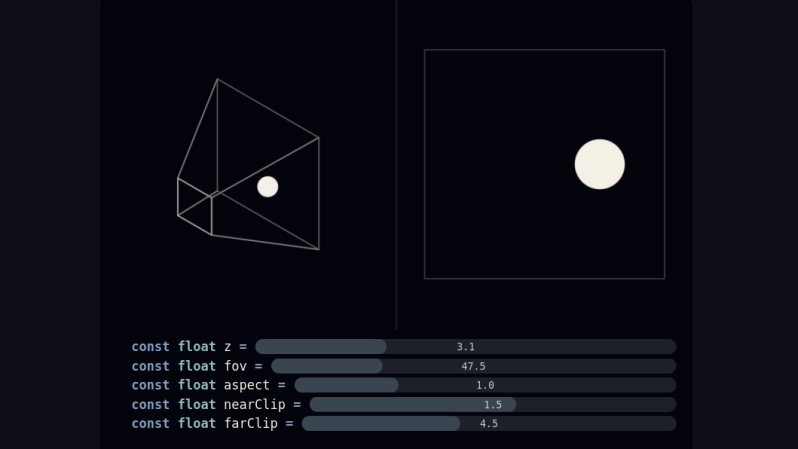
When starting out as a programmer, [Gabriel] used various tools that provided a camera somewhat automatically. But after reaching the limits of these types of frameworks, the next step is to learn how that works from scratch. It turns out that it’s a bit of matrix math, with values for foreground and background clipping planes as well as aspect, field of view, and position. This basically replicates a trapezoidal prism which can be thought of as a viewer looking at a scene from the perspective of a camera. To provide the depth effect, the X and Y coordinates are divided by the Z coordinate within this matrix system, making far-away objects smaller and generating the 3D effect.

On [Gabriel]’s site which explains this method, there are a few sliders in several examples that demonstrate how changing values of each of these variables changes the perspective and the object being displayed. For a math lesson it is very interactive and helps intuit these concepts. Cameras aside, the generation of 3D objects has its own unique set of math equations to learn about that are “equally” interesting.

Image

Choice, Control, And Interruption

We were talking about [Maya Posch]’s rant on smartphones, “The Curse of the Everything Device”. Maya’s main point is that because the smartphone, or computer, can do everything, it’s hard for a person to focus down and do one thing without getting distracted, checking their whatever feed, or getting an important push notification about the Oscars. She was suggesting tying your hands to the mast by using a device that can only accommodate the one function, like a dedicated writing tool or word processor.

[Kristina Panos] compared the all-singing, all-dancing black rectangle to an everything-device of old: the all-in-one stereo receiver with built-in tape player, record player, and not just FM, but also AM radio receiver. The point being, the hi-fi device also does a whole lot of things but isn’t similarly cursed. The tape player never interrupts your listening to the AM radio station. When the record is over, it doesn’t swap over to FM. Your agency is required.

Similarly, it’s probably not intrinsically problematic that the smartphone has a camera, a web browser, text messages, and heck even a telephone built in. It’s how they interact with each other and the user, each vying for user attention, and interrupting with popups and alarms. It’s maybe a simple matter of software! (Says the hardware guy.)

Where would a distraction-free, but fully featured, phone begin? With the operating system? It would be perverse to limit you to one app at a time, or to make switching between them more cumbersome. How about turning off notifications, and relying on changing context only when you think about it? Maybe that’s a middle ground. How do you cope with the endless distractions offered to you by your smartphone? By your main computer?

Image

UNIX For A Legacy TI

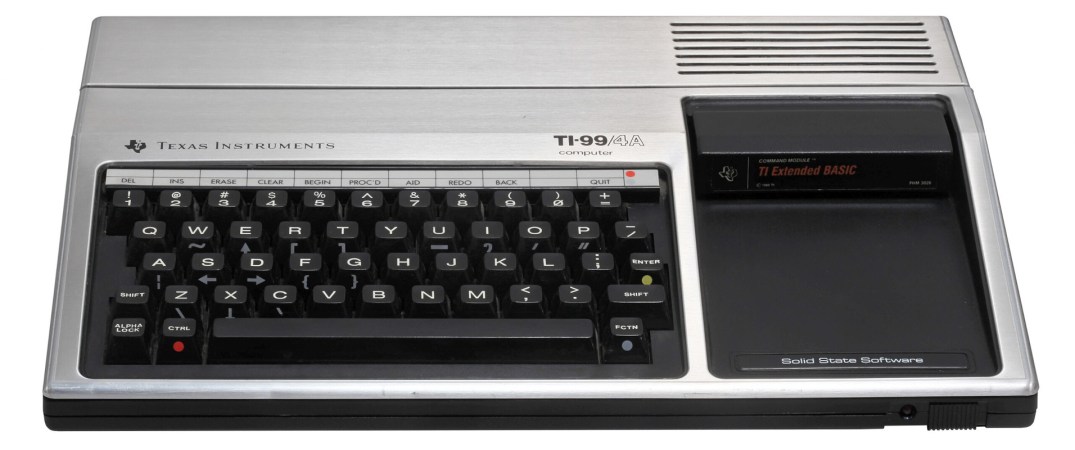
Although now mostly known as a company who cornered the market on graphing calculators while only updating them once a decade or so, there was a time when Texas Instruments was a major force in the computing world. In the late 70s and early 80s they released a line of computers called the TI-99 to compete (unsuccessfully) with various offerings from Commodore, and these machines were fairly robust for the time. They did have limited memory but offered a 16-bit CPU and plenty of peripherals, and now there’s even a UNIX-like OS that they can run.

This version of UNIX is called UNIX99 and is the brainchild of AtariAge forum member [mrvan] who originally wasn’t looking to develop a full operating system for this computer but rather a set of standard C libraries to help with other projects. Apparently the step from that to a UNIX-flavored OS wasn’t too big so this project was born. While the operating system doesn’t have a UNIX certification, it has most of the tools any of us would recognize on similar machines. The OS has support for most of the TI-99 hardware, file management, a basic user account system, and a command shell through which scripts can be written and executed.

That being said, the limitations of the hardware do come through in the operating system. There’s no multitasking, for example, and the small amount of memory is a major hurdle as well. But that’s what makes this project all the more impressive, and [mrvan] isn’t stopping here. He’s working on a few other improvements to this platform, and we look forward to seeing future releases. UNIX itself is extremely influential in the computing world, and has been used a the model for other homebrew UNIX-like operating systems on similar platforms of this era such as the Z80.

Thanks to [Stephen] for the tip!

Photo courtesy of Rama & Musée Bolo via Wikimedia Commons

Image

The Browser Wasn’t Enough, Google Wants To Control All Your Software

A few days ago we brought you word that Google was looking to crack down on “sideloaded” Android applications. That is, software packages installed from outside of the mobile operating system’s official repository. Unsurprisingly, a number of readers were outraged at the proposed changes. Android’s open nature, at least in comparison to other mobile operating systems, is what attracted many users to it in the first place. Seeing the platform slowly move towards its own walled garden approach is concerning, especially as it leaves the fate of popular services such as the F-Droid free and open source software (FOSS) repository in question.

But for those who’ve been keeping and eye out for such things, this latest move by Google to throw their weight around isn’t exactly unexpected. They had the goodwill of the community when they decided to develop an open source browser engine to keep the likes of Microsoft from taking over the Internet and dictating the rules, but now Google has arguably become exactly what they once set out to destroy.

Today they essentially control the Internet, at least as the average person sees it, they control 72% of the mobile phone OS market, and now they want to firm up their already outsized control which apps get installed on your phone. The only question is whether or not we let them get away with it.

Continue reading “The Browser Wasn’t Enough, Google Wants To Control All Your Software” →

Image

Reservoir Sampling, Or How To Sample Sets Of Unknown Size

Selecting a random sample from a set is simple. But what about selecting a fair random sample from a set of unknown or indeterminate size? That’s where reservoir sampling comes in, and [Sam Rose] has a beautifully-illustrated, interactive guide to how reservoir sampling works. As far as methods go, it’s as elegant as it is simple, and particularly suited to fairly sampling dynamic datasets like sipping from a firehose of log events.

While reservoir sampling is simple in principle it’s not entirely intuitive to everyone. That’s what makes [Sam]’s interactive essay so helpful; he first articulates the problem before presenting the solution in a way that makes it almost self-evident.

[Sam] uses an imaginary deck of cards to illustrate the problem. If one is being dealt cards one at a time from a deck of unknown size (there could be ten cards, or a million), how can one choose a single card in a way that gives each an equal chance of having been selected? Without collecting them all first?

In a nutshell, the solution is to make a decision every time a new card arrives: hold onto the current card, or replace it with the new one. Each new card is given a 1/n chance of becoming held, where n is the number of cards we’ve seen so far. That’s all it takes. No matter when the dealer stops dealing, each card that has been seen will have had an equal chance of ending up the one selected.

There are a few variations which [Sam] also covers, and practical ways of applying it to log collection, so check it out for yourself.

If [Sam]’s knack for illustrating concepts in an interactive way is your jam, we have one more to point out. Our own Al Williams wrote a piece on Turing machines; the original “universal machine” being a theoretical device with a read/write head and infinite paper tape. A wonderful companion to that article is [Sam]’s piece illustrating exactly how such a Turing machines would work in an interactive way.

Image

Open Source Hiding In Plain Sight

On the podcast, [Tom] and I were talking about the continuing saga of the libogc debacle. [Tom] has been interviewing some of the principals involved, so he’s got some first-hand perspective on it all – you should really go read his pieces. But the short version is that an old library that many Nintendo game emulators use appears to have cribbed code from both and open-source real-time operating system called RTEMS, and the Linux kernel itself.

You probably know Linux, but RTEMS is a high-reliability RTOS for aerospace. People in the field tell me that it’s well-known in those circles, but it doesn’t have a high profile in the hacker world. Still, satellites run RTEMS, so it’s probably also a good place to draw inspiration from, or simply use the library as-is. Since it’s BSD-licensed, you can also borrow entire functions wholesale if you attribute them properly.

In the end, an RTOS is an RTOS. It doesn’t matter if it’s developed for blinking LEDs or for guiding ICBMs. This thought got [Tom] and I to thinking about what other high-reliability open-source code is out there, hidden away in obscurity because of the industry that it was developed for. NASA’s core flight system came instantly to mind, but NASA makes much of its code available for you to use if you’re interested. There are surely worse places to draw inspiration!

What other off-the-beaten-path software sources do you know of that might be useful for our crowd?

Image

If You’re 3D Scanning, You’ll Want A Way To Work With Point Clouds

3D scanning is becoming much more accessible, which means it’s more likely that the average hacker will use it to solve problems — possibly odd ones. That being the case, a handy tool to have in one’s repertoire is a way to work with point clouds. We’ll explain why in a moment, but that’s where CloudCompare comes in (GitHub).

Image
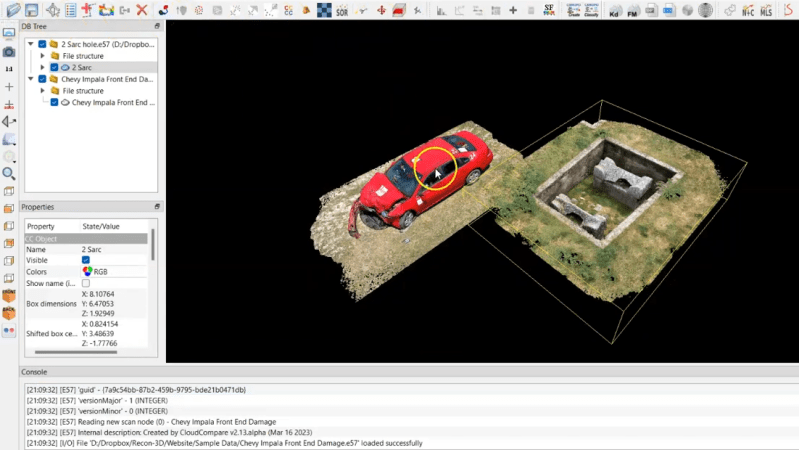
Not all point clouds are destined to be 3D models. A project may call for watching for changes in a surface, for example.

CloudCompare is an open source tool with which one can load up and do various operations on point clouds, including generating mesh models from them. Point clouds are what 3D scanners create when an object is scanned, and to become useful, those point clouds are usually post-processed into 3D models (specifically, meshes) like an .obj or .stl file.

We’ve gone into detail in the past about how 3D scanning works, what to expect from it, and taken a hands-on tour of what an all-in-one wireless scanner can do. But what do point clouds have to do with getting the most out of 3D scanning? Well, if one starts to push the boundaries of how and to what purposes 3D scanning can be applied, it sometimes makes more sense to work with point clouds directly instead of the generated meshes, and CloudCompare is an open-source tool for doing exactly that.

For example, one may wish to align and merge two or more different clouds, such as from two different (possibly incomplete) scans. Or, you might want to conduct a deviation analysis of how those different scans have changed. Alternately, if one is into designing wearable items, it can be invaluable to be able to align something to a 3D scan of a body part.

It’s a versatile tool with numerous tutorials, so if you find yourself into 3D scanning but yearning for more flexibility than you can get by working with the mesh models — or want an alternative to modeling-focused software like Blender — maybe it’s time to work with the point clouds directly.