Image

Archiving The World’s Oldest Webcam Feed

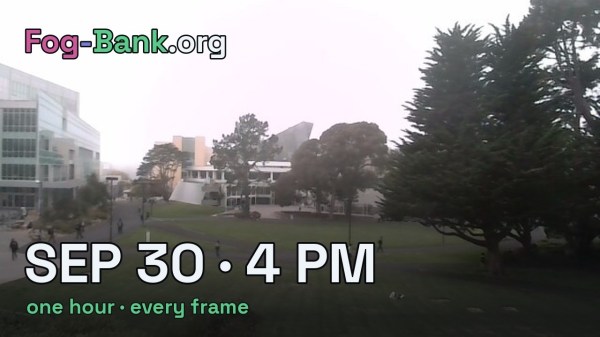
FogCam is the oldest webcam feed that’s still up and running. Installed at San Francisco State University, it’s been slowly uploading a new image to the web every 20 to 60 seconds or so since September 30, 1994. Very few of those images have ever been saved, but [Justin Earl] has come along to fix that with Fog-Bank.

[Justin] was eager to have top-notch coverage of the FogCam, so set up four separate catchers across three separate networks to scrape images from the feed. He runs one on his own server, one on his home machine, and two small programs running on Cloudflare. Each catcher reports the time it grabbed a fresh image from the site. FogCam has never replaced an image within 19 seconds, so as long as one of the catchers grabs an image at least every 18 seconds, [Justin]’s system should be archiving everything that’s being captured.

Currently the archive hosts over 169,000 images across 377 days, though the majority of that content is from a 2019 archive effort when it was believed the camera would soon be shut down. More stats are available, too.

It’s not the most interesting view in the world, but it’s neat to see such a project continue running long enough to celebrate its 32nd birthday this week. We’ve featured other neat webcam-related content before, too. Meanwhile, you can go check out the live feed if you want to peer through FogCam yourself. Continue reading “Archiving The World’s Oldest Webcam Feed” →

Image

The Whole Computer Is Vim

Love it or hate it, Vim, the vi-compatible minimalist editor, is a common denominator between a huge array of operating systems. If you need to edit a file, it’s usually safe to expect it there if your normal editor is absent. Now thanks to [Omwah] it’s moved onto the most meager of platforms, where it becomes the firmware itself rather than a program running on an OS.

ESP-Vim is, as its name suggests, Vim, for some of the ESP32 series of microcontrollers. It boots straight into the familiar editor on an attached screen, and it has filesystem and git access, along with MicroPython. It’s a small computer for working with text files and some basic scripting, and we like the idea.

It needs a board with an ESP32-S3 or P4, with 16 MB of Flash and at least 8 MB of PSRAM. There’s a list of boards that meet this spec, and we can’t help noticing that one of them is the version of the Cheap Yellow Display that comes with an S3. Hook up a Bluetooth keyboard and you’re in.

How easy it will be to use remains to be seen, but bearing in mind that the vi interface followed by Vim was designed for very slow terminals in a much earlier decade, and it could be just right for these platforms. Would you use one?


Vim logo: The Vim project, VIM License.

Image

SDR– Lets You Patch Together Your Setup

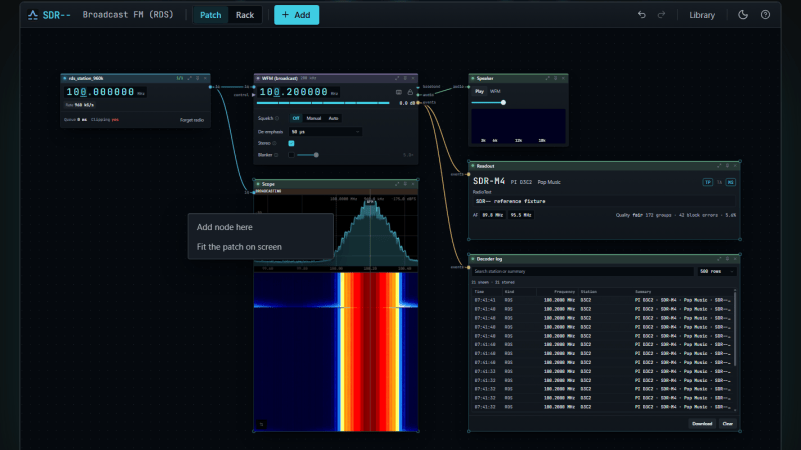
It is often helpful to think of a radio as a series of interconnected functional blocks—hence the use of block diagrams to convey how a given radio operates. [Julian Haag] has brought this ethos to SDR–, a software-defined radio program where you can patch together your setup.

There are many software defined radio tools out there, with various interfaces and methods of configuration. [Julian] wanted to keep things intuitive and simple, and so built SDR– with an interface similar to that of a modular synth. You drop in blocks, like a radio, a demodulator, or a speaker, and then you link them together with patch cables to route the signals where they need to go.

[Julian] has populated the tool with plenty of useful decoders, too, so you can have lots of fun from the get go. You can play with things like ADS-B, POCSAG, SSTV, DAB, and RDS right out of the box. There’s also some fun passive radar and direction finding tools there too if you want to dive in. Files are on GitHub for the curious.

We’ve featured lots of neat SDR hacks over the years, like this neat real-time beamforming setup. Meanwhile, if you’re cooking up your own radio experiments in the homelab, don’t hesitate to let us know on the tipsline.

Image

Sheety Turns Spreadsheets Into Binaries, For Some Reason

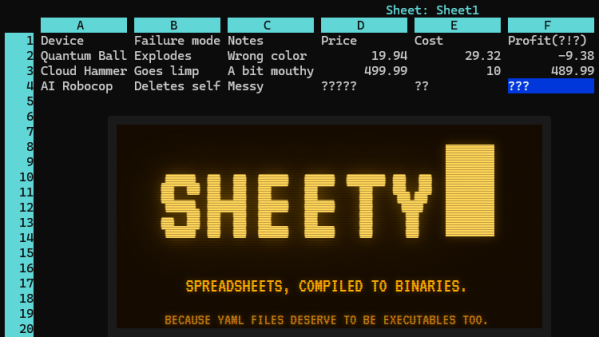
Ever wanted a spreadsheet as an executable with a built-in terminal interface? No? Well, that’s a pity because [Roberto Alsina]’s Sheety project does exactly that.

Sheety compiles spreadsheet definitions into a self-contained, executable binary with zero runtime dependencies. It presents a simple terminal application (with mouse support) in which one can browse and edit data and formulas with a simple interface. As far as formats go it can import and export Excel files, or a human-readable .yaml file.

When Sheety runs, the data and formulas defined are compiled into a self-contained executable with the formulas baked in, and that’s actually what one sees and uses. If a formula gets changed in the UI, a new and updated version is created on the fly to reflect the changes.

Sheety is perfectly functional, though it does have some limitations. Can the display width of cells be resized? They cannot. Does anyone actually need this? Probably not, as [Roberto] happily admits. Is it a fun project? Absolutely.

Be warned that while Sheety supports the Excel format, it understandably doesn’t support every single function Excel has added in the over forty years it has been around.

Sheety is written in Crystal and the GitHub repository has everything you need if you’d like to give it a try for yourself.

Image

The Deep Magic Of 3D Graphics Perspective

Many of us of a certain age will have had their first true, good 3D video game experience with Super Mario 64. Unlike previous 3D games, the camera was an object controllable by the player, rather than a first-person-ony mode or one where the game tries to guess the best placement for the camera. We might take this mechanic for granted today, but 3D was a new technology at the time that took experimentation before settling on the norms we have today. From a programming perspective, 3D graphics can be a bit of a head-scratcher but [Gabriel] shows that perspective and the camera can be as simple as a few lines of math.

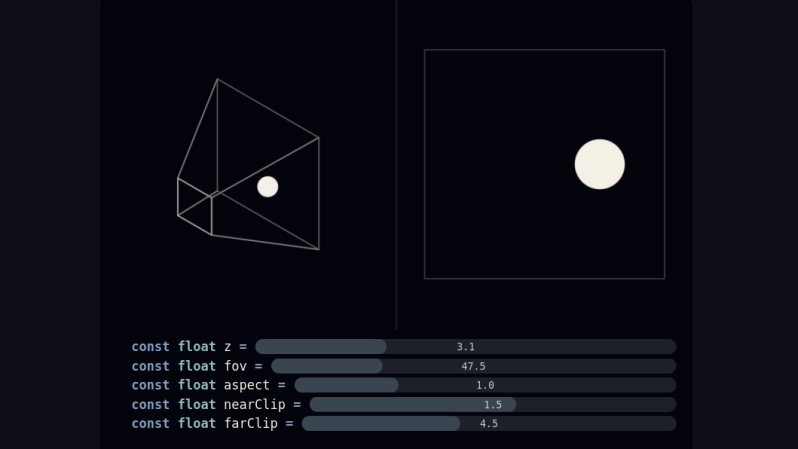
When starting out as a programmer, [Gabriel] used various tools that provided a camera somewhat automatically. But after reaching the limits of these types of frameworks, the next step is to learn how that works from scratch. It turns out that it’s a bit of matrix math, with values for foreground and background clipping planes as well as aspect, field of view, and position. This basically replicates a trapezoidal prism which can be thought of as a viewer looking at a scene from the perspective of a camera. To provide the depth effect, the X and Y coordinates are divided by the Z coordinate within this matrix system, making far-away objects smaller and generating the 3D effect.

On [Gabriel]’s site which explains this method, there are a few sliders in several examples that demonstrate how changing values of each of these variables changes the perspective and the object being displayed. For a math lesson it is very interactive and helps intuit these concepts. Cameras aside, the generation of 3D objects has its own unique set of math equations to learn about that are “equally” interesting.

Image

A Pocket-Sized Digital Fish Tank

The problem with trying to make a fish tank fit in your pocket is that you’ll either end up with water everywhere or a bunch of dead fish. Perhaps that’s why [StratoBuilds] pursued a digital solution instead.

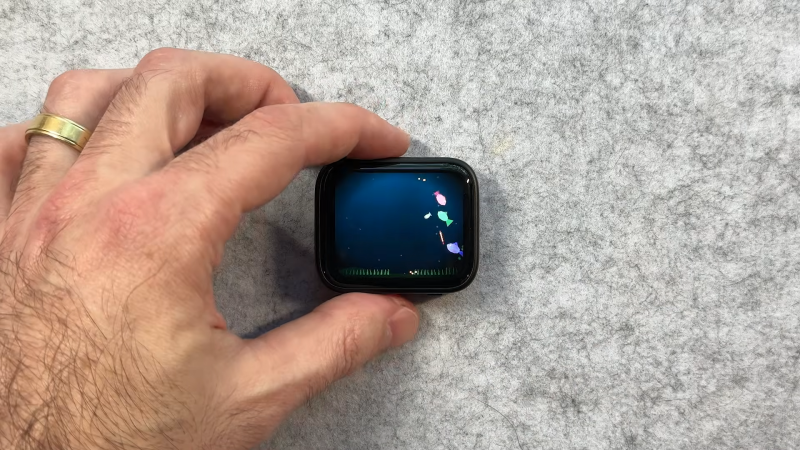
The concept behind Pocket Tank is relatively simple—it’s a small device that displays a virtual tank with a bunch of little fish swimming around inside. It’s based on the Waveshare ESP32-S3-Touch-AMOLED-1.8, which, if you’re wondering, is an ESP32-S3 with a 1.8″ screen attached, all wrapped up in a convenient plastic housing.

Thanks to the powerful microcontroller, there’s plenty of grunt on tap to run and display a small simulated fish tank. [StratoBuilds] whipped up a system wherein fish movement and animations are handled by regular code running at 25-30 fps, while the fish’s decision making is handled by a custom large language model that was condensed down to run on the ESP32 itself. As the fish swim around the tank, the situation is observed by the LLM and the fish’s current goals are changed accordingly depending on what’s going on. Much like a Tamogotchi, there are regular maintenance tasks for the user to handle, too, like cleaning the tank and feeding the fish to keep them alive.

The blog post and YouTube video do a great job of explaining the project; files are on GitHub for those that wish to tinker more directly. It’s funny, because when we normally look at fish tanks, we’re talking about real ones.

Continue reading “A Pocket-Sized Digital Fish Tank” →

Image

Abusing SQL To Play DOOM

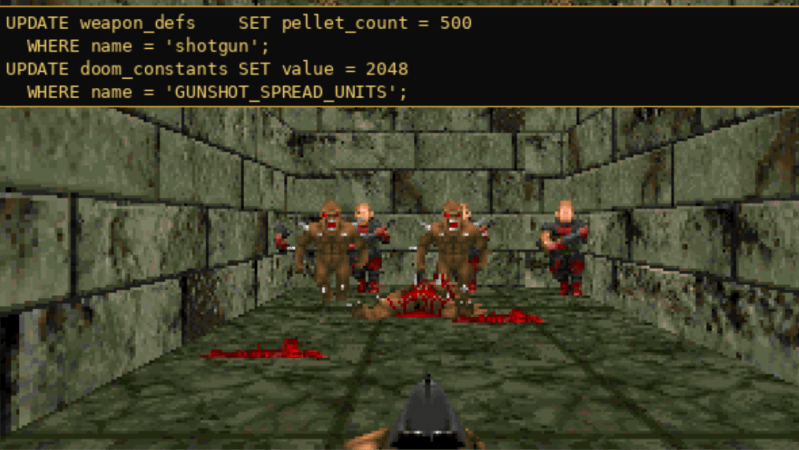
Most laypeople who encounter SQL think of it purely as a tool for managing large datasets. While that is certainly what it was designed for, SQL is still a programming language at its core. It includes many of the features found in general-purpose languages like C or Python, and although it wasn’t built for general-purpose work, it can handle a surprising range of tasks that programmers might not expect to use it for. To demonstrate its capabilities, and perhaps to show off their skills with SQL, a group at CedarDB ported the original DOOM to this language.

The project stores the WAD data (essentially everything except the engine) in a series of tables, which was fairly straightforward compared to the rest of the project. Where it gets more complicated is managing the timing that ties the game to 35 fps, and of course rendering the images. Their rendering process takes up 1300 lines of SQL across 89 common table expressions (CTEs) which is certainly advanced for this language. The rest of the project is another 4000 lines of SQL, with a bit of Python to handle the keyboard inputs, timing, and display of the generated bitmap.

Perhaps counterintuitively, DOOM might be the perfect game to run on SQL. It was built in an era before dedicated graphics cards and isn’t truly 3D, meaning that the programmers had to do a lot of tricks to get it to look as if it is 3D. This results in a lot of data transformations uniquely suited to SQL. It’s almost like DOOM‘s original renderer was built by someone with extensive SQL knowledge in the first place. For those looking to try this out, the source code for the project is available on a GitHub page, and for some other unique implementations of DOOM there’s also this version built in regular expressions and this one in Microsoft Word.