Search the Community
Showing results for tags 'webhook'.
Found 2 results
-
Version 1.0.0
38 downloads
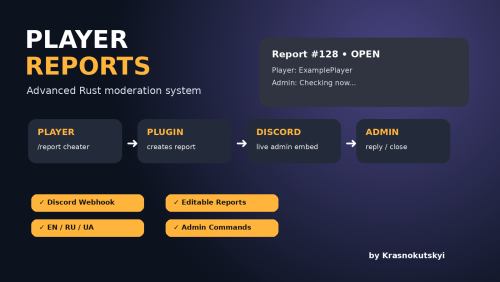
A modern and powerful in-game report system for Rust servers. Player Reports allows your community to contact server staff directly from the game while keeping everything organized through Discord integration. FEATURES ✔ In-game player report system ✔ Discord webhook integration ✔ One editable Discord message per report ✔ Admin reply system ✔ Report conversation history ✔ Open / close / reopen reports ✔ Multi-language support (EN / RU / UA) ✔ Automatic player language detection ✔ Permission system ✔ Fully configurable ✔ Clean and lightweight HOW IT WORKS 1. Player creates a report: `/report your message` 2. Staff receives notification: - In-game notification - Discord embed message 3. Admin can reply: `/rreply ID message` 4. Player receives the answer directly in-game. PLAYER COMMANDS /report message Create a report or add a message to an existing report. /myreports View your reports. /myreport ID View report conversation. ADMIN COMMANDS /reports View open reports. /reports all View all reports. /rview ID View full conversation. /rreply ID message Reply to player. /rclose ID reason Close report. /ropen ID Reopen report. PERMISSION playerreports.admin DISCORD FEATURES • Custom webhook • Custom bot name • Custom avatar • Role mentions • Embed colors • Automatic message updates LANGUAGES English Russian Ukrainian INSTALLATION 1. Upload PlayerReports.cs into: oxide/plugins/ 2. Start server or reload plugin. 3. Edit configuration: oxide/config/PlayerReports.json 4. Add your Discord webhook. 5. Give permission: oxide.grant group admin playerreports.adminFree -

Version 1.1.8
45 downloads
Player Reporting Plugin, Command Usage: /report (Player Name) (reason) /adminreports - Gui for seeing players with reports and how many requires "playerreports.admin" permssion Gui Preview in video below Permissions: o.grant group default playerreport.use o.grant group admin playerreport.admin Example Of Messages Sent To Discord Webhook Attached. When a player is reported, In-Game admins will receive a notification of that person being reported, if they have the permission "playerreport.admin" Default Config: { "Discord Webhook URL": "https://discord.com/api/webhooks/yourwebhookhere", "Ban Notification Webhook URL": "https://discord.com/api/webhooks/yourwebhookhere", "Server Shortname": "5x Duo Max Rustico", "Admin Notification": true, "Ban Appeal Link": "https://discord.gg/JKmGzRf7", "Maximum Reports Before Auto Ban": 10 } Localisation Support: { "Usage": "Usage: /report <player name> <reason>", "PlayerNotFound": "Player '{0}' not found. Check the spelling or try a different name.", "DidYouMean": "Did you mean: {0}?", "ReportSubmitted": "Your report against {0} has been submitted.", "ReporterField": "Reporter", "ReportedPlayerField": "Reported Player", "ReasonField": "Reason", "ReportedOn": "Reported on", "DiscordError": "Failed to send report to Discord: {0}", "CooldownMessage": "Please wait {0} seconds before submitting another report.", "AdminNotification": "Player {0} reported {1} for: {2}", "AutoBanMessage": "You have been automatically banned due to multiple reports. Appeal: {0}" }$4.99