Search the Community
Showing results for tags 'chatbot'.
Found 2 results
-

Version 1.0.2
42 downloads
ChatModerator — a powerful chat moderation plugin for Rust servers that automatically maintains order in player communication. Forget about manual moderation — the plugin automatically detects violations, punishes players and formats the chat in a unified style. Message Filtering Three violation handling modes: Censor, Block, Ignore Three violation levels: light, medium and severe — each with its own word list Automatic censorship of banned words with *** symbols Punishment System Automatic mute for violations — configurable for each level separately Automatic ban upon accumulating violations Configurable mute and ban duration for each violation level Automatic punishment removal upon expiration Anti-Spam Cooldown between messages Detection and blocking of repeated messages Spam mute with configurable duration Chat Formatting Customizable nick and message colors via HEX Unique nick colors by permission (e.g. for admins and VIP players) Gradient nicks support — smooth transition between two colors Customizable avatar for plugin system messages Flexibility Player data cleanup after wipe Ignore administrator messages Team chat moderation Global notifications about mutes and bans Automation Welcome message for newly connected players — customizable text via lang files Automatic periodic messages to all players — configurable interval and message list Random message selection with no repeats in a row Customizable server name displayed in auto and welcome messages Console Commands (RCON / admin only) Command Description chatmod.clearmute <steamid> Remove mute from a player chatmod.clearban <steamid> Remove ban from a player chatmod.clearviolations <steamid> Reset player violation counter Permissions Permission Description chatmoderation.color.admin Custom nick color for administrators (configurable) chatmoderation.color.vip Custom nick color for VIP players (configurable) You can add any number of custom color permissions through the config. Plugin Config en – example of plugin configuration in English ru – example of plugin configuration in Russian You can reach out to me in Discord: gaga407's Discord Profile$15.00- 4 comments
- 5 reviews
-
- 6
-

-

-

-
- #chat
- #moderator
- (and 6 more)
-
Version 2.4.0
4,142 downloads
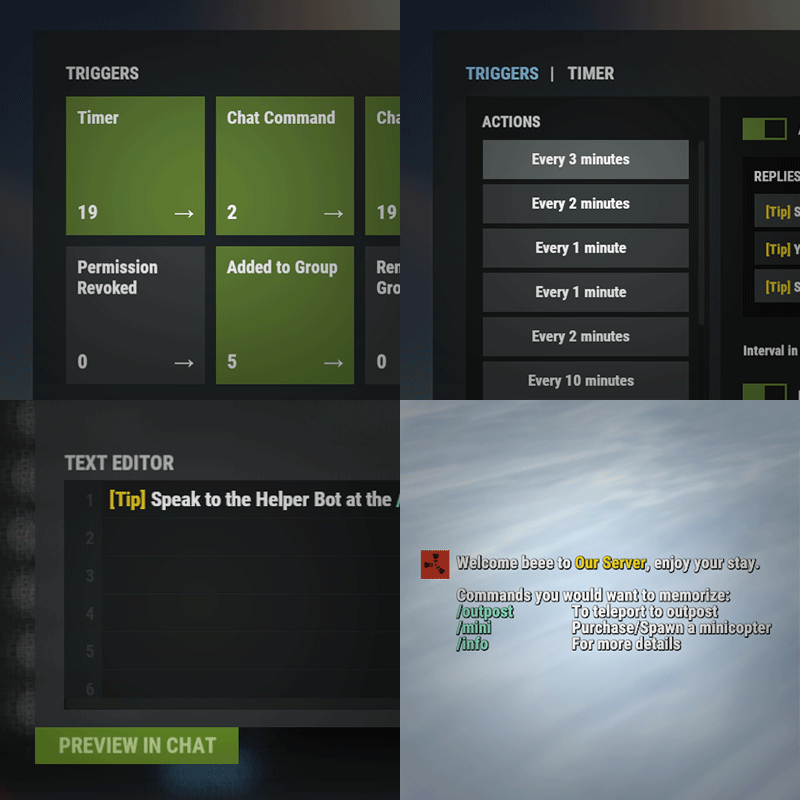
Automated chat messages based on chat keywords, advanced scheduling modes (Interval, Server Time, Game Time, and Countdown), or various other triggers. In addition to sending messages, the plugin can also automatically run server console commands when an action triggers. It comes with an easy to use Admin UI for complete setup, and supports special localization for your messages. You can define messages to be sent only to specific Groups or Permissions, and you can allow players to toggle on/off messages if they do not find them useful. SUPPORTED TRIGGERS If what you need is not here and still falls under the scope of the plugin description, reach out to me Timed | ChatCommand | AutoReply | NewPlayerJoined | PlayerConnected | PlayerDisconnected | PermissionGranted | PermissionRevoked | AddedToGroup | RemovedFromGroup | PlayerDead | CrateHacked | EnteredDeepSea | LeftDeepSea | EnteredZone | LeftZone | EnteredMonument | LeftMonument COMMANDS /am.edit - (Admin UI for complete setup) - requires automatedmessages.admin permission /tips - (Player command for toggling on/off messages) command can be changed in the config file MESSAGES LOCALIZATION You can switch between languages in Admin UI to setup localized replies for every language the game supports. Check config section below for how to add languages. Game Tips You can utilize Rust's native game tip UI to show specific messages instead or along with sending it to chat. VARIABLES Variables can be included in the messages text to show further info based on the trigger or player. The plugin also supports https://umod.org/plugins/placeholder-api with the extensive list of variables it brings. {playername} {playerid} - Player steam id {playercountry} {hacklocation} - Specific to messages with type CrateHacked {wipetimeremaining} - Days/Hours till wipe (based on rust convar settings if a missile silo monument is present). By default, displays like 2d 5h. You can format this by using the following specific placeholders: {wipetimeremaining:d} - Days remaining {wipetimeremaining:h} - Hours remaining (0-23) {wipetimeremaining:th} - Total hours remaining {online} - # of players online {sleeping} - # of players sleeping {joining} - # of players joining {target} - The target string associated with the triggered action. {countdown} - Live time remaining for actions using the Countdown scheduling mode. By default, displays time automatically. You can format this by using the following specific placeholders: {countdown:m} - Minutes remaining (0-59) {countdown:s} - Seconds remaining (0-59) {countdown:tm} - Total minutes remaining {countdown:ts} - Total seconds remaining CONFIG SETTINGS Below are only settings not currently available in Admin UI, highly recommended to edit triggers or actions using /am.edit Chat Icon (Steam Id) - Icon that will be used for all messages sent by the plugin, must be a steam id. Toggle Chat Command - "tips" - Chat command that allows a player to toggle on/off messages. AutoReply Cooldown (in seconds) - Per action cooldown timer when players type a keyword set. ChatCommand Cooldown (in seconds) - Per player cooldown timer when a player types a chat command. ZoneManager Cooldown (in seconds) - Per player cooldown timer on enter or exit zone. MonumentWatcher Cooldown (in seconds) - Per player cooldown timer on enter or exit monument. Replies Server Languages - Languages your server will support. Available options: af, ar, ca, cs, da, de, el, en-PT, en, es-ES, fi, fr, hu, it, ja, ko, nl, no, pl, pt-PT, pt-BR, ro, ru, sr, sv, tr, uk, vi, zh-CN, zh-TW Default Server Language - Fallback language if player client language had no available replies, you must have at least one reply for this language for the action to function. AutoReply `Broadcast to all` option to broadcast to team only if keywords sent from team chat - true/false$14.99