Search the Community
Showing results for tags 'localization'.
Found 3 results
-
Version 2.4.0
4,142 downloads
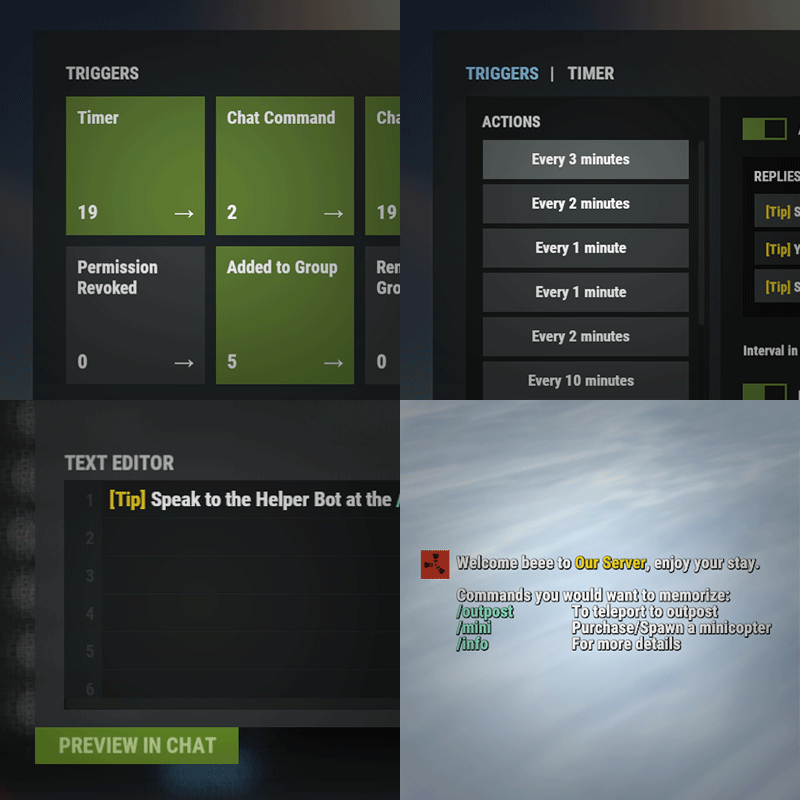
Automated chat messages based on chat keywords, advanced scheduling modes (Interval, Server Time, Game Time, and Countdown), or various other triggers. In addition to sending messages, the plugin can also automatically run server console commands when an action triggers. It comes with an easy to use Admin UI for complete setup, and supports special localization for your messages. You can define messages to be sent only to specific Groups or Permissions, and you can allow players to toggle on/off messages if they do not find them useful. SUPPORTED TRIGGERS If what you need is not here and still falls under the scope of the plugin description, reach out to me Timed | ChatCommand | AutoReply | NewPlayerJoined | PlayerConnected | PlayerDisconnected | PermissionGranted | PermissionRevoked | AddedToGroup | RemovedFromGroup | PlayerDead | CrateHacked | EnteredDeepSea | LeftDeepSea | EnteredZone | LeftZone | EnteredMonument | LeftMonument COMMANDS /am.edit - (Admin UI for complete setup) - requires automatedmessages.admin permission /tips - (Player command for toggling on/off messages) command can be changed in the config file MESSAGES LOCALIZATION You can switch between languages in Admin UI to setup localized replies for every language the game supports. Check config section below for how to add languages. Game Tips You can utilize Rust's native game tip UI to show specific messages instead or along with sending it to chat. VARIABLES Variables can be included in the messages text to show further info based on the trigger or player. The plugin also supports https://umod.org/plugins/placeholder-api with the extensive list of variables it brings. {playername} {playerid} - Player steam id {playercountry} {hacklocation} - Specific to messages with type CrateHacked {wipetimeremaining} - Days/Hours till wipe (based on rust convar settings if a missile silo monument is present). By default, displays like 2d 5h. You can format this by using the following specific placeholders: {wipetimeremaining:d} - Days remaining {wipetimeremaining:h} - Hours remaining (0-23) {wipetimeremaining:th} - Total hours remaining {online} - # of players online {sleeping} - # of players sleeping {joining} - # of players joining {target} - The target string associated with the triggered action. {countdown} - Live time remaining for actions using the Countdown scheduling mode. By default, displays time automatically. You can format this by using the following specific placeholders: {countdown:m} - Minutes remaining (0-59) {countdown:s} - Seconds remaining (0-59) {countdown:tm} - Total minutes remaining {countdown:ts} - Total seconds remaining CONFIG SETTINGS Below are only settings not currently available in Admin UI, highly recommended to edit triggers or actions using /am.edit Chat Icon (Steam Id) - Icon that will be used for all messages sent by the plugin, must be a steam id. Toggle Chat Command - "tips" - Chat command that allows a player to toggle on/off messages. AutoReply Cooldown (in seconds) - Per action cooldown timer when players type a keyword set. ChatCommand Cooldown (in seconds) - Per player cooldown timer when a player types a chat command. ZoneManager Cooldown (in seconds) - Per player cooldown timer on enter or exit zone. MonumentWatcher Cooldown (in seconds) - Per player cooldown timer on enter or exit monument. Replies Server Languages - Languages your server will support. Available options: af, ar, ca, cs, da, de, el, en-PT, en, es-ES, fi, fr, hu, it, ja, ko, nl, no, pl, pt-PT, pt-BR, ro, ru, sr, sv, tr, uk, vi, zh-CN, zh-TW Default Server Language - Fallback language if player client language had no available replies, you must have at least one reply for this language for the action to function. AutoReply `Broadcast to all` option to broadcast to team only if keywords sent from team chat - true/false$14.99 -
(1).thumb.gif.3621bf913311ac348587437f75a3cf0e.gif)
Version 0.0.5
44 downloads
FloatingHits – World-Space Hit Indicators. Now hits will be displayed in 3D space, rather than just on the screen. Configuration: { "Default hit": "<b> <size=25> <color=yellow> %DAMAGE% </color> </size> </b>", "Headshot": "<b> <size=25> <color=red> %DAMAGE% </color> </size> </b>", "Wounded": "<b> <size=25> <color=red> Fell! </color> </size> </b>", "Dead": "<b> <size=30> <color=red> Dead! </color> </size> </b>", "Maximum distance for drawing a hit (0 = endless)": 100, "Show hit if hitted npc": true, "Show hit if hitted animal": false }$5.00 -
Version 1.2.16
561 downloads
Если ты когда-либо создавал карту или префабы до потери сознания, а потом забывал сохранить свою работу — знай, с этой локализацией это больше не повторится! В планах — доработать этот файл и сделать его ещё более удобным и функциональным! Это обновлённая локализация — я постарался перевести на понятный язык всё, что только мог! Теперь интерфейс станет ближе и удобнее для каждого пользователя без сильного знания Английского языка! Установка: Скопировать файл перевода в папку RustEdit\Localization. Запустить RustEdit и выбрать перевод снизу слева вместо английского. Если перевода нет в списке для выбора, можно выбрать «Запуск от имени администратора» в свойствах файла RustEdit.exe. Буду рад любому фидбеку! ReadMe: На данный момент существует проблема со всеми русскими (и не только) локализациями для RustEdit — программа некорректно отображает некоторые буквы. Это не финальное решение, но оно позволит комфортнее пользоваться редактором, пока проблема не будет устранена полностью. По крайней мере, некорректное отображение снижено на столько, на сколько это сейчас возможно. Перед установкой, удалите все существующие локализации (Английский в том числе) и оставьте только f1x версию. Это нужно для корректной загрузки. Пользуйтесь ТОЛЬКО ей! В ином случае, этот фикс никак не поможет. Так же можете попробовать перезайти в программу, в некоторых случаях может помочь. До фикса ( бывало хуже ) ПослеFree- 1 review
-
- 8
-

-

-
- #русский
- #локализация
- (and 4 more)