Search the Community
Showing results for tags 'wipe'.
-
Version 0.1.10
1,335 downloads
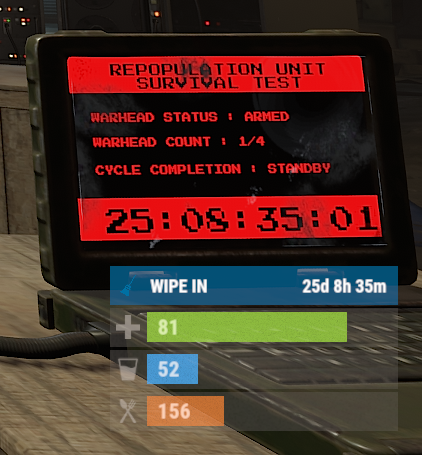
The plugin displays the time until the next wipe in the status bar. Depends on AdvancedStatus plugin. The ability to display the remaining time until the wipe: If there are N days left. Configurable in the configuration file; If player is in a safe zone or building privilege zone; The option to choose between a server wipe and a manually specified wipe; The ability to automatically generate language files for different languages(filled in English); The ability to customize the status bar for each of wipes; The ability to specify the order of the bar; The ability to change the height of the bar; The abillity to customize the color and transparency of the background; The ability to set a material for the background; The ability to switch between CuiRawImageComponent and CuiImageComponent for the image; The ability to get images from the local folder(*SERVER*\oxide\data\AdvancedStatus\Images); The abillity to set own image and customize the color and transparency of the image; The abillity to set sprite instead of the image; The ability to customize the color, size, font and outline of the text. wipestatus.admin - Provides the ability to set custom date of wipe. { "Chat command": "wipe", "Is it worth enabling GameTips for messages?": true, "List of language keys for creating language files": [ "en" ], "Is it worth displaying the wipe timer only when players in the safe zone or building privilege?": false, "The number of days before the wipe when the status bar will start to display. A value of 0 enables constant display": 0, "Bar settings key for a vanilla wipe": "_default", "Custom wipe dates list. Format: yyyy-MM-dd HH:mm. Example: 2025-12-25 13:30": {}, "List of status bar settings. Leave empty or null to recreate the default list": { "_default": { "Progress_Main_Color(Hex or RGBA)": "1 1 1 0.15", "Progress_Main_Transparency": 0.15, "BarType(TimeProgressCounter or TimeCounter)": "TimeCounter", "Order": 10, "Height": 26, "Main_Color(Hex or RGBA)": "#0370A4", "Main_Transparency": 0.7, "Main_Material(empty to disable)": "", "Image_Url": "https://i.imgur.com/FKrFYN5.png", "Image_Local(Leave empty to use Image_Url)": "WipeStatus_Default", "Image_Sprite(Leave empty to use Image_Local or Image_Url)": "", "Image_IsRawImage": false, "Image_Color(Hex or RGBA)": "#0370A4", "Image_Transparency": 1.0, "Is it worth enabling an outline for the image?": false, "Image_Outline_Color(Hex or RGBA)": "0.1 0.3 0.8 0.9", "Image_Outline_Transparency": 1.0, "Image_Outline_Distance": "0.75 0.75", "TextKey": "Bar_default", "Text_Size": 12, "Text_Color(Hex or RGBA)": "#FFFFFF", "Text_Font(https://umod.org/guides/rust/basic-concepts-of-gui#fonts)": "RobotoCondensed-Bold.ttf", "Text_Offset_Horizontal": 0, "Is it worth enabling an outline for the text?": false, "Text_Outline_Color(Hex or RGBA)": "#000000", "Text_Outline_Transparency": 1.0, "Text_Outline_Distance": "0.75 0.75", "SubText_Size": 12, "SubText_Color(Hex or RGBA)": "#FFFFFF", "SubText_Font": "RobotoCondensed-Bold.ttf", "Is it worth enabling an outline for the sub text?": false, "SubText_Outline_Color(Hex or RGBA)": "0.5 0.6 0.7 0.5", "SubText_Outline_Transparency": 1.0, "SubText_Outline_Distance": "0.75 0.75", "Progress_Reverse": false, "Progress_Color(Hex or RGBA)": "#0370A4", "Progress_Transparency": 0.7, "Progress_OffsetMin": "0 0", "Progress_OffsetMax": "0 0" } }, "Version": { "Major": 0, "Minor": 1, "Patch": 10 } } EN: { "CmdMainAdmin": "Available admin commands:\n\n<color=#D1CBCB>/wipe</color> <color=#D1AB9A>bar</color> <color=#D1CBCB>*booleanValue*(optional)</color> - Toggle the wipe bar display\n<color=#D1CBCB>/wipe</color> <color=#D1AB9A>time</color> - Current time based on server's timezone\n<color=#D1CBCB>/wipe</color> <color=#D1AB9A>add</color> <color=#D1CBCB>*wipeDate* *barId*(optional) *numericValue*(optional) *numericValue*(optional)</color> - Add a custom wipe date. Optionally, you can specify the style of the status bar, interval/spacing between wipes, and the number of intervals. Date format: yyyy-MM-dd HH:mm\n<color=#D1CBCB>/wipe</color> <color=#D1AB9A>add bar</color> <color=#D1CBCB>*wipeDate* *barID*(optional) *newBarId*(optional) *targetBarId*(optional)</color> - Add new status bar settings. Optionally, specify the ID of an existing bar to copy from\n<color=#D1CBCB>/wipe</color> <color=#D1AB9A>update</color> <color=#D1CBCB>*wipeDate* *newBarId*</color> - Update the status bar settings key for the specified custom wipe date. Use 'vanilla' instead of a wipe date to select the vanilla wipe\n<color=#D1CBCB>/wipe</color> <color=#D1AB9A>clear</color> - Clear all custom wipe dates\n\n--------------------------------------------------", "CmdMain": "Available commands:\n\n<color=#D1CBCB>/wipe</color> <color=#D1AB9A>bar</color> <color=#D1CBCB>*booleanValue*</color>(optional) - Toggle the wipe bar display\n\n--------------------------------------------------", "CmdServerTime": "Current real server time: '{0}'", "CmdNewDateAdded": "The new date '{0}' has been successfully added!", "CmdNewDateRangeAdded": "The list of dates was successfully added!", "CmdNewDateAddFailed": "Invalid format or the date is earlier than the current one. Example: '{0}'", "CmdUpdateFailed": "Failed to add/update status bar settings for '{0}'!", "CmdClearDates": "Custom dates list has been successfully cleared!", "CmdBarEnabled": "Displaying the wipe bar is enabled!", "CmdBarDisabled": "Displaying the wipe bar is disabled!", "Bar_default": "WIPE IN" } RU: { "CmdMainAdmin": "Доступные админ команды:\n\n<color=#D1CBCB>/wipe</color> <color=#D1AB9A>bar</color> <color=#D1CBCB>*булевоеЗначение*(опционально)</color> - Переключение отображения вайп бара\n<color=#D1CBCB>/wipe</color> <color=#D1AB9A>time</color> - Текущее время по часовому поясу сервера\n<color=#D1CBCB>/wipe</color> <color=#D1AB9A>add</color> <color=#D1CBCB>*датаВайпа* *айдиБара*(опционально) *числовоеЗначение*(опционально) *числовоеЗначение*(опционально)</color> - Добавление кастомной даты вайпа. Опционально можно указать стиль статус бара, интервал/отступ между вайпами и кол-во интервалов. Формат даты: yyyy-MM-dd HH:mm\n<color=#D1CBCB>/wipe</color> <color=#D1AB9A>add bar</color> <color=#D1CBCB>*айдиНовогоБара* *айдиЦелевогоБара*(опционально)</color> - Добавление новых настроек статус бара. Опционально можно указать айди исходного статус бара для копирования\n<color=#D1CBCB>/wipe</color> <color=#D1AB9A>update</color> <color=#D1CBCB>*датаВайпа* *новоеАйдиБара*</color> - Обновление ключа настроек статус бара для указанной даты вайпа. Используйте 'vanilla' вместо даты вайпа для выбора ванильного вайпа\n<color=#D1CBCB>/wipe</color> <color=#D1AB9A>clear</color> - Очистка всех кастомных дат вайпа\n\n--------------------------------------------------", "CmdMain": "Доступные команды:\n\n<color=#D1CBCB>/wipe</color> <color=#D1AB9A>bar</color> <color=#D1CBCB>*булевоеЗначение*</color>(опционально) - Переключение отображения вайп бара\n\n--------------------------------------------------", "CmdServerTime": "Текущее реальное серверное время: '{0}'", "CmdNewDateAdded": "Новая дата '{0}' успешно добавлена!", "CmdNewDateRangeAdded": "Список дат был успешно добавлен!", "CmdNewDateAddFailed": "Не верный формат или дата меньше текущей. Пример: '{0}'", "CmdUpdateFailed": "Не удалось добавить/обновить настройки статус бара для '{0}'!", "CmdClearDates": "Список дат был успешно очищен!", "CmdBarEnabled": "Отображение вайп бара включено!", "CmdBarDisabled": "Отображение вайп бара выключено!", "Bar_default": "ВАЙП ЧЕРЕЗ" } bar *booleanValue*(optional) - Toggle wipe bar visibility; time - Current time based on server's timezone. Permission "wipestatus.admin" required; add *wipeDate* *barID*(optional) *numberValue*(optional) *numberValue*(optional) - Add a custom wipe date. Optionally, you can specify the style of the status bar, interval/spacing between wipes, and the number of intervals. Date format: yyyy-MM-dd HH:mm. Permission "wipestatus.admin" required; add bar *wipeDate* *barID*(optional) *newBarId*(optional) *targetBarId*(optional) - Add new status bar settings. Optionally, specify the ID of an existing bar to copy from. Permission "wipestatus.admin" required; update *wipeDate* *newBarId* - Update the status bar settings key for the specified custom wipe date. Use 'vanilla' instead of a wipe date to select the vanilla wipe. Permission "wipestatus.admin" required; clear - Clear all custom wipe dates. Permission "wipestatus.admin" required. Example: /wipe add "2023-12-28 15:16" /wipe add bar "test" "_default" /wipe add "2024-07-16 19:00" "test" 7 20 - Starting from the date 2024-07-16 19:00, 7 days will be added 20 times, with "test" status bar style. /wipe update "vanilla" "test" /wipe update "2025-12-25 13:30" "test"$3.99 -
Version 1.3.3
11,824 downloads
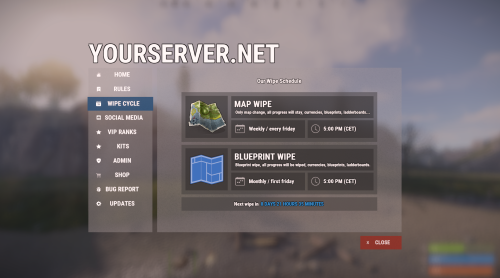
Bundle of four addons made for Welcome Panel UI. All four addons including preset default config files as you see them on screenshots.$14.99 -
Version 2.4.2
368 downloads
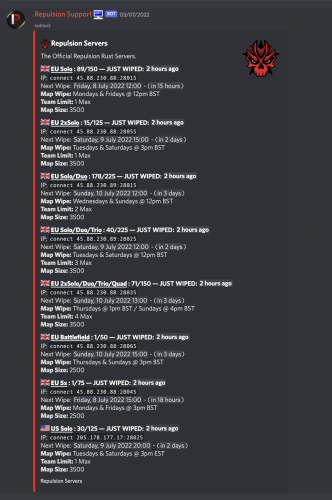
Simply the bot uses the integration of discord unix/epoch timestamps to count down your server(s) wipes in your discord automatically generating new timestamps as your server wipes, currently the bot allows monthly - (wiping at force) weekly, biweekly - (every 2 weeks) & Custom - (Multiple times a week) - as well as the full customisation of the embed in which the server info is held in (see above for example), the system is 100% automated once you create your servers/wipes. Countdown bot is coded in python utilising discord.py along with mongodb to store information Feature List : Create & Delete Wipes Fully customisable embed (Title, Description, Thumbnail, Footer, Embed Colour) Edit server information ie wipe-times or server descriptions Fully automated countdowns - autogenerates the next wipes Display server pop in the embed & last wipe Works alongside Force wipe, currently offering Monthly (force), Biweekly and Weekly wipe aswell as Custom - multiple wipes a week eg 2 Commands : (All showcased in pictures) !wipe - displays all servers and wipes to users !list - displays all embeds & serverids !create - allows you to make a new server / embed - followed by a number of questions !delete <server/embed> <id> allows you to delete servers & embeds !editeembed <id> - allows you to edit the embed id eg : thumbnail, description etc !editserver <id> - allows you to edit server information eg : wipe time, name, info Config: { "Misc":{ "Bot_Prefix":"!", "Bot_Token":"", "Server_Name":"Server Name Here", "Embed_Hex_Color":"#FFFFFF" }, "Mongo_Config":{ "MONGO_URL": "" }, "Discord_Config":{ "Guild_ID":0, "StaffRole_ID":0 } } Requirements Server with python 3.7 or above Pip packages listed - discord.py, aiohttp, motor,d nspython, python-dateutil, arrow, requests Suggested bot host 0.99$ -> https://serverstarter.host/ For any problems please msg me on discord : Skizzy#0037$21.99 -

Version 2.0.22
1,675 downloads
The ultimate solution for RUST server owners. Our plugin gives you complete control over scheduling server events, allowing you to create unique schedules that automatically adapt to your needs. Features of Wipe Schedule Handy built-in editor: Manage events directly in-game through an intuitive and user-friendly interface. Customizable calendar commands: Set up custom commands, so players can easily open the calendar and view upcoming events. Multi-language support: Localize the plugin for your audience by translating all interface text into any language. Customization flexibility: Add events with individual descriptions, dates, and times — perfect for wipes, tournaments, or special server events. Easy integration: Quick and easy installation with Server Panels. Flexible week display: Choose between two calendar week formats — Monday-first (ISO standard) or Sunday-first (American style) to match your server's preferences. Recurring events: Say goodbye to the hassle of manually scheduling events every week! Create events that automatically repeat on a set schedule:| Weekly events. Repeats every X days. Monthly and annual events. Complex combinations: Combine different repeat types to build unique and fully customizable schedules. Commands /wipe: Open the calendar interface (for players) wipeschedule.time (console): Displays current plugin time with configured timezone offset. Useful for verifying timezone settings. (RCON/Server console only) Permissions wipeschedule.admin: Grants full access to create, edit, and delete scheduled events through the in-game interface. Video Overview Web Config Editor Easily manage your WipeSchedule settings with our web-based configuration editor. This tool allows you to adjust plugin configurations through a user-friendly interface, eliminating the need to manually edit files on your server. P.S. To access the web config editor, you must be part of the "WipeSchedule" group in our Discord server. Join us at https://discord.gg/mevent and request the group to get started. Test Server Join our test server to experience all our unique features firsthand! Copy the IP address below to start playing! connect 194.147.90.239:28015 FAQ Q: Where can I see an example of a config? A: Config Q: How do I add WipeSchedule to the ServerPanel menu? A: Follow these simple steps: 1. Open ServerPanel menu in-game and click "+ADD CATEGORY" button 2. Set these exact parameters: Type: Plugin Plugin Name: WipeSchedule Plugin Hook: API_OpenPlugin 3. Click "SAVE" button to create the category Q: How can I hide the bottom panel with "/info" command and event color markers? A: To hide the bottom information panel, edit the UI configuration file located at oxide/data/WipeSchedule/SetupUI and set "Show panel with /info command and event color markers?": false in the Schedule section. The file name depends on your template: UIFullScreen.json for full screen mode, UIMenuV1.json for ServerPanel template V1, or UIMenuV2.json for ServerPanel template V2. Q: How do I set the calendar to start the week on Monday? A: By default, the calendar week starts on Monday (ISO standard). If you need to change it, edit the plugin configuration file and set "Start calendar week on Sunday": false to keep Monday as the first day, or set it to true to use Sunday-first format (American style).$29.95- 12 comments
- 4 reviews
-
- 8
-

-

-
- #wipe schedule
- #wipe
- (and 4 more)
-

Version 0.5.4
140 downloads
Hey! This is RustHandler, a tool for automatic Rust management (Debian-based Linux distros: Debian, Ubuntu Desktop & Server (64 bit)). No, you're not in the wrong place, this is all about hosting a RustDedicated Linux server, and managing it with a simple, pleasant Winform panel, making server management a breeze with just a few clicks. Installation : On the server side: -Put RustHandler.sh in your user's root directory (/home/YourUser/*here), where it must remain for RustHandler to function properly. -Do : chmod +x RustHandler.sh sudo ./RustHandler.sh -install And that's it! That's all there is to it! PC side : -Now run RustHandlerClient.exe on your PC, log in with your normal user (not root). -Log in > apply your settings in "Server Settings", save > Wipe > Update > Start ! THAT'S IT. -Optional: Install the Rust typography in the archive so that it's correctly interpreted in your software If you have any problem, you can contact me via Discord, I will answer you faster than on the site, search : sebl4rd With RustHandler, you can: -Wipe your server in 1 click. Before wiping, change your settings in Server Settings, then stop your server and wipe it (Full wipe or Save BP option). The Server settings panel contains a number of parameters, including : -CPU affinity -Automatic backups -Custom path selection -Network management -Startup convars -Autoupdate on startup -Choice of Oxide or Carbon compiler -Tips you have about 40 of the most useful convars. You can add/remove as many as you want. RustHandler automatically restarts your server, if for example you use the "TimedExecute.cs” plugin, if you program the command, every day at noon "restart 300”, the server will restart automatically, and if you activate the "Auto_Update” mod, it will update each time it restarts! RustHandler logs all restarts of your Rust server, whether accidental or not. If for example your server becomes unstable, and you suspect it to restart randomly, consult: /home/YourUser/RustHandler/restarter.log You will have a detailed list of reboots your machine has done. Server restart on 2022-04-07 19:59:05 Server restart on 2022-04-08 12:00:58 Server restart on 2022-04-09 12:01:25 Server restart on 2022-04-10 12:00:54 Server restart on 2022-04-11 12:01:18 Server restart on 2022-04-12 12:00:55 Also saves Rust server status backups. Plugin manager: Plugin Manager, allows you to install, update and manage your plugins very easily. Auto scraping of Umod site to keep database up to date. Detection of out-of-date plugins, links to plugins in an organized list... Etc. Rcon client : A Rcon client window, allowing you to make basic commands, and get feedback from your server. Currently pretty basic, but just a click away. You can easily check that your server has started up correctly with this. This window will be greatly improved. RustHandler also has a "protection”, which prevents launching a Rust server several times (otherwise data corruption). But it also allows you to run multiple Rust servers on your machine. If you want to run a 2nd Rust server simultaneously on your dedicated machine (or more), simply create another user, paste Rusthandler.sh at the root of this user, run RustHandler_Client.exe and log in. RustHandler automatically creates logs (raw logs) of your server, including EVERYTHING, so also the start of the server, which does not normally appear on an RCON protocol. Each time your server restarts, RustHandler creates a new log file. Linux beginners : Remember, NEVER to use root/sudo to modify server files/folders. If you modify files with root/sudo, your normal user will no longer be able to modify them! Upcoming updates: -Unfortunately, I haven't had time to translate everything yet, but it will happen very soon! (Baguette !) Added : English version since 0.0.3 -A Wipe mod (without BP)/ FullWipe : Done : in 0.0.4 version Plugin Manager : Oopsie ! A presentation in video A clicable interface throught ssh instead of word commands : Done.. Long time ago Scheduled Wipe -A command or clickable menu to easily import a backup. In case you have a corrupt save. -Your suggestions? Tell me about !$25.00 -

Version 1.12.0
162 downloads
Contracts is a time-rotating quest system plugin that allows you to create versatile quests/missions that rotate periodically. Each contract can have one or more objectives, with multiple objective types to choose from. It doesn't stop there: each objective can be augmented with objective conditions, which add additional requirements in order to progress it. This allows you to define versatile and unique quests: You could have quests as simple as "Kill 5 scientists"... or a little bit more challenging quests like "Kill 5 scientists with an assault rifle" or have crazy requirements like "Kill 5 scientists, with an assault rifle OR an MP5, between 25-50m away, while being below 20 HP, while wearing a bandana and riding a horse". The possibilities are endless! Not just another quest plugin Most quest plugins hand out static, repeatable, single-objective quests with no cap on how many you can have active at once and no deadline on finishing them. Players end up completing them passively in the background without ever engaging with the system, like achievements. Contracts turns these side-quests into main quests by putting them on a timer. A limited set of contracts is live at a time, each with a real deadline you define, so players have to decide what to prioritize rather than mindlessly clear a checklist. That's what keeps players logging back in throughout the wipe, when they'd otherwise burn out once progression stalls. Contracts also supports multi-objective quests with layered conditions (requirements), so a single contract can demand more than "kill 10 scientists." Simple objectives stack into real challenges. Features (Lite) The following are the limited features of the Lite version. See the Full version's page for the full feature set. Read more about the Lite edition on the website. Highly customizable quests/missions to help you build your unique set of goals and control difficulty beyond just progression amounts required. Control the flow and order of how contract objectives can be completed. 5 objective types to vary gameplay across your server 5 objective condition types to add as many layers of challenge that you want to your objectives Customizable categories and their rotation period, with the possibility to disable rotations altogether and manually control when contracts rotate. Clean and customizable UI for browsing and tracking contracts. Leaderboard to rank your whole server by Contract Score. (limited) Event logging with JSONL format support Powerful Web editor to make editing your configs a breeze and viewing insightful charts on your JSONL logs Quick Links Full Edition Discord Server Full Documentation Web Editor Roadmap Full Plugin Documentation Contracts is a very large plugin with a growing number of features. Documenting everything on the Codefling plugin page (here) can be very intimidating, inconvenient to read/search and drive new users away when they see a wall of text. For these reasons, I've created a structured, digestable and detailed documentation website with guides for new Contracts users! Check it out: https://www.rustcontracts.com Web Editor Nobody wants to be writing complex JSON structures by hand! Head to the Web Editor at https://editor.rustcontracts.com , drop your data configs and start editing your configs in a convenient UI. The quality of the editor and its extensive features are on par with the quality of the plugin! This isn't just simple forms and inputs. Editor Features Convenient UI: Edit all your contracts, categories and presets in a Web-based UI. No manual JSON editing required. Rich Editing Experience: Validation, undo/redo from anywhere, ID refactoring, autocomplete fields, optional raw JSON editing and more QoL features. Data Persistence: Save snapshots of your configs and restore or download them at a later time (data saved in your browser). Advanced Data Importing: You can import entire data files or choose parts of them to merge into your working config. This makes importing new default contracts or shared contracts into your existing config a breeze. AI Generated Contracts: Use the prompt given by the editor in ChatGPT/Claude and paste its response into the editor to generate a contract. Command Palette: Easily navigate through contracts, categories, presets from anywhere in the editor through the command palette. Stats: View your JSONL logs in pre-made charts to gain insights into your contracts, such as pacing and reward balance. Discord Join the official Discord server for support, announcements and more! https://discord.rustcontracts.comFree -

Version 6.1.5
16,273 downloads
MyRustServer is a Rust Server Tool that allows you to create and manage your own Rust Server in just a few clicks. The tool brings many possibilities and options that simplify your life as a server admin. No unnecessary creation of batch files, easy installation of the server and extensions, easy updating of your plugins, wipe your server with one click and manage your players. Join the discord for better and faster support Big thanks to everyone who supports the project and helped me You can run MyRustServer on up to 4 different systems. You can create as many servers on one system as your hardware allows. It is a standalone program for Windows Only, with which you can host your own server, connecting to other server host service providers is not possible. No Support for OneDrive Drives. No Support for Cracked Servers. The dashboard shows you all relevant information about your server. Here you control your server. Auto Restart Server Auto Update Server Auto Update Oxide/Carbon Only Updates on Startup Force Restart Set Game Mode (Vanilla, Survival, Softcore, Hardcore, Weapontest and Primitive) Set CPU Affinity Set Process Priority Start/Restart Kill and Save Server With the installer you can easily install and update your server. No batch files are used. Server Install or Update Server (Master, BETA, AUX01, AUX02, AUX03) Verify Server Files Repair Server Files Install Discord Extension Install RustEdit Install Rust.UI Oxide Install Oxide (Public, Staging) Update/Uninstall Oxide Show Server in Modded/Community Permisson Manager Carbon Install Carbon (Production, Preview, Edge, Staging, AUX02, AUX03) Update/Uninstall Carbon Show Server in Modded/Community Under Settings you give your server your personal touch. Here you can set everything for your server. Server Settings Name Logo URL Web URL App Logo URL Description Tags Max Players Add Users (Admins, Mods) RCON Password Add Ports to Windows Firewall Server Port RCON Port Query Port App Port Server IP RCON IP Add Custom Maps Server Map (Procedural, Custom, Barren, Hapis Island, Craggy, Savas Island, Savas Island Island_koth) Map Size Map Seed Start Configs (convars) Backups (MRS, Oxide/Carbon, Server, Harmony) Advanced Settings Create Backup on Server Start Minimize Server Console at Startup Start Rust Server on MyRustServer Startup Disable MyRustServer Console Process Start Commands for RustDedicated.exe In Plugins you can easily manage your plugins. No annoying manual reload after editing. Plugins Reload Update View Website Enable/Disable Delete Update Check Plugins for Update (Supported sites for checking are: uMod, Codefling, Lone.Design, Chaos, RustWorkshop, Github, ModPulse, RustPlugins, ServerArmour, ImperialPlugins, MyVector, SkyPlugins, Game4Freak) Update Plguin (Only plugins from uMod can be updated directly from MyRustServer.) Editor Edit Configs/Data Auto Reload Plugin on Save Reload Search by Text Plugin Installer Install Plugins from uMod Here you can create your own schedule if I don't have time at the moment. Wipe Shedule Blueprints, Map, Backpacks, Logs, Player Deaths, Player Identities, Player Stats, Player Tokens, Custom Folder/File Custom Map New Map Seed on Wipe Custom Seed Date to Server Title Customs (Wipe Shedule) Custom Maps Custom Seed Wipe Blueprints, Map, Backpacks, Logs, Player Deaths, Player Identities, Player Stats, Player Tokens, Custom Folder/File Custom Map New Map Seed on Wipe Custom Seed See exactly who is on your server. Online Player List Offline Player List Banned Player List Give Item Open Steam profile Copy SteamID Copy Name Check IP Kick Player Ban Player Teleport to Me to Player Teleport Player to Me Set/Remove Admin/Mod White List Kick Max Allowed Bans Kick Max Allowed Ping Enable Whitelist Block Country View Server Console Send Commands/Say to your Server Add Quick Commands Connect your server to your Discord to use as remote control or status information. Start Bot on MyRustServer Startup Bot Commands: send Commands talk to Server check server status start the server stop the server restart the server kill the server version status update server update Oxide update Carbon check plugins Webhooks: Send Server Startup Send Server Online Send Server Offline Send Server Restart Send Client Update Send Server Update Send Oxide Update Send Carbon Update Send Wipe Notification Send Low FPS Warning Send Plugins Update Personalize your server messages. Send Server Messages (Restart, Updates and Wipe) Send Custom Messages Send Custom Commands Sets for each Message a Time Determine how long your server needs until it is reloaded. Server Restart Server Update Update Oxide/Carbon Server Wipe$29.99- 243 comments
- 68 reviews
-
- 46
-
-
-

-
- #rust server tool
- #rust server management
- (and 28 more)
-
Version 2.1.13
996 downloads
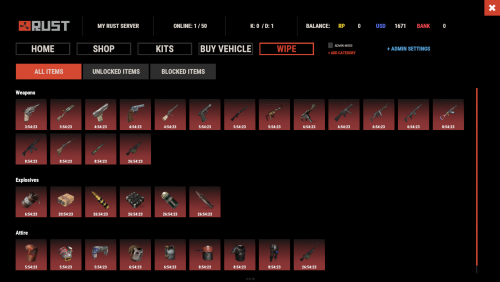
Introducing WipeBlock, the essential Rust server management plugin that allows you to control which items players can access at different stages after a server wipe! Create a balanced progression system that prevents early access to powerful weapons, explosives, and high-tier gear, ensuring a fair and enjoyable experience for all players during the critical early-game phase. ️ Features of WipeBlock Elegantly prevents access to high-tier items for configurable time periods after a server wipe Customizable categories for Weapons, Explosives, and Attire with independent timers Beautiful user interface showing players which items are currently blocked and when they will unlock Visual gradient system to indicate how much time remains until an item becomes available Seamless integration with ServerPanel for easy access Compatible with Notify plugin for player notifications when items are blocked On-screen indicator showing when blocked items are about to unlock Permission system to allow VIPs or admins to bypass item restrictions Notification system for players when items become available Handles all item interactions - equipping, moving, reloading weapons, etc. Automatic monitoring of player inventories to enforce restrictions Multiple UI templates (Fullscreen, ServerPanel V1, ServerPanel V2) Commands /block or /wipeblock - Open the WipeBlock menu to view blocked items and timers wb.indent [seconds] - Admin command to adjust the time indent from the wipe date Permissions WipeBlock.ignore - Allows players to bypass the WipeBlock restrictions WipeBlock.unlocknotify - Players with this permission receive notifications when items unlock Showcase Fullscreen Template ServerPanel V1 Template ServerPanel V2 Template On-Screen Indicator TEST SERVER Join our test server to experience WipeBlock and our other plugins in action! Copy the IP Address below to start playing! connect 194.147.90.239:28015 Developer API WipeBlock provides a developer-friendly API for integration with other plugins: bool AnyBlocked() - Checks if any items are currently blocked int SecondsFromWipe() - Returns the number of seconds since the wipe (adjusted by time indent) bool IsBlocked(ItemDefinition def) - Checks if a specific item definition is blocked bool IsBlocked(string shortName, ulong skin = 0) - Checks if an item with the specified shortname and skin is blocked int LeftTime(string shortName, ulong skin = 0) - Returns the remaining time in seconds until the specified item unlocks Hooks WipeBlock provides the following hooks that other plugins can subscribe to: void OnWipeBlockEnded() - Called when all items have been unblocked Example usage in your plugin: private void OnWipeBlockEnded() { // Execute code when all WipeBlock items are unlocked Puts("All items have been unblocked!"); // Perhaps enable your PVP plugin or other game-changing features } FAQ Q: How do I configure which items are blocked and for how long? A: In the WipeBlock.json configuration file, you can define categories (Weapons, Explosives, Attire, etc.) and set time periods in seconds for each item. For example, setting "3600" means the item will be blocked for 1 hour after wipe. Q: Can players still find these items in-game during the block period? A: Yes, players can still find or loot these items, but they cannot equip, use, or place them in their hotbar until the block period expires. The items will automatically move to their main inventory. Q: Does this plugin affect all players equally? A: By default, yes. However, you can grant the "WipeBlock.ignore" permission to specific players or groups to allow them to bypass the restrictions. Q: How will players know which items are blocked? A: Players will see notifications when they try to use blocked items. Additionally, they can use the /block command to view a complete list of blocked items and their remaining time until unlocking. Q: Can I adjust the timers during a running wipe? A: Yes, administrators can use the /wb.indent command to adjust the time indent, effectively changing when items will unlock. Q: Does WipeBlock work with modded or custom items? A: Yes, you can add any item to the configuration using its shortname and skin ID. Q: How do I add WipeBlock to the ServerPanel menu? A: Follow these simple steps: 1. Open ServerPanel menu in-game and click "+ADD CATEGORY" button 2. Set these exact parameters: Type: Plugin Plugin Name: WipeBlock Plugin Hook: API_OpenPlugin 3. Click "SAVE" button to create the category$21.95- 48 comments
- 1 review
-
- 4
-
-
-
- #wipeblock
- #auto wipe
- (and 7 more)
-
.thumb.gif.4707aef13cba7c3b9ad410f5f982b71c.gif)
Version 1.1.25
5,806 downloads
Daily Rewards is a strong tool for Rust admins who want to keep their players engaged until the end of the wipe. You can provide your gamers with distinct daily rewards for logging in with this plugin. This way, you not only liven up gameplay, but also encourage longer playtime. With Daily Rewards, don't lose the chance to draw in new players and keep returning ones! Features of Daily Rewards Beautiful and user-friendly interface Daily rewards for logging Motivating players to stay in the game longer Retention of players until the end of the wipe Compatibility with many plugins Edit rewards and config via in-game interface (no JSON editing required) By default, the plugin supports English, Russian, and Chinese languages Cooldown time before receiving an award Saving rewards in the plugin's inventory Do not receive rewards from inventory while in the build block, raid block, or combat block Commands daily – open daily rewards interface dailyrewards.wipe – wipe of player data dailyrewards.top [format: csv, empty (default)] [limit (10 is default)] – get a list of players with the day their award. dailyrewards.manage – manage daily reward settings dailyrewards.manage playtime set <steam_id> <amount> – sets the playtime for the specified player. dailyrewards.template [fullscreen/inmenu] [target_template] – sets the interface template for daily rewards. Parameters: [fullscreen/inmenu]: Type of interface template to set. Valid values: fullscreen or inmenu. [target_template]: For the inmenu template, you must specify the template number (1 or 2). Permissions dailyrewards.use – allows you to open the DailyRewards menu dailyrewards.edit - allows you to enable edit mode Video FAQ Q: Where can I see an example of a config? A: Config Q: How do I add DailyRewards to the ServerPanel menu? A: You can do this directly from the ServerPanel in-game: 1. Open the ServerPanel menu in-game. 2. If you have permission to edit, switch the panel to edit mode so you can see the blue "EDIT CATEGORY" and "EDIT PAGES" buttons. 3. Choose the category where you want DailyRewards to appear and click the "EDIT CATEGORY" button for that category. 4. While you are in this category in the ServerPanel, click the "EDIT PAGES" button to create a new page (or edit an existing one) for DailyRewards. 5. For that page, set these exact parameters: Type: Plugin Plugin Name: DailyRewards Plugin Hook: API_OpenPlugin 6. Save the changes. The DailyRewards button will now appear in the ServerPanel in the category you selected.$34.95 -

Version 1.12.0
197 downloads
Contracts is a time-rotating quest system plugin that allows you to create versatile quests/missions that rotate periodically. Each contract can have one or more objectives, with multiple objective types to choose from. It doesn't stop there: each objective can be augmented with objective conditions, which add additional requirements in order to progress it. This allows you to define versatile and unique quests: You could have quests as simple as "Kill 5 scientists"... or a little bit more challenging quests like "Kill 5 scientists with an assault rifle" or have crazy requirements like "Kill 5 scientists, with an assault rifle OR an MP5, between 25-50m away, while being below 20 HP, while wearing a bandana and riding a horse". The possibilities are endless! Not just another quest plugin Most quest plugins hand out static, repeatable, single-objective quests with no cap on how many you can have active at once and no deadline on finishing them. Players end up completing them passively in the background without ever engaging with the system, like achievements. Contracts turns these side-quests into main quests by putting them on a timer. A limited set of contracts is live at a time, each with a real deadline you define, so players have to decide what to prioritize rather than mindlessly clear a checklist. That's what keeps players logging back in throughout the wipe, when they'd otherwise burn out once progression stalls. Contracts also supports multi-objective quests with layered conditions (requirements), so a single contract can demand more than "kill 10 scientists." Simple objectives stack into real challenges. Features Highly customizable quests/missions to help you build your unique set of goals and control difficulty beyond just progression amounts required. Control the flow and order of how contract objectives can be completed. 21 objective types to vary gameplay across your server 23 objective condition types to add as many layers of challenge that you want to your objectives Customizable categories and their rotation period, with the possibility to disable rotations altogether and manually control when contracts rotate. Clean and customizable UI for browsing and tracking contracts. HUD to track contracts while playing. Leaderboard to rank your whole server by Contract Score. Permission based features for your VIP members: Max active contracts globally, Max active contracts per category and Max HUD pins. Event logging with JSONL format support Powerful Web editor to make editing your configs a breeze and viewing insightful charts on your JSONL logs Quick Links Discord Server Full Documentation Web Editor Roadmap Lite Edition - Try Contracts for FREE Included While you can discard and customize the contracts, categories and presets yourself, the plugin comes with: 4 categories: Hourly (14 contracts), Daily (26 contracts), Weekly (19 contracts) and Wipe (6) 65 contracts designed to touch just about every objective types and objective conditions available. These contracts' difficulty was designed for the category they were assigned to. You can preview these without purchasing the plugin in the web editor by loading the default data. Full Plugin Documentation Contracts is a very large plugin with a growing number of features. Documenting everything on the Codefling plugin page (here) can be very intimidating, inconvenient to read/search and drive new users away when they see a wall of text. For these reasons, I've created a structured, digestable and detailed documentation website with guides for new Contracts users! Check it out: https://www.rustcontracts.com Web Editor Nobody wants to be writing complex JSON structures by hand! Head to the Web Editor at https://editor.rustcontracts.com , drop your data configs and start editing your configs in a convenient UI. The quality of the editor and its extensive features are on par with the quality of the plugin! This isn't just simple forms and inputs. Editor Features Convenient UI: Edit all your contracts, categories and presets in a Web-based UI. No manual JSON editing required. Rich Editing Experience: Validation, undo/redo from anywhere, ID refactoring, autocomplete fields, optional raw JSON editing and more QoL features. Data Persistence: Save snapshots of your configs and restore or download them at a later time (data saved in your browser). Advanced Data Importing: You can import entire data files or choose parts of them to merge into your working config. This makes importing new default contracts or shared contracts into your existing config a breeze. AI Generated Contracts: Use the prompt given by the editor in ChatGPT/Claude and paste its response into the editor to generate a contract. Command Palette: Easily navigate through contracts, categories, presets from anywhere in the editor through the command palette. Stats: View your JSONL logs in pre-made charts to gain insights into your contracts, such as pacing and reward balance. Discord Join the official Discord server for support, announcements and more! https://discord.rustcontracts.com$29.99- 13 comments
- 2 reviews
-
- 3
-
-
- #contracts
- #quests
- (and 19 more)
-

Version 1.5.6
85 downloads
Wipe Timer is an Oxide plugin for Rust servers that lets players easily check how long remains until the next scheduled server wipe. It automatically tracks wipe cycles, updates configuration data when a new save occurs, and can announce wipe times through chat or on player connection. Core Features Chat Commands /wipetest — Displays time remaining until the next wipe. /wipesave — Shows remaining time and immediately updates the wipe schedule. Automatic Wipe Scheduling When a new save is created, the plugin adds a configurable number of days (default: 7) to determine the next wipe date. Player Interaction Auto‑responds in chat when players mention “wipe.” Optionally announces wipe time when players join the server. Configuration System Stores wipe interval, date, and time components (year, month, day, hour, minute, second). Supports automatic config updates and version tracking. Configuration The settings and options can be configured in the WipeTimerEnhanced file under the config directory. The use of an editor and validator is recommended to avoid formatting issues and syntax errors. { "Wipe Timer Settings": { "AutoRespond to Chat": true, "Broadcast to players on join": true, "Wipe cycle days length (default 7 for weekly wipes)": 7, "Current year": 2026, "Month of the year": 7, "Day of the month": 2, "Hour of the day": 15, "Minutes of the hour": 0, "Seconds of the minutes": 0 }, "Version": { "Major": 1, "Minor": 5, "Patch": 5 } }Free -
Version 1.4.4
2,361 downloads
Raid Time Manager · Rust · Oxide · Carbon Your best players get raided at 4am and never log in again You set the hours raiding is open. Outside them the damage, the ladder stacks, the ceiling drops and the turret placements all stop — and everyone can see the schedule on screen. A full week is configured out of the box, and every hour of it is editable from a calendar in game. The HUD Six layouts, one of them fits your screen Switched live from the settings screen — every player's HUD is redrawn on the spot. How it goes From install to the night before wipe MINUTE ONE It works before you open the config Raid time is set to 18:00–22:00 Monday to Friday, 10:00–22:00 Saturday, 08:00–22:00 Sunday. Every hour outside that is safe time, and the restrictions are already on. Your timezone, by offset or by name, daylight saving included Several raid windows in one day, or none at all for a full safe day Nothing to fill in first — edit the week later, or never EVERY DAY Nobody has to ask when raid time is A HUD shows today's windows as a bar, a marker for where the clock sits inside them, and a green or red dot for whether raiding is open right now. Six positions, switched live. Players can hide it, and it hides itself on cameras and drones Every player reads it in their own language, on a 12- or 24-hour clock An alert on screen the moment raid time opens, and again when it closes An optional Discord webhook warns your players a set time before it opens WHEN THEY TRY Blocking damage alone does not stop a raid Someone who cannot blow a wall will stack ladders, drop a ceiling inside your compound, or park a turret on your door instead. Thirteen switches, so you block what matters on your server and leave the rest alone. Damage. Other people's buildings, your own, twig, boats, tugboats, fire Raids with no player behind them. Patrol helicopter, MLRS, SAM sites and auto turrets, each its own toggle Building tricks. Ladders and ceilings inside someone else's privilege, cupboards and turrets placed next to one They are told why. A blocked shot or placement puts the reason on the player's screen Your own exceptions. A prefab list that stays damageable whatever the clock says, and a separate switch for other people's sleeping bags WIPE DAY The exceptions are where a schedule earns its keep A fixed week is fine until wipe day, a holiday, or the first complaint about being raided ten minutes after joining. All four of those are settings. Set hours for one specific date from the calendar — it beats the weekly rule Safe days after a wipe, written into the schedule for you New players protected for a few hours, if you want them to be Or block offline raids only, with a shorter grace period for your donators Alongside the rest It fits what you already run All optional, all off until you point at them. ✓ TruePVE — its ruleset is switched with the schedule, so the two never disagree ✓ ZoneManager — confine the whole thing to listed zones, or apply it everywhere except them ✓ Raidable Bases — event bases stay raidable around the clock, safe time never locks players out ✓ Your own commands — run any server command the moment raid time opens, and again when it closes Reference One command, and it is yours to rename Everything else is a screen you click through in game. Chat /rtm Open the raid calendar. Admins also get a settings button on it. Chat /rtm hud Hide the HUD, or bring it back Perm rtm.vip Shorter offline grace period. Rename it or add more groups. Straight answers Asked before every purchase Do I need TruePVE? No, it blocks the damage itself. TruePVE is optional and only makes the two systems agree if you already run it. Can I still raid people who are online? Turn on offline-only mode and safe time protects a base only while the owner and their whole team are away. Do I have to edit config files? Not for the schedule. The calendar and settings screens change the hours, the toggles and the HUD position from in game. Is it English only? No. Days, months, AM/PM and every message are language file entries, so you translate once and each player sees their own. What about NPCs and scripted raids? One switch lets non-player raiders through at any hour, and the prefab list covers anything that must always stay damageable. Will the HUD annoy my players? Six positions including a compact one, they can dismiss it themselves, and you can switch it off server-wide. 13 actions you can block 6 HUD layouts 3 integrations — TruePVE, ZoneManager, Raidable Bases 1 dependency — ImageLibrary$14.99- 215 comments
- 6 reviews
-
- 10
-
-
-
- #raid
- #raid time
- (and 19 more)
-
Version 1.5.0
26 downloads
Wipe Timer keeps your players updated with a single Discord wipe message that updates automatically without creating duplicates or spamming the channel. Features - Previous and next wipe dates - Current wipe day and cycle progress - Online players, map size, and map seed - Weekly, biweekly, monthly, and custom schedules - Manual or automatic wipe scheduling - Dynamic embed colors as the wipe approaches - Automatic map images through RustMapApi - Custom map image URL support - Configurable Discord channel alerts - Private Discord alerts for admins - Automatic recovery if the Discord message is deleted - In-game countdown through AdvancedStatus or SimpleStatus Take Your Rust Server to the Next Level Premium performance, lightning-fast support, and an exclusive 30% OFF using code KHALED Player Command Players can check the next wipe and remaining time with: /wipe Short alias: /wt Admin Commands Requires permission: `wipetimer.admin` - /wipe set 2026-05-11 18:00 - /wipe in 7d - /wipe auto weekly - /wipe auto biweekly - /wipe auto monthly - /wipe auto 14d - /wipe tz 3 - /wipe refresh Optional Integrations - RustMapApi: automatic server map image - SimpleStatus or AdvancedStatus: in-game countdown The Discord wipe system works without these optional plugins. Discord Bot Permissions The bot requires: - View Channel - Send Messages - Embed Links - Attach Files - Read Message History Attach Files is only required when using automatic map images. Performance Wipe Timer uses one persistent message per channel, updates only when needed, handles Discord rate limits, retries failed requests, prevents duplicate alerts, and stores only the required message state.$9.99 -

Version 1.4.4
337 downloads
This plugin provides two types of protection for players in Rust. Firstly, you can enable general protection. General protection provides universal protection for all players starting from when the server wipe occurs, and during the duration specified in the configuration file, no player can damage another player's base. Secondly, you can enable player-based protection. In player-based protection, each player has protection starting from when they first join the server after a wipe, for the duration specified in the configuration file. During this period, the player cannot damage another player's base, and other players cannot damage their base. To activate general protection, the 'Protect Type' setting in the configuration file should be set as follows: "Protect Type": 2, To activate player-based protection, the 'Protect Type' setting in the configuration file should be set as follows: "Protect Type": 1, Along with player-based protection, you can allow players to purchase extra protection time. To enable players to purchase extra protection time, the 'Buy Protect Enabled' setting in the configuration file should be set as follows: "Buy Protect Enabled": true, With this setting, players can use the '/buyprotect amount' command to purchase protection time (the amount should be a whole number representing minutes). To configure the unit for protection cost ('rp', 'scrap', or 'economics'), the cost per minute of protection, and the duration after which the protection becomes active if the player doesn't have an active protection, you need to modify the respective settings: "How many minutes after purchase should it be active?": 60, "Cost of Protect for a Minute": 100, "Protect Cost Type? scrap / rp, economy": "rp", "How often should it check purchase requests? (enter minute example 5)": 5 Using the above settings as an example, if the player doesn't have an active protection, they will pay 100 RP for 1 minute of protection, and the purchase will be processed at 19:00 if made at 18:00 in real time. If the player already has an active protection, they will pay 100 RP for 1 minute, and the time will be added on top of their existing protection time. If you set "How many minutes after purchase should it be active?" to 0, the purchased protection will be immediately added to the player. To enable notifications on the right side above the health bar, the following settings should be configured, and the ImageLibrary and CustomStatusFramework plugins should be installed. If you prefer to use chat notifications only, you don't need to install these two plugins. "Gui Enabled": true, Admin Commands The plugin includes the following commands that can only be used by admins: /addprotect player_nick_name_part x -> Adds x minutes of protection to the player. /removeprotect player_nick_name_part -> Removes the player's protection. /checkprotect player_nick_name_part -> Displays how much protection time the player has remaining. Player Commands /noprotect -> Player’s can remove protect theirself. /buyprotect minute ->(minute must be intger) if player has enough cost added protect to player Console Commands addprotect steam64id minute All Config Settings { "Protect Enabled": true, "Remove Fire Ball Enabled?": true, "Custom Status Framework Gui Enabled": false, "Simple Status Gui Enabled": true, "Protect Type": 2, "Chat Message Enabled": true, "Protect Time": 7200, "Protect Icon Url": "https://img.icons8.com/?size=100&id=3MDFHx9dG2fQ&format=png&color=000000", "Player Has Protect Notification Color Code": "0.46275 0.22745 0.18431 1", "Notification Title Color Code": "0.91373 0.77647 0.75686 1", "Notification Text Color Code": "0.91373 0.77647 0.75686 1", "Notification Image Color Code": "0.91373 0.77647 0.75686 1", "Wipe Protect Enabled Notification Background Color Code": "0.46275 0.22745 0.18431 1", "Check Status Gui Time": 5, "Give Back C4, Rocket, Satchel Enabled": false, "Buy Protect Enabled": false, "How many minutes after purchase should it be active?": 60, "Cost of Protect for a Minute": 60, "Protect Cost Type? scrap / rp, economy": "scrap", "How often should it check purchase requests? (enter minute example 5)": 5, "Message Size?": 15, "Plugin Meesage Pre Tag Color ": "#FFA500", "Dont Protect this Prefabs (Twigs, Metal, Stone, TopTier)": [ "Twigs", "Wood" ], "Dont Protect this Items (drone.deployed)": [ "ladder.wooden.wall", "cupboard.tool.deployed", "cupboard.tool.retro.deployed", "cupboard.tool.shockbyte.deployed", "coffinstorage", "woodbox_deployed", "box.wooden.large", "drone.deployed", "autoturret_deployed", "sam_site_turret_deployed", "scraptransporthelicopter", "attackhelicopter.entity", "minicopter.entity", "beachtowel.deployed", "barricade.cover.wood_double" ] } Language Settings: You can modify the notification messages in different languages under the 'Language' folder. Discord: If you find any bugs, need assistance, or have suggestions related to the plugin, you can reach out on Discord. Discord pisagor0104 https://discord.gg/JnQftZeSXD$29.99- 40 comments
- 6 reviews
-
- 2
-
-
- #wipe protect
- #new player protect
- (and 6 more)
-

Version 1.0.1
11 downloads
xWipeRaidProtection Protect your players hard work with this simple and reliable raid protection plugin. This plugin is designed to prevent players from losing everything during wipe periods or unfair raid situations. It helps create a more balanced and enjoyable experience by giving players peace of mind that their bases and items are safer. With easy setup and automatic protection features, server owners dont need to worry about complicated configurations. Once installed, the plugin works quietly in the background to reduce frustration, encourage fair gameplay, and keep your community happy. No datafile - Countdown Time is depending on creation time of new save file (after wipe). </> Commands (Admin Only) /xwrp move - Gives you the possibility to move the whole UI ingame without doing anything manually in the config. /xwrp reset - Reset the UI position to the initial position. Config { "ProtectionHours": 1.0, "AllowLadderPlacement": false, "ProtectionOverMessage": "<color=#55ff88>Global Raid protection is over, happy raiding!</color>", "BlockedDamageMessage": "<color=#ff6b6b>Global Raid protection is active\n</color>» You must wait <color=#ffd166>{0}</color> before damaging bases.", "BlockedLadderMessage": "<color=#ff6b6b>Global Raid protection is active\n</color>» You must wait <color=#ffd166>{0}</color> before placing ladders.", "UiAnchorMin": "0.41 0.897", "UiAnchorMax": "0.59 0.955" }$15.99 -

Version 2.0.0
532 downloads
Rust Plugin · Self-service data wipe Give your Rust players a clean, safe way to reset their own progress SelfWipe allows players to selectively wipe their own blueprints, buildings, inventory, backpacks, and skill-tree progress through an in-game UI. Every action requires confirmation before it is performed, and administrators can reset all data for a specific player with a command. Warning — wipes are permanent. Players should be clearly informed that erased data cannot be restored. Features ✓ Clean in-game self-wipe menu ✓ Confirmation prompt before each wipe action ✓ Reset individual categories or wipe everything at once ✓ Blueprint reset ✓ Inventory wipe — belt, main inventory, and worn items ✓ Building removal tied to player-owned Tool Cupboards ✓ Backpack clearing through the Backpacks API ✓ Skill-tree reset through the server resetdata command ✓ Optional raid-block compatibility with NoEscape ✓ Configurable menu buttons, descriptions, icons, and commands ✓ Permission-based player access ✓ Administrative player-data reset command What each wipe option does Pick a single category, or run them all with one button. Blueprints Resets all learned blueprints for the player. Buildings Removes building entities tied to Tool Cupboards owned by the player — based on the cupboard owner, not everyone authorised on it. Inventory Clears the player's belt, main inventory, and worn items. Backpack Clears the player's stored backpack through the Backpacks API. Skill tree Runs resetdata <SteamID> — needs a skill-tree/progression plugin that provides the command. Wipe everything Runs all available wipe actions in sequence — still confirmed first. Commands & permissions Permission Description selfwipe.use Allows a player to open and use the SelfWipe menu. selfwipe.resetcommand Allows a non-admin to use the administrative resetall command. Player commands Open the self-wipe menu: /wipe The default command is /wipe (configurable). A secondary fixed command is also available: /wipeui Players need the selfwipe.use permission to use either command. Administrator command Admins, or players with selfwipe.resetcommand, can reset all supported data for another player: /resetall <SteamID/PlayerName> /resetall 76561198000000000 /resetall PlayerName Resets the target's blueprints, buildings, inventory, backpack, and skill tree. Configuration The configuration file is generated automatically after the plugin is first loaded. Every menu button — its text, description, icon, and command — is editable. { "Button list": [ { "Command": "SELF_WIPE BP", "Text": "Blueprints", "Description": "Reset everything you've learned", "Icon item shortname": "blueprintbase", "Icon skin id": 0, "Enable button": true }, { "Command": "SELF_WIPE BUILD", "Text": "Buildings", "Description": "Destroy every structure on your TCs", "Icon item shortname": "cupboard.tool", "Icon skin id": 0, "Enable button": true }, { "Command": "SELF_WIPE INVENTORY", "Text": "Inventory", "Description": "Clear belt, main, and worn items", "Icon item shortname": "box.wooden", "Icon skin id": 0, "Enable button": true }, { "Command": "SELF_WIPE BACKPACK", "Text": "Backpack", "Description": "Empty your stored backpack", "Icon item shortname": "largebackpack", "Icon skin id": 0, "Enable button": true }, { "Command": "SELF_WIPE SKILLTREE", "Text": "Skill tree", "Description": "Refund and reset all skills", "Icon item shortname": "techparts", "Icon skin id": 0, "Enable button": true } ], "Chat Command": "wipe" } Optional plugin support Backpacks Required for the Backpack wipe option. NoEscape Optional raid-block gating — players can't wipe while raid-blocked. Skill-tree plugin Any progression plugin that provides the resetdata command powers the Skill tree wipe. Installation 1 Drop SelfWipe.cs into oxide/plugins/ (or carbon/plugins/). 2 Grant selfwipe.use to players who may wipe their data. 3 Optional: install Backpacks, NoEscape, and a skill-tree plugin for those wipe options. 4 Config and language files generate automatically on first load. A clean, controlled way to start fresh Let players reset their own progress on demand — safely, with confirmation, and fully under your control. Works on Oxide and Carbon.$10.00- 45 comments
- 2 reviews
-
- 4
-
-
-
- #wipe
- #playerwipe
- (and 2 more)
-

Version 1.0.0
26 downloads
NexusRestartManager is a professional Rust server lifecycle plugin that manages restarts, wipe tracking, Discord notifications, and native decay configuration COMMANDS (ADMIN): • Restart server: /nrm restart <seconds> [reason] Example: /nrm restart 300 Server update • Cancel a scheduled restart: /nrm cancel COMMANDS (PLAYERS): • View wipe info : /nrmwipe • View wipe info: /nextwipe PERMISSIONS: Admins must have: nexusrestartmanager.admin Grant using your permissions plugin (Oxide/Carbon). oxide.grant user <playername_or_steamid> nexusrestartmanager.admin carbon.grant user <playername_or_steamid> nexusrestartmanager.admin DISCORD FEATURES (AUTOMATIC): • Server Online message (status + wipe cycle) • Restart Scheduled message (countdown + reason) • Server Offline message (uptime + wipe age + wipe cycle) • No duplicate or spam messages • No fake player counts DECAY SETTINGS (CONFIG ONLY): This plugin uses Rust’s native decay system. Example: "Decay": { "Upkeep period (minutes)": 1440 } • 1440 = normal (vanilla) decay • Higher number = slower decay • Lower number = faster decay • Applies automatically on server start and wipe • No commands required IMPORTANT NOTES: • Requires Oxide/Carbon Discord extension for Discord messages • Does NOT wipe blueprints • Does NOT force wipes (tracking only) • Lightweight and production safe This plugin uses a Discord webhook to send server status messages. STEP 1: Create a Discord webhook 1. Open Discord 2. Go to your server 3. Right-click the channel you want messages in 4. Click "Edit Channel" 5. Go to "Integrations" 6. Click "Webhooks" 7. Click "New Webhook" 8. Copy the Webhook URL STEP 2: Add webhook to the plugin config 1. Start the server once with the plugin installed 2. Stop the server 3. Open this file: oxide/config/NexusRestartManager.json or use carbon config 4. Paste your webhook URL into: "Discord": { "Webhook URL": "PASTE_URL_HERE" } STEP 3: Save the file and restart the server • Do NOT reload for first setup • Restart the server fully STEP 4: Verify it works • When the server starts, Discord should show "Server Online" • Run: /nrm restart 60 Test • You should see a restart message in Discord$4.99 -

Version 1.0.5
133 downloads
Global Storage Pro creates storage for your players that can be access from any global storage container. Containers will automatically spawn at safe-zone monuments, allowing players to safely store their items. The plugin will create an instance of storage for each player that loots the box, allowing for multiple players to loot the same global storage chest to manage their own instances of storage. Monument spawns: Automatically spawns containers at safe zone monuments. These can be repositioned using the gs.setpos command. Map specific spawns: Use the gs.addloc command to create a spawn point for a container that will be based on the map name. Anytime the map with a valid name is loaded, a container will spawn at the specified location. Placeholder spawns: Using RustEdit, placeholder entities can be deployed at specific locations to create automatic spawns for your custom monuments. Deployable containers: Players can be given deployable containers to setup in their bases that access the storage network. Comprehensive white/black list: Have full control over what items can be added to GlobalStoragePro containers based on skin, name, shortname and text fields. Permission based slots and deployments: You can create any number of permissions that will provide more or less storage slots, and deployments of containers. Administrative tool: Access the contents of any players global storage in-game using the gs.view command. Persistent wipe settings: Allow contents of containers to persist between wipes. Command: gs.givestorage <target> <amount> Type: Console Permission: globalstoragepro.admin (or can be run by the server with no perms) Description: Gives the target player a deployable global storage item. Command: gs.setpos Type: Chat Permission: globalstoragepro.admin Description: Sets the spawn location for the nearest monument (or monument marker for custom monuments) Command: gs.addloc Type: Chat Permission: globalstoragepro.admin Description: Adds a spawn location for a global storage chest. The name of the map is captured and put into the config along with the location for future spawns. Command: gs.openplayerinventory <userid> Type: Chat Permission: globalstoragepro.admin Description: Opens the storage container for the specified userid. Command: gs.view Type: Chat Permission: globalstoragepro.admin Description: Provides a list of all containers that have contents to the admin, who can then select one to view its contents. // Adds an item to the target players global storage container void TryAddItemToGlobalStorage(BasePlayer player, Item item, bool notify)$14.99 -

Version 1.0.0
38 downloads
Wipe attendance polls for clans. Leaders post a poll; members vote Yes/Maybe/No. Names update live, voters get a DM with wipe time. MongoDB saves all votes. 1. Create a Discord bot - Go to [discord.com/developers](https://discord.com/developers/applications) → **New Application** → **Bot** → copy the **token** - Copy the **Application ID** from **General Information** - **OAuth2 → URL Generator** → pick `bot` + `applications.commands` → invite the bot to your server 2. Get IDs (turn on Developer Mode in Discord settings) - Right-click your **server** → **Copy Server ID** - Right-click the **leader role** → **Copy Role ID** 3. MongoDB - Free database: [mongodb.com/atlas](https://www.mongodb.com/cloud/atlas) - Copy your connection string (looks like `mongodb+srv://user:pass@cluster.../wipe-react`) 4. Config Copy `config.example.json` to `config.json` and fill in:Free -
Version 1.1.5
7,921 downloads
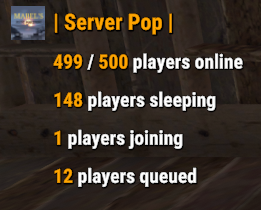
Display server population statistics in the chat using the !pop trigger. It provides detailed information about online, sleeping, joining, and queued players. Additionally, the !wipe trigger displays the time remaining until the next server wipe. The plugin supports cooldowns for trigger usage, customizable chat messages, and game tip responses. Features Cooldown Management Prevents spam by enforcing a configurable cooldown period for the !pop trigger. Detailed Player Statistics Displays the number of online players, sleeping players, players joining, and players in the queue. Customizable Messages Configure the chat prefix and SteamID for message icons. Customize messages' appearance, including colors and formats. Multi-Response Options Option to broadcast the server population message globally or to the player who issued the trigger. Supports both chat messages and game tip notifications. Welcome Messages Displays a customizable welcome message to players when they connect. Optionally shows the server population on player connect. Wipe Timer Displays time left till wipe with !wipe trigger. Trigger Filter Auto filters the !pop, !wipe, !bp, !purge, !st & !discord triggers so it isn't displayed in the chat (Reqs BetterChat) Configuration Options: Cooldown Settings • Cooldown (seconds): The cooldown period in seconds between uses of the !pop command. Chat Settings • Chat Prefix: The prefix displayed before the server population message in chat. • Chat Icon SteamID: The SteamID of the icon used for chat messages. Message Settings • Global Response: Determines if the response should be broadcast globally or sent only to the player who triggered the command. • Use Chat Response: If true, responses will be sent in the chat. • Use Game Tip Response: If true, responses will be shown as game tips (toasts). • Value Color (HEX): The color used for values in the messages. Response Settings • Show Online Players: Show the number of online players. • Show Sleeping Players: Show the number of sleeping players. • Show Joining Players: Show the number of players currently joining. • Show Queued Players: Show the number of players in the queue. Connect Settings • Show Pop On Connect: Show the server population message when a player connects. • Show Welcome Message: Show a welcome message when a player connects. • Show Wipe On Connect: Show wipe timer when a player connects. Wipe Settings • Wipe Timer Enabled: Enable the use of !wipe trigger to display wipe timer • Wipe Timer (epoch): Set the time till wipe using Epoch Time Stamp. Blueprint Wipe Settings • Blueprint Wipe Timer Enabled: Enable the use of !bp trigger to display blueprint wipe timer • Blueprint Wipe Timer (epoch): Set the time till blueprint wipe using Epoch Time Stamp. Purge Settings • Purge Enabled: Enable the use of !purge trigger to display purge timer • Purge Timer (epoch): Set the time till the purge using Epoch Time Stamp. Skill Tree Settings • Skill Tree Timer Enabled: Enable the use of !purge trigger to display purge timer • Skill Tree Timer (epoch): Set the time till skill tree using Epoch Time Stamp. Discord Settings • Discord Enabled Enable the use of !discord trigger to display invite link • Discord Invite Link: Set the discord link to be displayed. Triggers: !pop - displays server population !wipe - displays wipe time !bp - displays blueprint wipe time !purge - displays purge time !st - displays skill tree wipe time !discord - displays discord invite link Default Configuration: { "Cooldown Settings": { "Cooldown (seconds)": 60 }, "Chat Settings": { "Chat Prefix": "<size=16><color=#FFA500>| Server Pop |</color></size>", "Chat Icon SteamID": 76561199216745239 }, "Messgae Settings": { "Global Response (true = global response, false = player response)": true, "Use Chat Response": false, "Use Game Tip Response": true, "Use Single Line Chat Pop Response": false, "Value Color (HEX)": "#FFA500" }, "Response Settings": { "Show Online Players": true, "Show Sleeping Players": true, "Show Joining Players": true, "Show Queued Players": true }, "Connect Settings": { "Show Pop On Connect": true, "Show Welcome Message": true, "Show Wipe On Connect": true }, "Wipe Response Settings": { "Wipe Timer Enabled": false, "Wipe Timer (epoch)": 0 }, "Blueprint Wipe Response Settings": { "Blueprint Wipe Timer Enabled": false, "Blueprint Wipe Timer (epoch)": 0 }, "Purge Response Settings": { "Purge Timer Enabled": false, "Purge Timer (epoch)": 0 }, "Skill Tree Wipe Response Settings": { "Skill Tree Timer Enabled": false, "Skill Tree Wipe Timer (epoch)": 0 }, "Discord Response Settings": { "Discord Enabled": false, "Discord Invite Link": "" }, "Version": { "Major": 1, "Minor": 1, "Patch": 4 } } Default Language: { "Online": "{0} / {1} players online", "Sleeping": "{0} players sleeping", "Joining": "{0} players joining", "Queued": "{0} players queued", "WelcomeMessage": "Welcome to the server {0}!", "CooldownMessage": "You must wait {0} seconds before using this command again.", "WipeMessage": "Next wipe in: {0}", "DiscordMessage": "Join Us @ {0}", "OneLine": "{0} / {1} players with {2} joining! {3} queued", "BPWipeMessage": "Next blueprint wipe in: {0}", "PurgeMessage": "Purge starts in: {0}", "SkillMessage": "Next skill tree wipe in: {0}" }Free- 32 comments
- 5 reviews
-
- 7
-
-
-
- #population
- #server
- (and 7 more)
-
Version 1.2.4
239 downloads
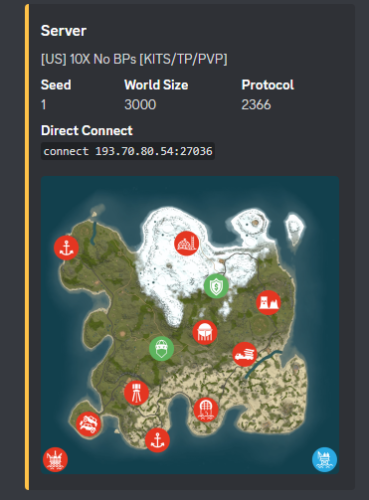
Using Discords Webhooks it sends an embed to discord notifying users of server wipes. * Different message support between FacePunch Forced wipes & Manually wiped * Includes Automation * Includes test console command * Includes Embed Setting Options * Coded for optimal performance Now requires RustMaps.com API key! Because they re-wrote the website forcing all users to sign in & make one, lol. Notes: * When you see " [Discord Wipe Embed] Waiting on rustmaps retrying in 60seconds." It means exactly what it says... * It means it's waiting on the rust-maps website to generate the Image & will re-try posting the discord embed in 60 sec. Configuration { "Sets Console Command": "sendwipe", "Disable Auto Send (Requires you to manually use console command to send embed message)": false, "ConnectionInfo": { "DiscordWebhookURL": "", "ServerName": "[US] -10X No BPs [KITS/TP/PVP]", "RustServerIp": "", "DonationURL": "", "EnableStaging": false, "EnableBarren": false, "RustMapsApiKey": "" }, "ForceWipe": { "AtEveryone": false, "AtRoleID": "", "EmbedHexColour": "#ffc348", "This will replace the Map Image if used": "", "This will generate the Map Image if enabled": false }, "Manually": { "AtEveryone": false, "AtRoleID": "", "EmbedHexColour": "#ffc348", "This will replace the Map Image if used": "", "This will generate the Map Image if enabled": false }, "Embed Fields & Descriptions": { "Map": { "Enabled": true, "Description": "", "Inline": false }, "Seed": { "Enabled": true, "Description": "", "Inline": true }, "World Size": { "Enabled": true, "Description": "", "Inline": true }, "Protocol": { "Enabled": true, "Description": "", "Inline": true }, "Direct Connect": { "Enabled": true, "Description": "", "Inline": false }, "Donation Link": { "Enabled": true, "Description": "", "Inline": false } }, "Sets Server Commands to run after wipe": [], "Do not touch.": { "WipedTime": "Thursday, 13 November 2025 17:29", "LastWipe": "Thursday, 13 November 2025 17:29" } }$9.99- 9 comments
- 1 review
-
- 1
-
-
- #khan
- #discordwipeembed
- (and 8 more)
-

Version 1.0.2
8,197 downloads
Let players know how many days left till next wipe with this simple countdown plugin. • Features - show time left with chat command - auto broadcast when players type keyword in chat - api to get time left • Commands • Config • APIFree- 55 comments
- 6 reviews
-
- 11
-
-
-

-
- #wipe
- #countdown
- (and 5 more)
-

Version 2024.5.2.1658
324 downloads
SAVE 13% WHEN BUYING THE BUNDLE NOW SUPPORTING PROCGEN AND CUSTOM URL BASED MAPS ! This plugin will allow you to setup automatic server wipes without requiring external scripts. This plugin is very useful for any server owner but I'm positive that it will be really useful for those hosting providers running panel based game instances where you do not have full access to customize the server or the provided wipe tool is very limited. You should have a look at the suggested plugins for Oxidation's Scheduler which is a perfect fit for a fully in-game automatic wipe process. The plugin also allows you to set a list of seeds that will be used at server wipe to select the new map seed. You can define as many different wipe types as you'd like on the config file like so: This example is for a "forced" wipe. In order to execute the wipe type on the rcon console "wipe forced". "Forced": { "Restart": 120, "Message": "A server wipe is being executed, we'll be back shortly", "Game": { "Blueprints": true, "Logs": true, "Map": true, "PlayerDeaths": true, "PlayerIdentities": true, "PlayerStates": true, "PlayerTokens": true }, "Plugins": { "Convalence": true, "Data": true, "Groups": true, "Language": true, "Logs": true, "Users": true }, "Files": [ "my/custom/path/this_file_will_be_deleted.json" ], "Blacklist": [ "carbon/data/this_file_will_never_be_deleted.json" ] } This example is for a "weekly" wipe. In order to execute the wipe type on the rcon console "wipe weekly". "Weekly": { "Restart": 120, "Message": "A server wipe is being executed, we'll be back shortly", "Game": { "Blueprints": false, "Logs": true, "Map": true, "PlayerDeaths": true, "PlayerIdentities": false, "PlayerStates": true, "PlayerTokens": false }, "Plugins": { "Convalence": false, "Data": true, "Groups": false, "Language": true, "Logs": true, "Users": false }, "Files": [ "my/custom/path/this_file_will_be_deleted.json" ], "Blacklist": [ "carbon/data/this_file_will_never_be_deleted.json" ] } This is a standalone Harmony patch, Oxide installation is optional. Copy the Oxidation.Wiper.X.dll file into your HarmonyMods folder and restart your server. At the first server start after installing the patch a new configuration file Oxidation.Wiper.json will be created at the HarmonyMods folder. What is Harmony ? Harmony is a library for patching .NET code during runtime, it directly manipulates game code (CIL) without any additional abstraction layer such as Oxide. The direct patching of the game's byte code allows more performant modding as developers no longer need to rely on third party code, events or hooks to build custom functionality.$4.99 -
Version 1.0.5
99 downloads
DynamicData — Configurez sans limites « Plus aucune limite de configuration. Laissez libre cours à votre imagination. » DynamicData automatise l'application de vos fichiers de données (JSON) pour Rust selon une chronologie relative à l'effacement. Ajoutez vos profils (par plugin) , spécifiez quand ils doivent s'appliquer (par exemple, 2j4h, 6h30m, 1j@redémarrage) , et le plugin cible est rechargé avec la bonne configuration, immédiatement ou au prochain redémarrage. Objectif : moins d’opérations manuelles, moins d’erreurs, une progression de réinitialisation claire et amusante pour vos joueurs. Points forts Aucune limite : planifiez autant de profils que nécessaire, pour autant de plugins que vous le souhaitez. Délai d'activation flexible : immédiat ou au prochain redémarrage (idéal pour les changements importants). Progression naturelle des réinitialisations : rendez vos serveurs lisibles et motivants, dès le premier jour. Conçu pour être compatible : fonctionne avec tous les plugins utilisant des fichiers de données. Installation et démarrage rapide Déposez DynamicData.cs dans oxide/plugins et (re)chargez-le. Préparez vos fichiers JSON pour chaque plugin. Placez-les sous oxide/data/DynamicData/<Plugin>/... avec un suffixe temporel (et @restart si souhaité). Démarrez le serveur : DynamicData applique et recharge automatiquement les plugins cibles aux moments opportuns. Comment ça marche Placez vos profils JSON ici : oxide/data/DynamicData/<Plugin>/<Subfolder>/*.json (par exemple, DynamicData/RaidableBases/Profiles/Medium_2d.json) . Les fichiers comportent un suffixe temporel (\d+[dhms] peuvent être chaînés) et éventuellement @restart. Exemples : Easy_6h.json, [email protected] . DynamicData calcule chaque échéance à partir du Jour 1 (effacement) , ajoute une marge déterministe (quelques secondes) pour lisser les pics, puis copie le JSON vers l'emplacement de données du plugin cible et recharge ce plugin. If @restart is present, the profile is marked READY and only applies at the next reboot (useful for big changes). Structure & Naming Dynamic root: oxide/data/DynamicData (real-time watch on *.json). Destination: the base name (without the time suffix) becomes the final data file for the plugin (e.g., Profiles/Medium_2d.json ⇒ oxide/data/RaidableBases/Profiles/Medium.json). Valid suffixes: concatenations of d/h/m/s (e.g., 2d4h30m, 45m, 10s). Add @restart to force application on reboot. Important — Match the Target Plugin’s Official Directory Structure DynamicData applies your files only if the tree under oxide/data/DynamicData/<Plugin>/... mirrors exactly what the target plugin expects under oxide/data/<Plugin>/.... Golden rule Everything after <Plugin>/ in DynamicData must be the exact same path as in oxide/data/<Plugin>/... (same folders, same case, same filename). Concrete Examples oxide/data/DynamicData/RaidableBases/Profiles/Easy.json <- Default config (Important to place if you want a default config loaded) oxide/data/DynamicData/RaidableBases/Profiles/Medium.json+12h <- Config loaded after 12h of wipe oxide/data/DynamicData/RaidableBases/Profiles/Hard.json+2d <- Config loaded after 2 days of wipe oxide/data/DynamicData/RaidableBases/Profiles/Expert.json+4d@restart <- Config loaded after 4 days of wipe, only after a server restart Raidable Bases Evolving Over the Wipe Days 1–2: Easy + Medium profiles, 1 event, component-heavy loot; applied immediately at opening. Days 3–5: Medium + Hard profiles, 2–3 events, T2/T3 loot; applied on next restart for a smooth transition. Day 6+: Hard + Expert profiles, 3–4 events, rich loot (rare C4/Rockets), buffed NPCs; applied immediately on the morning of Day 6. One-Click Seasonal Pack Halloween (Oct 24 → 31): “Spooky” bases, themed loot, NPC +25%; trigger with @restart on 10/24. Other Plugins (any that read data files) Kits: Starter (D1–D2), weekend farm promo (D3–D5), advanced kits (D6+). BetterNPC: Calm day / Night +HP +accuracy / end-of-wipe heavy loadouts. Loot tables: progressive T2/T3 ramp, event boosts. NTeleportation: cooldowns and costs relax as the wipe progresses. Skins/SkinBox: automatic seasonal whitelists; off-season ⇒ vanilla/server set. Permissions dynamicdata.admin — access to commands (authLevel 1+ also accepted). oxide.grant group admin dynamicdata.admin Commands (console/RCON) dyndata.list – Shows Day 1 (wipe), last application, and next due time per plugin; marks [PAUSE] if applicable. dyndata.simulate <duration|all|*> – Simulates upcoming applications up to a horizon (e.g., 1h, 30m, 2d, all). Useful to verify your plan. dyndata.rescan – Immediate rescan of the DynamicData folder, applies what’s due, reschedules the rest. dyndata.pause <Plugin> – Pauses a plugin (no applications while paused). dyndata.resume <Plugin> – Resumes a previously paused plugin. Configuration (oxide/config/DynamicData.json) Available keys (defaults shown): LogLevel: "info" — levels: quiet, info, verbose. RateLimitPerMinute: 3 — limit of applications per minute (built-in queue). JitterMinSeconds: 5, JitterMaxSeconds: 30 — deterministic jitter per plugin/file to avoid bursts. MaxDataSizeBytes: 2000000 — max JSON size (safety). DisplayTimeZone: "Europe/Paris" — timezone for logs/displays. InterpretSaveCreatedAs: "auto" — how to interpret SaveCreatedTime if it lacks a timezone (auto, display-tz, server-local, utc). WipeDetectPriority: ["signature","files","serverinfo"] — wipe detection order: signature: seed/size/level change ⇒ wipe, files: detect via .map/.sav timestamps, serverinfo: SaveCreatedTime reported by the server. FileDetectionWindowHours: 12 — analysis window for .map/.sav files. FilePreGenToleranceHours: 2 — tolerance when files are pre-generated before boot. FileClampToBoot: true — if needed, clamps Day 1 to boot time to stay consistent. WipeLogShowUtc: false — also show UTC timestamps in wipe logs. ReloadTargetPlugin: true — auto-reload target plugin after copying. QuarantineStrayDynamicFiles: true — quarantines “stray” dynamic files in oxide/data/DynamicData.__quarantine__. Conseil : utilisez dyndata.simulate 2d pour valider votre plan avant une réinitialisation réelle. FAQ Q : Cela ne fonctionne-t-il qu'avec certains plugins ? A : Non, tout plugin qui utilise des fichiers de données (JSON) . Q : Dois-je redémarrer à chaque modification ? R : Non. Choisissez « immédiat (en direct) » ou « @restart » . Le plugin cible se recharge automatiquement. Q : Que se passe-t-il si je veux revenir en arrière ? R : Conservez vos profils intermédiaires (début/milieu/fin/saisonnier) et réactivez le précédent pour revenir à l'état souhaité. Q : Impact sur les performances ? R : Les applications sont occasionnelles, les rechargements sont ciblés, la limite de débit est configurable — impact négligeable pour un serveur standard.$19.99








.thumb.jpg.7b7118ca6f13ed2752b37b38bf188582.jpg)