Posts

Showing posts with the label WEF

Documenting WEF Models
Image
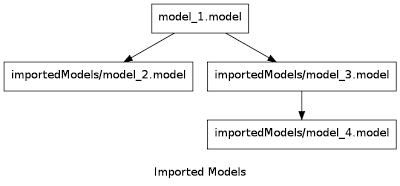
Web Experience Factory is a pretty good tool for rapid development, but its designer lacks automated documentation that can be used to explain an application to a new developer. Models can get extremely complicated, especially when they're assembled by developers who are just starting to use the tool. This article describes how graphs can be generated using eclipse. Using an Eclipse Plugin to Generate Graphs I've worked with projects that, in some cases, imported dozens of other models, making it quite challenging to follow a sequence of events. About a year ago I had the idea of generating a graph showing how models are imported into each other, but quickly got lost in the details of graphing within eclipse. I recently stumbled on an open source application named Graphviz , and when I saw the simplicity of using a DOT file to describe a graph, I was able to quickly develop a plugin to inspect a WEF model and produce a graph of it. An easy candidate for a graph is tracing how ...

WEF Profiling Explained

Image
Profiling is a frequently misunderstood concept in web experience factory. This blog entry describes profiling by comparing it to java code, something that more developers are familiar with. Comparing Profiles to Java Code Many people struggle with the concept of profiling and profile sets, but it can be closely compared to a conditional statement in java. Suppose that we have a button that needs to be displayed if the application is accessed from an android device. Coding this using java would look something like this (depending on the framework): if (request.getHeader("User-Agent") == "android"){    button.visible = true; } The same can be accomplished with WEF profiling except we don't have any code to work with, only a button builder with inputs. Ideally, we would want to apply the results of profiling to the builder enable input, setting it to true or false which would effectively replicate what the java code above does. Think of a profile set as a collecti...

WEF and Custom HTML

Image
Working with custom HTML is probably one of the most common patterns I've seen when building an application with web experience factory (WEF). Typically this is a situation where I'm given a really nice HTML stub from a professional web designer and I need to build an application around it. Don't Fight with WEF A common mistake I see all the time is a web developer trying to untangle or intercept the code generated by WEF. Don't do it, you're going to lose your mind or create an unmaintainable mess (or both). Here are a few tips that should help: 1 - Turn off the theme 2 - Don't let the data page builder create the UI 3 - Learn how to exploit page automation Turn off the Theme There are two ways to accomplish this, adding a theme builder to your model and selecting the individual components, or blanking out the theme file name in the project's override.properties . The theme is great when using WEF's default user interface, but it just gets in the way of...

Managing CVS Branches with WEF

Today I finally had the time to resolve a problem I had experienced regarding branches on CVS with web experience factory. Sometimes I want to work with a branch that, for some unknown reason, doesn't show up in eclipse drop down lists. I know it exists, but I have no means to select it. Eclipse and CVS Branches The solution to the problem is documented in this eclipse CVS FAQ list , but it's worth mentioning in a WEF blog because we typically don't check in the .project file. As the FAQ explains, eclipse looks at this file to determine which branches are available for a project, so we have to change the CVS configuration to look at another file instead. Checking in the .project file causes problems when later attempting to check out using the new WEF project wizard . Following the instructions in the FAQ above provides an easy work around. Hope someone finds some use in this tidbit of information.

Ajax Busy Indicators in WEF

This is my first posting for websphere portlet factory re-branded as web experience factory. I guess I'll have to get used to WEF, at least it sounds like a word now although not very meaningful. Looking Under the Hood I often seem to find myself snooping in code, usually when trying to fix a bug or extend some OOTB functionality to my liking. In this case I had a need to display some busy indicators during an unusually long ajax call, which led me to the javascript that enables ajax in WEF. The file of interest is WebContent\factory\clientjavascript\ajax\ppr.js and inside it, the following code can be found: // Can overload these to, e.g., show a progress indicator for long operations. startLoad: function() { }, endLoad: function() { }, Since directly altering this file is not a good idea, we can instead take the advice in the comment and overload the functions in our own script: dojo.require("dojox.widget.Standby"); var standby = new dojox.widget.Standby({ ...

Building a WPF Project with Ant

Generally speaking, I never endorse deploying an application to a production environment unless it has been built from scratch in a clean environment. This means that building a portlet factory WAR from the eclipse IDE is not the way to do a production build, even though it is really convenient. Building with Ant Apache ant has been around for a long while now, is an excellent framework for building WAR files and is the tool that WPF uses to build its own WAR files. In older versions of WPF the build process was somewhat lacking, but the team at IBM has really done a great job with the latest release of the product (I think this improved build may have been available in 6.1.5, but we skipped over that and went straight to 7.0). Below is an example of how I've taken the sample build.xml provided with the product and modified it to pull code from CVS and allow for project specific settings. The build.properties is mostly unchanged: CVSTag=HEAD # Build source root directory !NOTE! T...