

The AVG() function in PostgreSQL is an aggregate function that calculates the average value of a numeric column. It ignores NULL values and returns the arithmetic mean of all non-NULL values.
- Perform statistical analysis on table data.
- Use with clauses such as GROUP BY and HAVING.
Syntax
AVG(expression)Where:
- expression: The numeric column or expression whose average value is calculated.
Examples
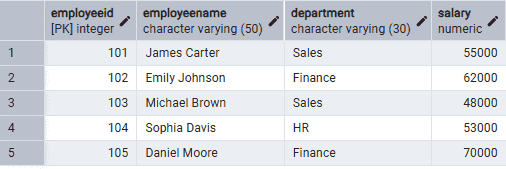
Firstly, create an Employees table and insert some records.
Query:
CREATE TABLE Employees (EmployeeID INT PRIMARY KEY,EmployeeName VARCHAR(50),Department VARCHAR(30),Salary NUMERIC);INSERT INTO Employees VALUES(101, 'James Carter', 'Sales', 55000),(102, 'Emily Johnson', 'Finance', 62000),(103, 'Michael Brown', 'Sales', 48000),(104, 'Sophia Davis', 'HR', 53000),(105, 'Daniel Moore', 'Finance', 70000);
Output:
Example 1: Calculate the Average Salary
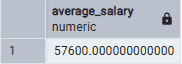
The following query calculates the average salary of all employees.
Query:
SELECT AVG(Salary) AS Average_SalaryFROM Employees;
Output:
Example 2: AVG() with GROUP BY
The following query calculates the average salary for each department.
Query:
SELECTDepartment,AVG(Salary) AS Average_SalaryFROM EmployeesGROUP BY Department;
Output:
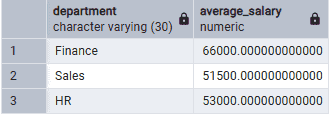
- The GROUP BY clause groups employees by department.
- The AVG() function calculates the average salary for each department.
Example 3: AVG() with WHERE Clause
The following query calculates the average salary of employees in the Sales department.
Query:
SELECT AVG(Salary) AS Average_SalaryFROM EmployeesWHERE Department = 'Sales';
Output:
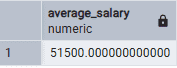
- The WHERE clause filters employees in the Sales department.
- The AVG() function calculates the average salary only for the filtered rows.
Example 4: AVG() with HAVING Clause
The following query displays departments whose average salary is greater than 55,000.
Query:
SELECTDepartment,AVG(Salary) AS Average_SalaryFROM EmployeesGROUP BY DepartmentHAVING AVG(Salary) > 55000;
Output:
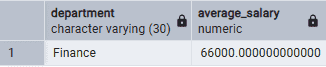
- The GROUP BY clause groups employees by department.
- The HAVING clause filters groups based on the average salary.
