

The COUNT() function in PostgreSQL is an aggregate function that returns the number of rows or non-NULL values in a column. It is commonly used to count records in a table and can be combined with clauses such as WHERE, GROUP BY and HAVING. The COUNT() function helps users to:
- Count the total number of rows in a table.
- Count records that satisfy a specific condition.
- Use with GROUP BY and HAVING to summarize data.
Syntax
COUNT(expression)or
COUNT(*)Where:
- expression: The column whose non-NULL values are counted.
- *: Counts all rows in the table, including rows containing NULL values.
Examples
Firstly, create a Students table and insert some records.
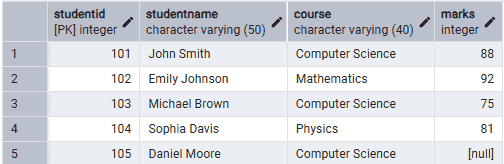
Example 1: Count Total Rows
The following query returns the total number of students.
Query:
SELECT COUNT(*) AS Total_Students
FROM Students;
Output:

- The COUNT(*) function counts every row in the Students table.
- It includes rows containing NULL values.
Example 2: COUNT() on a Column
The following query counts the number of students whose Marks value is not NULL.
Query:
SELECT COUNT(Marks) AS Students_With_Marks
FROM Students;
Output:
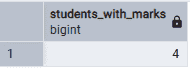
- The COUNT(Marks) function counts only non-NULL values in the Marks column.
- The row with NULL marks is ignored.
Example 3: COUNT() with GROUP BY
The following query counts the number of students in each course.
Query:
SELECT
    Course,
    COUNT(*) AS Total_Students
FROM Students
GROUP BY Course;
Output:
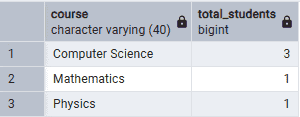
- The GROUP BY clause groups students by course.
- The COUNT(*) function returns the number of students in each course.
Example 4: COUNT() with HAVING Clause
The following query displays courses having more than one student.
Query:
SELECT
    Course,
    COUNT(*) AS Total_Students
FROM Students
GROUP BY Course
HAVING COUNT(*) > 1;
Output:
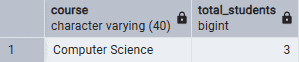
- The GROUP BY clause groups records by course.
- The HAVING clause filters groups with more than one student.
- Only the Computer Science course satisfies the condition.
