

REPLACE() function in PostgreSQL replaces all occurrences of a specified substring within a string with another substring.
- Replace specific text within a string.
- Modify text values without changing the original data.
- Clean and format string data.
- Update repeated text efficiently.
Syntax
REPLACE(string, from_substring, to_substring)Where:
- string: The original string to be modified.
- from_substring: The substring to search for.
- to_substring: The substring that replaces the matching text.
Example 1: Replace Text in a String
The following query replaces "World" with "PostgreSQL" in a string.
Query:
SELECT REPLACE('Hello World', 'World', 'PostgreSQL') AS UpdatedText;Output:
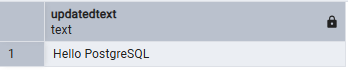
- REPLACE() function replaces every occurrence of World with PostgreSQL.
Example 2: Replace Text in a Table Column
Consider the following Courses table.
CREATE TABLE Courses (
    CourseID INT,
    CourseName VARCHAR(100),
    Instructor VARCHAR(50)
);
INSERT INTO Courses VALUES
(101, 'Basic SQL', 'John Smith'),
(102, 'Advanced SQL', 'Emily Davis'),
(103, 'SQL for Beginners', 'Michael Brown');
The following query replaces SQL with PostgreSQL in the CourseName column.
Query:
SELECT
    CourseName,
    REPLACE(CourseName, 'SQL', 'PostgreSQL') AS UpdatedCourse
FROM Courses;
Output:
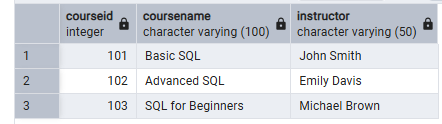
- REPLACE() function replaces all occurrences of SQL with PostgreSQL in each course name.
Example 3: Replace Multiple Occurrences
The following query replaces all occurrences of "-" with "/" in a date string.
Query:
SELECT REPLACE('2026-08-02', '-', '/') AS FormattedDate;Output:
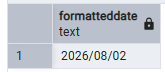
- REPLACE() function replaces every occurrence of - with / in the string.
