

PostgreSQL FORMAT() function creates a formatted string by replacing placeholders with specified values. It is commonly used to generate dynamic text, SQL queries and customized output.
- Formats strings by inserting values into placeholders.
- Supports creating dynamic SQL statements and customized text output.
Syntax
SELECT FORMAT(format_string, value1, value2, ...);Where:
- format_string: The template string containing format specifiers.
- value1, value2, ...: Values inserted into the placeholders.
Common Format Specifiers
- %s: Formats the value as a string.
- %I: Formats the value as an SQL identifier (table or column name).
- %L: Formats the value as an SQL literal.
Example: Format a String
Query:
SELECT FORMAT('Welcome to %s!', 'PostgreSQL');Output:

- FORMAT() function replaces the %s placeholder with the string 'PostgreSQL'.
Working
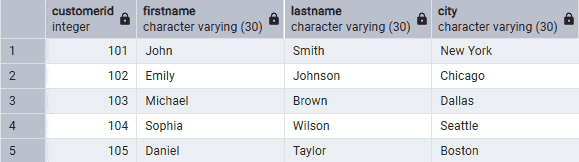
Consider the following Customers table for the examples below:
Example : Use FORMAT() with Table Data
Query:
SELECT FORMAT('%s %s', FirstName, LastName) AS FullName
FROM Customers;
Output:
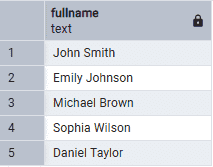
- FORMAT() replaces each %s placeholder with the corresponding column value.
Example : Use FORMAT() with Position Specifiers
Query:
SELECT FORMAT(
'%1$s purchased a %2$s. %1$s rated it 5 stars.',
'John',
'Laptop'
);
Output:

- %1$s and %2$s let you reuse the same arguments multiple times.
Example : Build a Dynamic SQL Statement
Query:
SELECT FORMAT(
'SELECT * FROM %I WHERE CustomerID = %L;',
'Customers',
101
) AS Query;
Output:

- %I formats table/column names, while %L formats SQL literal values.
