

In SQL, aliases provide temporary names for columns or tables to make queries cleaner and easier to understand. They are especially helpful in complex queries or when dealing with lengthy names.
Example: First, we create a demo SQL database and table, on which we will use the Aliases command.

Query:
SELECT empid AS id
FROM employees;
Output:

- The query selects the EmpID column from the Employees table.
- It assigns a temporary alias id to the EmpID column in the result set.
- The output will display the employee IDs under the column name id.
Types of aliases
There are two types of aliases:
Column Aliases
A column alias is used to rename a column just for the output of a query. They are useful when:
- Displaying aggregate data
- Making results more readable
- Performing calculations
Syntax:
SELECT column_name AS alias_name
FROM table_name;
- column_name: column on which we are going to create an alias name.
- alias_name: temporary name that we are going to assign for the column or table.
- AS: It is optional. If you have not specified it, there is no effect on the query execution.
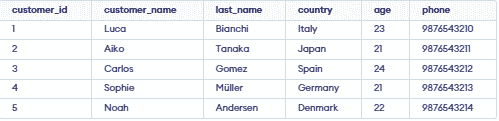
Let's understand Aliases in SQL with the help of example. First, we will create a demo SQL database and table, on which we will use the Aliases command.
Query:
SELECT customer_id AS id
FROM Customer;
Output:

- The output displays customer IDs under the column name id.
Table Aliases
A table alias is used when you want to give a table a temporary name for the duration of a query.
Query:
SELECT DISTINCT c1.customer_name, c1.country
FROM customer AS c1
JOIN customer AS c2
ON c1.age = c2.age
AND c1.country = c2.country
AND c1.customer_id <> c2.customer_id;
Output:

- The query uses table aliases (c1 and c2) for the same Customer table.
Combining Column & Table Aliases
We want to fetch customers who are aged 21 or older and rename the columns for better clarity. We will use both table and column aliases.
Query:
SELECT c.customer_name AS name,
       c.country AS location
FROM customer AS c
WHERE c.age >= 21;
Output:

