

SQL provides the WHERE clause to filter rows based on one or more conditions. It ensures that queries return or modify only the required records.
- Filters data based on specified conditions.
- Used with SELECT, UPDATE and DELETE statements.
- Works with comparison and logical operators.
Example: First, we will create a demo SQL database and employee table, on which we will use the WHERE Clause command.

Query:
SELECT Name, Department, Salary
FROM employee
WHERE Salary > 50000;
Output:

Syntax
SELECT column1, column2
FROM table_name
WHERE column_name operator value;
- column1, column2: Columns you want to retrieve.
- table_name: Table you are querying from.
- operator: Comparison logic (e.g., =, <, >, LIKE).
- value: The value or pattern to filter against.
Examples
We will create a basic employees table structure in SQL for performing all the where clause operation.
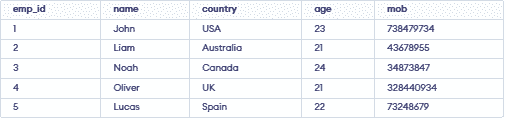
Example 1: Where Clause with Logical Operators
To fetch records of Employee with age equal to 24.
Query:
SELECT * FROM employees WHERE age=24;Output:

Example 2: WHERE with Comparison Operators
To fetch the emp_id, Name and Country of employees with age greater than 21.
Query:
SELECT emp_id, Name, Country
FROM employees
WHERE age > 21;
Output:

Example 3: Where Clause with BETWEEN Operator
The BETWEEN operator is used to filter records within a specified range, and it includes both the start and end values. In this example, we want to find employees whose age is between 22 and 24, including both 22 and 24.
Query:
SELECT * FROM employees
WHERE age BETWEEN 22 AND 24;
Output:

Example 4: Where Clause with LIKE Operator
The LIKE operator is used to filter data by matching a specific pattern in the WHERE clause. In this example, we retrieve records of employees whose names start with the letter 'L'.
- The % wildcard represents any number of characters (including zero).
- The _ wildcard represents exactly one character.
Query:
SELECT * FROM employees
WHERE Name LIKE 'L%';
Output:

Example 5: Where Clause with IN Operator
The IN operator filters data by matching a column against multiple specified values. Here, we find employees whose age is 21 or 23.
Query:
SELECT Name FROM employees
WHERE age IN (21,23);
Output:

Operators Used in WHERE Clause
| Operator | Description |
|---|---|
| > | Greater Than |
| >= | Greater than or Equal to |
| < | Less Than |
| <= | Less than or Equal to |
| = | Equal to |
| <> | Not Equal to |
| BETWEEN | In an inclusive Range |
| LIKE | Search for a pattern |
| IN | To specify multiple possible values for a column |
