

The SQL UPDATE statement is used to modify existing data in a table by changing the values of one or more columns.
- The WHERE clause specifies which rows should be updated.
- Without WHERE, all rows in the table are modified.
Syntax
UPDATE table_name
SET column1 = value1, column2 = value2,...
WHERE condition;
- table_name: Name of the table you want to update.
- SET: The column(s) you want to update and their new values.
- WHERE: Filters the specific rows you want to update.
Note: The SET keyword assigns new values to columns, while the WHERE clause selects which rows to update. Without WHERE, all rows will be updated.
Working with the UPDATE Statement
Consider the customer table shown below, which contains each customer’s unique ID, name, last name, phone number and country. This table will be used to demonstrate how the SQL UPDATE statement works.
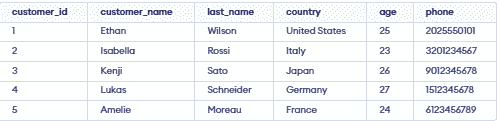
Example 1: Update Single Column
We have a customer table and we want to update the Age to 25 for the customer whose customer_name is 'Isabella'.
Query:
UPDATE customer
SET  Age = 25
WHERE  customer_name = 'Isabella';
SELECT * FROM customer;Output:
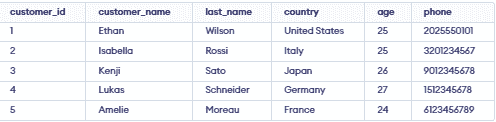
- The query updates the Age to 25 for the customer named 'Isabella'.
- It affects only the row where customer_name = 'Isabella'.
- It is used to modify existing data in a specific record.
Example 2: Updating Multiple Columns
We need to update both the customer_name and country for a specific customer_id.
Query:
UPDATE customer
SET  customer_name = 'John',
country = 'Spain'
WHERE customer_id = 1;
Output:
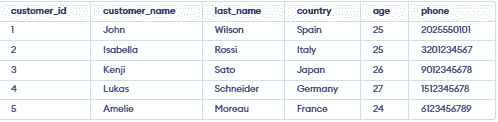
- The query targets the row where customer_id = 1.
- It updates customer_name to 'John' and Country to 'Spain'.
- Both columns are updated simultaneously in a single SQL statement.
Note: For updating multiple columns we have used comma(,) to separate the names and values of two columns.
Example 3: Omitting WHERE Clause in UPDATE Statement
If we accidentally omit the WHERE clause, all the rows in the table will be updated, which is a common mistake. Let’s update the customer_namefor every record in the table:
Query:
UPDATE customer
SET  customer_name = 'Mike';
SELECT * FROM customer;Output:
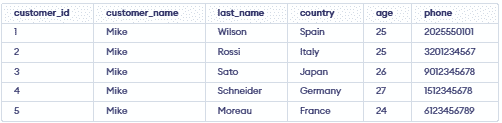
- Updates the customer_name to 'Mike' for all rows in the customer table.
- It affects every record because no WHERE clause is used.
