

The DROP DATABASE statement permanently deletes a database and its objects. This action is irreversible, so back up the database before deleting it.
- Permanent: Deletes all database data and objects.
- Backup: Create a backup before deletion.
- Privileges: Requires appropriate permissions.
- Database State: Can be dropped depending on the DBMS and database state.
Syntax
DROP DATABASE IF EXISTS Database_Name;Working
Step 1: Create a Sample Database
First, let's create a database on which we will run the query. This will allow us to perform operations and test the SQL DROP DATABASE command.
CREATE DATABASE geeksforgeeks;Step 2: Verify the Database
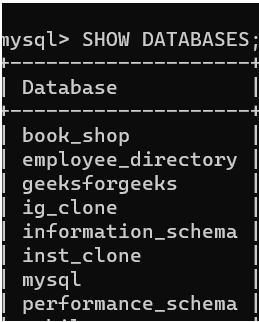
To confirm that the geeksforgeeks database was successfully created, use the following command to list all databases:
Query:
SHOW DATABASES;Output:
Step 3: Drop the Database
Now that the database is confirmed to exist, let’s use the DROP DATABASE command, to delete the database 'geeksforgeeks'.
Query:
DROP DATABASE geeksforgeeks;Output:

Step 4: Verify the Deletion
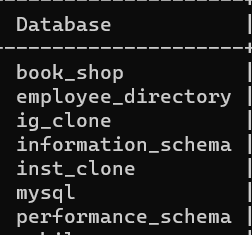
After dropping the database, use the SHOW DATABASES command to verify that the GeeksForGeeks database no longer exists.
Query:
SHOW DATABASES;Output:
SQL DROP DATABASE IF EXISTS
To avoid any error while running the DROP DATABASE command use the IF EXISTS clause, which will delete the database only if it exists in the system.
Example:
DROP DATABASE IF EXISTS geeksforgeeks;- This command will check if the database exists before attempting to drop it, making it safer to run in scripts or on production systems.
