

The SQL GROUP BY clause is used to arrange identical data into groups based on one or more columns. It is commonly used with aggregate functions like COUNT(), SUM(), AVG(), MAX() and MIN() to perform calculations on each group of data.
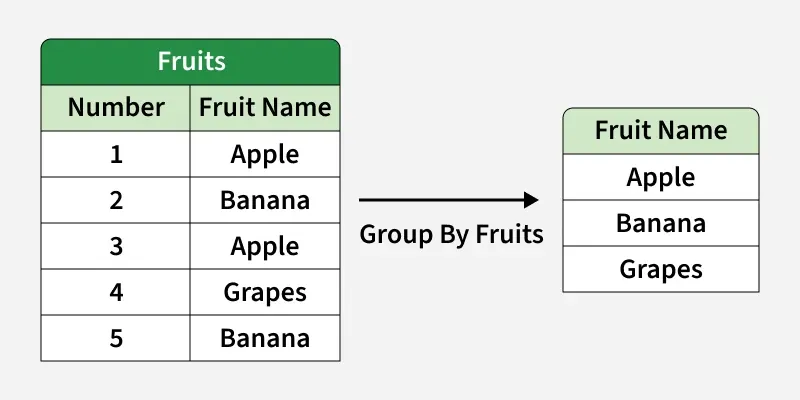
Example: First, we will create a demo SQL database and table, on which we will use the GROUP BY command.
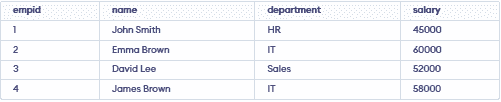
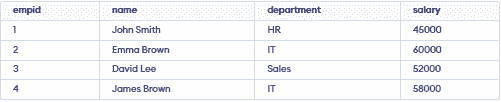
Query:
SELECT Department, SUM(salary) AS totalsalary
FROM employees
GROUP BY department;
Output:

- Groups all employee records based on their department.
- Calculates and returns total salary for each department.
Syntax
SELECT column1, aggregate_function(column2)
FROM table_name
WHERE condition
GROUP BY column1, column2;
- aggregate_function: function used for aggregation, e.g., SUM(), AVG(), COUNT().
- table_name: name of the table from which data is selected.
- condition: Optional condition to filter rows before grouping (used with WHERE).
- column1, column2: Columns on which the grouping is applied.
Working
Let's assume we have a students table. We will use sample data to understand how GROUP BY groups rows and works with aggregate functions.
Example 1: Group By a Single Column
GROUP BY combines rows with the same value. Here, we group students by subject.
Query:
SELECT subject, COUNT(*) AS student_countFROM studentsGROUP BY subject;
Output:

- Groups students by subject.
- Counts students in each group.
Example 2: Group By Multiple Columns
Here, we group rows by both subject and year.
Query:
SELECT subject, year, COUNT(*) AS student_countFROM studentsGROUP BY subject, year;
Output:

- Groups rows by subject and year.
- Counts rows in each group.
HAVING Clause with GROUP BY
HAVING filters grouped results using aggregate functions.
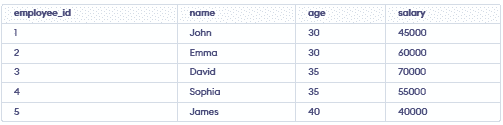
Example 1: Filter by Total Salary
Here, we return age groups with total salary above 50,000.
SELECT age, SUM(salary) AS total_salaryFROM employeesGROUP BY ageHAVING SUM(salary) > 50000;
Output:

- Groups employees by age.
- Returns groups with total salary above 50,000.
Example 2: Filter by Average Salary
Here, we return age groups with average salary above 60,000.
SELECT age, AVG(salary) AS average_salaryFROM employeesGROUP BY ageHAVING AVG(salary) > 60000;
Output:

- Groups employees by age.
- Returns groups with average salary above 60,000.
