🚀 Supercharge your YouTube channel's growth with AI.
Try YTGrowAI FreeHow to Load Pickled Pandas Objects with read_pickle


A pickle file records the Python path of every class inside the object that wrote it. That recorded path is why a file loads on one pandas release and raises a missing-module error on another. I loaded a frame from a path with read_pickle on pandas 3.0.5, then broke the input four separate ways.
What a pickled pandas object actually stores
Serializing a DataFrame writes the values and the rebuild instructions into one binary stream. read_pickle walks that stream, imports each class path it finds, and calls the constructor recorded beside it.
That design is why pickle keeps what a CSV cannot. A CSV stores text, so the reader guesses the types back and gets timestamps and categories wrong, which the header handling in read_csv cannot repair.
| Column | dtype after to_pickle and read_pickle | dtype after to_csv and read_csv |
|---|---|---|
| order_id | int64 | int64 |
| placed_at | datetime64[us] | str |
| channel | category | str |
| total | float64 | float64 |
| note | str | str |
I wrote five columns with those types, read the frame back both ways, and compared each result to the object I had written. The pickle arrived equal, and the CSV did not, because two columns had returned as text.
What you need before the first call
The call itself is one import and one path. What decides whether it works is the environment holding the file.
- pandas installed in the environment that opens the file, since the API reference promises compatibility back to pandas 1.0 only for objects written by to_pickle. Installing the pickle module is a separate step on a fresh interpreter.
- The path as a string, a pathlib.Path, or an open binary handle, because read_pickle accepts all three.
- A complete file, since a download that stopped partway leaves a pickle that fails on its last byte.
- The compression name for the case where the filename does not carry the extension that matches the bytes inside it.
- A reason to trust the source, or a sandbox if you cannot name it.
The version rule is the one that decides a move between machines. A pickle written by pandas 1.x names classes that later releases removed, and the failure arrives as a missing module rather than a version complaint.
Loading a pickled DataFrame from a path
The shortest version of the job is a write, a read, and a comparison, because a comparison catches a lossy round trip that a printed head of rows hides. The write side is to_pickle, which takes the same path argument and the same compression options.
import pandas as pd

orders = pd.DataFrame(
    {
        "order_id": [1001, 1002, 1003, 1004],
        "placed_at": pd.to_datetime(["2026-08-01", "2026-08-02", "2026-08-02", "2026-08-03"]),
        "channel": pd.Categorical(["web", "app", "web", "store"]),
        "total": [19.99, 4.50, 130.00, 7.25],
        "note": ["first", None, "bulk", None],
    }
)

print("written by to_pickle")
print(orders.dtypes.to_string())

orders.to_pickle("orders.pkl")
loaded = pd.read_pickle("orders.pkl")

print("\nreturned by read_pickle")
print(loaded.dtypes.to_string())
print("\ntype:", type(loaded).__name__)
print("equals the frame I wrote:", loaded.equals(orders))
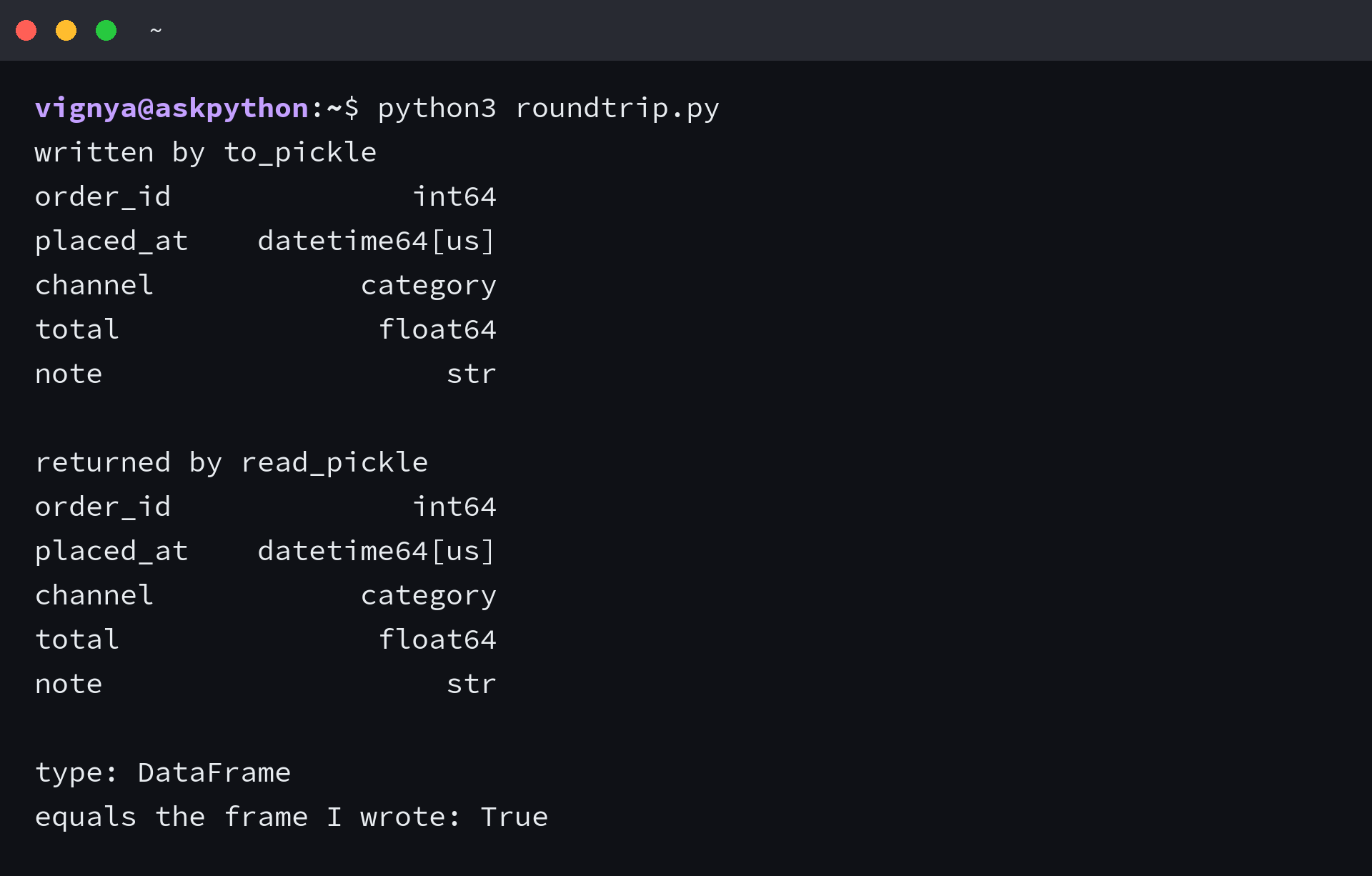
Print the type before you reach for columns that may not exist. The return type is whatever class the stream recorded, so a pickled Series returns as a Series and a saved dictionary as a dictionary.
Text arrives as str instead of object, and a parsed date column sits at datetime64[us] microseconds, a coarser grid than a fresh timestamp uses. Those dtypes are the current pandas defaults rather than an artifact of my frame.
Choosing compression when the filename lies
I wrote the same three-row frame four ways and read each one back, and only the files whose names carried the matching extension loaded without help. compression defaults to infer, and infer reads the filename rather than the bytes, so a mislabelled file reaches the pickler with its first byte read as an opcode.
import pandas as pd

frame = pd.DataFrame({"a": [1, 2, 3], "b": ["x", "y", "z"]})
frame.to_pickle("plain_bz2.pkl", compression="bz2")
frame.to_pickle("named_gz.pkl.gz", compression="gzip")

try:
    pd.read_pickle("plain_bz2.pkl")
except Exception as exc:
    print("name has no .bz2:", type(exc).__name__, "-", exc)

fixed = pd.read_pickle("plain_bz2.pkl", compression="bz2")
print("compression named by hand:", fixed.shape)

inferred = pd.read_pickle("named_gz.pkl.gz")
print("inferred from the .gz name:", inferred.shape)
| Written as | Read with | Result |
|---|---|---|
| bz2, file named plain_bz2.pkl | compression infer | UnpicklingError, pickle data was truncated |
| bz2, file named plain_bz2.pkl | compression bz2 | DataFrame of shape 3 by 2 |
| gzip, file named named_gz.pkl.gz | compression infer | DataFrame of shape 3 by 2 |
| zip, file named named_zip.pkl.zip | compression infer | DataFrame of shape 3 by 2 |
| gzip bytes cut in half, file named cut_in_half.pkl.gz | compression infer | EOFError, compressed file ended before the end-of-stream marker |
A gzip stream starts with 0x1f, which is not a pickle opcode at all, so the loader stops immediately with invalid load key.
A bz2 stream starts with the letters BZh9, and that leading B is the opcode for a bytes object. The loader reads the length field behind it, expects 825845850 bytes, and reports truncated data when only one byte remains.
Both messages point at the same fix. Name the compression by hand when the filename does not say it, or rename the file so the extension matches what is inside.
Loading every pickle in a folder
A pipeline that saves one file per day leaves a directory rather than a file, and a Stack Overflow question about pickled tweets asks exactly this. The accepted answer maps read_pickle over the file list and concatenates the results.
import glob
from pathlib import Path

import pandas as pd

daily = Path("daily")
daily.mkdir(exist_ok=True)
for day in range(1, 4):
    pd.DataFrame({"day": [day], "value": [day * 10]}).to_pickle(daily / f"day{day}.pkl")

paths = sorted(glob.glob(str(daily / "*.pkl")))
combined = pd.concat(map(pd.read_pickle, paths), ignore_index=True)

print("paths matched:", paths)
print(combined.to_string(index=False))
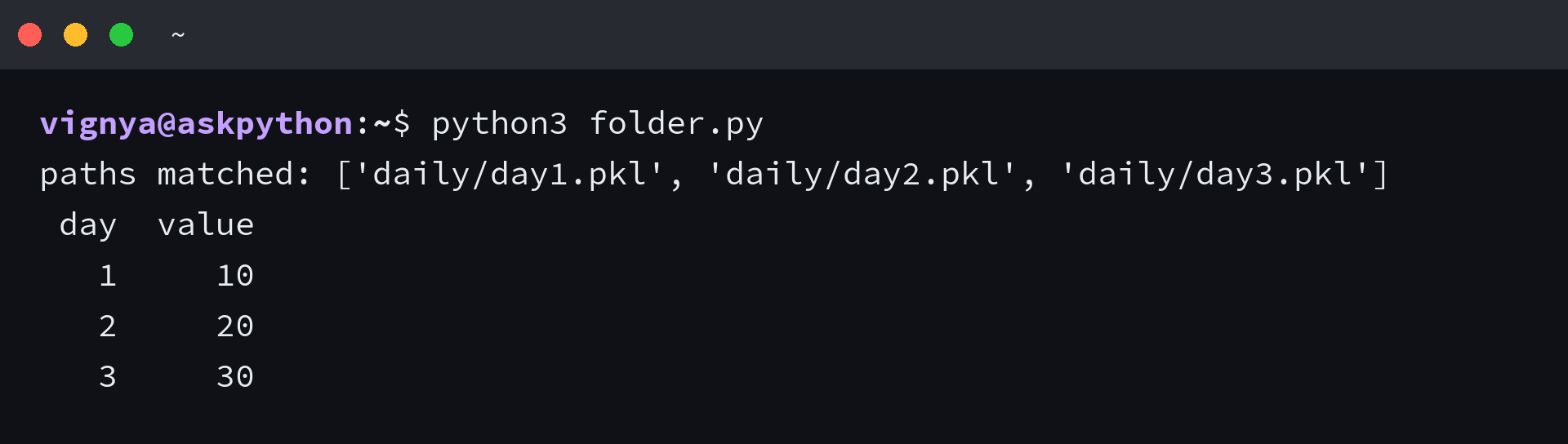
glob returns paths in directory order, so sorting them keeps the days in sequence, and ignore_index drops the per-file index to give the combined frame one continuous range.
Reading the four errors read_pickle raises
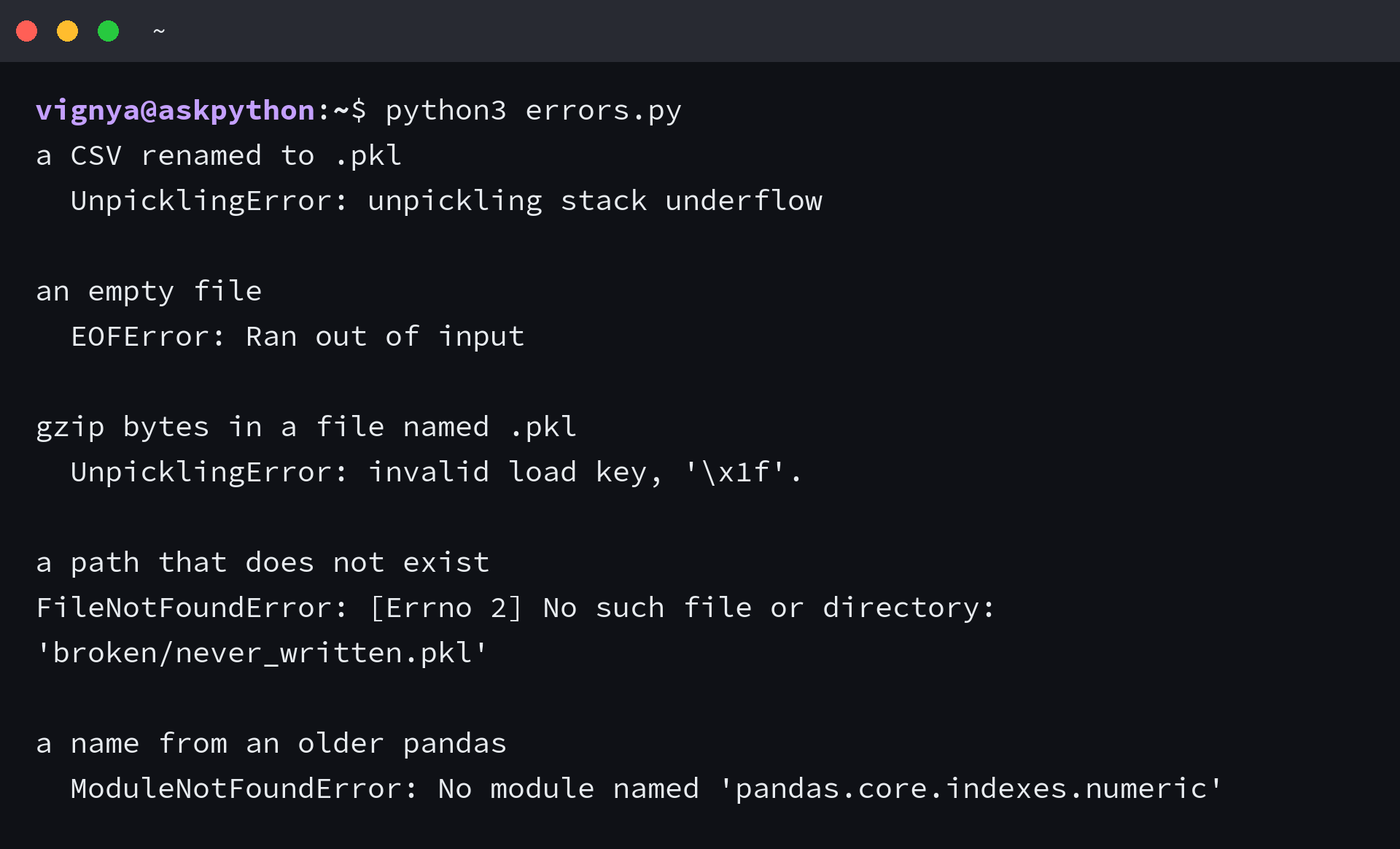
The table after the code maps each message to the call that clears it. Each message below names its own cause, and the companion walkthrough for reading pickle files covers the same calls from the other direction.
import pickle
from pathlib import Path

import pandas as pd

work = Path("broken")
work.mkdir(exist_ok=True)
pd.DataFrame({"a": [1, 2, 3]}).to_pickle(work / "good.pkl")

(work / "renamed_csv.pkl").write_text("a,b\n1,x\n2,y\n")
(work / "empty.pkl").write_bytes(b"")
pd.DataFrame({"a": [1, 2, 3]}).to_pickle(work / "gz_without_suffix.pkl", compression="gzip")

attempts = {
    "a CSV renamed to .pkl": work / "renamed_csv.pkl",
    "an empty file": work / "empty.pkl",
    "gzip bytes in a file named .pkl": work / "gz_without_suffix.pkl",
    "a path that does not exist": work / "never_written.pkl",
}

for label, path in attempts.items():
    try:
        pd.read_pickle(path)
    except Exception as exc:
        print(f"{label}\n  {type(exc).__name__}: {exc}\n")

legacy_bytes = b"cpandas.core.indexes.numeric\nInt64Index\n."
try:
    pickle.loads(legacy_bytes)
except Exception as exc:
    print(f"a name from an older pandas\n  {type(exc).__name__}: {exc}")
| Message | What produced it | What to do |
|---|---|---|
| UnpicklingError, unpickling stack underflow | a CSV or text file renamed to .pkl | read it with read_csv instead |
| UnpicklingError, invalid load key 0x1f | gzip bytes in a name that carries no .gz | pass compression gzip |
| UnpicklingError, pickle data was truncated | bz2 bytes read without the compression name, or a write that stopped | name the compression, or write the file again |
| EOFError, Ran out of input | an empty file | re-export the object |
| FileNotFoundError | a path that does not exist | check the path before the call |
| ModuleNotFoundError, no module named pandas.core.indexes.numeric | a file written by a pandas release that has since removed that class | re-export it from an environment that still opens it |
The bytes are intact and the class name recorded inside them is gone, so the loader stops before it reads a value. What reads like a corrupt file is a naming problem in the environment that opens it.
A fifth case raises nothing at all, because a file built by repeated pickle.dump calls holds several objects and read_pickle returns the first and stops.
I wrote three two-row frames into one file and asked read_pickle for the contents. It handed back two rows with no warning, and only the loop over pickle.load on a binary handle returned all three objects.
frames = []
with open("stream.pkl", "rb") as handle:
    while True:
        try:
            frames.append(pickle.load(handle))
        except EOFError:
            break

print(len(frames), "objects,", sum(f.shape[0] for f in frames), "rows")
Pickle files from other people run code
Unpickling is not a read the way opening a CSV is a read, because the stream can name a callable and the loader calls it before returning.
import pickle
from pathlib import Path

work = Path("untrusted")
work.mkdir(exist_ok=True)


class Summary:
    def __init__(self, rows):
        self.rows = rows

    def __reduce__(self):
        return (print, ("running before the data is returned",))


(work / "summary.pkl").write_bytes(pickle.dumps(Summary(8)))

print("opening the file")
loaded = pickle.loads((work / "summary.pkl").read_bytes())
print("object returned:", type(loaded).__name__)
print("rows attribute:", getattr(loaded, "rows", "not there"))
That print ran before the loader returned anything, and the object that came back was not the one I had written, because its own data never arrived. A file from an untrusted source can name any callable in the same position, which is why the pandas reference carries a warning beside the signature.
These four habits keep the risk at the boundary:
- Treat a pickle from outside your team as executable input rather than as data.
- Open an unfamiliar file once in a sandbox with no network and no credentials.
- Convert at the boundary and keep the conversion, so the untrusted format stops in one place. Parquet, JSON, and CSV all read without executing anything.
- Look at where the file came from rather than at its extension, since invalid load key shows how little a name tells you about contents.
The check that tells you the file was written correctly
The next command is the one to run before any code is built on top of the frame, in the environment that will consume it.
import pickle

import pandas as pd


def load_checked(path):
    """Read a pickled pandas object and fail with the reason, not the bytes."""
    try:
        obj = pd.read_pickle(path)
    except FileNotFoundError:
        raise SystemExit(f"no file at {path}")
    except (pickle.UnpicklingError, EOFError) as exc:
        raise SystemExit(f"{path} is not a complete pickle: {exc}") from exc
    except ModuleNotFoundError as exc:
        raise SystemExit(f"{path} needs a module this environment does not have: {exc}") from exc

    if not isinstance(obj, (pd.DataFrame, pd.Series)):
        raise SystemExit(f"{path} holds a {type(obj).__name__}, not a pandas object")
    return obj


frame = load_checked("orders.pkl")
print(type(frame).__name__, frame.shape, list(frame.columns))

Those branches turn four different failures into one sentence each, so a log line tells you which stage produced the file. Running the check in the consuming environment rather than the writing one is the point, because that is where the recorded class paths are resolved.
Load the object once where it will be used before the pipeline grows around it. A version problem found then is a message you can read, and the same problem found after the training run starts is a long afternoon.
Questions about read_pickle
How do I load a pickle file into a pandas DataFrame?
Call pandas.read_pickle with the file path and the call returns the object that was stored. A file written from a DataFrame comes back as a DataFrame, and a file written from a Series comes back as a Series.
What does invalid load key mean?
The loader read a byte that is not part of the pickle format. In practice that byte is the first byte of a compressed stream, a CSV, or an HTML error page, so check what the file actually contains before assuming the file is corrupt.
Can I read a pickle file without pandas?
Yes. The pickle module reads the stream and returns whatever object it holds, which is enough when the file stores a list or a dictionary. pandas is still needed to rebuild a DataFrame, so read_pickle stays the shorter route when pandas is installed.
Does read_pickle work on a file saved by an older pandas?
Only back to pandas 1.0, and only for objects written by to_pickle. A file from an earlier release can name classes that were removed, which surfaces as ModuleNotFoundError rather than a version warning.
Is a pickle file smaller than a CSV?
For frames with repeated text it is smaller, and it also keeps the dtypes. On the small test frame I wrote, the pickle took 985 bytes and the gzipped version took 602, so compression narrows the gap further on larger files.
Why is my pickle file empty?
A write interrupted between to_pickle and the process exit leaves a file with no complete object inside it. The loader reports EOFError, and writing the file again is the only fix.