🚀 Supercharge your YouTube channel's growth with AI.
Try YTGrowAI FreePython List Length: How to Count Items with len()

len() answered a ten million item list in 2.48 microseconds while a Python loop over the same list took 313 milliseconds. I timed both paths, and a difference of 126,313 times comes from a stored value rather than a faster way to count, which decides the length call you want once the data is nested or wrapped in an array.
What len() counts on a Python list
len() returns the number of top-level items in an object, and one call answers for a list, a string, a tuple, a dictionary, a set, a range, and a bytes object. Python describes the function that way in its own documentation of len, where the argument may be a sequence or a collection.
"""What len() counts, per built-in container."""

readings = [23.5, 19.0, 21.5]
readings.append(18.4)

word = "humidity"
temps = (23.5, 19.0, 21.5)
sensors = {"kitchen": 23.5, "porch": 19.0, "shed": 21.5}
alarms = {"frozen", "heat"}
window = range(5, 25)
raw = b"\x01\x02\x03"

print("list   ", len(readings))
print("str    ", len(word))
print("tuple  ", len(temps))
print("dict   ", len(sensors))
print("set    ", len(alarms))
print("range  ", len(window))
print("bytes  ", len(raw))
print()
print("len() does not care what is inside, only how many top-level items there are.")
print("window is range(5, 25), so len counts the numbers 5 through 24:", len(window))
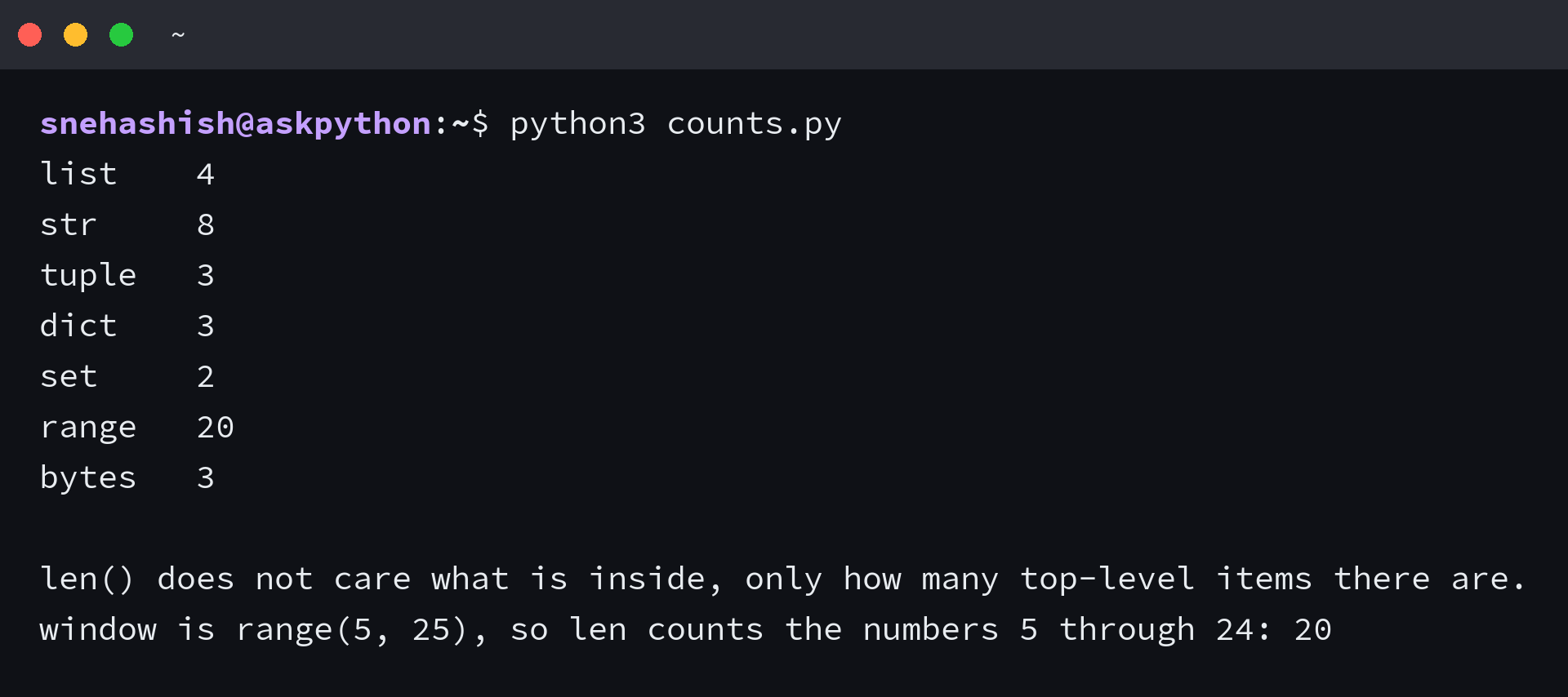
I ran that same call against seven built-in containers, and every one of them answered with an item count rather than a value count. A sensor dictionary with three names reports three, an alarm set holding two distinct members reports two, and range(5, 25) reports 20 because it covers 5 through 24.
The dictionary and the set can both hold fewer entries than the values written into them. A set given the same alarm twice still reports one member, because the duplicate never became an entry. Uniqueness is decided at insertion.
Objects that support len() reach well past the built-ins. The Sized protocol is one method wide, and it is the same __len__ a custom class implements.
If you are still choosing the container, my guide to the list type covers the methods that move the count.
What you need before the first command
The samples below ran on Python 3.14.7, and the first six need nothing installed beyond the interpreter itself.
- Python 3.14.7, or any current Python 3 release
- NumPy, for the array sample near the end, installed with pip install numpy
- A decision about which count you are after, made before you write the call
Which count you are after decides the call you write. When you want the number of things a list holds directly, you have your answer by the end of the next section. When you want the number of values inside a nested structure, or the size of the list in memory, len() is answering a different question and one extra call closes the distance.
How to get the length of a list in Python
Getting a count takes one call, so the work sits in knowing which of the three counts you just asked for.
Pass the list to len()
Call len() with the list as its only argument and read the integer back.
"""The one call that answers the question."""

readings = [23.5, 19.0]
readings.append(18.4)

length = len(readings)
print("readings:", readings)
print("length:", length)
print("reversed index of the last item:", -length)

if length > 3:
    print("more than three readings to review")
The return value is a plain integer, which means you can store it, compare it, and index with it. A count of three gives the last item a reversed index of minus three, so the same number serves the length check and the position.
Store it under a name when the value is read more than once. A second call costs almost nothing, but item_count in a conditional says what you meant in a way that a bare call does not.
Why len() returns instantly
A list keeps its own item count, so len() reads a field instead of walking the sequence, which is why the call costs the same on ten items and on ten million.
I timed both paths on a list of ten million integers. The call came back in 2.48 microseconds and a Python loop that added one per item finished in 313 milliseconds, which makes the loop 126,313 times slower.
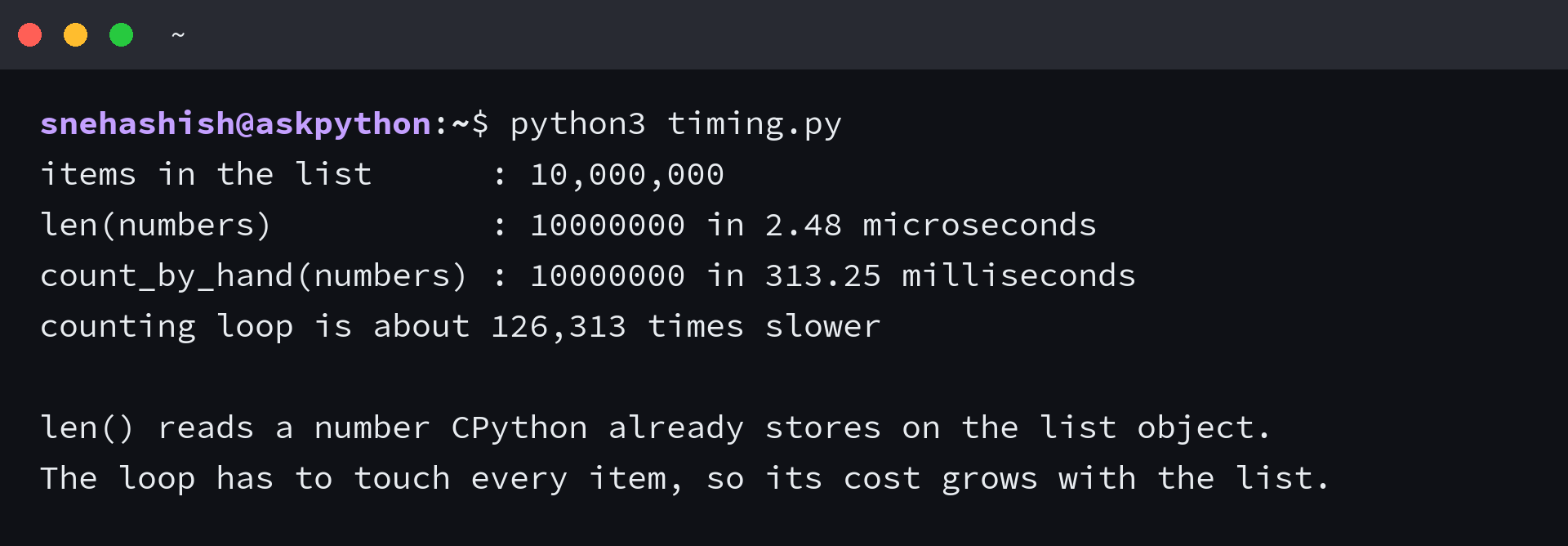
That loop is not badly written, it cannot win, because it touches every item while the stored count touches none. The Python documentation records the constant cost of len on a list in its table of built-in operation costs.
A subclass tells on itself here. Defining __len__ on a list subclass sends every length check into Python code, because the stored count stops being the answer. The constant cost travels and the fixed cost of the built-in goes with it.
Let your own class answer len()
len() works because it calls __len__ on the object it receives, so a class needs that one method to support the built-in. I wrote a small buffer that refuses to grow past its capacity and reports its own fill level through the same call.
"""Where len() gets its answer: __len__ on the object."""


class SensorBuffer:
    def __init__(self, capacity):
        self.capacity = capacity
        self.readings = []

    def add(self, value):
        if len(self.readings) >= self.capacity:
            raise RuntimeError("buffer full")
        self.readings.append(value)

    def __len__(self):
        return len(self.readings)


buffer = SensorBuffer(capacity=3)
print("len(buffer) when empty ->", len(buffer))
print("bool(buffer) when empty ->", bool(buffer))

buffer.add(23.5)
buffer.add(19.0)
print("len(buffer) after two adds ->", len(buffer))
print("bool(buffer) after two adds ->", bool(buffer))
print()

try:
    buffer.add(21.5)
    buffer.add(18.4)
except RuntimeError as exc:
    print("RuntimeError:", exc)

print("len(buffer) ->", len(buffer))
print()
print("bool() falls back to __len__ when a class defines it, so an empty buffer is falsy.")
print("Defining __len__ is what makes the built-in len() work on your own class.")
The same method decides truthiness once a class has no __bool__. Python falls back to __len__ and reads zero as false, so an empty buffer drops out of an if statement with no comparison written. The data model documents both halves of that behaviour under object.__len__.
When len() gives the wrong answer or refuses
A nested list, a missing size, and a memory question each turn a correct count into the wrong number, and each one has a fix that costs a single call.
Nested lists report the outer length
A list of rows reports the number of rows, and that answer is accurate while almost never being the one a reader wanted.
"""len() counts outer items. A nested list hides the rest."""

grid = [
    [10, 11, 12, 13, 14, 15],
    [20, 21, 22, 23, 24, 25],
]

print("grid =", grid)
print("len(grid) =", len(grid))
print("numbers actually stored =", sum(len(row) for row in grid))
print()

flat = [value for row in grid for value in row]
print("flattened =", flat)
print("len(flattened) =", len(flat))
print()

mixed = [[1, 2], 3, [4, [5, 6]]]


def count_all(node):
    if isinstance(node, list):
        return sum(count_all(child) for child in node)
    return 1


print("mixed =", mixed)
print("len(mixed) =", len(mixed))
print("count_all(mixed) =", count_all(mixed))
print()
print("len sees three items in mixed because the nesting is invisible to it.")
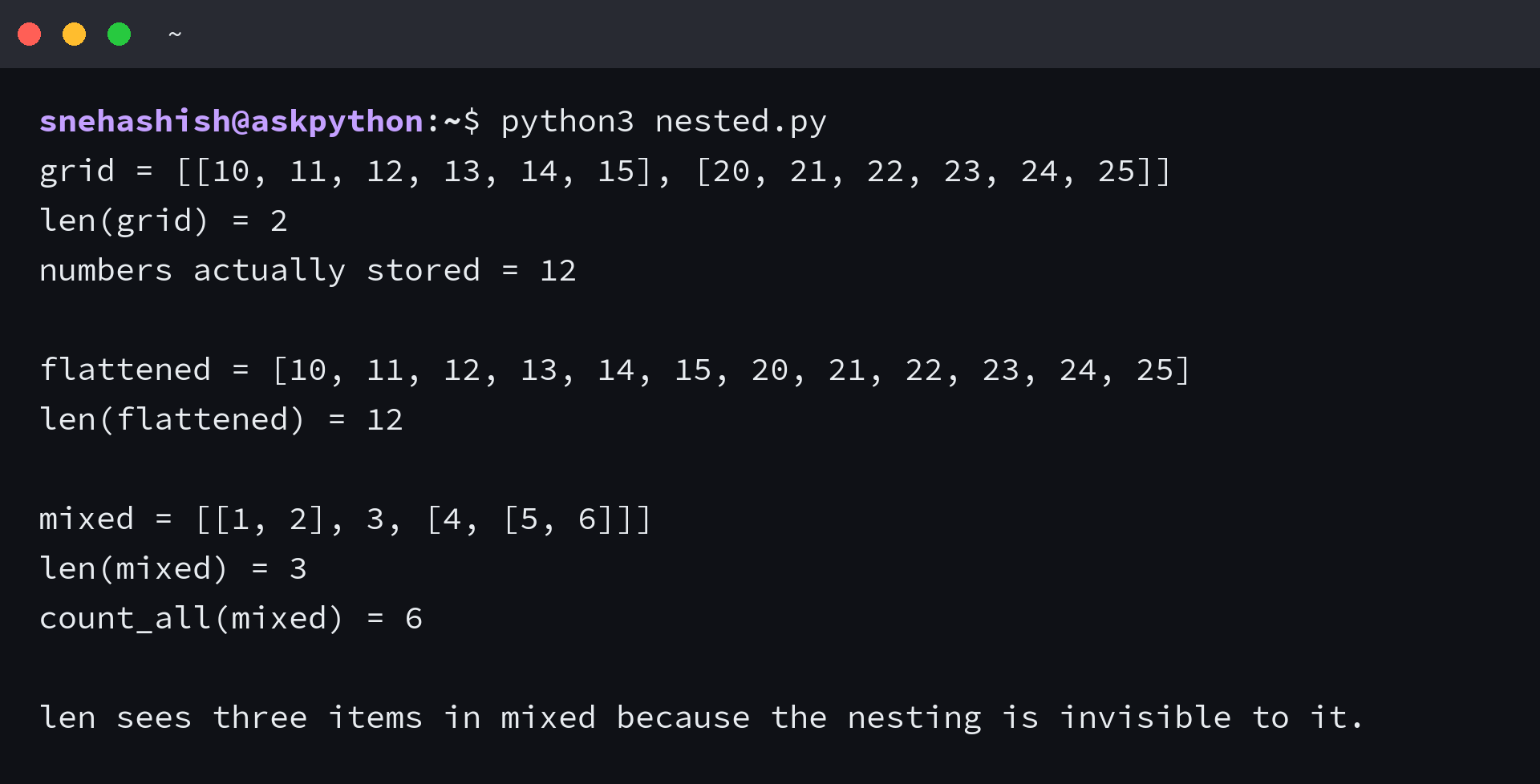
I built a two-row grid for this and len() reported the rows rather than the numbers inside them. Summing len() across the rows gives 12 for a grid that reports 2 as a whole, and when the depth varies from row to row, count_all walks the structure and totals every leaf. That returns 6 for a mixed list whose top-level count is 3.
A comprehension that flattens the grid first gives the same 12 and builds a second list to hold it. The walk counts without copying, which matters when the data is large enough that a copying it costs more than counting it, though count_all pays with a call stack that grows once per level of nesting. Flatten in a loop when the depth is unknown.
The TypeError family and the generator with no length
Pass something without a size and len() raises TypeError with the offending type named in the message.
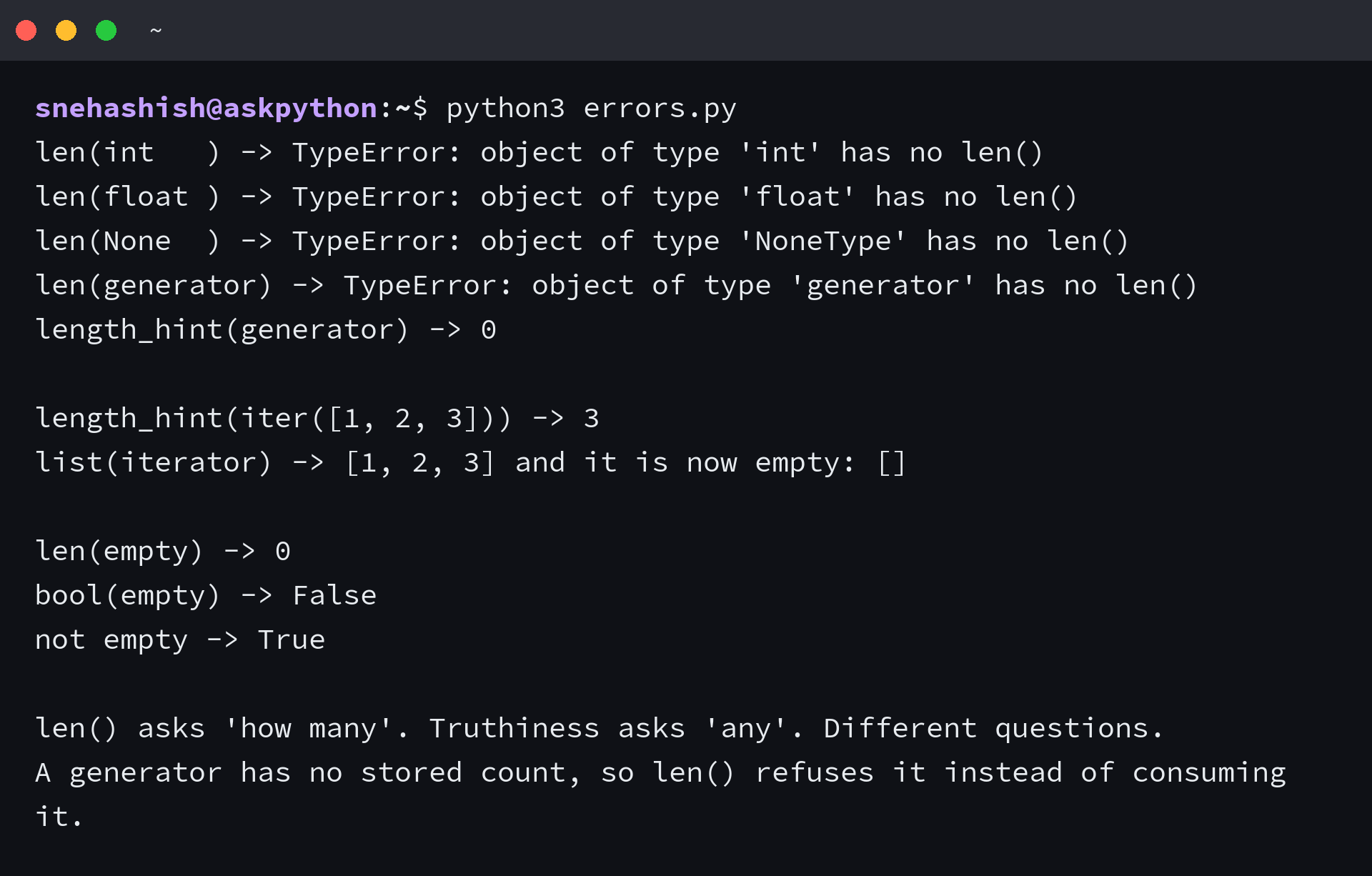
A generator belongs to that family. It produces items on demand and keeps no count, so len() refuses rather than draining the sequence to produce a number.
I expected operator.length_hint to walk the generator and hand me 10. It returned 0, because the hint reads a length the object already exposes and a generator exposes none.
The function still earns a place for an iterator built with iter(), where it reports the remaining items without consuming them, as the operator documentation describes. Treat its number as an estimate, and read a default zero as not knowing rather than empty.
Length is not size in bytes
The phrase python list size covers two questions, and answering the memory one by accident produces a number that looks nothing like an item count.
"""len() is not memory size. Two different questions, two different tools."""

import sys

numbers = [10, 20, 30, 40]

print("numbers          =", numbers)
print("len(numbers)     =", len(numbers), "items")
print("sys.getsizeof    =", sys.getsizeof(numbers), "bytes for the list object itself")
print()
print("int objects          :", sys.getsizeof(10), "bytes each")
print("list object          :", sys.getsizeof(numbers), "bytes")
print("pointers to the ints :", len(numbers) * 8, "bytes")
print()

big = list(range(1000))
print("len(list(range(1000))) =", len(big))
print("sys.getsizeof(same)    =", sys.getsizeof(big), "bytes")
print()
print("A list holds pointers. len() counts the pointers, not the objects they point at.")
I measured a four-item list at 88 bytes while len() reported 4 items, and those two numbers never converge because one counts pointers and the other counts bytes. In practice you reach for sys.getsizeof when the question is memory, since it returns the size of an object in bytes, and len() when the question is items.
| Question you are asking | Call to use | What comes back |
|---|---|---|
| How many items does this list hold? | len(data) | the stored top-level count |
| How many values sit inside the nesting? | sum(len(row) for row in rows) | every leaf, one pass |
| How much memory does this list occupy? | sys.getsizeof(data) | bytes for the list object |
| How many items remain in this iterator? | operator.length_hint(it) | an estimate, or the default |
| How many elements does this array hold? | data.size | every element, all dimensions |
Make the count match the question you are asking
Every surprise above comes from one property, which is that len() reports a stored count of top-level items, so the number it returns is always true and sometimes not the one you meant.
Array data is where the mismatch returns, because len() on a two-dimensional array reports the size of the first dimension alone.
"""When the data is a NumPy array, len() answers a narrower question."""

import numpy as np

array_2d = np.array([[10, 11, 12, 13, 14, 15], [20, 21, 22, 23, 24, 25]])

print("array_2d.shape  =", array_2d.shape)
print("len(array_2d)   =", len(array_2d))
print("array_2d.size   =", array_2d.size)
print()

as_list = [[10, 11, 12, 13, 14, 15], [20, 21, 22, 23, 24, 25]]
print("len(as_list)    =", len(as_list))
print("sum(map(len, as_list)) =", sum(map(len, as_list)))
print()

column = array_2d[:, 0]
print("array_2d[:, 0]  =", column)
print("len(column)     =", len(column))
print()

scalar = np.array(7)
print("np.array(7).shape =", scalar.shape)
try:
    len(scalar)
except TypeError as exc:
    print("len(np.array(7)) -> TypeError:", exc)
print()
print("On an array, len() returns the first dimension only.")
print("For every element, read .size. For the dimensions, read .shape.")
print()

values = [[10, 11], [20, 21]]
print("len(value)                :", len(values))
print("getattr(value, 'shape')   :", getattr(values, "shape", None))
print("getattr(value, 'size')    :", getattr(values, "size", None))
I expected a zero-dimensional array to report one item. It raised TypeError with len() of unsized object instead, which is the honest answer for a scalar.
Read shape for the dimensions and size for every element, so the answer comes from the attribute that matches the question.
Run this against your own data before you build anything on top of a count, and it will tell you in one line whether you are holding a list or an array:
value = [[10, 11], [20, 21]]
print(len(value), getattr(value, "shape", None), getattr(value, "size", None))
That prints 2, None, None for a plain list. Swap in an array and the same call reports the first dimension beside the shape and the element total, which is the difference between the two containers in one command.
The getattr calls carry a default of None on purpose, so the same line runs against a plain list without raising AttributeError and against an array without a branch.
FAQ
How do I get the length of a list in Python?
Call len() with the list as its argument. It returns an integer count of the items in the list, and the same call works on tuples, strings, dictionaries, sets, ranges, and bytes objects.
What does len() return for a list of lists?
It returns the number of rows rather than the number of values. A two-row grid reports 2 even when it holds 12 numbers inside. Sum len() over the rows, or walk the structure, to count the values.
Why does len() raise TypeError on an integer?
An integer stores no length and defines no __len__, so len() has nothing to return. The message names the type it received, for example object of type int has no len().
Is len() faster than counting with a loop?
Yes, and the difference widens with the list. len() reads a stored count at a fixed cost, while a Python loop has to touch every item, so the two are not in the same cost class.
Does len() count the elements in a NumPy array?
It returns the first dimension only. A two-dimensional array shaped 2 by 6 reports 2 from len(), while its size attribute reports 12. Read shape for the dimensions and size for every element.