Image

Why The ULC Audio Codec Is A Perfect Fit For The N64

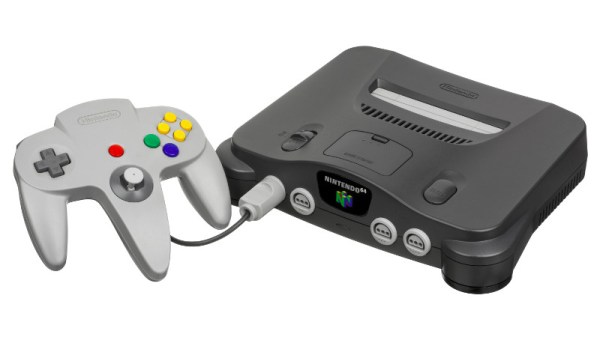
Although the Nintendo 64 could deliver solid 3D graphics with assets loaded at a blistering speed from the game cartridge, audio-wise it was a bit more hampered. The main challenge here was that streaming PCM audio data from a roomy CD as on the PlayStation wasn’t an option, and using compressed audio samples was impaired by Nintendo’s refusal to open up more than the CPU for third-party codecs, leading to most N64 games using so-called ‘sound fonts’ that use sample-based tracks.

Once the N64’s RSP vector processor became available for use by developers it became possible to use MP3s without clobbering the CPU, but this was still an imperfect solution. In a recent article by [Dominic Szablewski] it is thus argued that the Ultra Low Complexity (ULC) codec might be a match made in haven for the N64 hardware.

This still uses the same modified discrete cosine transform (MDCT) as many lossy audio codecs including MP3 do, but the ULC code is designed to be extremely light-weight for decoding. [Dominic] first came across it in the form of an old Game Boy Advance demo that played a 70 kbps file with no issues on the 16 MHz ARM CPU.

Naturally the ULC codec’s creator [Aikku93] didn’t employ any unusual black magic to achieve this feat, mostly just foregoing some of the heavier elements of e.g. MP3 like splitting the signal into bands, and using a light-weight syntax to store transformed coefficients.

Here [Dominic]’s goal was to port the ULC code to work with the N64’s RSP so as to offload as  much of the decoding as possible. This required becoming extremely intimate with MIPS assembly, with [Dominic] eventually giving up and asking an LLM coding chatbot to translate bits of ULC C code to [Max Bebök]’s RSP language (RSPL) syntax instead.

The good news here is thus that the open source N64 SDK libDragon now has ULC support, just in case you want more than simple tracker-based music for your homebrew N64 game and do not feel like clobbering the RSP and CPU at the same time with something like MP3 or Ogg Vorbis.
Image

Porting A “Crappy” Flash Game To The IBM 5150 And Beyond

Flash is obsolete and the IBM 5150 is obsolete. Therefore, by the transitive property of algebra, you should be able to run flash games on IBM’s original PC, right? Okay, obviously not — there’s obsolete, and then there’s obsolete — but that didn’t stop [TheRasteri] from trying to bring his favorite scatological humor game to glorious CGA in a slightly not-safe-for-work video.

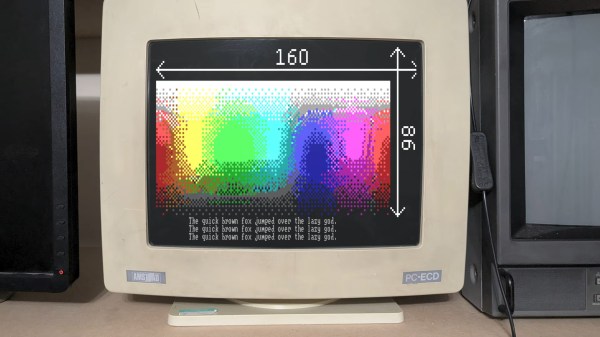
CGA is really not meant to display the fine details of a 2000s flash game, but [TheRasteri] has some experience with the Amstrad CPC and its demoscene, where they’ve learned to hack the heck out of the same MC6845 CRT controller chip that lives on a CGA card. With a few lines of carefully-crafted assembler, he’s able to swap character height on the fly to create the equivalent of a 160 x 86 pixel window in CGA text mode. That’s probably the most impressive part of this build, but the adventure of vintage-DOS C development on display here is worth watching. He’s using Open Watcom V2 and coding the entire thing as a huge state machine, and tests it on a wide range of DOS machines to catch all the bugs.

While Adobe Flash once enabled a golden age of browser games, we could be on the verge of another thanks to WebAssembly. If you want to hear about programming in C on DOS, we’ve seen a good case made for it.

Continue reading “Porting A “Crappy” Flash Game To The IBM 5150 And Beyond” →

Image

Huge PalmOS Development Archive Goes Online, Thanks To Personal Backups

Palm OS, an operating system for a range mobile devices that predated mobile phones, is largely forgotten today. Or at least, that’s what [Aaron Ardiri] thought.

That all changed when he was contacted by a developer about some Palm OS software he had written decades ago. He soon realized there was a whole community of enthusiasts enthusiastically exploring a platform he had assumed was a forgotten layer in the strata of early mobile computing history.

This led [Aaron] to dust off and publish his substantial personal archive of development tools, source code, documentation, and more all related to his years of working with Palm OS in the early days of mobile computing.

When it comes to the importance of preserving computing history, we can’t put it better than [Aaron] himself so we’ll just quote him here:

Preservation is not simply about keeping old files. Source code, tools and documentation provide a record of how engineers solved problems under the constraints of their time. They also preserve knowledge that is easily lost when companies disappear and platforms are discontinued.

In many ways, Palm OS devices like the PalmPilot have very little in common with modern mobile computing platforms. They had to do more with less, and development reflected that. If you’re curious what these devices were like, here’s a great tour that includes a browser-based emulator.

Image

A Modern Smalltalk

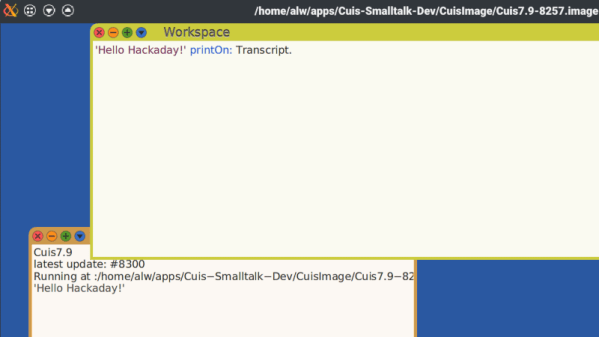
In the history of object-oriented (OO) computer languages, Smalltalk has a special place. It wasn’t the first OO language, and it hasn’t spread as well as some others. But it was the first OO language many people encountered, and it influenced many other languages you’ve probably seen. Developed at the famed Xerox PARC, it also introduced many people to the “model/view/controller” (MVC) architecture. Cuis Smalltalk is a free and portable modern Smalltalk-80 environment. It replaces the traditional MVC framework with Morphic, but otherwise, it would be very familiar to someone who used Smalltalk in the 1990s. The project’s goal is to stay simple at the core, although you can add complexity via packages.

The software has been around for a while, but it is on a rolling release model, so the install page suggests you clone the Git repo. You can, however, get a stable release, which might be important if you were deploying applications. Running the program results in a Cuis desktop where you can open various things like workspaces, help documents, and the transcript.

Smalltalk throws some people because it takes OO to an extreme. For example, you don’t add two and three using an operator. You send the object two a message that includes another object, three. You can think of sending a message as calling a method on an object. As with virtual functions in C++, different objects can respond differently to the same request. For example, an Animal class might have a speak message that causes a cow to print “moo” and a chicken to print “cluck.”

You get used to it, and there’s a very nice class browser that lets you examine classes and what you can do with them. There are even packages to work with an Arduino over a serial port. They haven’t been updated lately, so they might (or might not) need a little work.

We’ve looked at GNU Smalltalk before. We’ve also seen a version that runs directly on a Raspberry Pi.

Continue reading “A Modern Smalltalk” →

Image

Lazarus And The Free Pascal Compiler Gain Dynamic Package Support

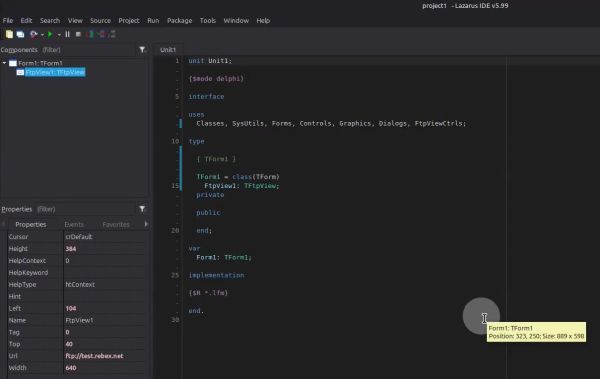
"Built with Free Pascal Lazarus" bannerIf you have developed in Pascal or Delphi in the past decades, you’re probably familiar with the Lazarus IDE that provides an interface to the Free Pascal Compiler (FPC), much like Delphi’s IDE. For users of Lazarus IDE there’s now an exciting new development, with the announcement that FPC and Lazarus now support dynamic packages.
The upshot of this is that you no longer need to rebuild the IDE if you want to add components, controls and Lazarus extensions. In addition you can use this same dynamic package feature in your own Pascal applications this way.

Naturally this is a great improvement, and it’s good to see more improvements to such a venerable programming language. Not only is it still being used today for just about anything, including web development, but there is a good case to be made for using Pascal today as it’s no longer the language it was half a decade ago.

We’d also be remiss to not mention the legacy of [Niklaus Wirth], who not only created Pascal, but was also instrumental in the development of Object Pascal together with Apple. This effort ultimately led to everything from Turbo Pascal to Delphi, FPC and so much more, making it a heartening sight to see this legacy being kept alive today.

Image

Visualize Regular Expressions With Marbles

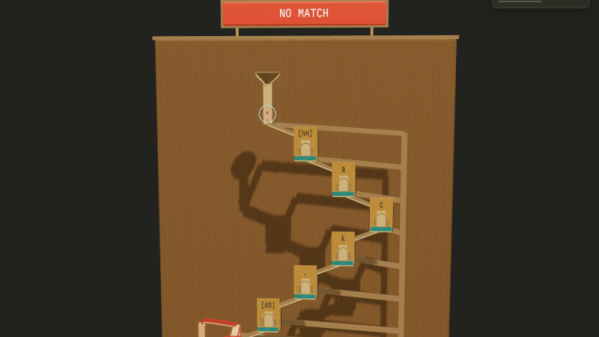
If you are one of those people who visualize things physically better than in the abstract, then Regex Marble Run by [bottomless] might be for you. You enter a test expression and a string, and the site generates a virtual marble machine that lets you see the regular expression pick apart the string in a physical way.

Click this link, and you’ll see the regular expression “^[hH]ack.[dD][^0-9]*$” which, if you aren’t a regular expression user, might seem a bit cryptic. However, it is fairly simple if you take it bit-by-bit.

The caret character tells it to match the start of the string. So “^dog” will match “dog” and “dog food” but won’t match “food for a dog.” The following bit “[hH]” will match either “h” or “H”. Then there is “ack” which is just what you think it is. So a string starting with “hack” or “Hack” might match (depending on the rest of the expression.

The period means match any single character. Then there’s another “[]” but this time with “dD” to match any kind of D. The next “[]” character class is a range from 0-9, but since there is a caret, the match is negated. So “[^0-9]” means match anything except a digit from 0 to 9. The “*” means we can have zero or more of these. So “HackxD” matches, but so does “HackxDXYZabc” for now. Trick question: Does “HackxDXYZabc123” match? So far, yes, but it only matches to the lowercase “c” character.

The final character, “$” means end of string. So now “HackxDXYZabc123” does not match because we are still in the middle of the string. However, “HackxDXYZabc” will match since the previous “*” “ate” the rest of the string.

Head spinning? The site will let you see each letter of a test string as a marble that falls through the different parts of the regular expression. Balls that pass wind up in the left-hand box, while failures are in the right-hand box. Will it help you? We don’t know, but it is fun to watch.

Want a refresher on regular expressions? Or perhaps you want some practice?

Image

Mars Pathfinder: What Really Happened?

You’ve probably heard of Mars Pathfinder, the NASA lander and its Sojourner rover that took up residence on Mars in 1997. At first, all was well, but after a few days, the lander suffered a series of total system resets. A watchdog timer detected a problem and forced reboots. [Vivek Bhageria’s] recent post looks into what happened and the eventual solution.

The root cause was priority inversion. This happens when a lower-priority task holds a resource needed by a higher-priority task and prevents the higher-priority task from executing. In this case, the operating system was VxWorks, but this can happen on any kind of priority scheduling system.

The simplified version is that there were two tasks that each used the same mutex to avoid stepping on each other. The highest priority was a data distribution task. The lowest priority task dealt with meteorology data processing. There was also a medium-priority task that handled bus maintenance.

The failure would occur when the low-priority task had the mutex and lost its time slot before releasing it. The high-priority task would then find it couldn’t take the mutex. However, the low-priority task didn’t get control again because of the medium-priority tasks waiting to run.

In effect, the high-priority task was now waiting on something that couldn’t become available until the lowest-priority task was able to run. That’s priority inversion.

Continue reading “Mars Pathfinder: What Really Happened?” →