Image

The Goat Emoji Is 100% Valid Machine Code, And It Doesn’t Stop There

Did you know emojis can be executables? Well, they are if you treat them like Intel 8088 or 8086 machine code, anyway. [GloriousCow] shared this clever revelation, demonstrating that executable programs could be created entirely from emojis. To really appreciate why, it’s necessary to take a small step back.

It all started when [GloriousCow] happened to notice, entirely by chance, that 🐐 (the goat emoji) was F0 9F 90 90. Anyone familiar with x86 assembly language probably recognizes 90h as nop,  or null operation, or “spend a cycle doing nothing”. What about F0 and 9F? Together they are lock lahf (assert the bus lock signal then copy some status flags into register AH) which, on an 8088 and 8086, essentially does nothing.

This means the goat emoji (F0 9F 90 90) is 100% technically valid machine code. It doesn’t do anything, but here’s where it gets even more interesting.

Image
A short string of emojis is machine code that writes HELLO (lower right) by writing directly to video memory.

There are loads of emojis, and many of them start with F0 9F followed by two more bytes, and many of those other two-byte combinations are surely also valid machine code. Could one create a meaningful executable program consisting entirely of emojis? The answer is yes, and [GloriousCow] crafted a simple Hello World program to demonstrate.

The simple program looks like this: 🐸☺️🐰🐎♐🗃️🧯🧯🧯🐮💗🦮🪏♐🐰🐹🗃️🧯🧯🧯🧯💗🪗🧯😗🧮🫪😗🧮😗🐮😪😔⭐. Save that string of emojis to a file, give it a .com extension, and run it in DOSBox with CPU type set to 8086. It’ll print HELLO at the bottom-right of the screen by writing directly to video memory.

There are loads more details on the original blog post, including plenty of resources and tips for writing your own executables with emojis. There’s also a much more involved VGA demo program made from emojis, so give it a look.

Some of you may be aware that ASCII characters can also be used in a similar way (and more flexibly, since they are not four-byte combinations like emojis). This was used in BASIC programs as a way to cleverly embed machine code in things like REM statements, creating odd-looking code that did things in BASIC that shouldn’t have been possible.

Image

Porting A “Crappy” Flash Game To The IBM 5150 And Beyond

Flash is obsolete and the IBM 5150 is obsolete. Therefore, by the transitive property of algebra, you should be able to run flash games on IBM’s original PC, right? Okay, obviously not — there’s obsolete, and then there’s obsolete — but that didn’t stop [TheRasteri] from trying to bring his favorite scatological humor game to glorious CGA in a slightly not-safe-for-work video.

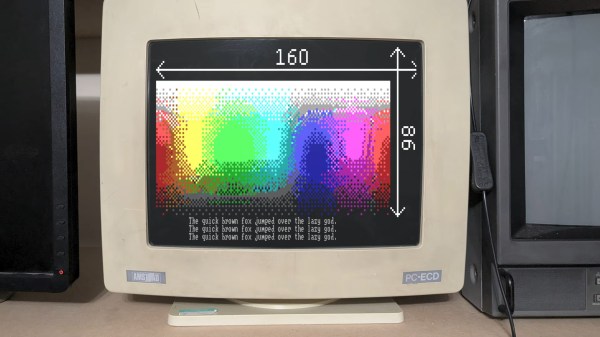
CGA is really not meant to display the fine details of a 2000s flash game, but [TheRasteri] has some experience with the Amstrad CPC and its demoscene, where they’ve learned to hack the heck out of the same MC6845 CRT controller chip that lives on a CGA card. With a few lines of carefully-crafted assembler, he’s able to swap character height on the fly to create the equivalent of a 160 x 86 pixel window in CGA text mode. That’s probably the most impressive part of this build, but the adventure of vintage-DOS C development on display here is worth watching. He’s using Open Watcom V2 and coding the entire thing as a huge state machine, and tests it on a wide range of DOS machines to catch all the bugs.

While Adobe Flash once enabled a golden age of browser games, we could be on the verge of another thanks to WebAssembly. If you want to hear about programming in C on DOS, we’ve seen a good case made for it.

Continue reading “Porting A “Crappy” Flash Game To The IBM 5150 And Beyond” →

Image

Yesterday Has Never Looked This Good: Feast Your Eyes On The 2026 Retrocomputing Challenge Winners!

If there’s one category among those we see here at Hackaday that has something for everyone, it’s retrocomputing. Spanning everything from relay-based machines that fill a wall through to modern machines with a retro twist, there must be few of us who haven’t seen such a project as been impressed. Our most recent contest challenged you to come out with your best retrocomputing projects, and we’re extremely pleased to say that you didn’t disappoint us. Here are the results, both the outright winners, and the honourable mentions.

First up, our top three. For these, we are happy to award the prize of a  $150 DigiKey gift certificate. Continue reading “Yesterday Has Never Looked This Good: Feast Your Eyes On The 2026 Retrocomputing Challenge Winners!” →

Image

FloppoScope Is A Disk Image Analyzer

If you’re a big retro tech fan, you might still have a floppy drive on hand, or even some sort of high-end disk imaging solution. If you’re a little less committed, you may still have plenty of disk images on your hard drive for various reasons. Either way, you might find [0ldStaph]’s latest project to be useful for examining any disk images you have on hand.

FloppoScope is a browser-based tool for analyzing floppy disk images. Despite being browser-based, everything runs locally, so you’re not actually risking any sensitive data by using the tool—though we can’t imagine you’ve got too much Top Secret intel stored as floppy disk images, anyway.

The tool will draw you a nicely color-coded map of the disk layout and shows all the pertinent data for the filesystem of the image. It will even let you preview common file types if you need. The tool can also convert images between various formats, and spit out reports on things like bad sectors or corrupted files that have been detected. FloppoScope can handle everything from PC and Apple format disks, to Amiga, Atari DOS, and BBC Micro stuff. Oddities like various Sharp MZ machines and the NeXTSTEP format are included too. It works with both image and flux files, as well, so whichever way you captured your disks, it should work here.

We’ve looked at the importance of imaging remaining floppy disks quite recently. If you’ve got unpreserved disks sitting in your bedroom, shed, or study, consider getting on that as a matter of priority at this point!

Image

Huge PalmOS Development Archive Goes Online, Thanks To Personal Backups

Palm OS, an operating system for a range mobile devices that predated mobile phones, is largely forgotten today. Or at least, that’s what [Aaron Ardiri] thought.

That all changed when he was contacted by a developer about some Palm OS software he had written decades ago. He soon realized there was a whole community of enthusiasts enthusiastically exploring a platform he had assumed was a forgotten layer in the strata of early mobile computing history.

This led [Aaron] to dust off and publish his substantial personal archive of development tools, source code, documentation, and more all related to his years of working with Palm OS in the early days of mobile computing.

When it comes to the importance of preserving computing history, we can’t put it better than [Aaron] himself so we’ll just quote him here:

Preservation is not simply about keeping old files. Source code, tools and documentation provide a record of how engineers solved problems under the constraints of their time. They also preserve knowledge that is easily lost when companies disappear and platforms are discontinued.

In many ways, Palm OS devices like the PalmPilot have very little in common with modern mobile computing platforms. They had to do more with less, and development reflected that. If you’re curious what these devices were like, here’s a great tour that includes a browser-based emulator.

Image

A 1982 Modem For $100

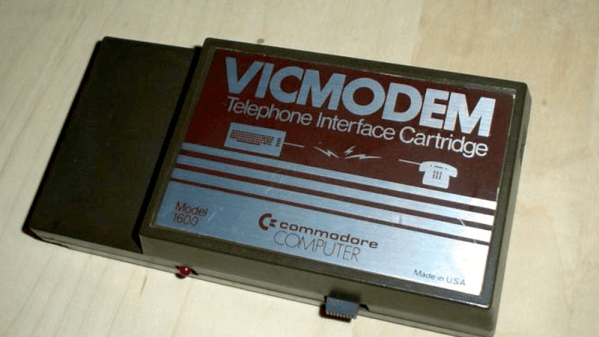
[Dave Farquhar] takes a walk down memory lane about the Commodore 1600 VICModem, perhaps the first phone modem to sell for less than $100. Commodore, of course, was famous for making cheaper computers like the VIC20, the Commodore 64, and lower-cost peripherals like disk drives. But how did they hit the $100 price point with the modem when competing 300 baud modems sold for at least twice that, and a 1200 baud unit would set you back at least $600?

First, Commodore didn’t handle the design themselves. Instead, they outsourced to Anchor Automation, a well-known modem manufacturer. It used a Motorola MC14412 modem on a chip, along with six other chips. The chip could, in theory, do 600 baud, but the modem was rated for 300. But it did make some interesting design choices.

Continue reading “A 1982 Modem For $100” →

Image

2026 Retrocomputing Challenge: Custom RISC-V Processor For Retro System

Although once little more than an academic endeavor, the RISC-V architecture is slowly supplanting applications that would have normally gone to ARM. Even a few microcontrollers have chips running this open-source instruction set now, and we expect it to grow in the future since it doesn’t require the licensing of an ARM or x86 chip. [M_Jagadeesh97] is getting ahead of the curve with this retro gaming system built on a custom-designed RISC-V system.

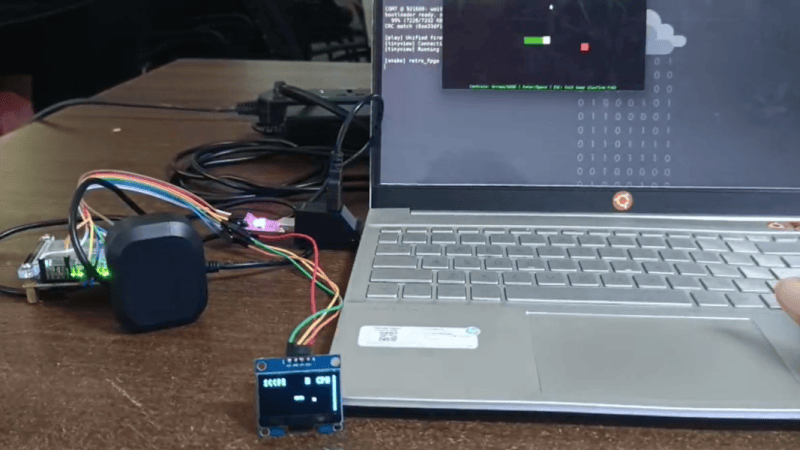
Most of us, presumably including [M_Jagadeesh97], don’t have access to chip fabrication tools, but what we can get is any of various FPGAs. This RISC-V CPU is built on a Terasic DE0-Nano board with 32 MB of RAM available to it, and boots to a launcher with 32 games available. There are a few limitations with this low-power system which was largely solved by limiting the display to 64×32, which lets it maintain the same aspect ratio as the original DOOM as well as the same aspect ratio for many of the older games, while still maintaining 45 FPS.

The project writeup goes deep into the design of a system like this, from the bare metal, the CPU design, the timing of the video signals, and how to implement a Wolfenstein-like raycaster. After adding a small display it looks to be fairly portable as well and is an excellent demonstration of how powerful inexpensive boards like this  FPGA can be with the proper amount of effort.